Description
Chrome Auto Login for WooCommerce: Nowadays, users tend to have multiple accounts such as social media accounts, business-related accounts, accounts for online banking etc, and so the user will have to remember multiple passwords for multiple accounts.
It is likely that at some point of time the user may tend to forget passwords and may have to suffer losses due to the same reason. To save the users from such circumstances, the Chrome Auto login for WooCommerce is the best solution.
It facilitates the user to save passwords for multiple accounts and each time the user logs in, the password need not be entered as it is already saved in Chrome. This saves the users from the trouble of remembering passwords for each account.
Also, if you want your Facebook posts visible on your website, then check Social Wall Feeds for Wordpress.
Highlighted Features
Login-Just a Click Away
The users can easily log in by tapping on the saved account. There is no need to add the password while logging in to any saved account as it is already saved in chrome.
Manage Passwords
The customers can add multiple account credentials and view the passwords and also delete the passwords for the accounts, if necessary.
Web Browser Support
Chrome Auto Login module is compatible with Google Chrome. The website which is associated with the auto sign in must be HTTP secure.
No Hassle to Remember Passwords
The customers will not have to remember passwords each time they log in.
Beneficiary factors of Auto Sign in
Auto Sign in is an essential feature incorporated by Chrome browser for saving passwords of the user’s account after seeking permission. There may be times when the user may tend to forget passwords for the accounts.
If the password is saved with the Chrome browser, the user can simply tap on the account and log in.
- The users will not have to add passwords while logging into an account.
- The accounts and passwords associated with the accounts are saved in Chrome.
- Reduces the hassle of remembering passwords for multiple accounts.
- The users can delete the password for an account if needed.
- A secure way to access a website in the Chrome.
Additionally, you can check WooCommerce WhatsApp OTP Login to allow the store admin and the customer to log in or register to the WooCommerce store using Whatsapp OTP.
Configuring the Credentials
Once the module is successfully installed, the admin can configure the Google API credentials and the Client Id for the module. The API Key and the Client Id is retrieved from the Google API and Services page.
- The Manage Passwords and the Auto Sign in must be turned on under Chrome Settings.
- The module is configured under “Chrome Smart Lock > Google Smart Lock settings”.
- The admin will add the API Key received from the Google API and Services Page.
- The Client Id will be retrieved, is added by the admin of the store.
Customer End- Single Click Login Process
Chrome Auto Sign in for WooCommerce is a user-centric module and it eases the login process for the users as the user can log in and access a website in a single click.
- The first time a user will have to log in by simply entering the credentials.
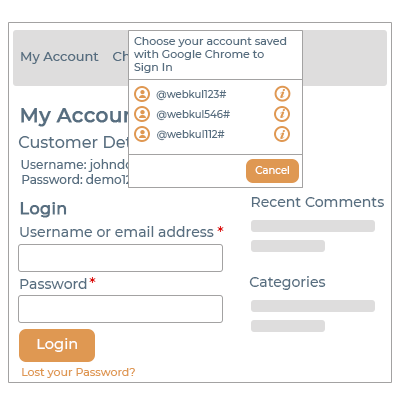
- Thereafter the user can select a menu tab in the frontend and a list of saved accounts will display.
- The user can select any of the saved accounts from the list and login to the account.
- The passwords for the accounts present in the list will be saved, so the user will not have to enter passwords for any account in the list.
- Before saving the password, Chrome will seek permission from the user. The user can also delete a password if required.
- On clicking the Cancel button of the saved account list, the user is redirected to the My Account page.
Support
For any query or issue, please create a support ticket here http://webkul.uvdesk.com/
You may also check our quality WooCommerce Plugins.