WooCommerce WhatsApp OTP Login
WooCommerce WhatsApp OTP Login allows the store admin and the customer to log in or register to the WooCommerce store using Whatsapp OTP.
- Admin can log in to their account using WhatsApp OTP.
- Customers can also register or log in using WhatsApp OTP.
- Admin can enable/disable the authority to change the Mobile no.
- Eliminate the need to enter Store credentials for login.
- Set the length of the OTP received on your WhatsApp.
- Admin can set the custom message for Registration and Login.
- Eliminate the need to manage separate Email and password for the store.
- WooCommerce Whatsapp Login is now compatible with WooCommerce's latest feature Cart and Checkout blocks.
- This module is compatible with WooCommerce’s new High-Performance Order Storage (HPOS) feature.
Regular Price: $49.00
Special Price $25.00
- Description
- Reviews
- FAQ
- Customers ()
- Specifications
- Cloud Hosting
- Changelog
WooCommerce WhatsApp OTP Login extension allows customers and the admin to log in to their store using Whatsapp OTP. It enhances login security and prevents users from creating multiple accounts in the store. This module eases the customer login process and builds up the trust of customers on the web store.
Users can register themselves with WhatsApp OTP-based Authentication. They do not have to manage Email or Password for the Store. Also, if you want your customer can log in to your account using an existing social credential you can check the WordPress Social Login module.
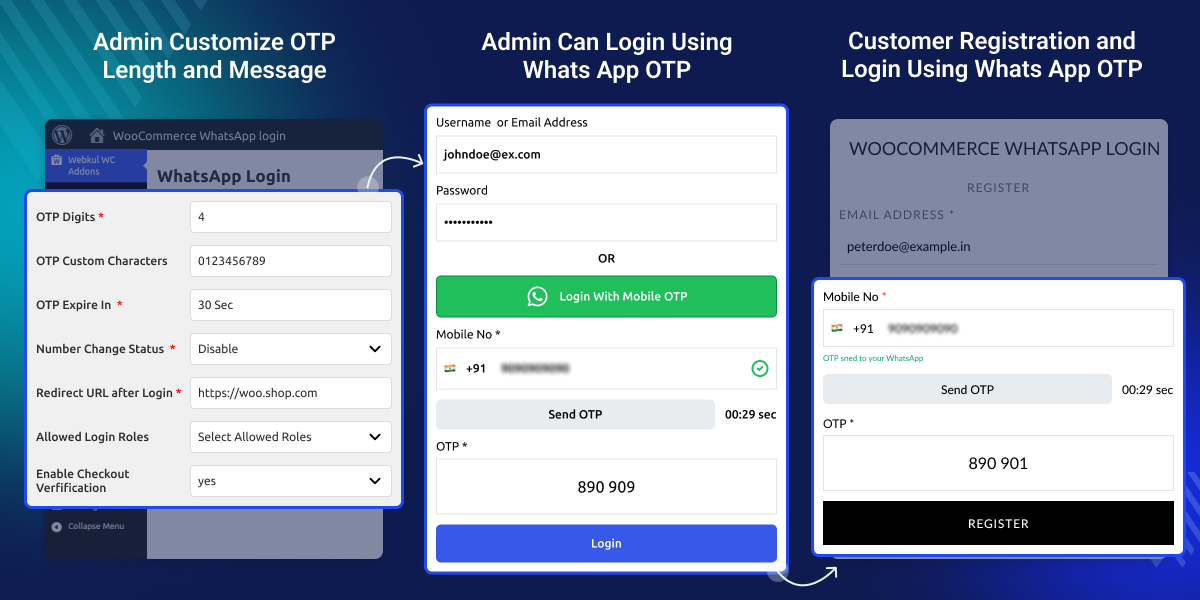
Highlighted Feature WooCommerce WhatsApp OTP Login
WhatsApp OTP-based Authentication
The WhatsApp OTP-based Authentication is more secure and eases the login process.
Reduce Multiple Account
Prevent users from creating multiple accounts in the store.
New User Registration Via WhatsApp
The new user can register to the store using their WhatsApp No.
Backend Login using WhatsApp Authentication
The store admin can also log in to the store via WhatsApp OTP-based authentication.
Update Mobile Number
The store admin can allow their customers to update their registered WhatsApp mobile No.
Supports HPOS feature
The WooCommerce WhatsApp OTP Login Support HPOS Feature.
Why do we need a WooCommerce Whatsapp OTP Login?
The Woocommerce WhatsApp OTP login module offers a seamless login experience to the customer. The largest of the population is familiar with WhatsApp. This builds the trust of the store users in the eCommerce store.
For instance, a customer or the store admin visiting the WooCommerce store. But they forget their login credentials. Yet, there is an option to log in through WhatsApp in the store. This helps them to Log in to their account through Whatsapp OTP-based Authentication.
Additionally, if you want to sell products and services to verified and approved customers you can check Customer Verification for WooCommerce Module.
Module Configuration
After installing the WooCommerce WhatsApp OTP Login plugin, the WordPress and WooCommerce admins can log in to the store using WhatsApp OTP. Here the admin will configure the module.
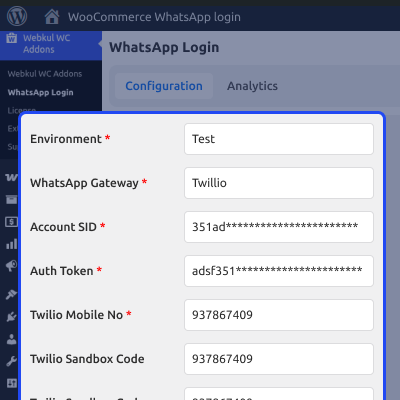
- Enter the Twilio credentials
- Set the length of the OTP to be received on the registered WhatsApp Mobile Number.
- Enable/Disable the no. change status.
- Admin can also customize the OTP message data.

Admin Login
WooCommerce WhatsApp OTP Login plugin also allows the WordPress and WooCommerce admins to log in to the store using WhatsApp OTP. Here the admin will
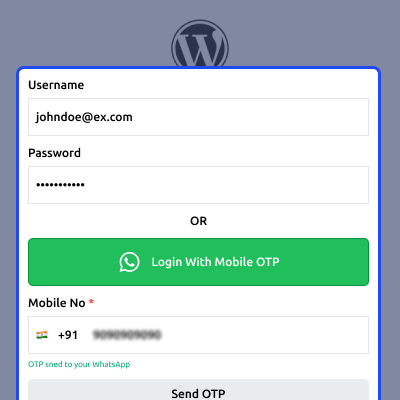
- The store admin will log in through the WhatsApp OTP-based Authentication.
- The store owner receives OTP on the registered WhatsApp mobile number.
- The admin will be directly redirected to the admin backend panel.

Customer Registration
With Woocommerce WhatsApp OTP Login the customers can also register themselves for the store through the WhatsApp OTP.
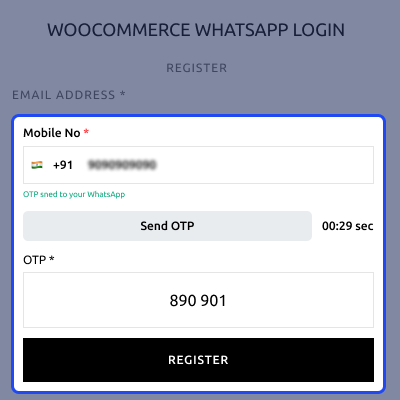
- Users will enter their registered WhatsApp mobile number.
- User receiving OTP on the registered WhatsApp mobile number.
- Enter the OTP so, the customer will be redirected to the WooCommerce store.

Support
For any query or issue, please create a support ticket here http://webkul.uvdesk.com/
You may also check our quality WooCommerce Plugins.
Specifications
Frequently Asked Questions
Specification
Detailed technical features and requirements to help you understand the module’s capabilities and ensure smooth integration with your system.
Cloud Hosting
Detailed technical features and requirements to help you understand the module’s capabilities and ensure smooth integration with your system.
Move to Cloud Today
We’re partnered with top-tier, trusted providers!
Default Configuration Details of Server
RAM 1 Core
Processor 30 GB
Hard Disk
Database
Want to know more how exactly we are going to power up your eCommerce Website with Cloud to fasten up your store
* Server Configuration may vary as per application requirements.
Change Logs
- + Features
- - Bugs
- Added: WhatsApp Cloud API support as a gateway option.
- Added: Dedicated Analytics Dashboard to track WhatsApp feature usage and customer engagement.
- Added: Mandatory WhatsApp OTP verification during checkout for specific payment methods (e.g., Cash on Delivery).
- Added: 'Link WhatsApp Number' feature in the 'My Account' section for existing customers.
- Added: Ability to export verified WhatsApp numbers to CSV.
- Added: Standalone WhatsApp Login Gutenberg block with WooCommerce Checkout Block compatibility.
- Added: Comprehensive End-to-End (E2E) testing suite using Playwright to ensure plugin stability.
- Added: Admin setting to configure custom OTP characters (e.g., Alphanumeric, Alphabetic).
- Added: Twilio Sandbox Code setting for easier testing in test mode.
- Added: Frontend notification banner instructing users to join Twilio sandbox during test mode.
- Tweak: Optimized frontend template (`wkwpl-form-field.php`) for improved accessibility, label associations, and removed inline styles.
- Tweak: Configurable UI/UX options for customizing the Login button and form template.
- Tweak: Rate limiting restricted to maximum 3 OTP messages per 15 minutes to prevent abuse.
- Tweak: Centralized OTP generation method to improve code maintainability (DRY principles).
- Tweak: Replaced deprecated `current_time()` usage with modern `current_datetime()`.
- Security: Implemented strict validation and output escaping across all frontend templates.
- Security: Replaced HTTP `geoplugin.net` with secure `WC_Geolocation::geolocate_ip()` and `ipapi.co` fallback.
- Security: Fixed IP spoofing vulnerability by securely validating `REMOTE_ADDR`.
- Security: Migrated from `wp_rand()` to cryptographically secure `random_int()` for OTP generation.
- Added: Upgraded Twilio API for live environment.
- Added: Added count-down timer option in the configuration.
- Initial release


