USD
  • EUR
  • INR
  • USD
Cart
Cart 0
  • You have no items in your shopping cart.
    Cart
    Cart 0
    • You have no items in your shopping cart.
    Hire a Developer
    ×
    Contact Us!
    Send Again
    Close
    Please Login to Write Your Review

    CS-Cart Block.io Bitcoin Wallet

    CS-Cart Block.io Bitcoin Wallet adds Bitcoin payment support to CS-Cart stores, allowing users to pay for orders using cryptocurrency during checkout.


    • Accept Bitcoin payments directly on CS-Cart checkout.

    • Block.io wallet integration for cryptocurrency payments.

    • Compatible with CS-Cart Multi Vendor marketplaces.

    • Generate Bitcoin wallet addresses for the user.

    • Create a wallet address during registration or checkout.

    • Monitor Bitcoin transactions in real time.

    • Configure custom Bitcoin exchange rates.

    • Update order status after payment confirmation.

    • Store and manage user Bitcoin wallet details.

    • Secure cryptocurrency payment processing workflow.

    Additional Info

    Before installing the add-on, extract the downloaded package.

    • Install the License Manager add-on first.
    • Then install the required add-on.
    • Follow the license activation steps to generate your license key.

    Screenshots
    CS-Cart Block.io Bitcoin Wallet CS-Cart Block.io Bitcoin Wallet CS-Cart Block.io Bitcoin Wallet CS-Cart Block.io Bitcoin Wallet CS-Cart Block.io Bitcoin Wallet CS-Cart Block.io Bitcoin Wallet
    Show More Hide All
    $59.00

    * Required Fields

    Add To Cart
    $59.00
    Configure and Buy
    • Description
    • Reviews
    • FAQ
    • Customers ()
    • Specifications
    • Cloud Hosting
    • Changelog

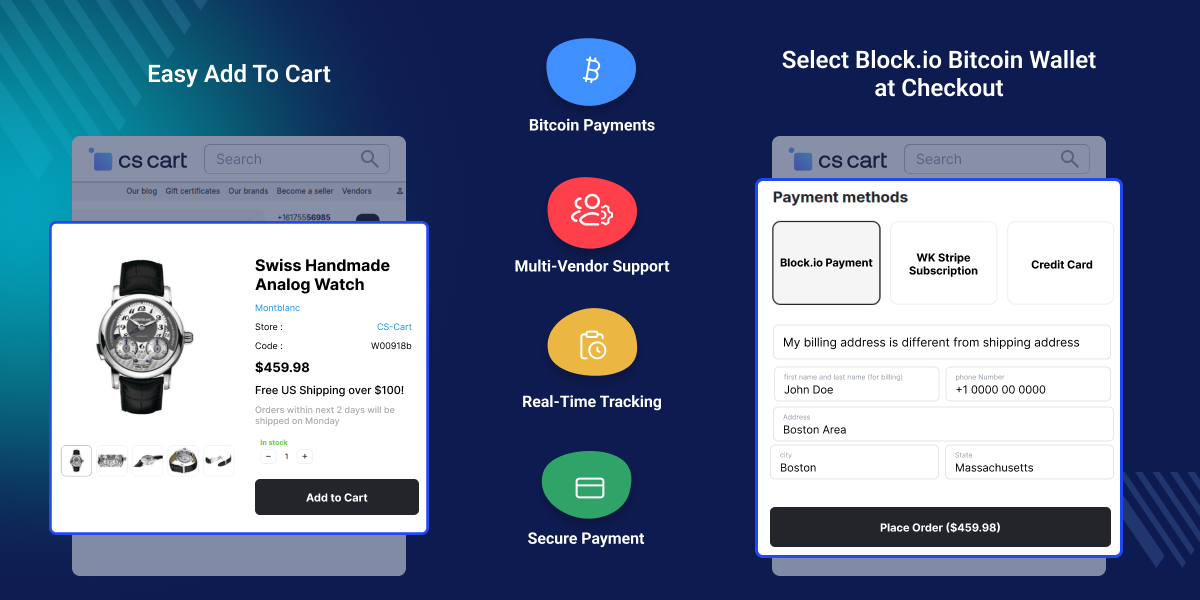
    CS-Cart Block.io Bitcoin Wallet lets stores accept Bitcoin payments. It adds Bitcoin as a payment option at checkout. The add-on connects the store with Block.io. It is suitable for online stores, digital product sellers, service providers, and Multi-Vendor marketplaces.

    Users can choose Bitcoin during checkout. The add-on can create a Bitcoin wallet address during registration. It can also create one during checkout. This helps users who do not have a wallet address. They can start using Bitcoin payments more quickly. Store admins can manage wallet settings from the backend.

    They can update exchange rates and payment options. Admins can also check payment records and transaction details. The add-on supports transaction tracking and works with CS-Cart Multi-Vendor.

    Also, stores looking to accept secure credit and debit card payments can check out CS-Cart Culqi Payment Gateway add-on.
    CS-Cart Block.io Bitcoin Wallet

    Highlighted Features of CS-Cart Block.io Bitcoin Wallet

     Bitcoin Payments at Checkout

    Let customers pay with Bitcoin during checkout.

     Block.io Connection

    Connect the store with Block.io for Bitcoin payments.

     Wallet Request at Signup

    Users can request a wallet address during account signup.

     Payment Tracking

    Track Bitcoin payments and transaction updates.

     Exchange Rate Management

    Set and update Bitcoin exchange rates.

     Multi-Vendor Support

    Use Bitcoin payments in CS-Cart Multi-Vendor stores.

    Why Do We Need CS-Cart Block.io Bitcoin Wallet?

    CS-Cart stores support many payment methods. However, Bitcoin payments are not available by default. Stores that want to accept Bitcoin often need an additional solution.

    More customers now use digital currencies for online payments. Many businesses want to offer more payment choices.

    CS-Cart Block.io Bitcoin Wallet adds Bitcoin as a payment option at checkout. Customers can pay with Bitcoin without leaving the store. The add-on helps create wallet addresses, track payments, and manage settings from the admin panel.

    Store owners can manage Bitcoin payments from one place. The add-on reduces manual work and helps keep payment records organized. It is built for CS-Cart stores and supports day-to-day store operations.

    Also, if you want secure online payments that can be accepted without storing sensitive user payment data, check CS-Cart CyberSource Payment Gateway (Secure Acceptance) add-on.

    Use Cases

    Digital Product Stores

    Accept Bitcoin payments for software, digital downloads, online tools, and subscription-based products.

    Multi-Vendor Marketplaces

    Allow marketplace users to pay using Bitcoin while managing cryptocurrency transactions within CS-Cart Multi-Vendor.

    International Online Stores

    Receive payments from users across different countries through Bitcoin without depending on local gateways.

    Technology and Crypto Businesses

    Offer cryptocurrency payment options that match the expectations of users who actively use digital assets.

    Block.io Payment Method

    The Block.io Payment Method adds Bitcoin to the checkout page. Users can choose Bitcoin when placing an order. The add-on works with the existing checkout process and helps stores accept Bitcoin payments from customers.
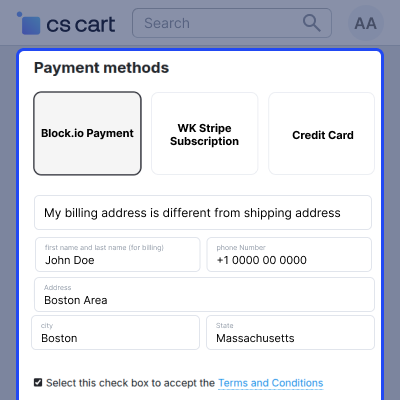
    • Show Bitcoin as a payment option at checkout
    • Connect Block.io with the store
    • Accept payments in Bitcoin
    • Support CS-Cart and Multi-Vendor stores
    Block.io Payment Method

    Payment Method Setup

    The Payment Method Setup section lets store admins add Block.io as a payment option. Admins can create a new payment method and configure Block.io from the admin panel. This makes Bitcoin payments available during checkout.
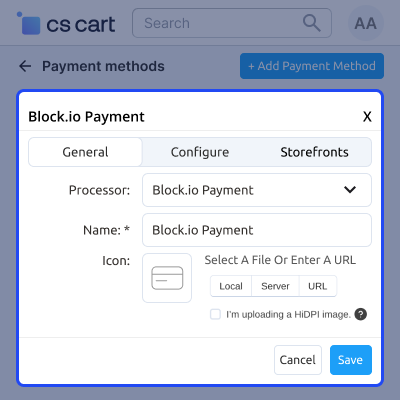
    • Create a Block.io payment method
    • Select Block.io as the payment processor
    • Set up payment details from the admin panel
    • Enable Bitcoin payments at checkout
    Payment Method Setup

    Payment Configuration Management

    This section helps admins manage Bitcoin payment settings. Admins can add a Bitcoin wallet address for the store, configure exchange rates, and choose payment options. They can also define the order status after payment.
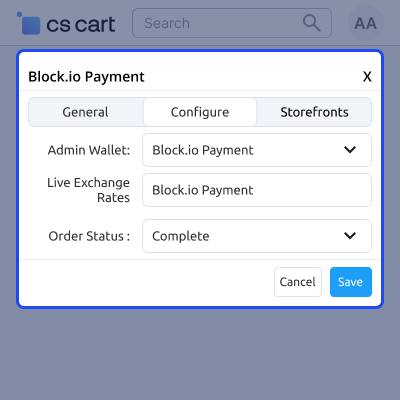
    • Add the store Bitcoin wallet address
    • Set Bitcoin exchange rates
    • Choose the order status after payment
    • Manage payment settings from one place
    Payment Configuration Management

     CS-Cart Block.io Bitcoin Wallet Support -

    For any query or issue please create a support ticket here http://webkul.uvdesk.com/

    You may also check our other top-quality CS-Cart Add-ons.

    Specifications

    Product Version1.2
    Released8 years ago
    CategoryCS-CartPayment
    Last UpdatedJune 22, 2026 (12 days ago)
    Supported VersionsCS-Cart  CS-Cart Multivendor  4.16.x  4.17.x  4.18.x  4.19.x  4.20.x  
    Rating 5.0
    based on 1 reviews

    Recent Reviews

    Write a review

    Best Services Ever

    Posted On - November 2, 2022

    when you make contact they always are there to help
    Also, the modules are clean and good AAA++++

    Frequently Asked Questions

     Does the add-on support CS-Cart Multi-Vendor?
    Yes, this add-on is compatible with CS-Cart Multi-Vendor and can be used in marketplace environments.
     
     Can users pay using Bitcoin during checkout?
    Yes, users can select Bitcoin as a payment method and complete their order using cryptocurrency.
     
     Is a Bitcoin wallet address required for users?
    Yes, a wallet address is required for Bitcoin transactions. The add-on can generate a wallet address for users who do not already have one.
     
     Can the user request a Bitcoin wallet address during registration?
    Yes, the user can request a Bitcoin wallet address while creating an account on the store.
     
     What happens if a user does not have a Bitcoin wallet address at checkout?
    The add-on can generate a Bitcoin wallet address during the checkout process, allowing the user to continue with the payment.
     
     Can the store admin set a custom exchange rate?
    Yes, the admin can configure exchange rates according to business requirements from the payment settings page.
     
     How are Bitcoin payments tracked?
    The add-on works with Block.io to monitor Bitcoin transactions and payment activity in real time.
     
     Can the admin choose which order status is applied after payment?
    Yes, the admin can define the order status that should be assigned after a successful Bitcoin payment confirmation.
     
     Where can the admin view users' Bitcoin wallet addresses?
    User Bitcoin wallet addresses can be viewed from the user profile section in the CS-Cart admin panel.

    Move to Cloud Today

    AWS Free tier hosting for one year by amazon web services, for more details please visit AWS Free Tier.

    GCP Free tier hosting for one year with 300 credit points by google cloud platform, for more details please visit GCP Free Tier.

    Azure free tier hosting for one year with 25+ always free services, for more details please visit Azure Free Tier.

    In our default configuration we will provide tremendous configuration for your eCommerce Website which is fast to load and response.

    Default Configuration Details of Server

    • 1 GB RAM
    • 1 Core Processor
    • 30 GB Hard Disk
    • DB with 1 GB RAM and 1 Core Processor

    * Server Configuration may vary as per application requirements.

    Want to know more how exactly we are going to power up your eCommerce Website with Cloud to fasten up your store. Please visit the Cloudkul Services.

    Get Started with Cloud
    • - Feature Add (+)
    • - Feature remove (-)
    • - Bug Fixed (!)
    • - Modification (*)
    Version 1.2
    • Resolved issues.
    Version 1.1.2
    • Added checks for api key, api pin and admin wallet address before checkout.
    • Added chck for 0 Exchange rate in case live exchange rate could not be fetched.
    • Resolved phpcs issues.


