USD
  • EUR
  • INR
  • USD
Cart
Cart 0
  • You have no items in your shopping cart.
    Cart
    Cart 0
    • You have no items in your shopping cart.
    Hire a Developer
    ×
    Contact Us!
    Send Again
    Close
    Please Login to Write Your Review

    CS-Cart Buy Now

    CS-Cart Buy Now add-on streamlines the purchasing process by adding a seamless Buy Now button, eliminating the need for separate pages and enhancing the shopping experience for customers.


    • Well integrated with CS-Cart & CS-Cart Multi-Vendor.

    • Adds the "Buy Now" button along with the "Add To Cart" Button.

    • Integrates the Buy Now button to the product and quick view page on the CS-Cart store.

    • Buy Now allows users to directly buy products and redirect to the checkout page.

    • Enhances customers' experience & makes the shopping process seamless.

    • Easily configurable – Just do some settings and it is ready to use.

    • Easy to manage at the admin end.

    Screenshots
    $39.00

    * Required Fields

    Add To Cart
    $39.00
    Configure and Buy
    • Description
    • Reviews
    • FAQ
    • Customers ()
    • Specifications
    • Cloud Hosting
    • Changelog

    CS-Cart Buy Now: With the help of this module, you can add a Buy Now Button to your store along with an Add To Cart Button.

    This module is very well integrated with CS-Cart and CS-Cart multi-vendor since it takes customers directly to the checkout page and makes the checkout process faster. The Buy Now Button is also available on the CS-Cart store's product and quick view pages.

    Check out CS-Cart Auction Add-on that allows admins and vendors to create auctions and sell products to the highest bidder.
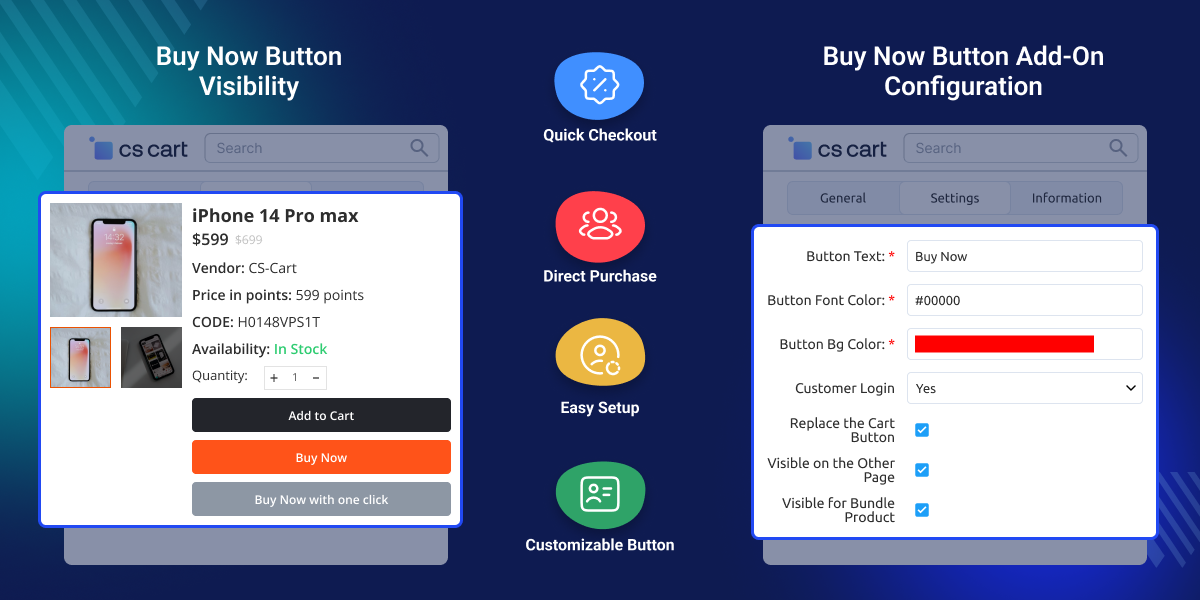
    CS-Cart Buy Now

    Highlighted Features of CS-Cart Buy Now

     Quick Checkout

    The buyer will be redirected to the checkout confirmation page as a result of this.

     Drop Add To Cart

    Customers simply hit the buy now button to be directed to the checkout page, avoiding the add to cart option.

      Improves the Client Experience

    Enhances customers’ shopping experience and optimizes the process.

     Simple to Set Up

    It is easily adaptable, all you have to do is change a few settings and it is ready to use

    Why do we need CS-Cart Buy Now Button module?

    CS-Cart Buy Now Button Add-on makes the buying process faster and simpler for customers. It allows shoppers to skip unnecessary steps and go directly to the checkout page with a single click, which improves the overall shopping experience.

    By reducing cart abandonment and saving customers’ time, it helps increase conversions. The add-on is easy to configure, works smoothly with CS-Cart and CS-Cart Multi-Vendor, and gives admins full control without extra complexity.

    Explore our CS-Cart Banner Booking Add-on that enables easy banner advertising on your CS-Cart or Multi-Vendor store.

    Product Detail Page

    Buyers can access the details related to the products on a Product Detail Page.
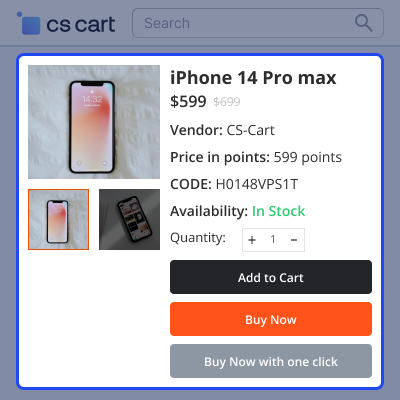
    • Buyers can view the product description and product overview.
    • The product detail page offers relevant information about the products.
    • Buyers get a better idea of what they're buying on the product detail page.
    Product Detail Page

    Quick View Page

    Buyers can rapidly see the products in this portion of the module
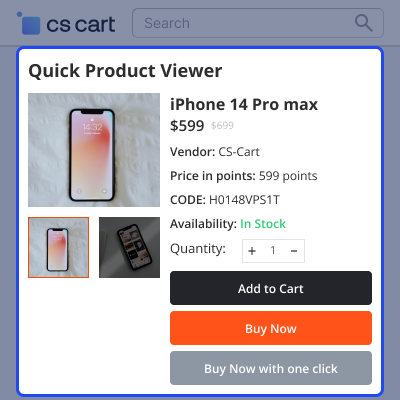
    • Customers quickly view information about the products on this page.
    • Provide rapid access to crucial product features like the image, descriptions.
    • Make it simple for buyers to choose the product variants.
    Quick View Page

    Buy Now Button Configuration

    In this module section, the admin can configure the Buy Now Button settings from here.
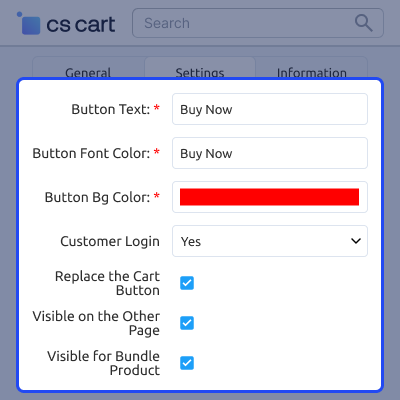
    • Admins can customize the button text, font color, and background color.
    • Visibility of the Buy Now button can be restricted to logged-in customers only.
    • Admins can replace the Add to Cart button, show the Buy Now button on other pages, and enable it for bundle products.
    Buy Now Button Configuration

    Buy Now Button for Individual Products

    In this module section, the admin can control the Buy Now button for individual products.
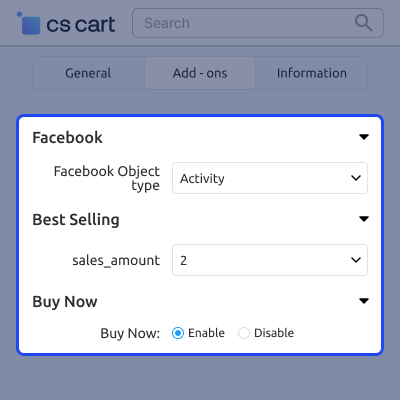
    • Admins can enable or disable the Buy Now button on a per-product basis.
    • This allows better control over which products can be purchased using Buy Now.
    • Admins can manage product-level settings easily from the backend.
    Buy Now Button for Individual Products

    Buy Now Button Visibility by Categories

    Admin can manage Buy Now button visibility by categories.
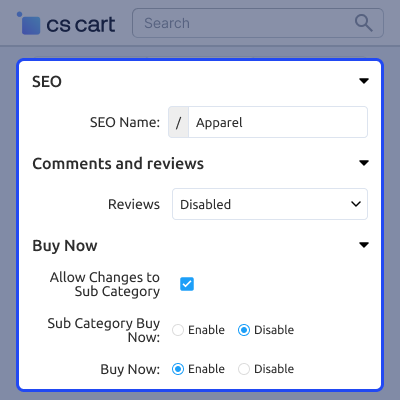
    • Admins can enable or disable the Buy Now button for selected categories.
    • This helps control where the Buy Now option is displayed in the store.
    • Category-wise settings allow better customization and product purchase flow management.
    Buy Now Button Visibility by Categories

     CS-Cart Buy Now Support -

    For any query or issue please create a support ticket here http://webkul.uvdesk.com/

    You may also check our other top-quality CS-Cart Add-ons.

    Specifications

    Product Version1.4
    Released8 years ago
    Last UpdatedDecember 18, 2025 (3 months ago)
    Supported Versions4.16.x  4.17.x  4.18.x  CS-Cart  CS-Cart Multivendor  
    Write a review

    Frequently Asked Questions

     Is it necessary to first add the product to the cart?
    No, when you hit the Buy Now Button, you will be directed to the checkout page.
     
     How did this plugin help with checkout speed?
    This plugin of CS-Cart redirected the buyers to the checkout confirmation page.
     
     Can users be able to purchase products through this module?
    Yes, the Buy Now Button allows the customer to purchase a product immediately.
     
     Is it possible for the admin to manage this plugin?
    Yes it is easily managed by the admin.
     
     Where does the Buy Now Button appear to the customers?
    It can be found on the product page as well as on the quick view page.

    Move to Cloud Today

    AWS Free tier hosting for one year by amazon web services, for more details please visit AWS Free Tier.

    GCP Free tier hosting for one year with 300 credit points by google cloud platform, for more details please visit GCP Free Tier.

    Azure free tier hosting for one year with 25+ always free services, for more details please visit Azure Free Tier.

    In our default configuration we will provide tremendous configuration for your eCommerce Website which is fast to load and response.

    Default Configuration Details of Server

    • 1 GB RAM
    • 1 Core Processor
    • 30 GB Hard Disk
    • DB with 1 GB RAM and 1 Core Processor

    * Server Configuration may vary as per application requirements.

    Want to know more how exactly we are going to power up your eCommerce Website with Cloud to fasten up your store. Please visit the Cloudkul Services.

    Get Started with Cloud
    • + Features
    • - Bugs
    Version 1.4
    • ! Made compatible with AB theme.
    • ! compatible with latest cscart verison-4.19.
    Version 1.3
    • * Updated language file.
    • ! Made compatible with Stripe payment method.
    Version 1.2
    • + Option added to replace the add to cart button.
    • ! Not able to remove products added into cart.
    Version 1.1
    • + Option added to show the button to Guest customer or not.
    • + Option added to disable button on storefront from admin panel.
    Version 1.0
    • + Integrates Buy Now button at product view and quick view in CS-Cart store.
    • + Buy Now allows user to directly buy product and redirect to checkout page.


