USD
  • EUR
  • INR
  • USD
Cart
Cart 0
  • You have no items in your shopping cart.
    Cart
    Cart 0
    • You have no items in your shopping cart.
    Hire a Developer
    ×
    Contact Us!
    Send Again
    Close
    Please Login to Write Your Review

    CS-Cart PayLane Payment Method

    CS-Cart PayLane Payment Method helps stores accept online payments with 30+ payment methods and support for 160+ currencies.


    • Accept payments in over 160 currencies.

    • Let customers choose from 30+ ways to pay.

    • Keep payment data safe with SSL security.

    • Accept both credit and debit card payments.

    • Support eWallet and bank transfer payments.

    • Show payment fields on the checkout page.

    • Supports 3D Secure authentication

    • Easy to set up and manage from the admin panel.

    • Compatible with multilingual CS-Cart stores.

    Screenshots
    CS-Cart PayLane Payment Method CS-Cart PayLane Payment Method CS-Cart PayLane Payment Method CS-Cart PayLane Payment Method CS-Cart PayLane Payment Method
    Show More Hide All
    $59.00

    * Required Fields

    Add To Cart
    $59.00
    Configure and Buy
    • Description
    • Reviews
    • FAQ
    • Customers ()
    • Specifications
    • Cloud Hosting
    • Changelog

    CS-Cart PayLane Payment Method adds the PayLane payment gateway to your CS-Cart store. It helps you accept secure online payments from customers around the world. The add-on works with both CS-Cart and CS-Cart Multi-Vendor. It also supports many languages and currencies.

    Customers can pay with credit cards, debit cards, bank transfers, direct debits, and eWallets. The add-on also supports an inline checkout. Customers can enter their payment details and finish the order on the same page.

    The payment gateway protects every transaction with SSL encryption and 3D Secure. These features help keep payment data safe. They also reduce fraud and build customer trust.

    Module provide quick and simple setup. Enter your PayLane account details to start accepting payments. No core files need to be changed. This makes the add-on easy to install, update, and manage.

    dditionally,try CS-Cart Credit Europe Bank Virtual POS Payment Integration for secure card payments. It supports installment payments and 3D Secure checkout for a smooth payment experience.
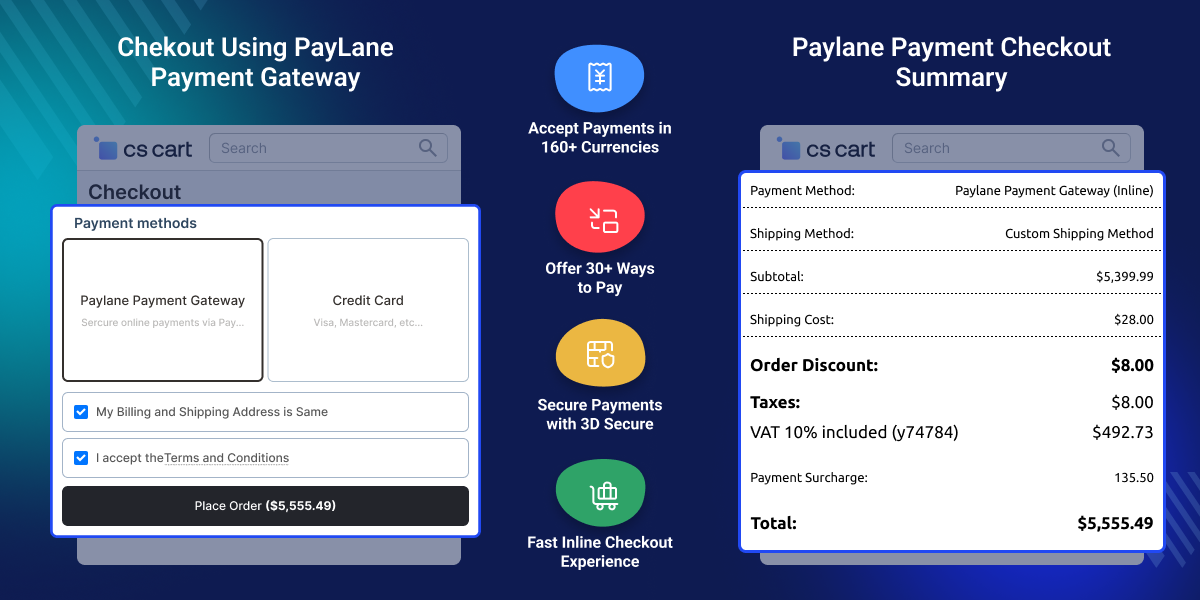
    CS-Cart PayLane Payment Method

    Highlighted Features of

     Works with Multiple Currency

    The CS-Cart PayLane Payment supports multiple currencies like USD, EUR, GBP & PLN, etc.

     Supports Various Payment Options

    The PayLane provides various payment options to complete the purchase, like credit and debit cards, direct debits, wire transfers, e-wallets, etc.

     3D secured

    It also provides a 3D secure payment option that will enhance the website security.

     Direct Payment Transfer

    The admin will get the order payment directly in their bank or in their CS-Cart wallet according to the chosen option.

    Why do we need CS-Cart PayLane Payment Gateway?

    Many online stores serve customers from different countries. Standard payment options may not provide enough currency choices or payment flexibility for global buyers.

    Basic payment methods may not offer enough currency options or payment choices for global customers. When customers cannot find a suitable way to pay, it can make the buying process more difficult and less convenient.

    CS-Cart PayLane Payment Method helps solve this problem by supporting more than 160 currencies and over 30 payment options. Customers can pay using cards, bank transfers, direct debits, and eWallets. The gateway also uses SSL security and 3D Secure protection to help keep online payments safe and secure.

    The CS-Cart PayLane payment gateway provides the facility to integrate the PayLane payment gateway with the CS-Cart store, working with both online and offline CS-Cart payment methods.

    Use Cases of CS-Cart PayLane Payment Gateway

    • International Online Stores

      Accept payments from customers around the world.

    • Multi-Vendor Marketplaces

      Give buyers more ways to pay.

    • Fashion and Apparel Stores

      Make checkout fast and easy for shoppers.

    • Electronics and Gadget Stores

      Accept safe payments for large orders.

    • Stores Serving Global Customers

      Support many currencies and languages.

    • Growing eCommerce Businesses

      Sell in new markets with ease.

    Initial Configuration

    Setting up the CS-Cart PayLane Payment Method is quick and easy. Install the add-on, add the payment method, and enter your PayLane account details. Save the settings to start accepting secure online payments.
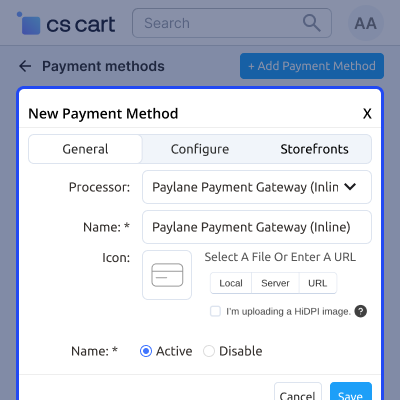
    • Install and enable the PayLane Payment Method add-on.
    • Select PayLane Payment Gateway (Inline) as the payment processor.
    • Enter the API Login, Public API Key, API Password, and Hash Salt.
    • Save the settings to enable PayLane at checkout.
    • Accept secure online payments from your customers.
    Initial Configuration

    Add PayLane Payment Method

    Add the PayLane Payment Method and enter your PayLane account details. Set the payment options and save the changes. Customers can then pay in the selected currency during checkout.
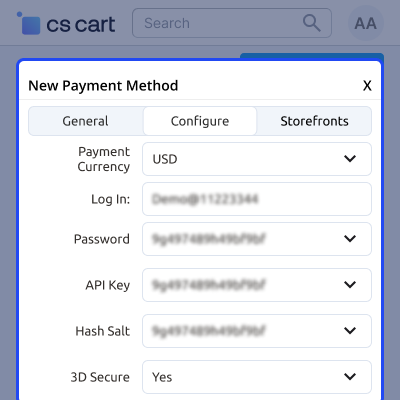
    • Add PayLane Payment Gateway (Inline) as the payment method.
    • Enter your PayLane account details.
    • Choose the payment currency.
    • Set templates, user groups, and order statuses.
    • Save the settings to enable PayLane payments.
    Add PayLane Payment Method

    Customer End PayLane Payment

    Customers can choose PayLane at checkout, enter their card details, and complete the payment securely. After payment, they receive an order confirmation and can track their order status.
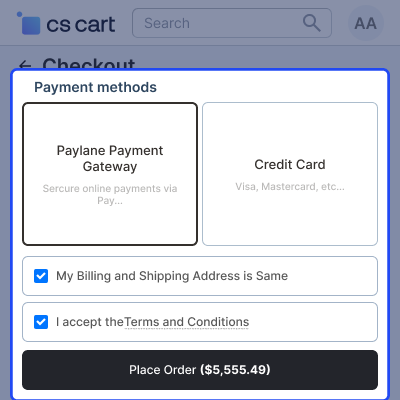
    • Select PayLane Payment Gateway at checkout.
    • Enter credit or debit card details on the secure payment form.
    • Complete the payment with inline checkout.
    • Receive an order confirmation after successful payment.
    • Track the order status from the customer account.
    Customer End PayLane Payment

     CS-Cart PayLane Payment Method- Support

    For any query or issue please create a support ticket here http://webkul.uvdesk.com

    You may also check our other top-quality CS-Cart Add-ons.

    Specifications

    Product Version1.0
    Released6 years ago
    CategoryCS-CartPayment
    Last UpdatedJuly 10, 2026 (14 days ago)
    Supported Versions4.14.x  4.15.x  4.16.x  4.17.x  CS-Cart  4.18.x  CS-Cart Multivendor  4.14.x  4.15.x  4.16.x  4.17.x  4.18.x  
    Write a review

    Frequently Asked Questions

     Does the module support multi-currency?
    Yes, the module supports multi-currency for payment completion.
     
     Can a user use debit and credit both cards to complete the payment?
    Yes, the module supports debit and credit card payments.
     
     Does the module support eWallet and offline transfer for the payment completion?
    Yes, the customer can use eWallet(PayPal or Apple Pay) and wire transfer to complete the payment.
     
     Does an admin need to create a PayLane account?
    The admin needs a merchant account to configure the payment method on CS-Cart.

    Move to Cloud Today

    AWS Free tier hosting for one year by amazon web services, for more details please visit AWS Free Tier.

    GCP Free tier hosting for one year with 300 credit points by google cloud platform, for more details please visit GCP Free Tier.

    Azure free tier hosting for one year with 25+ always free services, for more details please visit Azure Free Tier.

    In our default configuration we will provide tremendous configuration for your eCommerce Website which is fast to load and response.

    Default Configuration Details of Server

    • 1 GB RAM
    • 1 Core Processor
    • 30 GB Hard Disk
    • DB with 1 GB RAM and 1 Core Processor

    * Server Configuration may vary as per application requirements.

    Want to know more how exactly we are going to power up your eCommerce Website with Cloud to fasten up your store. Please visit the Cloudkul Services.

    Get Started with Cloud
    Not Available


