USD
  • EUR
  • INR
  • USD
Cart
Cart 0
  • You have no items in your shopping cart.
    Cart
    Cart 0
    • You have no items in your shopping cart.
    Hire a Developer
    ×
    Contact Us!
    Send Again
    Close
    Please Login to Write Your Review

    CS-Cart PayUMoney Payment Gateway

    CS-Cart PayUMoney Payment Gateway allows your store to accept quick and safe online payments with PayUMoney and offers a smooth checkout for your customers.


    • Admin can add and enable the PayUMoney payment gateway in CS-Cart.

    • Admin must enter PayUMoney merchant details to activate payments.

    • Customers can make payments using PayUMoney at checkout.

    • Supports both Test Mode and Live Mode.

    • Automatic currency conversion based on admin currency.

    • Admin can choose to save PayUMoney response details.

    • Secure transactions with encrypted processing.

    • Helps reduce payment related risks.

    Screenshots
    CS-Cart PayUMoney Payment Gateway CS-Cart PayUMoney Payment Gateway CS-Cart PayUMoney Payment Gateway CS-Cart PayUMoney Payment Gateway CS-Cart PayUMoney Payment Gateway CS-Cart PayUMoney Payment Gateway
    Show More Hide All
    $59.00

    * Required Fields

    Add To Cart
    $59.00
    Configure and Buy
    • Description
    • Reviews
    • FAQ
    • Customers ()
    • Specifications
    • Cloud Hosting
    • Changelog

    CS-Cart PayUMoney Payment Gateway lets store owners accept safe online payments through PayUMoney. It supports cards, net banking, and other payment options for smooth checkout.

    It is useful for stores that want a simple payment setup without manual work. Customers can complete orders quickly without delays during checkout. Admins can switch between test and live modes to check payments before going live. This helps avoid errors during real transactions.

    Payments stay secure with encrypted handling, which helps protect customer data during checkout. The checkout flow is simple and fast, making it easy for customers to complete payments without confusion.

    If you need more control over exchange rates and want live updates from different sources, you can use CS-Cart Advance Live Currency Converter add on.

    Note - PayUmoney Merchant account is needed, click here to sign up
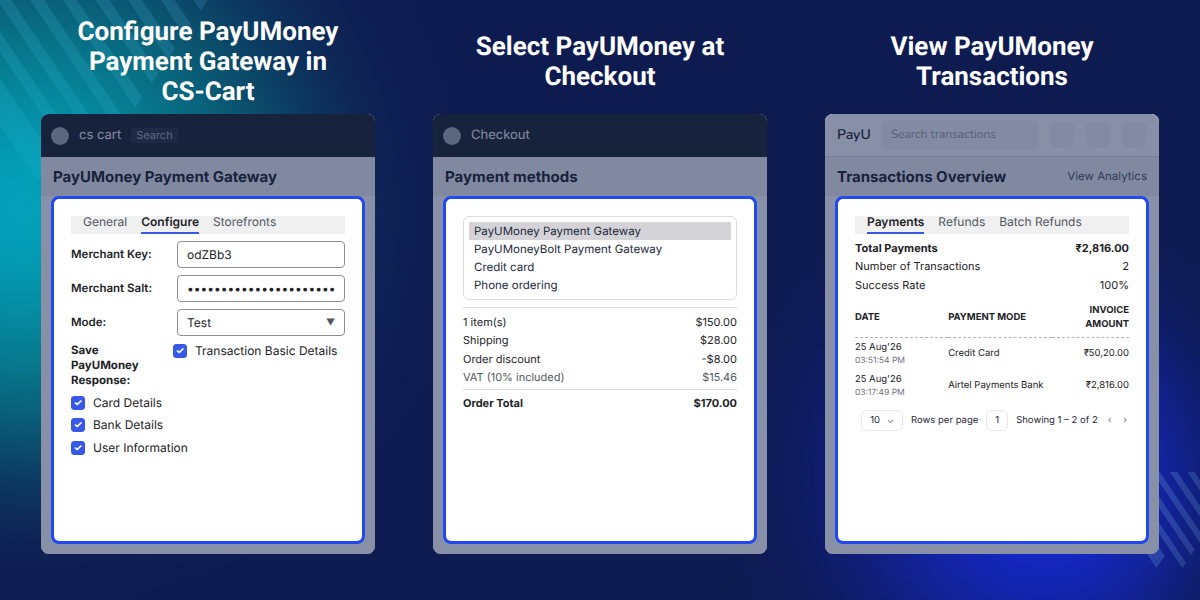
    CS-Cart PayUMoney Payment Gateway

    Highlighted Features

     Multiple Card Support

    Pay via Visa, Mastercard, American Express, Discover, and JCB.

     Secure Payment Processing

    Encrypted transactions keep customer data safe.

     Automatic Currency Conversion

    Payment amount adjusts based on customer location.

     Smooth Checkout Flow

    Customers complete payments quickly without extra steps.

     Order Status Management

    Admin can manage success and failure order statuses.

     Save Payment Response Data

    Store PayUMoney response details for tracking.

    Why do we need this CS-Cart PayUMoney Payment Gateway?

    CS-Cart PayUMoney Payment Gateway helps stores accept safe online payments through PayUMoney. Many store owners struggle with card support, data safety, and order status updates, which slows down transactions.

    Customers get a smooth checkout, and store owners get a simple, reliable setup. It is built using real store use cases and follows practical payment handling standards.

    For stores with visitors from different countries, you can also show the right language and currency based on location using the CS-Cart Geolocation Language and Currency Converter add on.

    Real Use Cases for CS-Cart PayUMoney Payment Gateway

    Use this add on to accept online payments, reduce checkout failures, and manage transactions smoothly in your store.

     Online Retail Stores

    Good for stores that want quick card and net banking payments without manual work.

     Subscription or Repeat Orders

    Supports faster payments and reduces checkout drop offs.

     Multi Currency Stores

    Fits stores getting orders from different regions with auto currency adjustment.

     Digital Product Stores

    Good for stores selling ebooks, software, or downloads with instant payment.

    Configure PayUMoney Payment Details

    The admin can add basic details to activate PayUMoney in CS-Cart and make it ready for checkout in one step. This sets up the PayUMoney gateway and allows payments to run without any errors.
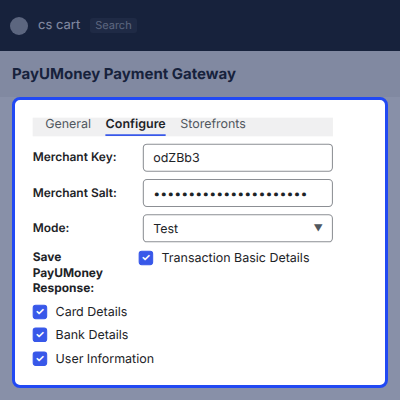
    • Set test or live mode
    • Add payment instructions
    • Show or hide the method at checkout
    • Works with standard CS-Cart settings
    Configure PayUMoney Payment Details

    PayUMoney Payment Option on Checkout

    Customers can select PayUMoney on the CS-Cart checkout page and use it easily while placing their orders. This helps buyers complete payments quickly without confusion, improving checkout success rates.
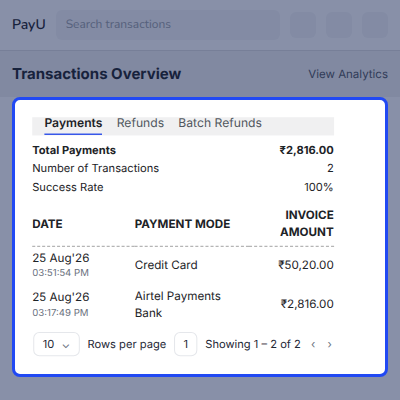
    • Shows PayUMoney as a selectable payment method
    • Works with the default CS-Cart checkout layout
    • No extra steps or redirects inside the store
    • Helps reduce failed checkouts
    PayUMoney Payment Option on Checkout

    Card Payment Form

    The screen shows the PayUMoney card payment form, where customers add their card number, expiry date, CVV, and name to complete the order. It helps users to finish their card payment quickly without leaving the PayUMoney secure page.
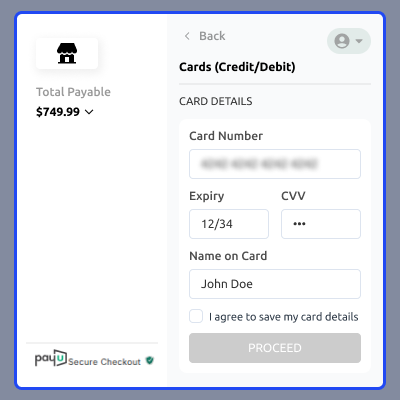
    • Clean card input form for easy checkout
    • Supports Visa, Mastercard, Amex, and more
    • Secure CVV and card data handling
    • Works with PayUMoney's secure environment
    Card Payment Form

    CS-Cart PayUMoney Payment Gateway Support -

    For any query or issue please create a support ticket here http://webkul.com/ticket

    You may also check our other top-quality CS-Cart Extensions.

    Specifications

    Product Version2.0
    Released10 years ago
    CategoryCS-CartPayment
    Last UpdatedMay 1, 2026 (7 days ago)
    Supported VersionsCS-Cart  4.14.x  4.15.x  4.16.x  4.17.x  4.18.x  CS-Cart Multivendor  4.14.x  4.15.x  4.16.x  4.17.x  4.18.x  
    Rating 5.0
    based on 2 reviews

    Recent Reviews

    Write a review

    Amazingly quick and prompt response!

    Posted On - October 31, 2017

    Have been using this addon for a long time now without any issues. A few days ago had some issues, we contacted the developer and the response was amazingly quick and prompt. Solved the issue in a few hours.

    I have never seen such a prompt response and amazingly quick resolution. I will highly recommend this addon and more ever the developer for the (once again) amazingly quick turnaround time

    Great company

    Posted On - July 13, 2017

    great plugin and great company

    Frequently Asked Questions

     What happens if the payment is interrupted?
    The order status shows the transaction as failed or incomplete in the CS-Cart PayUMoney Payment Gateway flow.
     
     Can customers retry payment after failure?
    Customers can place the order again and try completing the payment.
     
     Will customers stay on my website during payment?
    Customers are redirected to PayU’s secure payment page to finish the transaction.
     
     Is there any limit on the transaction amount?
    Transaction limits depend on the PayUMoney account settings.
     
     Can I track failed payments?
    Failed transactions appear in the order details for quick review.
     
     Will this slow down my checkout page?
    The module is designed to work smoothly without slowing down checkout.
     
     Can I use this module on multiple stores?
    Usage across different stores depends on the license terms of the CS-Cart PayUMoney Payment Gateway.
     
     Will I get notified after each transaction?
    Transactions can be checked from the CS-Cart admin panel and the PayUMoney dashboard.

    Move to Cloud Today

    AWS Free tier hosting for one year by amazon web services, for more details please visit AWS Free Tier.

    GCP Free tier hosting for one year with 300 credit points by google cloud platform, for more details please visit GCP Free Tier.

    Azure free tier hosting for one year with 25+ always free services, for more details please visit Azure Free Tier.

    In our default configuration we will provide tremendous configuration for your eCommerce Website which is fast to load and response.

    Default Configuration Details of Server

    • 1 GB RAM
    • 1 Core Processor
    • 30 GB Hard Disk
    • DB with 1 GB RAM and 1 Core Processor

    * Server Configuration may vary as per application requirements.

    Want to know more how exactly we are going to power up your eCommerce Website with Cloud to fasten up your store. Please visit the Cloudkul Services.

    Get Started with Cloud
    • + Features
    • - Bugs
    Version 2.0
    • ! Unable to find QR code when selected Paytm.
    • ! Test card link is not working.
    • * Compatible with version 4.18.x.
    Version 1.4
    • * Compatible with version 4.6.x.
    Version 1.3
    • * Compatible with version 4.5.x.
    Version 1.2
    • * Compatible with version 4.4.x.
    Version 1.1
    • + Automatic currency convertor according to admin currency.
    • + Admin can choose to save details to save in response from PayUMoney.
    Version 1.0
    • + Helps minimizing costs and risks.
    • + PayUMoney is verified by Visa & Master Card Secure Code enabled gateway.
    • + PayUMoney bolt hosted checkout.


