USD
  • EUR
  • INR
  • USD
Cart
Cart 0
  • You have no items in your shopping cart.
    Cart
    Cart 0
    • You have no items in your shopping cart.
    Hire a Developer
    ×
    Contact Us!
    Send Again
    Close
    Please Login to Write Your Review

    CS-Cart Payment Link For Customer

    CS-Cart Payment Link for Customer allows the admin to generate a secure payment link for an order and send it to the customer.


    • The admin can generate a payment link for an order from the backend.

    • The admin can send the payment link to the customer via email.

    • Admin can configure a custom email template for sending the payment link.

    • The admin can set an expiration time for the payment link.

    • The admin can regenerate the payment link if the previous link expires.

    • Customers can open the payment link and complete the payment from the checkout page.

    • The admin can easily configure and manage the add-on from the admin panel.

    Screenshots
    CS-Cart Payment Link For Customer CS-Cart Payment Link For Customer CS-Cart Payment Link For Customer CS-Cart Payment Link For Customer CS-Cart Payment Link For Customer
    Show More Hide All
    $39.00

    * Required Fields

    Add To Cart
    $39.00
    Configure and Buy
    • Description
    • Reviews
    • FAQ
    • Customers ()
    • Specifications
    • Cloud Hosting
    • Changelog

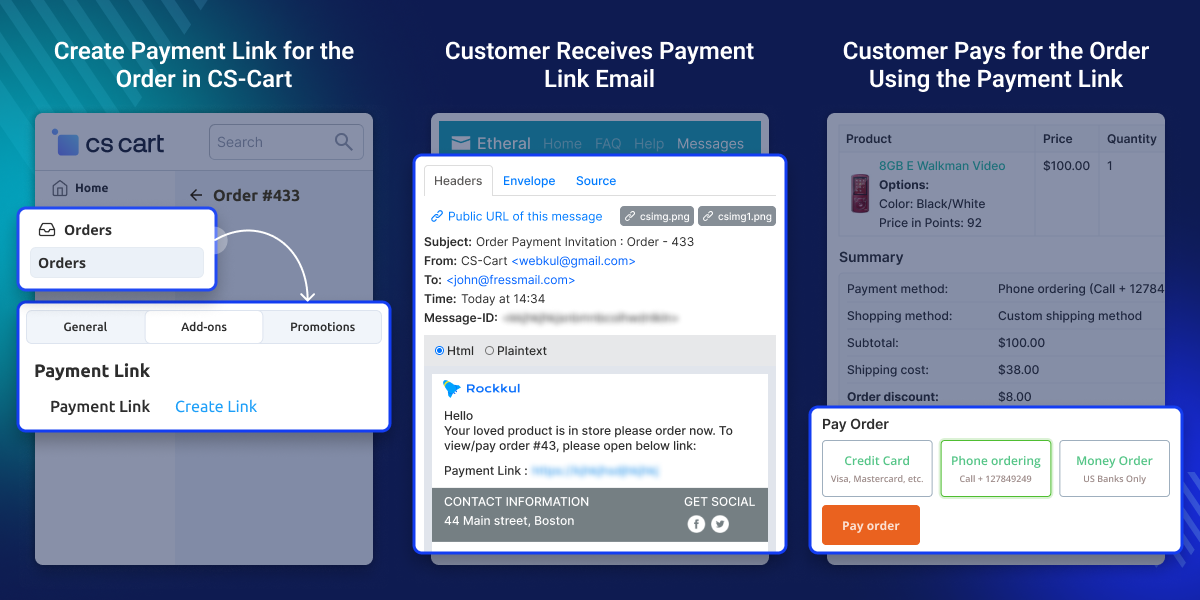
    CS-Cart Payment Link for Customer allows the admin to create an order and send a payment link to the customer to complete the payment.

    The payment link redirects the customer to the checkout page with all order details already filled in, such as products, prices, discounts, shipping methods, and addresses.

    The customer only needs to select a preferred payment method and complete the payment.
    CS-Cart Payment Link For Customer

    Highlighted Features

     Easy to Manage

    From the backend, the admin can quickly manage the module.

     Secure to use

    The admin can use this module to allow their customers to make safe payments.

     Saves Time

    It saves the time to send the payment link directly to the customer.

     Simple Checkout

    Customers may use the CS-Cart Payment link to make a payment and finish their order in a simple and secure manner.

    What is the need for CS-Cart Payment Link For Customer?

    Every online business owner's responsibility is to provide clients with a safe, secure, rapid, and dependable payment option. It assists the business owner in developing a strong customer-store relationship.

    Admins may provide payment links to their customers using CS-Cart Payment Link for Customers. Customers may pay for online orders quickly and securely using this method.

    Set Payment Link Expiration Time in CS-Cart

    The admin can define how long the payment link remains active before it expires.
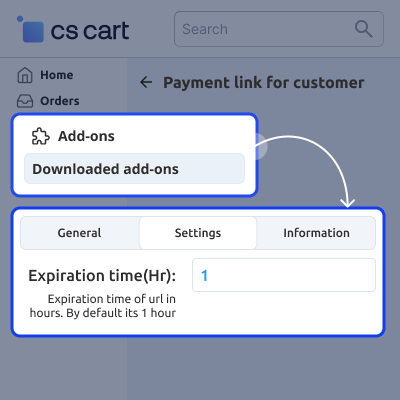
    • The admin can specify the expiration time for the payment link in hours.
    • The system automatically disables the payment link after the set time expires.
    • The admin can generate a new payment link if the previous link expires.
    • This feature helps ensure secure and time-limited payment access for customers.
    Set Payment Link Expiration Time in CS-Cart

    Generate Payment Link for the Order in CS-Cart

    The admin can generate a payment link for an order and share it with the customer to complete the payment.
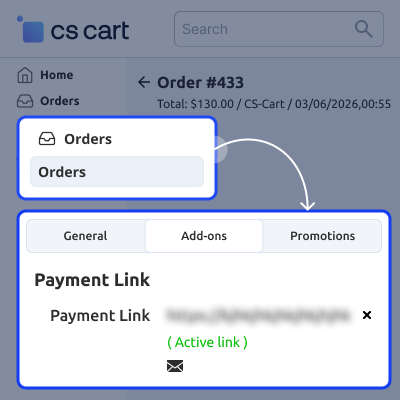
    • The admin can create the payment link directly from the order details page.
    • The system generates a unique link for the selected order.
    • The admin can copy the link or send it to the customer via email.
    • The customer can use the link to open the order page and complete the payment.
    Generate Payment Link for the Order in CS-Cart

    Customer Receives Payment Link Email

    The system sends the payment link to the customer’s email so they can complete the order payment.
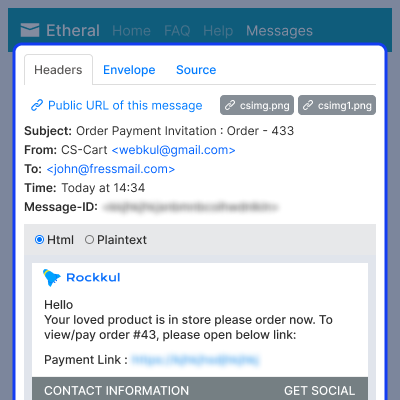
    • The customer receives an email containing the payment link.
    • The email includes the order details and payment instructions.
    • The customer can click the link to open the order payment page.
    • The customer can review the order and proceed with the payment.
    Customer Receives Payment Link Email

    Customer Completes Payment Using the Payment Link

    The customer opens the payment link and completes the order payment from the storefront.
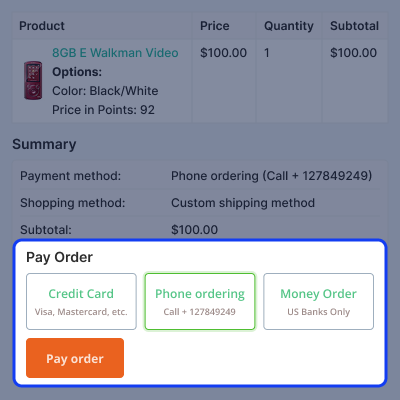
    • The customer clicks the payment link received in the email.
    • The system redirects the customer to the order details page on the storefront.
    • The customer selects a preferred payment method to proceed.
    • After successful payment, the order becomes ready for further processing.
    Customer Completes Payment Using the Payment Link

     CS-Cart Payment Link For Customer Support -

    For any query or issue, please create a support ticket here http://webkul.uvdesk.com/

    You may also check our other top-quality CS-Cart Add-ons.

    Specifications

    Product Version1.2
    Released8 years ago
    Last UpdatedMarch 13, 2026 (10 days ago)
    Supported VersionsCS-Cart  CS-Cart Multivendor  4.16.x  4.17.x  4.18.x  4.19.x  
    Rating 5.0
    based on 1 reviews

    Recent Reviews

    Write a review

    Excellent Products & Services by Webkul

    Posted On - September 30, 2022

    I am using this app for one month, the support team is very helpful and the live chat feature is also very helpful for direct contact with support rather than a ticket system

    Frequently Asked Questions

     How does the customer complete the payment using the link?
    The customer clicks the payment link, reviews the order details on the storefront, selects a preferred payment method, and completes the payment.
     
     Is it possible to send a custom email with a payment link to a customer?
    Yes, the customer will receive a custom email with a payment link.
     
     Is it possible for the admin to specify the link expiration time?
    Yes, there is a feature to set the link expiration time.
     
     Is this module suitable for both old and new email templates?
    The module may be used with both old and new email templates.
     
     Is it possible for the customer to re-create the payment link?
    Yes, once the link expires, users will have the ability to rebuild it.
     
     How does the admin generate a payment link for an order?
    The admin can open the order details page in the admin panel and click the Create Payment Link button to generate the link.

    Move to Cloud Today

    AWS Free tier hosting for one year by amazon web services, for more details please visit AWS Free Tier.

    GCP Free tier hosting for one year with 300 credit points by google cloud platform, for more details please visit GCP Free Tier.

    Azure free tier hosting for one year with 25+ always free services, for more details please visit Azure Free Tier.

    In our default configuration we will provide tremendous configuration for your eCommerce Website which is fast to load and response.

    Default Configuration Details of Server

    • 1 GB RAM
    • 1 Core Processor
    • 30 GB Hard Disk
    • DB with 1 GB RAM and 1 Core Processor

    * Server Configuration may vary as per application requirements.

    Want to know more how exactly we are going to power up your eCommerce Website with Cloud to fasten up your store. Please visit the Cloudkul Services.

    Get Started with Cloud
    Changelog
    • - Feature Add (+)
    • - Feature remove (-)
    • - Bug Fixed (!)
    • - Modification (*)
    Version 1.2
    • * Compatible with version 4.19.x.
    • - Remove Firebase logic for URL shortening.
    Version 1.1
    • + Functionality to send payment link to the customer via custom email.
    • + Functionality to set custom email template to send to the customer.
    • ! Works well with both Old and New email templates.
    Version 1.0
    • + Provides a feature to shorten the long URL via Google Firebase APIs.
    • + A feature to set link expiration time is also provided.
    • + Functionality to recreate the payment link is also available.


