USD
  • EUR
  • INR
  • USD
Cart
Cart 0
  • You have no items in your shopping cart.
    Cart
    Cart 0
    • You have no items in your shopping cart.
    Hire a Developer
    ×
    Contact Us!
    Send Again
    Close
    Please Login to Write Your Review

    CS-Cart Product Availability By Pincode/Zipcode

    CS-Cart Product Availability by Pincode / Zipcode lets customers check delivery before they buy. They can enter their postal code and see if shipping is available. As a result, stores get fewer failed orders and better conversions.


    • Check delivery using pincode or zipcode.

    • Show serviceable and non-serviceable areas instantly.

    • Popup delivery check on product page.

    • Validate postal code on cart page.

    • Import zipcode data using CSV.

    • Create multiple product delivery groups.

    • Customers can change location anytime.

    • Reduce cart abandonment.

    • Improve checkout confidence.

    • Faster buying decisions.

    • Easy backend area management.

    • Useful for local and regional stores.

    Screenshots
    CS-Cart Product Availability By Pincode/Zipcode CS-Cart Product Availability By Pincode/Zipcode CS-Cart Product Availability By Pincode/Zipcode CS-Cart Product Availability By Pincode/Zipcode CS-Cart Product Availability By Pincode/Zipcode CS-Cart Product Availability By Pincode/Zipcode CS-Cart Product Availability By Pincode/Zipcode
    Show More Hide All
    $49.00

    * Required Fields

    Add To Cart
    $49.00
    Configure and Buy
    • Description
    • Reviews
    • FAQ
    • Customers ()
    • Specifications
    • Cloud Hosting
    • Changelog

    CS-Cart Product Availability by Pincode / Zipcode helps stores show delivery status early. So, customers do not have to wait until checkout. Many buyers leave when they see delivery limits at the last step.

    However, this module fixes that problem. Now, customers can check their pincode on the product page. If delivery is available, they can continue without doubt.

    In addition, the popup makes the process quick and simple. Admins can also manage delivery zones from the backend. They can upload many pincodes using CSV files.

    This saves time and effort. Moreover, customers can check delivery again on the cart page. So, they feel more confident before placing the order.

    This module works well for grocery, pharmacy, furniture, and local stores. It also fits brands with area-based delivery. In short, it helps build trust and increases completed orders.

    Additionally, you can explore CS-Cart Custom Shipment Carriers Tracking module. It helps customers track orders with their chosen carrier and use different shipping options.
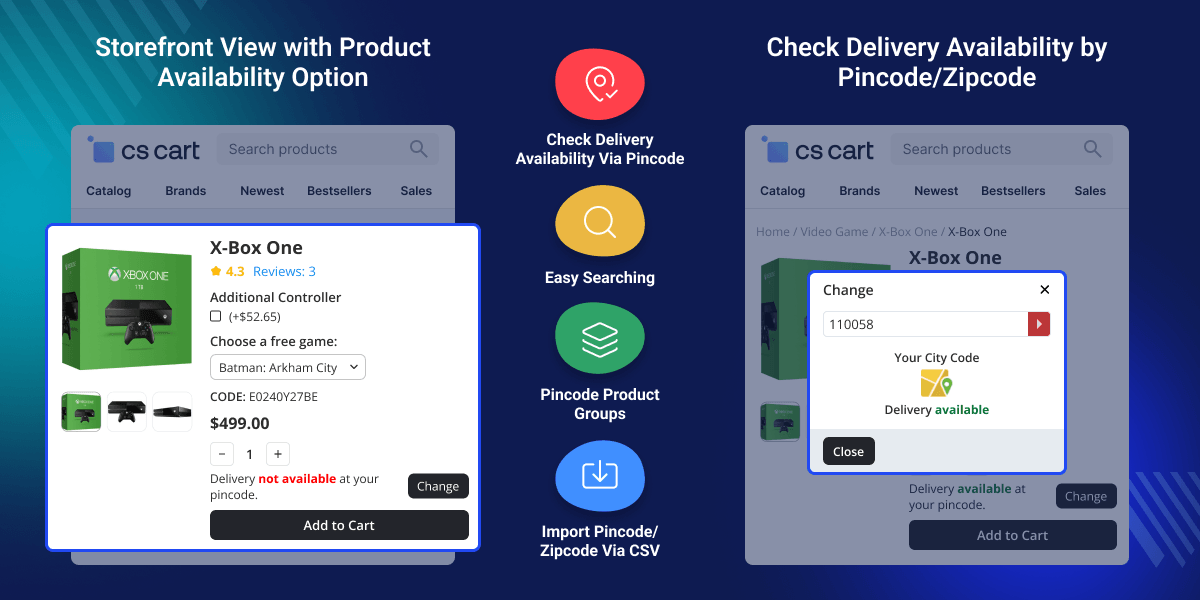
    CS-Cart Product Availability by Pincode

    Highlighted Features of CS-Cart Product Availability by Pincode

     Instant Delivery Availability Check

    Customers can check delivery within seconds. So, they know right away if they can order.

     Product Page Popup Search

    A simple popup lets users enter their zipcode quickly. Also, it keeps the buying flow smooth.

     Cart Page Validation

    Customers can recheck delivery before payment. This helps avoid wrong orders.

     CSV Import Support

    Admins can upload many postal codes at once. As a result, setup becomes faster.

     Multiple Product Groups

    Stores can assign different delivery areas to products. So, they get better control.

     Flexible Location Change

    Customers can update their location anytime. Therefore, they can check delivery again if needed.

    Why Do We Need CS-Cart Product Availability by Pincode?

    By default, CS-Cart does not show delivery availability early. Because of this, customers get confused. They may contact support or leave the store. This increases cart abandonment. So, stores need a quick way to check delivery areas.

    This module solves that issue. It shows delivery status on product and cart pages. As a result, customers get clear information. Also, stores get better order accuracy. It works well for city-wise and regional delivery setups.

    Additionally, admin can manage cash on delivery by location using the CS-Cart COD Availability By Pincode/Zipcode add-on.

    Use case of CS-Cart Product Availability by zipcode

    Use this add-on to manage product delivery availability by zipcode for different store types.

     Grocery Store

    Customers instantly check if home delivery is available in their area before ordering groceries.

     Pharmacy Store

    Users verify medicine delivery availability first for urgent and time-sensitive orders.

     Furniture Seller

    Stores accept furniture orders only from serviceable locations to avoid delivery issues.

     Electronics Store

    Prevent orders from remote areas where shipping or delivery is unavailable.

     Multi-City Brand

    Easily manage and update delivery zones across cities with CSV uploads.

     Hyperlocal Store

    Manage fast local delivery based on selected city, zone, or nearby area.

    Delivery Availability Search by Zipcode

    Customers can enter their zipcode on the product page. They get instant delivery status. So, they can decide quickly.
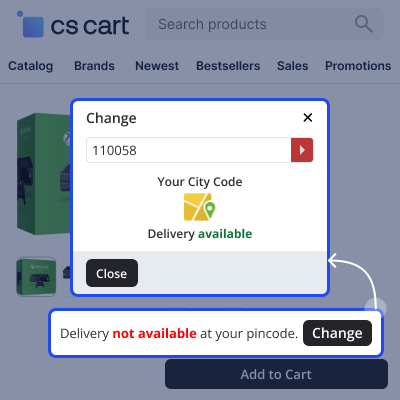
    • Popup location check
    • Fast response
    • Better confidence
    • Smooth buying flow
    • Lower exits
    Delivery Availability Search by Zipcode

    Backend Pincode Management

    Admins can manage delivery areas from the backend. They can update zones anytime. So, they stay in control.
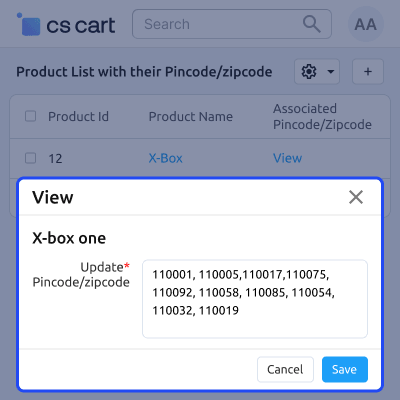
    • Add or remove pincodes
    • Edit delivery zones
    • Organize product groups
    • Manage coverage
    • Easy updates
    Backend Pincode Management

    Bulk CSV Import for Postal Codes

    Stores can upload many pincodes using CSV files. This is helpful for large delivery networks. Also, it saves setup time.
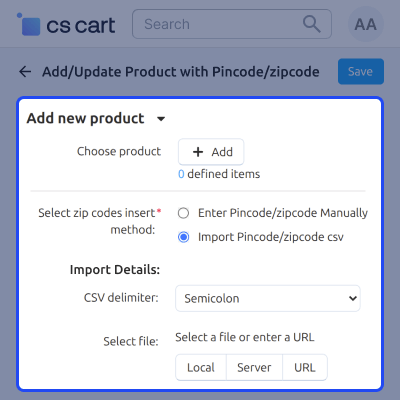
    • Bulk upload
    • Quick updates
    • Supports large data
    • Accurate setup
    • Scalable system
    Bulk CSV Import for Postal Codes

    Bulk Product Assignment

    Stores can add many pincodes at once for quick bulk setup. This is useful for large delivery networks and saves admin time.
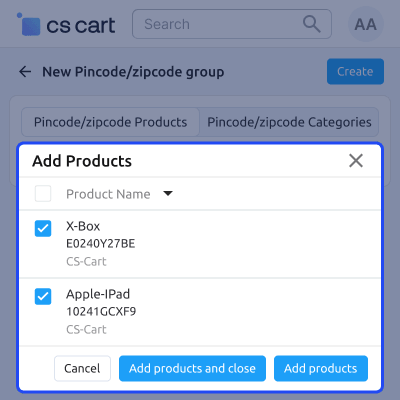
    • Multi-product selection
    • Add to new zipcode group
    • One-click bulk add
    • Save and close option
    • Easy product linking
    Bulk Product Assignment

    CS-Cart Product Availability By Pincode/Zipcode -

    For any query or issue please create a support ticket here http://webkul.com/ticket

    You may also check our other top-quality CS-Cart Add-ons.

    Specifications

    Product Version1.3
    Released10 years ago
    CategoryCS-CartOrder
    Last UpdatedMay 1, 2026 (12 days ago)
    Supported VersionsCS-Cart  4.14.x  4.15.x  4.16.x  4.17.x  4.18.x  
    Write a review

    Frequently Asked Questions

     Which file will be used to import the data?
    CSV files can be used for data import/export.
     
      How customer will search the location?
    By entering the zipcode on the products page in a popup window and then the location will display accordingly.
     
     Will the admin can validate the pincode/zipcode?
    Yes, the admin can validate the pincode/zipcode on the product and cart page.
     
     How many product group can be created?
    Multiple product groups can be created from the backend.
     
      Will the customer can change the postal code anytime?
    Yes, customers can change their postal code at any time and also at the time of adding shipping details.

    Move to Cloud Today

    AWS Free tier hosting for one year by amazon web services, for more details please visit AWS Free Tier.

    GCP Free tier hosting for one year with 300 credit points by google cloud platform, for more details please visit GCP Free Tier.

    Azure free tier hosting for one year with 25+ always free services, for more details please visit Azure Free Tier.

    In our default configuration we will provide tremendous configuration for your eCommerce Website which is fast to load and response.

    Default Configuration Details of Server

    • 1 GB RAM
    • 1 Core Processor
    • 30 GB Hard Disk
    • DB with 1 GB RAM and 1 Core Processor

    * Server Configuration may vary as per application requirements.

    Want to know more how exactly we are going to power up your eCommerce Website with Cloud to fasten up your store. Please visit the Cloudkul Services.

    Get Started with Cloud
    Not Available


