USD
  • EUR
  • INR
  • USD
Cart
Cart 0
  • You have no items in your shopping cart.
    CS-Cart Extensions
    Cart
    Cart 0
    • You have no items in your shopping cart.
    Hire a Developer
    ×
    Contact Us!
    Send Again
    Close
    Please Login to Write Your Review
    CS-Cart Product Page Shipping Cost

    CS-Cart Product Page Shipping Cost

    x
    Free

    * Required Fields

    $39.00
    Add To Cart
    30 Days Money Back Guarantee*

    CS-Cart Product Page Shipping Cost add-on displays shipping methods and prices based on the location, which allows customers to calculate shipping before adding products to the cart.


    • Accurate shipping cost is based on the customer’s location & cart items.

    • Provide various shipping options for customers.

    • Determine the shipping cost based on size, location, & weight.

    • Displaying estimated delivery times for shipping methods & locations.

    • Automatically select default shipping days for undefined product shipping methods.

    • It seamlessly integrates with CS-Cart.

    CS-Cart Product Page Shipping Cost
    CS-Cart Product Page Shipping Cost
    $39.00
    30-Day Refund Policy.
    Check How It Works
    $39.00
    Configure and Buy
    30 Days Money Back Guarantee*
    X
    • Description
    • Reviews
    • FAQ
    • Customers ()
    • Specifications
    • Cloud Hosting
    • Changelog

    CS-Cart Product Page Shipping Cost: Show shipping rates on your CS-Cart store's product page. Customers can check the delivery cost on the product page rather than in the cart. Customers may see all of the various shipping methods based on their zip code.

    It allows your customers to determine shipping costs before adding items to their cart, using the many delivery methods offered.

    This add-on displays the shipping cost on the product page, allowing buyers to check the delivery cost of a product without having to navigate to the basket page.
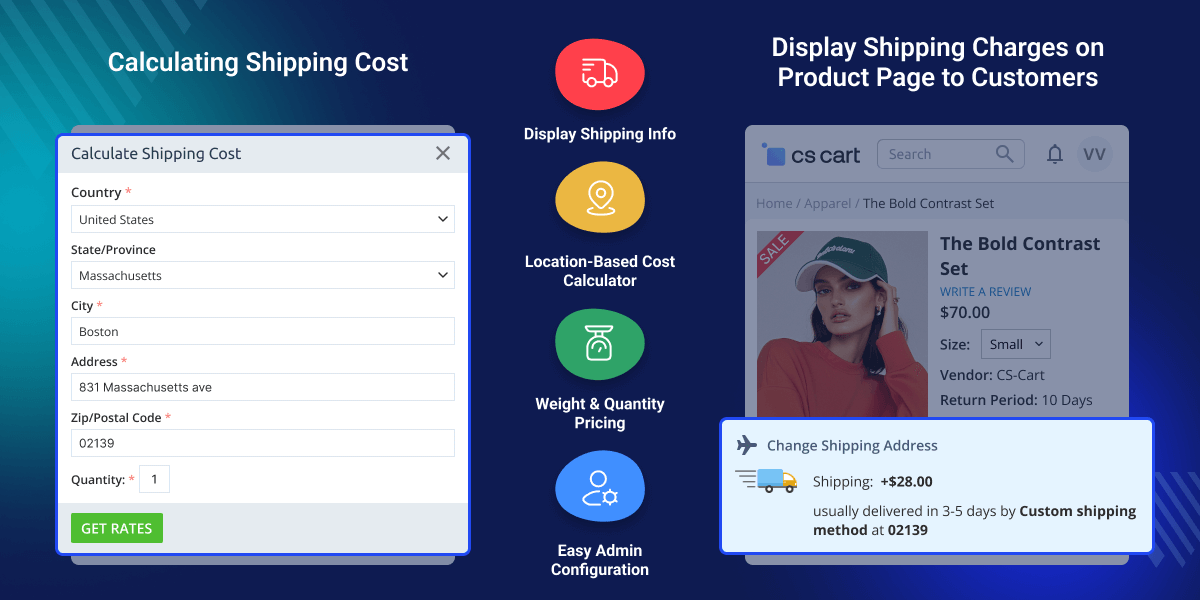
    CS-Cart Product Page Shipping Cost

    Highlighted Features

     Displays

    On a product's website or in tabs, it displays shipping methods, time, and pricing.

     Auto-Loading

    Payment methods load automatically when the page is loaded.

     Installation is simple

    The installation of our goods takes 5 minutes if you follow the step-by-step instructions.

     Enhancement of performance

    We recognize the importance of speed in an online store. To make your store run as quickly as possible, we analyze and optimize our add-ons code.

    Why do we need CS-Cart Product Page Shipping Cost?

    The default CS-Cart functionality does not display the shipping cost of a product before checkout. Even if a client does not complete the order after learning the price, you will still spend considerable resources to get them to do so.

    Based on the user's geolocation, the add-on displays the delivery price and time on a product page. Calculating the price can be done automatically when the page is open, or manually when the button is pressed (to decrease server load).

    Knowing the terms makes it much easier for a customer to purchase and having free shipping increases your chances of getting an order.

    Setup Product Page Shipping Cost for CS-Cart

    The admin can enable or disable the registration form at the front end of the CS-Cart Product Page Shipping Cost.
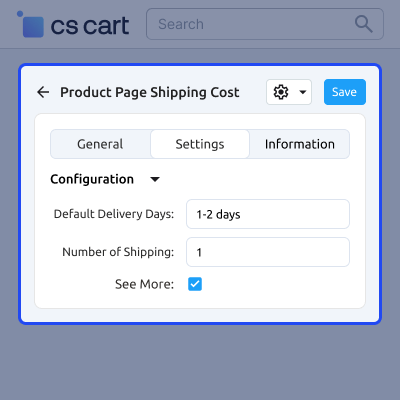
    • For products that do not have a shipping method selected, enter the default number of days for shipping. 
    • Enter the number of shipping options you want to show on the product page. 
    • Select the "see more" option to show all delivery options for the product.
    Setup Product Page Shipping Cost for CS-Cart

    Display Shipping Charges on Product Page to Customers

    Product delivery costs displayed. To compute the rate of the delivery method based on location, click "change.
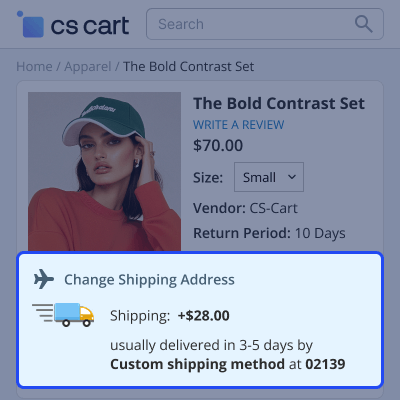
    • The user must input the specifics of the address to which he or she wishes to send the package. 
    • To calculate shipping costs, enter the quantity of the product and click "get rates". 
    • Configure the parameters.
    Display Shipping Charges on Product Page to Customers

    CS-Cart Product Page Shipping Cost Features:

    • Well integrated with CS-Cart/Multivendor.
    • Shipping info is displayed on the product view page.
    • Option to calculate the shipping cost based on location, cost of product, weight, and quantity of product.
    • Ability to pick the default shipping days if the shipping method is not defined for any desired product.
    • Easy to configure and use at the admin end.

    CS-Cart Product Page Shipping Cost Tutorial :

    For a detailed video tutorial please check the link https://www.youtube.com/watch?v=lqGwZQ_H5vY

    CS-Cart Product Page Shipping Cost -

    For any query or issue please create a support ticket here http://webkul.com/ticket

    You may also check our other top-quality CS-Cart Modules.

    Specifications

    Product Version1.4
    Released10 years ago
    Last UpdatedJuly 13, 2026 (1 month ago)
    Supported VersionsCS-Cart  CS-Cart Multivendor  4.14.x  4.15  4.15.x  4.16.x  4.17.x  4.18.x  4.19.x  

    Ratings

    We'd love to hear your thoughts! Share your feedback and help us craft an even better experience tailored just for you.

    5.0
    1 Reviews
    based on verified customer feedback
    Write a review
    Jamalla

    Handy add-on

    Posted On - March 8, 2019

    "Product Page Shipping" is very handy and easy addon. Installing and using it very straightforward ..

    Frequently Asked Questions

     Is it possible for a buyer to see the shipping costs without picking a shipping method on the product page?
    To examine the anticipated shipping rates, the user must enter their location on the product page and click calculate.
     
     Is this module applicable to both logged-in and non-logged-in customers?
    This module works for both logged-in and guest users because both can access the product page and finish the checkout procedure.
     
     Is it feasible for the admin to set separate charges for each zone of deliverables?
    The admin can define per-unit shipping prices and delivery charges will be determined based on the distance between the store and the customer's location.
     
     Is it workable for the store owner to tack on extra fees on top of the shipping costs?
    The shipment charges per unit distance and handling charges (more charges) can be specified by the admin.
     
     Is it possible for the admin to set the deliverable zone range?
    The admin can currently set the maximum covered area range from the store location.

    Specification

    Detailed technical features and requirements to help you understand the module’s capabilities and ensure smooth integration with your system.

    Cloud Hosting

    Detailed technical features and requirements to help you understand the module’s capabilities and ensure smooth integration with your system.

    Default Configuration Details of Server

    1 GB
    RAM
    1 Core
    Processor
    30 GB
    Hard Disk
    1 GB RAM & 1 Core Processor
    Database

    Want to know more how exactly we are going to power up your eCommerce Website with Cloud to fasten up your store

    * Server Configuration may vary as per application requirements.

    Change Logs

    • - Feature Add (+)
    • - Feature remove (-)
    • - Bug Fixed (!)
    • - Modification (*)
    Version-1.4
    • + Added the license manager.
    Version 1.3
    • * Converted from Schema 3.0 to Schema 4.0.
    • ! Changed shipping rates for guest users.
    • + Added required field in add-on settings for shipping method.
    Version 1.2
    • ! Changed amount to quantity for Vivashop theme.
    • ! Shipping rates vary with weight modifier.
    • ! Changed position of change shipping link in Vivashop.
    • * Countries and rates updated for guest users.
    • * Change shipping option visible on quick-view page.
    Version 1.1
    • + Added notification with user guide and support link on add-on installation.
    • * Resolved state dropdown issue when location is not selected.
    • * Made Vivashop compatible with current functionalities.
    Version 1.0
    • + Shipping info displayed on product view page.
    • + Shipping cost calculation based on location, product cost, weight, and quantity.
    • + Option to set default shipping days when shipping method is not defined for a product.


