USD
  • EUR
  • INR
  • USD
Cart
Cart 0
  • You have no items in your shopping cart.
    Cart
    Cart 0
    • You have no items in your shopping cart.
    Hire a Developer
    ×
    Contact Us!
    Send Again
    Close
    Please Login to Write Your Review

    CS-Cart Purchase Order

    CS-Cart Purchase Order helps businesses create purchase orders, manage suppliers, track shipments, and restock out of stock products with better inventory control.


    • Automatic purchase orders for out of stock products.

    • Supplier management with purchase order tracking.

    • Create and manage supplier quotations.

    • Track incoming and partial product shipments.

    • Automatic inventory updates after stock receipt.

    • Send purchase orders and quotations by email.

    • Print and download purchase order invoices.

    • Support automatic or manual procurement methods.

    • Add the supplier cost price and purchase quantity.

    • Works with CS-Cart and Multi Vendor Plus & Ultimate.

    Screenshots
    CS-Cart Purchase Order CS-Cart Purchase Order CS-Cart Purchase Order CS-Cart Purchase Order CS-Cart Purchase Order CS-Cart Purchase Order
    Show More Hide All
    $69.00

    * Required Fields

    Add To Cart
    $69.00
    Configure and Buy
    • Description
    • Reviews
    • FAQ
    • Customers ()
    • Specifications
    • Cloud Hosting
    • Changelog

    CS-Cart Purchase Order helps businesses manage supplier purchases from one place. It lets you create purchase orders, track shipments, and maintain purchase records with quantity and price information.

    The add on is suitable for online stores that buy products from suppliers regularly. It reduces manual work and helps organise the purchasing process. When a product goes out of stock, a purchase order can be created automatically. This helps reduce stock shortages and keeps products available.

    You can create quotations, send purchase orders by email, and track incoming or partial shipments with ease. Stock levels update after items are received from suppliers. This gives your team a clear view of incoming products.

    The add on supports purchase order invoices, shipment records, and both manual and automatic procurement methods for different business needs.

    Also, to make order cancellation simple with admin controls, rules, refunds, and tracking using CS-Cart Order Cancellation add on.
    CS-Cart Purchase Order

    Why Do We Need CS-Cart Purchase Order?

    CS-Cart Purchase Order helps businesses buy products from suppliers in a better way. It keeps suppliers, quotations, purchase orders, and shipments in one place.

    The add on creates purchase orders when products go out of stock and updates inventory after supplier deliveries. You can choose automatic or manual procurement based on your business needs.

    It is a good fit for businesses that buy products regularly. The add on helps reduce manual work, improve stock control, and keep the purchasing process organised.

    Additionally, to track orders with interactive progress, custom tracking stages, automatic status updates, and visual order tracking using CS-Cart Order Status Tracker add on.

    Use Cases

    Multi Store Retail Inventory

    Retail stores can create purchase orders when stock runs out. This helps bring in new stock on time and reduces manual work.

    Wholesale Product Procurement

    Wholesale businesses can manage suppliers and purchase orders from one place. They can also keep purchase records for bulk orders.

    Electronics and Gadget Stores

    Electronics stores can link suppliers to products. They can order new stock quickly when product quantity becomes low.

    Multi Vendor Marketplace Operations

    Marketplace owners can manage suppliers and purchase orders for many vendors. They can keep all purchase records in one place.

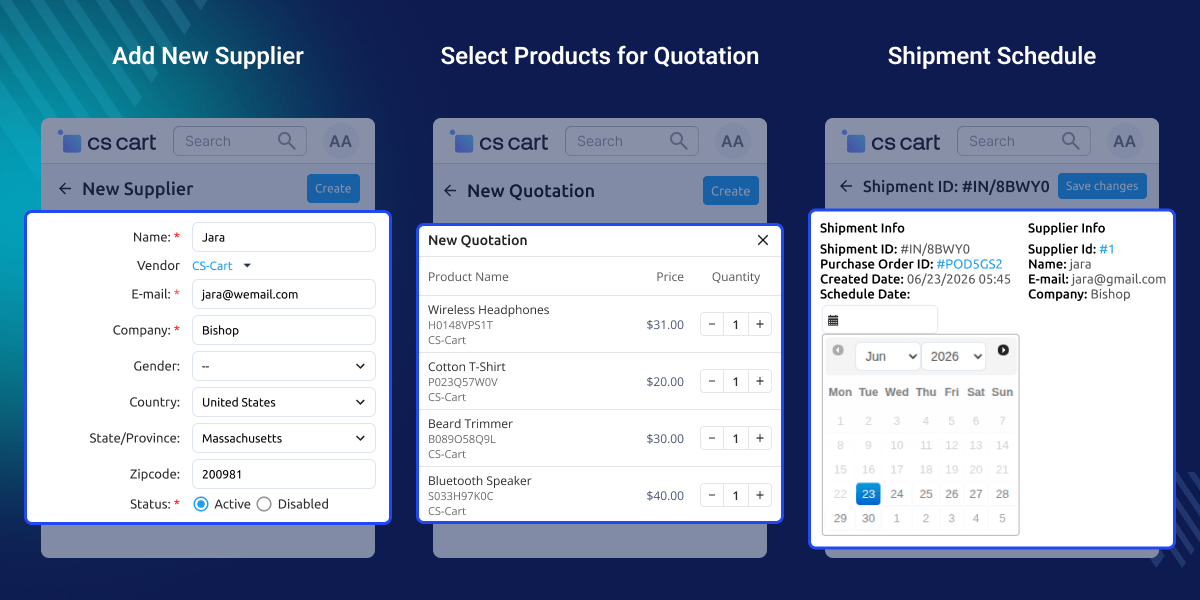
    Add New Supplier

    Add a new supplier from one simple form. Enter the company, contact, and address details. You can link the supplier to a vendor and use the record for purchase orders, quotations, and shipments.

    Clear supplier records make daily work easier. They help you create purchase orders faster, track shipments, and keep supplier details in one place.
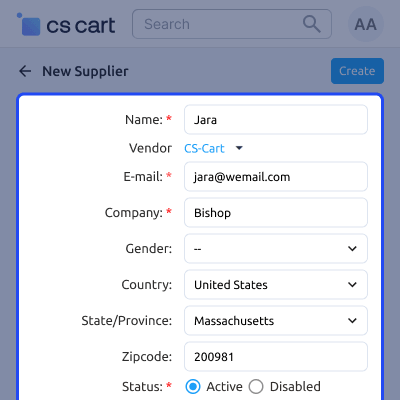
    • Add supplier name, company, and email.
    • Link a supplier to a vendor.
    • Save country, state, and ZIP code.
    • Set status as Active, Hidden, or Disabled.
    • Use supplier records for purchase orders and quotations.
    • Edit supplier details at any time.
    Add New Supplier

    Management of Quotations

    The admin can email the suppliers with a purchase order and quotation request in the CS-Cart store.
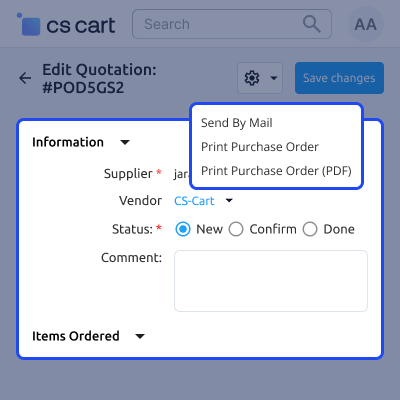
    • Multiple Products can be assigned to one Supplier.
    • For the creation of Quotations, the admin must choose a vendor.
    • A quote's status can be changed by the admin from New to Confirm.
    Management of Quotations

    Shipment Scheduling

    Set a delivery date for each supplier shipment. The shipment page also shows the purchase order, shipment ID, and supplier details in one place.

    This helps you plan deliveries, stay in touch with suppliers, and keep orders moving. You can also create partial shipments when all products are not ready.
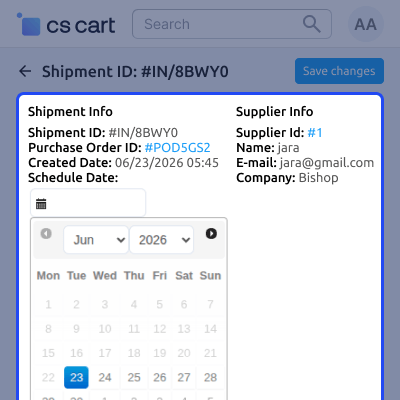
    • Set shipment dates with the calendar.
    • View the purchase order and shipment ID.
    • See supplier contact and company details.
    • Create partial shipments for remaining items.
    • Update shipment details at any time.
    • Track all shipments from the purchase order module.
    Shipment Scheduling

    Automatic Purchase Order Configuration

    Configure automatic purchase order settings for individual products by assigning a supplier, purchase quantity, and cost price. When stock runs out, the system can generate a purchase order based on these settings.

    This feature reduces manual purchasing, speeds up stock replenishment, and helps maintain consistent inventory levels with predefined procurement rules.
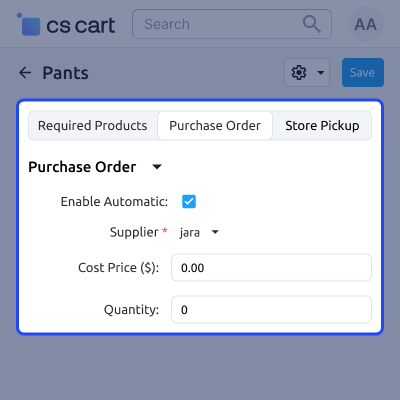
    • Enable automatic purchase order creation per product.
    • Assign a preferred supplier for procurement.
    • Set the supplier cost price for purchase orders.
    • Define the default purchase quantity for replenishment.
    • Generate purchase orders when products go out of stock.
    • Reduce manual procurement and inventory delays.
    Automatic Purchase Order Configuration

     CS-Cart Purchase Order- Support

    For any query or issue please create a support ticket here http://webkul.uvdesk.com

    You may also check our other top-quality CS-Cart Add-ons.

    Specifications

    Product Version1.1
    Released6 years ago
    CategoryCS-CartOrder
    Last UpdatedJune 30, 2026 (4 days ago)
    Supported Versions4.14.x  4.15.x  4.16.x  4.17.x  CS-Cart  4.18.x  CS-Cart Multivendor  4.14.x  4.15.x  4.16.x  4.17.x  4.18.x  
    Write a review

    Frequently Asked Questions

     Does the add on support supplier quotations?
    Yes, you can create quotations, assign suppliers, and manage the quotation approval process within the module.
     
     Can suppliers receive purchase order notifications?
    Yes, this module can send quotation and purchase order emails directly to suppliers.
     
     Can I download purchase order invoices?
    Yes, purchase order invoices can be printed and downloaded as PDF files for record keeping.
     
     Is the module compatible with CS-Cart Multi Vendor?
    Yes, this add on supports CS-Cart, CS-Cart Multi Vendor, Multi Vendor Plus, and Multi Vendor Ultimate.
     
     Can vendors use the purchase order feature?
    Yes, vendors can use the purchase order functionality when the required permissions are assigned by the administrator.
     
     Can I customise purchase order documents?
    Yes, you can add additional fields to the purchase order invoice through the document section.
     
     Does the add on support multiple languages?
    Yes, this module includes multi language support for stores operating in different regions.

    Move to Cloud Today

    AWS Free tier hosting for one year by amazon web services, for more details please visit AWS Free Tier.

    GCP Free tier hosting for one year with 300 credit points by google cloud platform, for more details please visit GCP Free Tier.

    Azure free tier hosting for one year with 25+ always free services, for more details please visit Azure Free Tier.

    In our default configuration we will provide tremendous configuration for your eCommerce Website which is fast to load and response.

    Default Configuration Details of Server

    • 1 GB RAM
    • 1 Core Processor
    • 30 GB Hard Disk
    • DB with 1 GB RAM and 1 Core Processor

    * Server Configuration may vary as per application requirements.

    Want to know more how exactly we are going to power up your eCommerce Website with Cloud to fasten up your store. Please visit the Cloudkul Services.

    Get Started with Cloud
    Not Available


