USD
  • EUR
  • INR
  • USD
Cart
Cart 0
  • You have no items in your shopping cart.
    Cart
    Cart 0
    • You have no items in your shopping cart.
    Hire a Developer
    ×
    Contact Us!
    Send Again
    Close
    Please Login to Write Your Review

    CS-Cart Special Promotion Conditions

    CS-Cart Special Promotion Conditions adds targeted discount rules to your store. Store owners can create Buy X Get Y offers, new customer deals, and order based discounts to drive more sales.


    • Adds bonus products to the cart when cart conditions are met.

    • Apply offers only to new customers using targeted conditions.

    • Set discounts based on the customer's lifetime order total.

    • Schedule offers for specific selected dates.

    • Restrict offer usage to once per day, week, month, or year.

    • Works with CS-Cart and CS-Cart Multivendor storefronts.

    Screenshots
    CS-Cart Special Promotion Conditions CS-Cart Special Promotion Conditions CS-Cart Special Promotion Conditions CS-Cart Special Promotion Conditions CS-Cart Special Promotion Conditions CS-Cart Special Promotion Conditions CS-Cart Special Promotion Conditions CS-Cart Special Promotion Conditions CS-Cart Special Promotion Conditions
    Show More Hide All
    $49.00

    * Required Fields

    Add To Cart
    $49.00
    Configure and Buy
    • Description
    • Reviews
    • FAQ
    • Customers ()
    • Specifications
    • Cloud Hosting
    • Changelog

    CS-Cart Special Promotion Conditions extends the default promotion system by adding new rule types. It gives store owners control over who gets an offer and when it applies.

    Instead of running the same deal for everyone, offers can be targeted based on how customers shop. New buyers can receive first order deals, while repeat customers can unlock rewards based on their lifetime order total. Buy X Get Y adds a bonus product to the cart as soon as customers add the required quantity.

    All deals work automatically in the background. The cart updates as customers meet the conditions, so they can see the offer without taking any extra steps. Usage limits control how often a deal can be used, while selected date conditions allow offers to run only on specific days.

    This keeps campaigns focused and prevents overuse. Drive higher order value, reward loyal customers, and run targeted campaigns without manual effort.

    Add cashback rewards to your offers by pairing this module with CS-Cart Wallet System, so every purchase returns value to the customer.
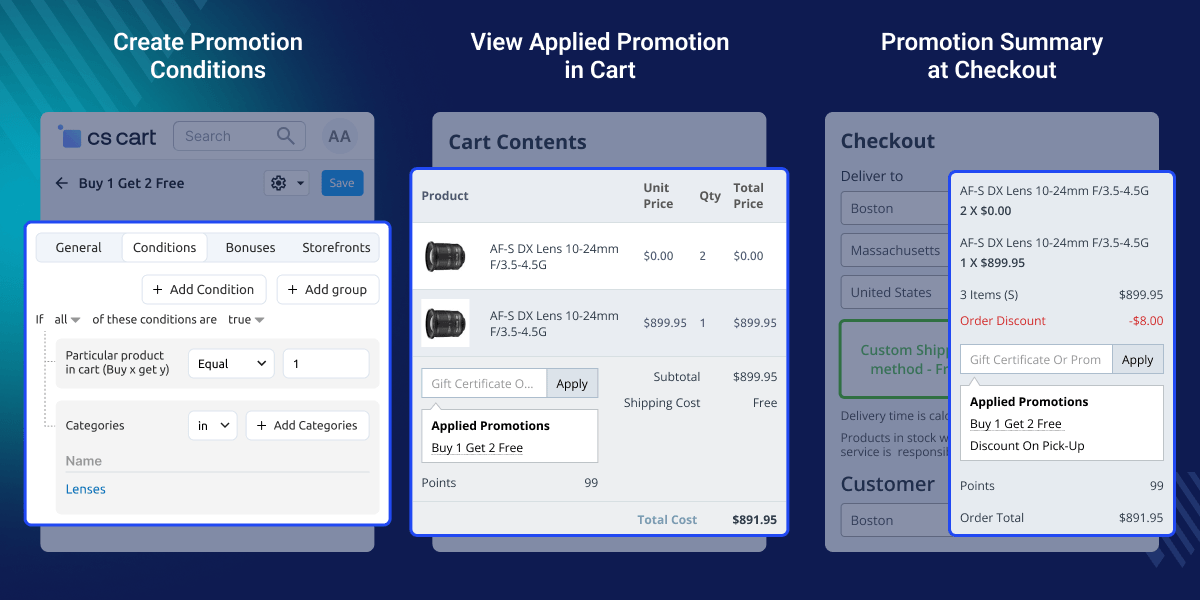
    CS-Cart Special Promotion Conditions

    Highlighted Features

     Buy X Get Y Offers

    Bonus products are added to the cart once customers meet the defined criteria.

     New Customer Deals

    Target new buyers with exclusive offers to drive their first purchase.

     Order Based Rules

    Discounts apply based on a customer's lifetime order total.

     Usage Limits

    Control how often a customer can use a deal within a set time period.

     Date Based Offers

    Deals run only on the dates selected during setup.

     Multivendor Compatibility

    These rules work across all sellers in a Multivendor marketplace.

    Why do we need CS-Cart Special Promotion Conditions?

    CS-Cart Special Promotion Conditions extends the default promotion system in CS-Cart. Builtin options offer limited support for discount rules based on customer activity, order history, or account status.

    Store owners miss out on targeted deals without these controls. New buyers cannot be given special offers, and repeat customers are not rewarded based on their purchase history.

    This module adds advanced rules to the admin panel. Bonus items appear when defined conditions are met, such as reaching a set lifetime order total. It helps run targeted promotions, improve order value, and reduce manual work.

    Additionally, you can pair this module with CS-Cart Group Buy Discount to offer bulk price cuts alongside the targeted deals.

    Use Cases for CS-Cart Special Promotion Conditions

    CS-Cart Special Promotion Conditions fits many sales plans. It allows for full control over who gets a deal, when it runs, and how often it applies.

    •  First Time Buyer Incentives

      Offer a discount or bonus item on the first order to encourage new customers.

    •  Seasonal Buy X Get Y Campaigns

      Buying a required quantity adds a free item at checkout.

    •  Order History Rewards

      Apply discounts when a customer reaches a set lifetime order total.

    •  Holiday Flash Sales

      Run time based deals that activate and expire automatically.

    •  Daily Deal Controls

      Limit usage to once per day to manage margins.

    •  Multivendor Deals

      Apply the same rules across all sellers in a marketplace.

    Manage All Promotions in Admin

    All your promotions, including the new condition types, sit in one list inside the admin panel. No separate section or extra navigation needed. Store owners can view status, priority, and zone for each promotion at a glance, making it easy to manage active campaigns.
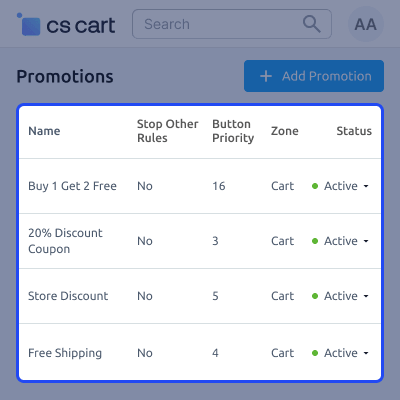
    • All promotions are listed with name, status, and zone.
    • Enable or disable any deal directly from the list.
    • Set button priority to control which deals take effect first.
    • New condition types appear alongside existing rules.
    Manage Promotions

    Create and Configure Promotions

    Each promotion has its own setup page with tabs for general details, conditions, bonuses, and storefronts. Store owners can add all details in one place before activating the deal.
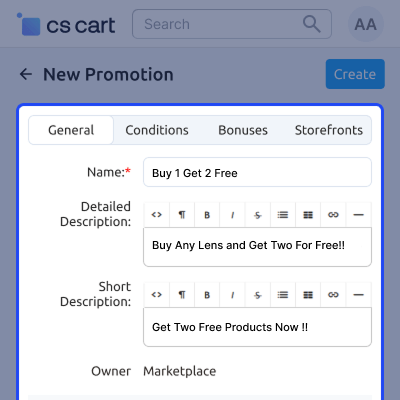
    • Name and describe each promotion clearly.
    • Four tabs cover all setup steps in one place.
    • Works within the native CS-Cart promotions workflow.
    • Create and save new deals without leaving the admin panel.
    Create Promotions

    Set Up Buy X Get Y Conditions

    The Conditions tab is where store owners define what triggers a promotion. For Buy X Get Y, the required product quantity and filters are set here.
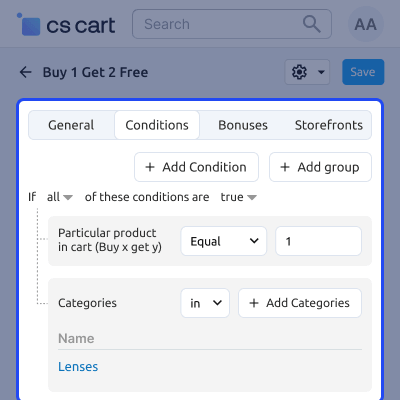
    • Set quantity rules for specific products in the cart.
    • Filter conditions by product category.
    • Add multiple conditions to one promotion.
    • Choose whether all or any conditions need to be met.
    Buy X Get Y Conditions

    Buy X Get Y Promotion Condition

    Customers receive bonus items automatically when they meet the defined criteria. The cart updates without requiring any action from the customer.
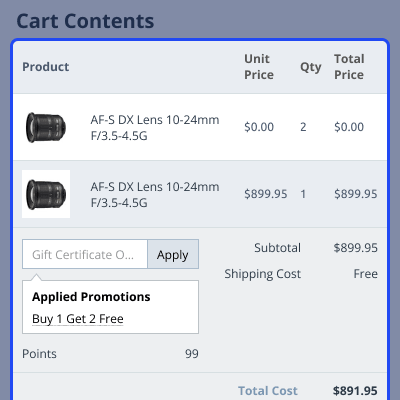
    • Bonus product is added to the cart automatically.
    • Cart shows the applied promotion before checkout.
    • No manual steps needed from the customer.
    • Conditions can be set by product or category.
    Buy X Get Y Promotion

    Promotion Summary at Checkout

    All applied deals are visible during checkout. Customers can review discounts and bonuses before placing the order.
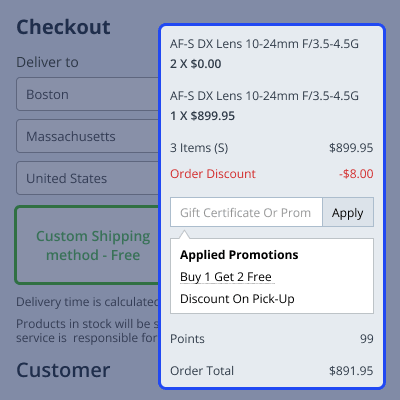
    • Checkout page lists all applied promotions.
    • Order total updates automatically with discounts.
    • Multiple promotions can work together.
    • Customers see final savings before purchase.
    Promotion Summary

     CS-Cart Special Promotion Conditions- Support

    For any query or issue please create a support ticket here http://webkul.uvdesk.com

    You may also check our other top-quality CS-Cart Add-ons.

    Specifications

    Product Version1.0
    Released5 years ago
    CategoryCS-CartMarketing
    Last UpdatedApril 21, 2026 (9 days ago)
    Supported Versions4.14.x  4.16.x  4.17.x  4.18.x  CS-Cart  4.15.x  CS-Cart Multivendor  4.14.x  4.15.x  4.16.x  4.17.x  4.18.x  
    Write a review

    Frequently Asked Questions

     How is CS-Cart Special Promotion Conditions different from default promotions?
    Default CS-Cart options offer limited support for rules based on new customers or order history. CS-Cart Special Promotion Conditions introduces those rule types directly in the admin panel.
     
     How does Buy X Get Y work in CS-Cart?
    Set the required quantity and conditions during promotion setup in the admin panel. Once met, the bonus product is added to the cart automatically.
     
     How to restrict a CS-Cart promotion to new buyers only?
    Apply the new customer rule during setup. The deal applies only to users placing their first order.
     
     How to reward repeat customers based on lifetime order total in CS-Cart?
    Define a lifetime order total threshold. When the customer reaches it, the discount applies at checkout automatically.
     
     Does CS-Cart Special Promotion Conditions work with Multivendor stores?
    It supports CS-Cart Multivendor and applies the same rules across all sellers.
     
     How to limit promotion usage per customer in CS-Cart?
    Limits are set within promotion settings in the admin panel. Each customer can use the offer only once within the selected time period, such as per day, week, month, or year.

    Move to Cloud Today

    AWS Free tier hosting for one year by amazon web services, for more details please visit AWS Free Tier.

    GCP Free tier hosting for one year with 300 credit points by google cloud platform, for more details please visit GCP Free Tier.

    Azure free tier hosting for one year with 25+ always free services, for more details please visit Azure Free Tier.

    In our default configuration we will provide tremendous configuration for your eCommerce Website which is fast to load and response.

    Default Configuration Details of Server

    • 1 GB RAM
    • 1 Core Processor
    • 30 GB Hard Disk
    • DB with 1 GB RAM and 1 Core Processor

    * Server Configuration may vary as per application requirements.

    Want to know more how exactly we are going to power up your eCommerce Website with Cloud to fasten up your store. Please visit the Cloudkul Services.

    Get Started with Cloud
    Not Available


