USD
  • EUR
  • INR
  • USD
Cart
Cart 0
  • You have no items in your shopping cart.
    Cart
    Cart 0
    • You have no items in your shopping cart.
    Hire a Developer
    ×
    Contact Us!
    Send Again
    Close
    Please Login to Write Your Review

    CS-Cart Spin To Win

    CS-Cart Spin To Win add-on allows store owners to add an interactive spin wheel game to the storefront and offer rewards such as discounts and promotional coupons to customers.


    • Create and manage Spin To Win games from the admin panel.

    • Assign promotions and rewards to wheel slices.

    • Configure spin limits for guest and registered users.

    • Customize wheel design, labels, and colors.

    • Display the spin wheel on selected storefront pages.

    • Track game participation and reward details from the dashboard.

    • Apply promotional conditions and bonus rules.

    Screenshots
    CS-Cart Spin To Win CS-Cart Spin To Win CS-Cart Spin To Win CS-Cart Spin To Win CS-Cart Spin To Win CS-Cart Spin To Win CS-Cart Spin To Win CS-Cart Spin To Win CS-Cart Spin To Win CS-Cart Spin To Win CS-Cart Spin To Win
    Show More Hide All
    $69.00

    * Required Fields

    Add To Cart
    $69.00
    Configure and Buy
    • Description
    • Reviews
    • FAQ
    • Customers ()
    • Specifications
    • Cloud Hosting
    • Changelog

    CS-Cart Spin To Win add-on allows store owners to add a spin wheel game to the storefront and provide promotional rewards to customers. Customers can spin the wheel and receive rewards such as discount coupons, promotional offers, or other configured benefits.

    The add-on provides options to create and manage multiple games from the admin panel. Admins can configure wheel slices, assign promotions, define spin limits, and customize the appearance of the wheel according to store requirements.

    The module supports both guest users and registered users, which allows admins to set separate participation rules for each user type. Store owners can also apply conditions and bonus rules to control how promotions work within the game.

    Admins can display the Spin To Win block on selected storefront pages using layout management. The dashboard section helps track user participation, rewards received, and promotion usage.

    Apart from this, you can use CS-Cart Pre Order to allow customers to purchase upcoming or out-of-stock products.
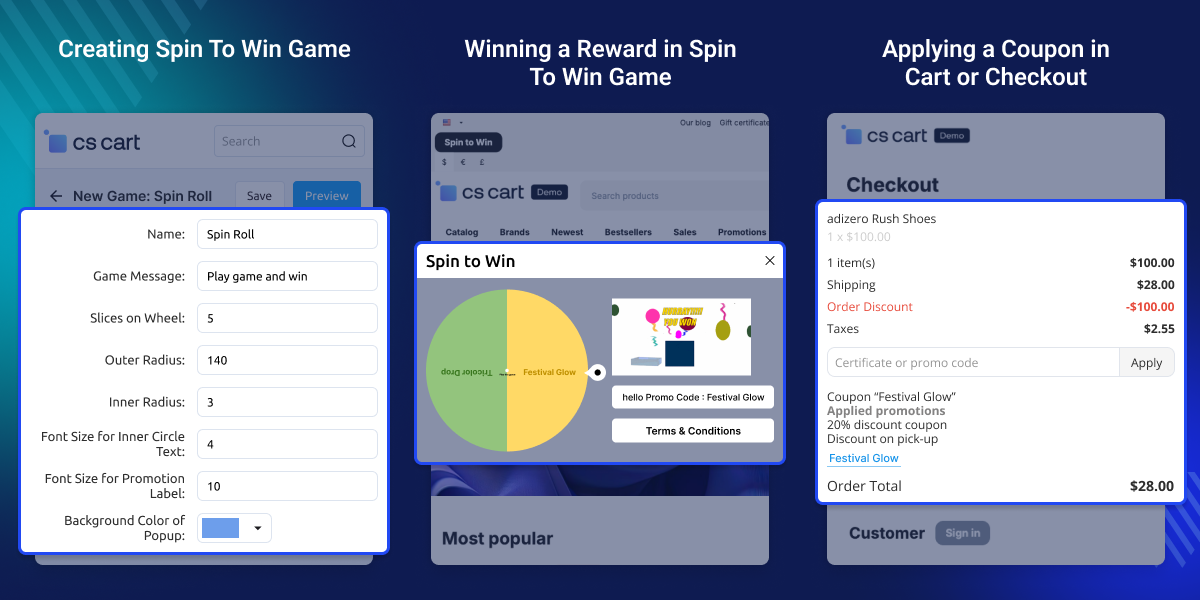
    CS-Cart Spin To Win

    Highlighted Features of CS-Cart Spin To Win

     Interactive Spin Wheel Game

    Add a spin wheel game to the storefront for customer participation.

     Promotion and Reward Support

    Assign discount coupons and promotional rewards to wheel slices.

     User Participation Control

    Set separate spin limits for guest users and registered users.

     Customizable Wheel Design

    Configure wheel labels, colors, slices, and display settings.

    Use Cases

    Promote Discount Campaigns

    Offer discount coupons and promotional rewards through the spin wheel.

    Increase User Participation

    Allow customers to interact with the storefront using the spin game.

    Manage Seasonal Offers

    Create special games for festival sales, holiday offers, or promotional events.

    Reward Registered Customers

    Provide separate rewards and spin limits for registered users.

    Why Do You Need CS-Cart Spin To Win?

    CS-Cart Spin To Win add-on helps store owners display promotional offers in an interactive format on the storefront. Customers can participate in the spin wheel game and receive rewards such as discount coupons or promotional benefits.

    The add-on also helps admins manage promotional campaigns, control user participation, and track reward distribution from the admin panel. It provides configurable options for game design, promotion rules, and storefront display settings.

    You can also check CS-Cart Make An Offer add-on for managing customer offers and price negotiations on products.

    Adding a Promotion in CS-Cart Spin To Win

    Create promotional rewards that customers can receive after spinning the wheel.
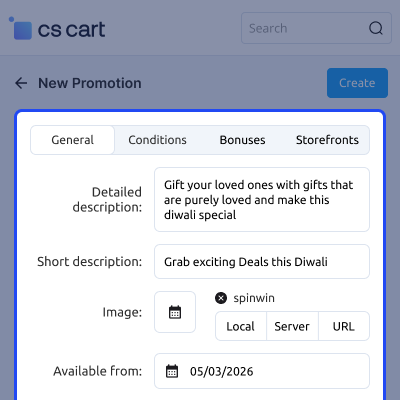
    • Add a new promotion from the Spin To Win section
    • Configure promotion name, dates, and priority
    • Apply conditions and bonus rules for rewards
    • Assign the promotion to the spin wheel game
    Adding a Promotion in CS-Cart Spin To Win

    Creating a Spin To Win Game in CS-Cart

    Create and configure a spin wheel game for the storefront.
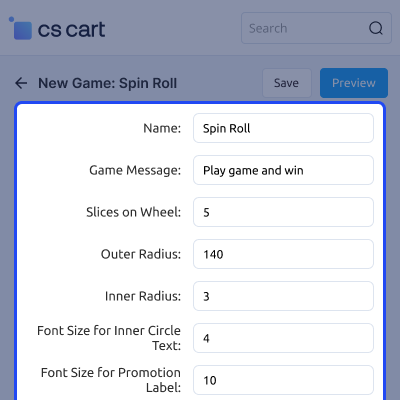
    • Add a new game from the admin panel
    • Configure wheel slices and game settings
    • Customize wheel design, labels, and colors
    • Assign promotions to the game for rewards
    Creating a Spin To Win Game in CS-Cart

    Winning a Reward in Spin To Win Game

    Customers can spin the wheel and receive configured promotional rewards.
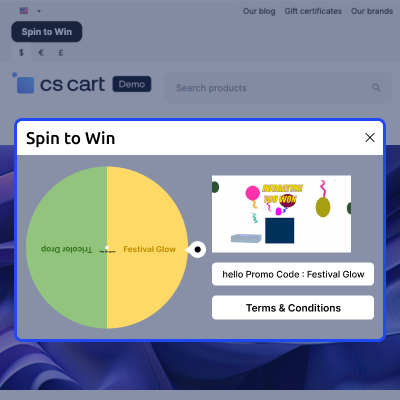
    • Enter the required details to play the game
    • Spin the wheel from the storefront
    • Receive a reward based on the wheel result
    • Use the received coupon in the cart or checkout
    Winning a Reward in Spin To Win Game

    Applying a Coupon in Cart or Checkout

    Customers can apply the received coupon during the purchase process.
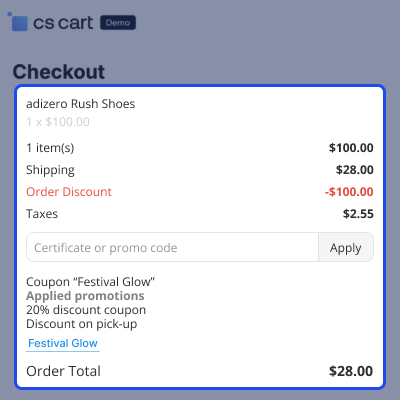
    • Add products to the shopping cart
    • Enter the coupon code in the cart or checkout page
    • Apply the coupon to receive the promotion benefit
    • Complete the order with the updated total
    Applying a Coupon in Cart or Checkout

     CS-Cart Spin To Win- Support

    For any query or issue please create a support ticket here http://webkul.uvdesk.com

    You may also check our other top-quality CS-Cart Add-ons.

    Specifications

    Product Version2.1
    Released6 years ago
    Last UpdatedMay 11, 2026 (3 days ago)
    Supported VersionsCS-Cart  CS-Cart Multivendor  4.18.x  4.19.x  4.20.x  
    Write a review

    Frequently Asked Questions

      Can guest users play the CS-Cart Spin To Win game?
    Yes, the admin can allow guest users to play the CS-Cart Spin To Win add-on game and configure the number of allowed spins.
     
      How can admins track Spin To Win activity?
    The dashboard section displays details such as user entries, game participation, and received promotions.
     
      Can I assign promotions to the CS-Cart Spin To Win wheel?
    Yes, the admin can assign discount coupons and promotional rewards to wheel slices in the CS-Cart Spin To Win add-on.
     
      Can I customize the design of the CS-Cart Spin To Win wheel?
    Yes, the CS-Cart Spin To Win add-on provides customization options for wheel colors, labels, slices, popup background, and other design settings.
     
      Where can I check entries and rewards in the CS-Cart Spin To Win add-on?
    You can check user entries, received promotions, and game details from the dashboard section of the CS-Cart Spin To Win add-on.
     
      How can customers use rewards received from the spin wheel?
    Customers can apply the received coupon or promotion in the cart or during checkout.

    Move to Cloud Today

    AWS Free tier hosting for one year by amazon web services, for more details please visit AWS Free Tier.

    GCP Free tier hosting for one year with 300 credit points by google cloud platform, for more details please visit GCP Free Tier.

    Azure free tier hosting for one year with 25+ always free services, for more details please visit Azure Free Tier.

    In our default configuration we will provide tremendous configuration for your eCommerce Website which is fast to load and response.

    Default Configuration Details of Server

    • 1 GB RAM
    • 1 Core Processor
    • 30 GB Hard Disk
    • DB with 1 GB RAM and 1 Core Processor

    * Server Configuration may vary as per application requirements.

    Want to know more how exactly we are going to power up your eCommerce Website with Cloud to fasten up your store. Please visit the Cloudkul Services.

    Get Started with Cloud
    • - Feature Add (+)
    • - Feature remove (-)
    • - Bug Fixed (!)
    • - Modification (*)
    Version 2.1
    • + Updated scheme-4.0 structure and compatible with cscart-4.20
    Version 2.0
    • + Admin can creates many game as he/she wants.
    • + Admin can select what game he wants to show on which page of Storefront.
    • + Promotions created in Spin to Win will only shows in Spin to Win Tab.
    • ! When click on spin to pin then it's not working @ front end.
    • ! On selecting checkboxes the texts are getting hidden.
    • ! Fixed the spin wheel was not appearing in case of arabic and the persian language.
    Version 1.0
    • + Dashboard containing the data of every spin used on Storefront.
    • + Admin can decide whether he wants to show game on storefront for Registered user or For Guest User.
    • + Admin can manage the complete view of his Spin Game like colors of Wheel, Logo, Background Image, Stroke Color, Radius of Logo, Message to be Displayed for each winning promotion, Label name of Promotion On Wheel, Font Size of Label, Font Size of Text written in Inner Wheel, Radius Of Inner Wheel.
    • + Admin can also apply conditions on wheel for never stop on that promotions.


