USD
  • EUR
  • INR
  • USD
Cart
Cart 0
  • You have no items in your shopping cart.
    Cart
    Cart 0
    • You have no items in your shopping cart.
    Hire a Developer
    ×
    Contact Us!
    Send Again
    Close
    Please Login to Write Your Review

    CS-Cart Store Pickup Shipping

    CS-Cart Store Pickup Shipping lets customers choose a nearby pickup point at checkout and collect orders from the selected store without waiting for delivery.


    • Add multiple store pickup points from admin or seller panel.

    • Assign products or product variants to specific pickup locations.

    • Bulk add products to pickup points via CSV upload.

    • Restrict select products to in store pickup only.

    • Set default and maximum pickup search radius.

    • Show store stock availability during pickup point selection.

    • Show distance and estimated travel time per store.

    • Use Google Maps for store location and directions.

    • Let customers search nearby stores by radius on storefront.

    • Update order item pickup status individually.

    • Change the assigned pickup store from the order detail page.

    • Works with CS-Cart and CS-Cart Multivendor.

    Additional Info

    Before installing the add-on, extract the downloaded package.

    • Install the License Manager add-on first.
    • Then install the required add-on.
    • Follow the license activation steps to generate your license key.

    Screenshots
    CS-Cart Store Pickup Shipping CS-Cart Store Pickup Shipping CS-Cart Store Pickup Shipping CS-Cart Store Pickup Shipping CS-Cart Store Pickup Shipping CS-Cart Store Pickup Shipping CS-Cart Store Pickup Shipping CS-Cart Store Pickup Shipping CS-Cart Store Pickup Shipping CS-Cart Store Pickup Shipping
    Show More Hide All
    $59.00

    * Required Fields

    Add To Cart
    $59.00
    Configure and Buy
    • Description
    • Reviews
    • FAQ
    • Customers ()
    • Specifications
    • Cloud Hosting
    • Changelog

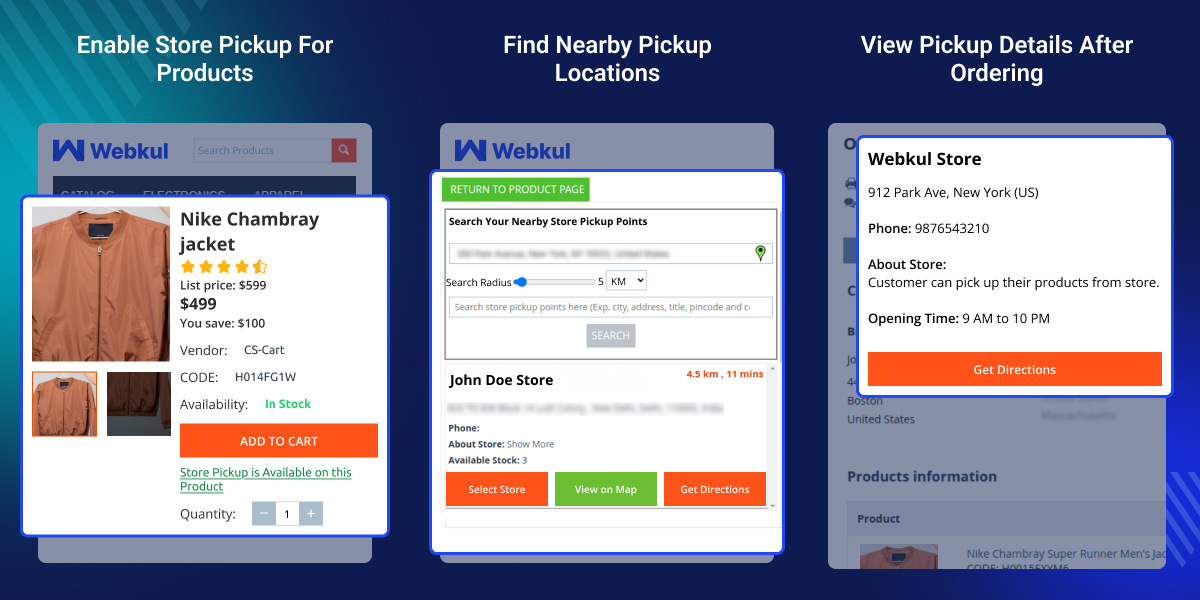
    CS-Cart Store Pickup Shipping adds a self pickup method to your store. Customers pick a local store at checkout instead of waiting for home delivery.

    Admin and sellers can both create pickup points and assign products to them. In a multivendor store, each seller runs their own pickup locations on their own.

    Customers search nearby pickup stores by radius on the storefront. Each result shows distance, travel time, and a Google Maps link to help them find the spot before ordering.

    Once the order is placed, directions, store address, and contact details show up on the customer's order page. Admin can switch the assigned store or mark items as picked up from the backend.

    For a full shipping setup, pair this addon with CS-Cart Custom Shipment Carriers Tracking to handle tracked delivery orders alongside pickups.
    CS-Cart Store Pickup Shipping

    Highlighted Features

     Multiple Pickup Point Management

    Admin and sellers can add as many pickup spots as needed and run them on their own from the backend.

     Multivendor Pickup Support

    Each seller in a multivendor store can set up and run their own pickup points without help from admin.

     Product Level Pickup Restrictions

    Mark certain products as pickup only. Customers won't see standard shipping for those items at checkout.

     Radius Based Store Search

    Customers set a radius on the storefront to find pickup spots near them.

     Location Based Stock Visibility

    Customers can check store stock before selecting a pickup location.

     Bulk Product Assignment via CSV

    Upload one CSV file to add many products to a pickup point at once.

     Google Maps Location Display

    Each pickup point links to Google Maps so customers can check the address before they order.

     Order Level Pickup Management

    Admin can switch the pickup store or update pickup status after the order goes through.

    Why do we need CS-Cart Store Pickup Shipping?

    CS-Cart Store Pickup Shipping closes a gap CS-Cart's default shipping setup leaves wide open. Native shipping options are built for delivery only, so tracking pickup points, per store stock, and nearby store search all become manual work.

    Without a real pickup option, customers have no way to choose where to collect their order at checkout. Store owners fall back on manual notes or separate shipping methods, which causes confusion and slows order processing.

    This addon adds a proper pickup workflow to the checkout. Admin and sellers add pickup points, assign products, and manage stock per store. Customers search nearby stores, check stock, and confirm a pickup spot before they order.

    Stores running both online and physical operations gain a more flexible setup, and pickup orders often bring added foot traffic and repeat visits. In a multivendor marketplace, each seller manages their own pickup points without extra admin overhead.

    Pair this with CS-Cart Extended Store Locator to help customers find stores near them before they start shopping.

    Use Cases

    CS-Cart Store Pickup Shipping fits any store where customers would rather collect than wait on a courier.

    • Electronics and Gadget Retailers

      Customers buying phones or accessories often want same day pickup. They grab the nearest branch at checkout and skip the shipping wait.

    • Grocery and Daily Essentials Stores

      Shoppers pick their local outlet and grab their order on the way home. No delivery slot, no missed orders.

    • Fashion and Apparel Brands with Multiple Outlets

      Customers order online and pick up at the outlet near their home or office. Stock per store helps them pick the right spot.

    • Multivendor Marketplaces with Physical Sellers

      Each vendor runs their own pickup points. Customers pick the most convenient spot per seller.

    • B2B Buyers Collecting Bulk Orders

      Business buyers often want direct pickup for bulk orders. Marking bulk items as pickup only keeps things simple on both ends.

    • Urgent or Last Minute Purchases

      When a customer needs something fast, pickup skips the shipping wait entirely. They order, pick a store nearby, and collect right away.

    Store Pickup Available

    Admin sets up a pickup point with store details, contact info, and exact map coordinates before it goes live for product assignment.
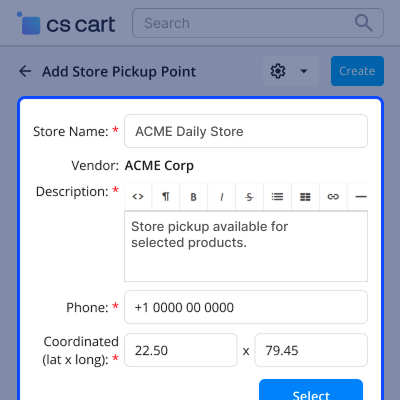
    • Use the map selector to pin precise store coordinates
    • Enter a phone number so customers can reach the store directly
    • Add address, pincode, and country for accurate location matching
    • Link the pickup point to a vendor in multivendor setups
    Store Pickup Available

     Configure Store Pickup Shipping

    Customers adjust a radius slider on the storefront to find pickup points near them, with results plotted live on a map.
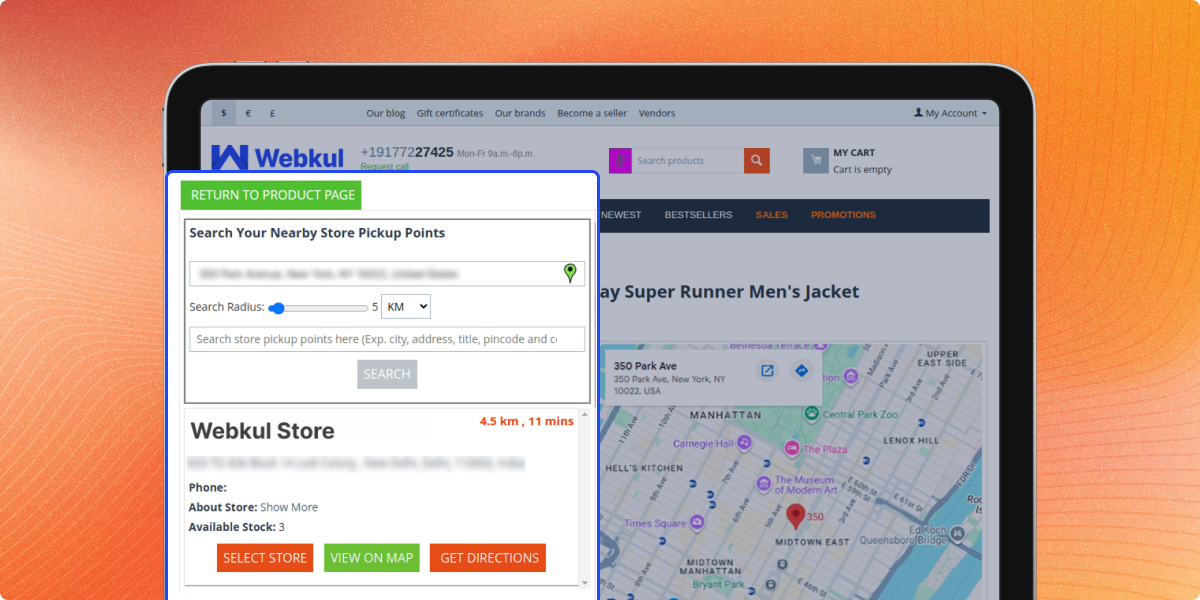
    • Drag the radius slider to widen or narrow the search area
    • See each result pinned on an interactive Google Map
    • Compare distance and travel time across nearby stores
    • Open directions straight from the store result card
    Configure Store Pickup Shipping

     Pickup Selection at Checkout

    Pickup selection sits right inside the standard checkout flow, next to shipping cost and any discount tied to the order.
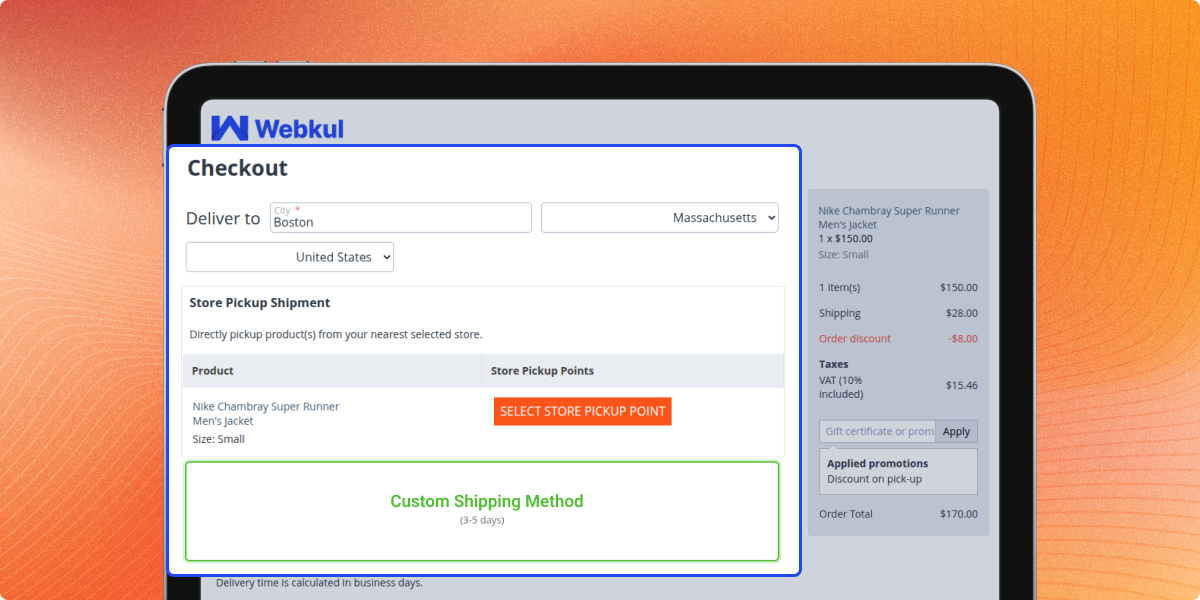
    • Pick a store without leaving the checkout page
    • See shipping cost update based on the pickup method chosen
    • Spot any pickup specific discount applied to the order total
    • Lock in the store before completing payment
    Pickup Selection at Checkout

    Customer End Options

    The Store Pickup Products view gives a store breakdown of which products are live, in stock, and ready for collection.
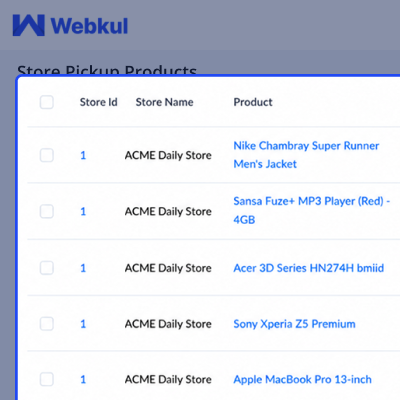
    • Scan stock counts per product without opening each listing
    • Spot inactive products that won't show at the pickup point
    • Cross check the same product across multiple stores at once
    • Catch low stock items before customers run into them at checkout
    Customer End Options

    Store Pickup Orders Tracking

    The addon adds a dedicated Store Pickup Orders view in the backend so admin can track pickup orders separately from standard delivery orders.
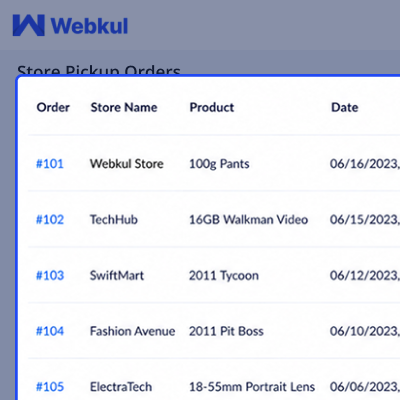
    • View all pickup orders separately from standard delivery orders
    • See store, product, customer, and quantity per order row
    • Update status per item: On Hold or Picked Up
    • Access the full order detail by clicking the order number
    Store Pickup Orders Tracking

    Store Pickup Shipping Method Settings

    The settings tab controls how the pickup search behaves across the storefront. Admin configures radius limits, map display, and stock visibility from one place.
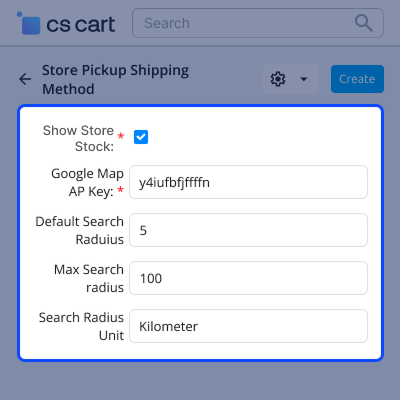
    • Set default search radius shown to customers at storefront
    • Set a maximum radius customers cannot exceed when searching
    • Choose radius unit: kilometers or miles
    • Add Google Maps API key to enable map display on pickup pages
    • Toggle store stock visibility on or off per store
    Store Pickup Shipping Method Settings

     CS-Cart Store Pickup Shipping- Support

    For any query or issue please create a support ticket here http://webkul.uvdesk.com

    You may also check our other top-quality CS-Cart Modules.

    Specifications

    Product Version1.2
    Released6 years ago
    Last UpdatedJune 30, 2026 (3 days ago)
    Supported VersionsCS-Cart  CS-Cart Multivendor  4.16.x  4.17.x  4.18.x  4.19.x  4.20.x  
    Write a review

    Frequently Asked Questions

     What does CS-Cart Store Pickup Shipping add to my store?
    A self pickup method that fits right into checkout. Customers pick a nearby store and collect their order there instead of waiting on delivery. Admin and sellers manage spots, assign products, and track pickup status from the backend.
     
     Can sellers in a multivendor store manage their own pickup points?
    Each seller manages their own pickup locations independently. No admin help needed per seller, which keeps multivendor setups clean.
     
     How does the radius search work on the storefront?
    Customers can search nearby pickup locations within a set radius and see nearby stores based on the range admin set up.
     
     Can products be restricted to pickup only?
    Admin can mark products as pickup only. This works well for local stock, bulky items, or anything that needs in store collection.
     
     Can the assigned pickup store be changed after an order is placed?
    Admin can switch the pickup spot from the order page. Items can also be marked picked up without changing the full order status.
     
     What does a customer see after placing a pickup order?
    The order page shows the store address, hours, contact number, and a directions link. No extra communication needed from the store.
     
     Does product variant assignment work for pickup points?
    Admin and sellers can tie pickup spots to specific product variants. Different variants can go to different pickup spots.
     
     Does this addon work with CS-Cart Multivendor?
    Supported on both CS-Cart and CS-Cart Multivendor. Each vendor manages their own pickup points and product assignments without needing shared admin access.

    Move to Cloud Today

    AWS Free tier hosting for one year by amazon web services, for more details please visit AWS Free Tier.

    GCP Free tier hosting for one year with 300 credit points by google cloud platform, for more details please visit GCP Free Tier.

    Azure free tier hosting for one year with 25+ always free services, for more details please visit Azure Free Tier.

    In our default configuration we will provide tremendous configuration for your eCommerce Website which is fast to load and response.

    Default Configuration Details of Server

    • 1 GB RAM
    • 1 Core Processor
    • 30 GB Hard Disk
    • DB with 1 GB RAM and 1 Core Processor

    * Server Configuration may vary as per application requirements.

    Want to know more how exactly we are going to power up your eCommerce Website with Cloud to fasten up your store. Please visit the Cloudkul Services.

    Get Started with Cloud
    • - Feature Add (+)
    • - Feature remove (-)
    • - Bug Fixed (!)
    • - Modification (*)
    Version 1.2
    • ! User is not able to change the store from checkout page.
    • ! User is not able to select the store from the checkout page.
    • ! The store listing is not showing, and the search bar is not working.
    • ! Guest user won't able to delete selected store.
    • ! Store pickup option available when store is in disable mode.v
    • ! Search field is not detecting the store location by country and state name.
    • ! Fixed issue where store pickup menus are not showing up on the vendor panel.
    Version 1.1
    • ! Git Issues Fixed.
    Version 1.0
    • + Added new feature for adding multiple products to any store through csv-file
    • *Language File updated * Updated flow related to user location and search filter.No need to add a pin code for user location.
    • !Git Issues Fixed.


