CS-Cart Stripe Connect Payment Gateway enables secure vendor payments and Stripe Connect features for multi-vendor marketplaces.
- Admin can easily configure and manage Stripe Connect.
- Admin can control Stripe Connect settings from the backend.
- Admin can manage the complete payment system.
- Customers can pay using Visa, Mastercard, American Express, and other supported cards.
- Customers can pay using Apple Pay, Google Pay, Microsoft Pay, and other supported payment methods.
- Customers can make payments in USD, EUR, GBP, INR, and other supported currencies.
- Admin can use Stripe in Test and Production modes.
- Vendors can connect their Stripe accounts with the admin's Stripe account.
- This add-on supports recurring payments with the required Recurring Payment add-on.
- This add-on supports Stripe Checkout for customer payments.
- Description
- Reviews
- FAQ
- Customers ()
- Specifications
- Cloud Hosting
- Changelog
CS-Cart Stripe Connect Custom is the add-on that allows you to integrate with Stripe Connect, a payment processing service that allows you to accept payments from customers and pay out to vendors or sellers on your platform.
As a result, the CS-Cart website can communicate with both standalone and custom Stripe accounts. CS-Cart platform should be linked to the Stripe custom account to receive customer payments. The admin will manage each interaction with his users.
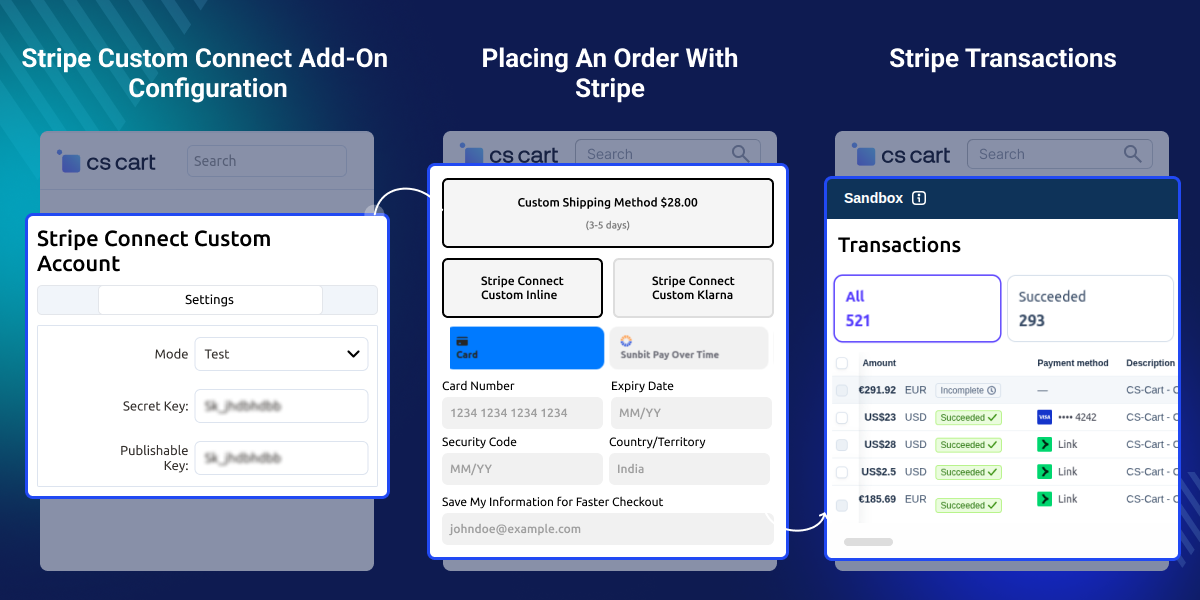
Highlighted Features
Vendor commission
The admin can set the commission for vendors.
Simple Refund
The admin can refund the amount in partial or full payment.
Linking your Stripe account
The seller can link their Stripe account to their online store.
Supported Card Types
Stripe payment support Visa, Mastercard, American Express, Discover, etc.
Why do we need a CS-Cart Stripe Connect custom account?
CS-Cart Stripe Connect Custom Account provides a secure, reliable, and easy-to-use platform for businesses and individuals to process payments and manage Stripe accounts.
With Stripe Connect Custom, you can create custom accounts for your sellers or vendors, and set up a split payment system where a percentage of each transaction is automatically transferred to their accounts.
Stripe Plugin Partner
Stripe is a simple and powerful way to accept payments online. Millions of businesses—ranging from startups to Fortune 500 companies—rely on Stripe’s software tools to accept payments securely and expand globally.
Webkul is proud to be associated with Stripe in developing customized payment gateway solutions for e-commerce stores, marketplaces, and mobile apps.
- Stripe is available to businesses in over 35 countries.
- Accept all major debit & credit cards, wallets, local payment methods.
- Supports processing payments in 135+ currencies
- Stripe meets the most stringent industry standards for security. Stripe is also audited by a PCI-certified auditor and is certified to PCI Service Provider Level 1.
Stripe Connect Custom Account Configuration
After installing the CS-Cart Stripe Custom Connects account, the admin can connect their store with a Stripe payment gateway in CS-Cart.
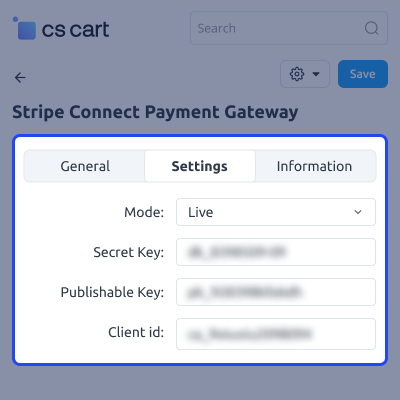
- The admin can set the mode to "live" or "test."
- The admin has to enter the Stripe API secret key and publishable key.
- The API key can get from the Stripe Connect Custom Account.
- The admin can add multiple payment methods.
Add Payment Method
Admin can add and configure the Stripe payment method from the CS-Cart backend.
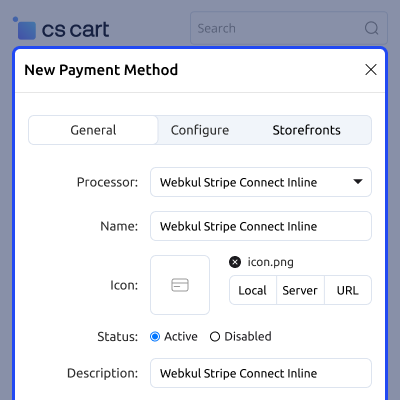
- Admin can add the Stripe Connect payment method.
- Admin can configure the Stripe payment settings.
- Admin can select Direct, Destination, or Separate Charge and Transfer.
- Admin can configure successful, pending, and failed payment statuses.

Customer Selects the Stripe Payment Method
Customers can select the Stripe payment method during checkout to proceed with the payment.
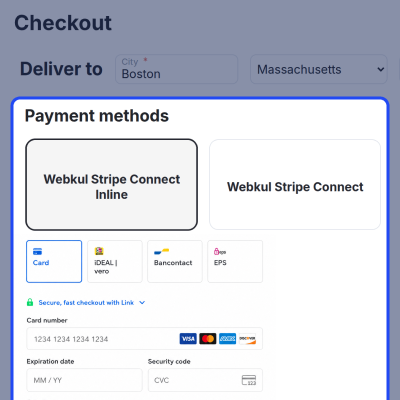
- Customers can select the Stripe payment method.
- Customers can enter the required payment details.
- Customers can complete the required payment verification.
- Customers can place the order after successful payment.

Stripe Transactions
Admin can view the payment transactions generated through the Stripe payment gateway on the Stripe dashboard.
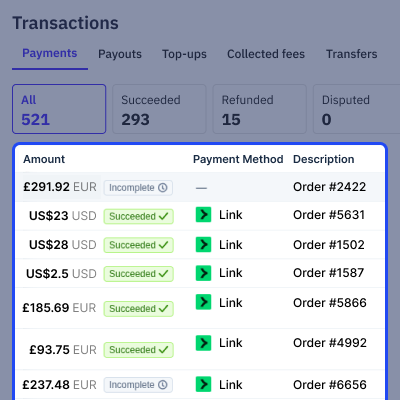
- Admin can view successful payment transactions.
- Admin can view payment and transfer details.
- Admin can view refund transactions.
- Admin can track Stripe transactions from the Stripe dashboard.

CS-Cart Stripe Connect Custom Account Support -
For any query or issue please create a support ticket here http://webkul.uvdesk.com
You may also check our other top-quality CS-Cart Extensions.
Specifications
Top addon
This addon is well implemented in the admin end. I had some questions about the addon and some The webkul team was very helpful, as always.
Frequently Asked Questions
Specification
Detailed technical features and requirements to help you understand the module’s capabilities and ensure smooth integration with your system.
Cloud Hosting
Detailed technical features and requirements to help you understand the module’s capabilities and ensure smooth integration with your system.
Move to Cloud Today
We’re partnered with top-tier, trusted providers!
Default Configuration Details of Server
RAM 1 Core
Processor 30 GB
Hard Disk
Database
Want to know more how exactly we are going to power up your eCommerce Website with Cloud to fasten up your store
* Server Configuration may vary as per application requirements.
Change Logs
- + Features
- - Bugs
- + Added the Klarna Payment Method.
- + Added license and encryption files for secure licensing.
- ! Fixed individual account verification individual email requirement.
- ! Fixed company account person verification file upload payload.
- ! Fixed duplicate PaymentIntent creation during AJAX checkout updates.
- + Added feature that vendor can retrieve their existing account by using account ID.
- + Added transfer feature in Js Payment Method.
- ! Transfer reversal was not working properly.
- -Changes in transfer days.
- -Fixed connect account issue.
- + Added Recurring payment.
- + Added disconnected transaction options.
- * Transfer days working
- * Proper refund working
- + Both Payments are 3dsecure
- + Total amount at Stripe Connect Balance
- + Reset button on the search
- * Git Issues Resolved
- * Compatible with Version 4.15.X
- * Made Compatible with Version 4.14.1.
- * Git Issues Resolved.
- * Compatible with version 4.13.x.
- * Stripe Js Checkout Updated.
- * Fixed git issues.
- * Compatible with version 4.12.x.
- * Fixed inline payment method


