Magento 2 Elasticsearch
Magento 2 Elasticsearch replaces slow default search with a fast and accurate engine that gives instant results, spell correction, and autocomplete for your store.
- Instant search results powered by the Elasticsearch engine.
- Auto-correct misspelled search terms automatically.
- Spell correction with adjustable sensitivity levels.
- Search suggestions for products, categories, and CMS pages.
- Synonym filter to map related terms to products.
- Multi-match and simple match query search modes.
- Layered navigation and filters driven by Elasticsearch.
- Bulk reindex data via command-line tools.
- Token and character filters to clean search input.
- Store-wise language stemmer for multi-language stores.
- Redesignable search box to match your store theme.
- Auto-fallback to the nearest matching keyword when no results are found.
- Dedicated out-of-stock product section on the search results page.
- Smart Search Mode for optimized queries and safe tokenization.
- Description
- Reviews
- FAQ
- Customers ()
- Specifications
- Cloud Hosting
- Changelog
Magento 2 Elasticsearch replaces slow default search with a fast, open-source analytics engine that returns results in milliseconds so customers find products without scrolling.
This module indexes products, categories, and CMS pages onto an Elasticsearch server so every search runs on this engine instead of the database, giving Magento 2 Open Source stores the same search speed as an Elasticsearch Magento 2 Community edition.
Customers get smarter results as they type, since suggestions appear instantly and misspellings are corrected, so a search for "bakpak" still returns backpacks.
When a query returns zero results the engine retries with the nearest keyword that has results, so a search for "bog" still shows bags instead of an empty page.
The search box design can be updated to match your theme, and out-of-stock products get their own section below in-stock results so browsing never ends early.
Smart Search Mode applies optimized query algorithms and safe tokenization automatically, while setting it to No lets you manually set multi-match type, operator, minimum match, and regex replacement.
Layered navigation and category filters also run on Elasticsearch so shoppers refine results quickly, and the engine handles all category-page search requests.
Reindexing is flexible, since you can update data on save, on schedule, or in bulk from the command line, so Magento2 Elasticsearch stores stay in sync after a large import.
Note: Elasticsearch Engine v7.6 must already be installed on the system of the store owner before installing the Magento 2 Elastics search extension. Also, it must be running.

Highlighted Features
Instant Search Results
Get millisecond responses from the Elasticsearch engine for every query.
Auto-Correct Suggestions
The engine fixes common misspellings before showing results.
Spell Correction
Admins set spell-checking levels to balance speed and accuracy.
Search Suggestions
Show related products, categories, and pages as customers type.
Synonym Filter
Map custom synonyms so related terms return the right products.
Query Modes
Choose multi-match or simple match search based on your needs.
Layered Navigation
Faster category filters powered by Elasticsearch instead of MySQL.
Bulk Reindexing
Reindex large catalogs quickly with command-line tools.
Out-of-Stock Section
Show sold-out products in a separate section on the search page.
Smart Search Mode
Optimized query algorithms and safe tokenization in one toggle.
Why do we need Magento 2 Elasticsearch Extension?
Magento 2 Elasticsearch matters because search is one of the most used features on any store, and shoppers expect it to work well when slow results and weak suggestions lose them mid-purchase.
Default Magento search relies on MySQL full-text queries that slow down on large catalogs, return vague matches, and ignore misspellings and synonyms, so the bigger the catalog grows the more shoppers leave without finding what they came for.
Elasticsearch fixes this since it is an open-source engine that scales as your data grows, and indexing products, categories, and CMS pages on it returns focused results in milliseconds.
Magento 2 Enterprise Elasticsearch only ships with Adobe Commerce, so this Magento 2 search extension is how Magento Open Source stores get the same search quality without paying for a separate engine.
This Magento Elasticsearch extension also covers the cases basic setups skip, like out-of-stock grouping and language-specific stemming, which a basic Magento 2 Elasticsuite setup does not handle, so you are not stuck with slow, vague results.
Also, Magento 2 AI Image Search extension allows your customers to search for the products within your store using AI image pattern search.
Use Cases
Large Catalog Search
Stores with thousands of SKUs need search that stays fast, and Elasticsearch keeps response times low even as the catalog grows.
Misspelled Product Queries
Shoppers often type wrong, so auto-correct returns the right products instead of an empty page and keeps them engaged.
Multi-Language Stores
Different regions search in different languages, where store-wise language stemmers handle each language correctly.
Refined Category Browsing
Category pages with layered navigation run on Elasticsearch so filters apply instantly without loading the whole catalog.
Bulk Data Updates
After importing or updating products in bulk, you can reindex everything quickly via command-line tools instead of waiting for scheduled updates.
Out-of-Stock Discovery
Sold-out products appear in their own section, so customers still find relevant items and can be notified when stock returns.
Integrate Elasticsearch to an Online Store
Run Elasticsearch 7.6 or above, install module, then pick it as the search engine under Stores > Configuration > Catalog > Catalog Search, where Search Settings handles smart search mode, spell correction, out-of-stock display, and language stemmers.
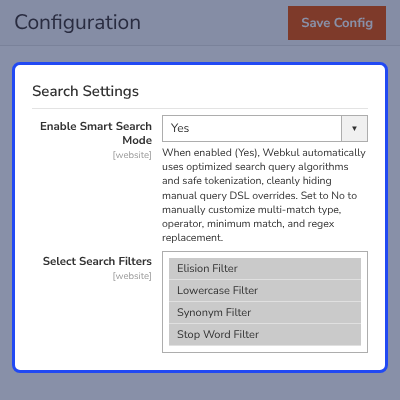
- Smart Search Mode for automatic optimized queries and safe tokenization
- Manual multi-match type, operator, minimum match, and regex replacement
- Spell correction with adjustable fuzziness levels
- Optional separate section for out-of-stock products
- Store-wise language stemmer for multi-language stores
- Token and character filters to clean the search query

Modifying Indexes with the Magento 2 Elasticsearch Extension
After adding products, the data must be indexed on the Elasticsearch server, so choose from pages, categories, and products, set the mode to Update on Save or Update on Schedule, and reindex from the Actions dropdown.
- Index types for pages, categories, and products
- Update on Save or Update on Schedule modes
- Reindex from the Actions dropdown
- Command-line bulk reindex
- Best after imports, migrations, or catalog changes

Search Suggestion
Related searches appear as soon as the customer types, so typing "fit" surfaces fitness watches, accessories, and equipment with image, price, and popular items, and a partial query becomes a guided path to the product.

- Related searches while the customer types
- Product suggestions with image and price
- Popular items listed in the search box
- Works with products, categories, and CMS pages
- Guided search instead of empty results

Auto Correct Search Results
Spell checking at level 1 or 2 lets fuzziness fix wrong spellings, so a search for "bakpak" shows backpacks, and if a query still returns nothing the engine reruns it with the nearest keyword that has results.
- Two adjustable spell-checking levels
- Fuzziness-based correction of misspelled terms
- Auto-fallback to the nearest keyword with results
- Works across products, categories, and pages
- Customers find products despite wrong spelling

Search Filters in Magento 2 Elasticsearch Extension
Choose from Elision, Lowercase, Synonym, and Stop Word token filters, add comma separated elision articles if needed, and use HTML Strip, Mapping, or Pattern Replace character filters with comma separated mappings such as ٠ => 0, ١ => 1.
- Elision, Lowercase, Synonym, and Stop Word filters
- Comma separated elision articles list
- Stop word filter with its own toggle and custom list
- HTML strip, mapping, and pattern replace filters
- 28 language stemmers with store-wise selection
- Words excluded from stemming via a custom list

Filter(s)/Layered Navigation Support
This extension supports advanced layered navigation where the Elasticsearch engine handles all search requests from category pages, so shoppers filter using sliders, options, and checkboxes and results apply faster.
- Faster category filter application
- Sliders, options, and checkboxes supported
- Works on category-specific pages
- Engine handles category page search requests
- One-click switch from MySQL to Elasticsearch

Out-of-Stock Product Section
Enable "Show Out-of-Stock Products Separately" in Search Settings so out-of-stock products appear in a dedicated section below the in-stock results, and customers still see items that may return in stock.
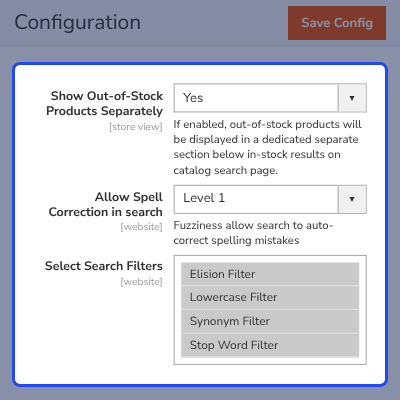
- Admin toggle in Search Settings
- Separate section below in-stock results
- Relevant sold-out products stay visible
- Works with layered navigation and filters
- Supports multi-store views

Support
For any query or issue please create a support ticket here http://webkul.uvdesk.com/ .
You may also check our quality Magento 2 Extensions .
Specifications
Excellent Product & Support
Excellent extensions and customer support.
Instant Support
I was facing issue regarding attribute and visiblity search. I raised ticket and got instant support.
Happy with support and special thanks to Alpana.
Frequently Asked Questions
Specification
Detailed technical features and requirements to help you understand the module’s capabilities and ensure smooth integration with your system.
Cloud Hosting
Detailed technical features and requirements to help you understand the module’s capabilities and ensure smooth integration with your system.
Move to Cloud Today
We’re partnered with top-tier, trusted providers!
Default Configuration Details of Server
RAM 1 Core
Processor 30 GB
Hard Disk
Database
Want to know more how exactly we are going to power up your eCommerce Website with Cloud to fasten up your store
* Server Configuration may vary as per application requirements.
Change Logs
- + Features
- - Bugs
- + Multilingual support added.
- + Spanish language stemmer added.
- + Compatible with Magento 2.4.7^ and PHP 8.3
- + Made compatible with Magento 2.4.6
- + Made compatible with Magento 2.4.4
- + Added webkul logo at config tab and added support services links
- + Multilingual support added.
- + Spanish language stemmer added.
- + Compatible with Magento 2.4.7^ and PHP 8.3
- + Made compatible with Magento 2.4.6
- + Made compatible with Magento 2.4.4
- + Added webkul logo at config tab and added support services links
- - fixed the issue of showing the whole document list on search pages
- - updated Ngram filter name according to the latest elastic Version
- + Added pagination in elastic search query
- - fixed product data update issue on the elastic index
- - fixed disable product shown in search suggestion
- + made compatible with Magento 2.4.*
- + supports elastic version 7.6.*
- - fixed the issue of showing the whole document list on search pages
- - updated Ngram filter name according to the latest elastic Version
- + Added pagination in elastic search query
- - Fixed product data update issue on elastic index.
- - Fixed disable product show in search suggestion.
- + made compatible with Magento 2.4.*
- + supports elastic version 7.6.*
- + Made compatible with Magento 2.3.5
- + Compatible with elastic 7.6.*
- - Removed cron management tab from config
- + made compatible with Magento 2.3.2
- + Made compatible with Magento 2.3.x
- + Made compatible with Magento 2.2.7
- + Works with the latest elastic search version 6.0.
- + Admin can easily replace the MySQL search engine with an elastic search engine.
- + Admin can easily update products, categories, and cms pages data to the elastic server.
- + Admin can set cron to update products, categories, and cms pages data on the elastic server.
- + Admin can also use the command-line tool to update website data to the elastic server.
- + After indexing data to elastic admin can easily update data on the elastic server too whenever he updates products, categories, or pages.
- + Admin can select which search filter to use on search input from the configuration.
- + Admin can select character filters to replace or remove unwanted terms from the search input.
- + Admin can configure the multi-match query to search on the storefront.
- + Admin select between searchable attributes to use for multi-match queries.
- + Admin can select a simple match query that will only work for name and SKU fields.
- + Works well will multi-store websites or multi-website.
- + Admin can choose store wise language stemmer to work with multi-languages.
- + Search suggestion will show results for category and pages as well.
- + Category, search and advanced search and layered navigation will be driven by data from the elastic server.
- + All the searchable and filterable attributes will be automatically indexed to elastic served.
- + Did you mean feature added
- + Index prefix added


