USD
  • EUR
  • INR
  • USD
Cart
Cart 0
  • You have no items in your shopping cart.
    Odoo Apps Extensions
    Cart
    Cart 0
    • You have no items in your shopping cart.
    Hire a Developer
    ×
    Contact Us!
    Send Again
    Close
    Please Login to Write Your Review
    Odoo Employee Pickup & Drop Management

    Odoo Employee Pickup & Drop Management

    x
    Free

    * Required Fields

    $99.00
    Add To Cart

    Odoo Employee Transport Management manages employee pickup and drop. Book cabs manually, periodically, or automatically on attendance check-in.


    • Manage employee pickup and drop services from the Odoo backend.

    • Book a cab automatically each day when the employee checks in.

    • Let employees set up periodical booking based on their own preferences.

    • Allow the cab manager to create routes, locations, and cab shifts.

    • Set a margin on cab shifts so employees must book the cab in advance.

    • Manage cab vendors, cab types, cab models, and cab drivers in one place.

    • Create trips and assign the vendor, cab, and seating capacity per trip.

    • Keep a defaulter list of employees who cancel an approved cab booking.

    • Show trip routes on Google Maps with the Route Locator button.

    • Send email alerts to employees whose latitude and longitude are missing.

    • Pause automatic cab booking on Saturday and Sunday.

    • View every past and current cab booking record in Booking History.

    Odoo Employee Pickup & Drop Management
    Odoo Employee Pickup & Drop Management
    $99.00
    Check How It Works

    Need Help Deciding?

    Support answers within one business day.

    Open a ticket
    $99.00
    Configure and Buy
    X
    • Description
    • Reviews
    • FAQ
    • Customers ()
    • Specifications
    • Cloud Hosting
    • Changelog

    Odoo Employee Transport Management is an Odoo module that plans cab pickup and drop for employees. It books cabs and tracks trips for staff transport.

    Employees book a cab from the Book your cab form or save a periodical booking. Odoo then books the cab each day once attendance is marked.

    Every booking is saved in Booking History. When an employee cancels an approved booking, Odoo adds that employee to the defaulter list.

    The cab manager sets routes, locations, cab shifts, vendors, cab types, cab models, and drivers. A shift margin forces booking ahead of time.

    The module uses the Odoo Attendance app for automatic booking. Map features need a Google Maps API key saved in System Parameters.

    Additionally, if you want to record where employees check in, then check Odoo Employee Attendance Geolocation.
    Odoo Employee Transport Management

    Highlighted Features of Odoo Employee Transport Management

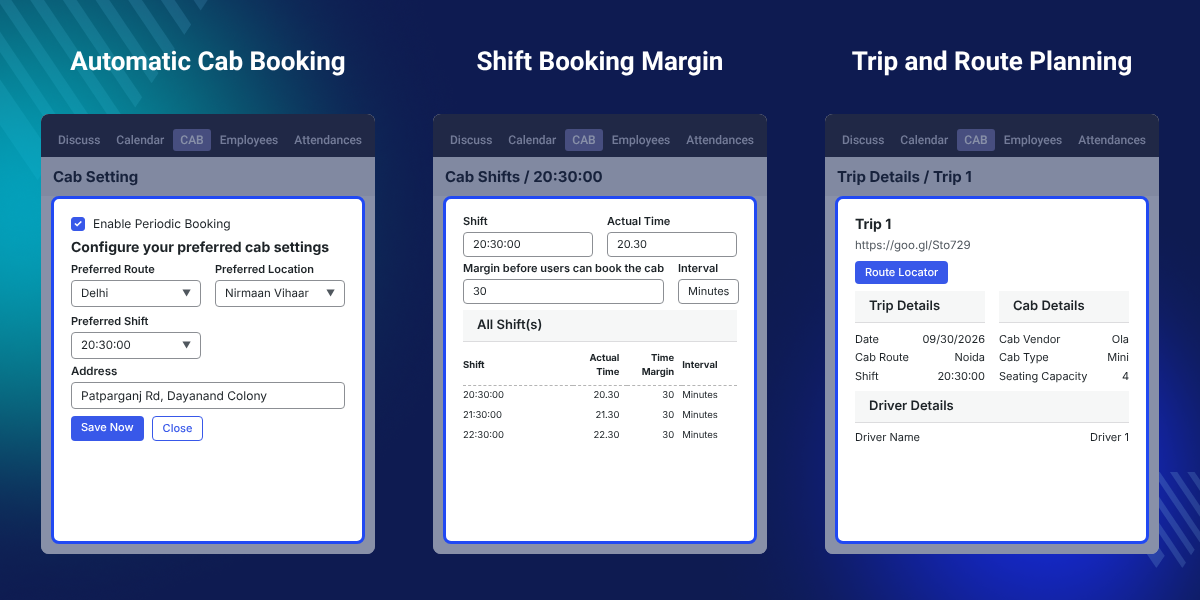
     Automatic Cab Booking

    Odoo books the cab for the current date as soon as the employee check-in is marked in Attendance.

     Periodical Booking

    Employees save their pickup and drop preferences once, and Odoo uses them to book cabs on working days.

     Shift Booking Margin

    The cab manager adds a margin to each cab shift, so employees have to book before the shift starts.

     Trip and Seat Planning

    Create trips on a route and assign the cab vendor, the cab, and the seating capacity for each trip.

     Route Locator on Maps

    The Route Locator button on Trip Details builds a Google Maps link that shows the cab route direction.

     Defaulter Tracking

    Employees who cancel an approved booking move to a defaulter list that the cab manager can review.

    Why Do We Need Odoo Employee Transport Management?

    Odoo has no built-in way to book cabs for staff. Companies that offer employee pickup and drop often plan it in sheets, calls, and chat groups.

    Manual planning breaks when shifts change. Cabs leave half empty, late requests pile up, and nobody tracks who cancels at the last minute.

    Odoo Employee Transport Management moves staff transportation into Odoo. Bookings, routes, shifts, vendors, and trips sit in one Cab menu.

    In daily use, the check-in link matters most. With a periodical booking saved, the cab is booked once Attendance marks the check-in.

    Also, if your employees mark attendance from their phones, you can check our app Odoo Attendance Mobile App.

    Odoo Employee Transport Management Use Cases

    • Shift-Based Offices and BPOs

      Teams on early or late shifts get a cab per cab shift, and the margin stops last-minute requests.

      Offices that record check-in on biometric devices can also use Odoo ZKTeco Biometric Attendance Integration.

    • Companies Using Cab Vendors

      Admins record each cab vendor with its cab types, models, and drivers, and assign vendors per trip.

      To track company-owned vehicles live, see Odoo Fleet Traccar Tracking.

    Configure Routes and Pickup Locations

    Routes and locations define where the cab goes. The cab manager creates them from the Configuration menu before any booking starts.
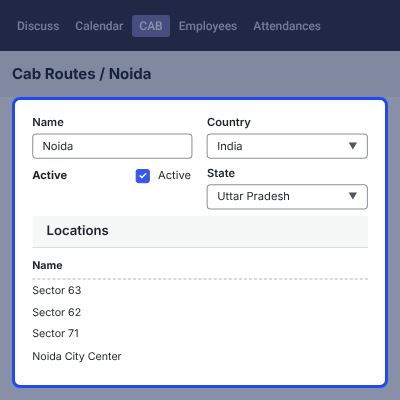
    • Create routes from Configuration > Routes > Create.
    • Add pickup and drop points from Configuration > Locations > Create.
    • Turn on geolocation from the Odoo Settings app.
    • Save the Google_map_api_key in System Parameters to use map features.
    • Email employees whose latitude and longitude are missing.
    Configure Routes and Pickup Locations

    Cab Shifts with Advance Booking Margin

    Cab shifts set the time slots for employee pickup and drop. Each cab shift carries a margin that decides how early a booking must be made.
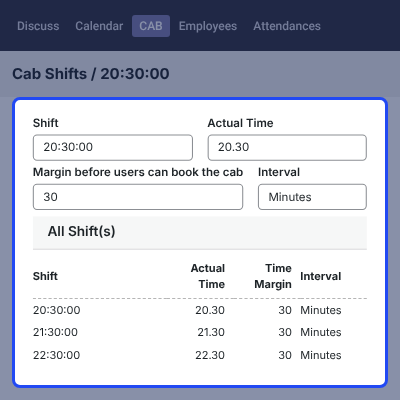
    • Create cab shifts from Configuration > Cab Shifts > Create.
    • Set up a cab shift for each pickup and drop time slot.
    • Set a margin so employees book the cab in advance.
    • Keep cab shift setup with the cab manager, along with routes and locations.
    Cab Shifts with Advance Booking Margin

    Manage Cab Vendors, Types, Models, and Drivers

    Cab vendor records hold the transport partners that supply cabs. Cab type, cab model, and cab driver records describe the fleet each vendor provides.
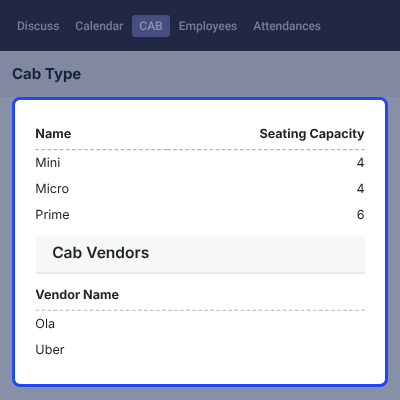
    • Add transport partners from Configuration > Cab Vendors > Create.
    • Define cab categories from Configuration > Cab Type > Create.
    • Record vehicle models from Configuration > Cab Models > Create.
    • Register drivers from Configuration > Cab Driver > Create.
    Manage Cab Vendors, Types, Models, and Drivers

    Book a Cab for Employee Pickup and Drop

    Employee cab booking starts from the Cab menu. The employee fills the booking form, and Odoo confirms the request with a success message.
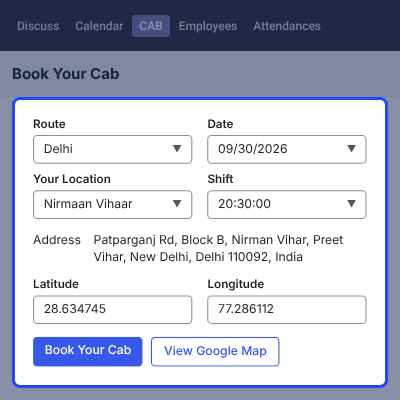
    • Open the form from Cab > Book your cab.
    • Fill in all the booking details on the form.
    • See a success notification once the booking is saved.
    • Make the booking in advance, as the cab shift margin requires.
    Book a Cab for Employee Pickup and Drop

    Periodical and Automatic Cab Booking on Check-In

    Periodical booking stores an employee's travel preferences. Automatic cab booking then uses them to book a cab each day when the employee checks in.

    Employee attendance is mandatory for booking the cab automatically. Automatic cab booking does not run on Saturday and Sunday.
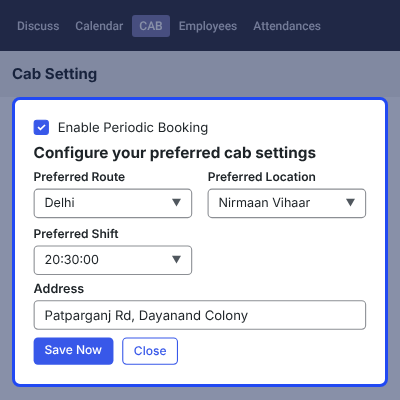
    • Open Cab Management > Periodical Booking.
    • Click the Click here tab to open the booking form.
    • Fill the periodical booking details in the popup window.
    • Trigger bookings on check-in or check-out as per the preferences.
    • Verify employee attendance in the Odoo Attendance app.
    Periodical and Automatic Cab Booking on Check-In

    Cancel Bookings and Track the Defaulter List

    Employees cancel a booked cab with one click. When the cancelled booking was already approved, Odoo adds the employee to the defaulter list.
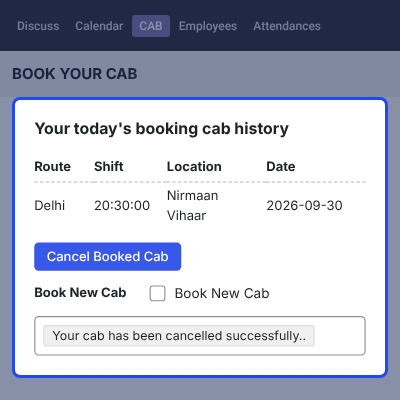
    • Cancel a booking with the Cancel Booked Cab option.
    • Cancel in a single click, with no extra form.
    • Track employees who cancel approved bookings.
    • Keep the defaulter list inside Odoo with the booking records.
    Cancel Bookings and Track the Defaulter List

    Employee Cab Booking History

    Booking History lists every cab booking made in Odoo. The cab manager uses it to check past and current employee transport records.
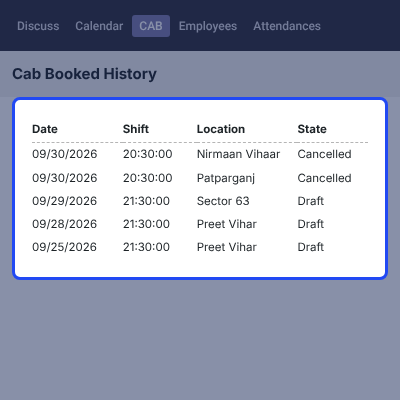
    • Open Booking History under the Cab Management menu.
    • See all employee cab booking records in one list.
    • Review bookings without leaving the Cab Management menu.
    • Keep a record of employee transport for the cab manager.
    Employee Cab Booking History

    Trip Details with Route Locator on Google Maps

    Trip Details holds each planned cab trip. The Route Locator button turns the trip into a Google Maps link that shows the route direction.
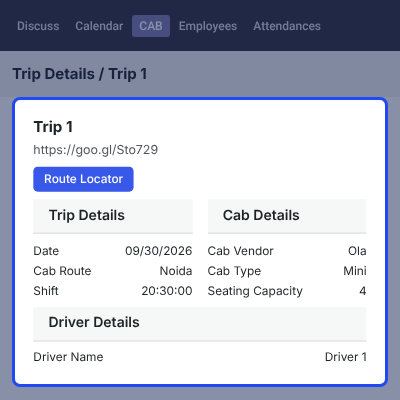
    • Open Cab > Cab Management > Trip Details.
    • Fill in the relevant trip detail fields.
    • Assign the vendor, the cab, and the seating capacity per trip.
    • Click Route Locator to create the Google Maps URL.
    • View the cab route direction on Google Maps.
    Trip Details with Route Locator on Google Maps

    Complete Odoo Employee Transport Management Feature List

    Cab Booking

    • Let employees book a cab from the Cab > Book your cab form
    • Save periodical booking preferences from Cab Management > Periodical Booking
    • Book the cab automatically for the current date once check-in is marked
    • Require employee attendance for automatic cab booking
    • Skip automatic cab booking on Saturday and Sunday
    • Show a success notification after each booking

    Transport Setup

    • Create routes and pickup or drop locations from the Configuration menu
    • Create cab shifts for each working time slot
    • Set a margin on cab shifts to enforce advance booking
    • Enable geolocation from the Odoo Settings app
    • Give the cab manager control over routes, locations, and shifts

    Vendors, Cabs, and Trips

    • Manage cab vendors, cab types, cab models, and cab drivers
    • Create trips from Cab > Cab Management > Trip Details
    • Assign the vendor, the cab, and the seating capacity for each trip
    • Manage trip routes for employee pickup and drop

    Maps, Alerts, and Records

    • Connect Google Maps with the Google_map_api_key in System Parameters
    • Generate a Google Maps URL with the Route Locator button
    • Show the route direction of each cab on Google Maps
    • Email employees whose latitude and longitude are missing
    • Keep a defaulter list of employees who cancel approved bookings
    • View all cab booking records in Booking History

    Odoo Employee Pickup & Drop Management Support -

    For any query or issue please create a support ticket here http://webkul.uvdesk.com

    You may also check our other top-quality Odoo Apps.

    Specifications

    Product Version1.0.1
    Released8 years ago
    CategoryOdoo Apps, Tool, 
    Last UpdatedOctober 1, 2026 (15 days ago)
    Supported Versions8.x  9.x  10.x  11.x  12.x  13.x  14.x  15.x  16.x  17.x  18.x  19.x  20.x  

    Ratings

    We'd love to hear your thoughts! Share your feedback and help us craft an even better experience tailored just for you.

    Write a review

    Specification

    Detailed technical features and requirements to help you understand the module’s capabilities and ensure smooth integration with your system.

    Cloud Hosting

    Detailed technical features and requirements to help you understand the module’s capabilities and ensure smooth integration with your system.

    Default Configuration Details of Server

    1 GB
    RAM
    1 Core
    Processor
    30 GB
    Hard Disk
    1 GB RAM & 1 Core Processor
    Database

    Want to know more how exactly we are going to power up your eCommerce Website with Cloud to fasten up your store

    * Server Configuration may vary as per application requirements.

    Change Logs

    Not Available


