USD
  • INR
  • USD
Cart
Cart 0
  • You have no items in your shopping cart.
    Cart
    Cart 0
    • You have no items in your shopping cart.
    Hire a Developer
    ×
    Contact Us!
    Send Again
    Close
    Please Login to Write Your Review

    Odoo Marketplace Stripe Connect

    Odoo Marketplace Stripe Connect automatically and safely splits payments between admin and sellers, making transactions faster and smoother for the whole marketplace.


    • Direct Stripe payments on-site no redirection.

    • Auto-splits payments between admin and sellers.

    • Sellers link Stripe accounts for direct payouts.

    • Supports full & partial refunds via the backend.

    • Customers can save and manage card details.

    • PCI compliant with 3D Secure for safe payments.

    • Admin controls all payment settings from the backend.


    Screenshots
    Odoo Marketplace Stripe Connect Odoo Marketplace Stripe Connect Odoo Marketplace Stripe Connect Odoo Marketplace Stripe Connect Odoo Marketplace Stripe Connect Odoo Marketplace Stripe Connect Odoo Marketplace Stripe Connect Odoo Marketplace Stripe Connect Odoo Marketplace Stripe Connect Odoo Marketplace Stripe Connect
    Show More Hide All
    $125.00

    * Required Fields

    Add To Cart
    $125.00
    Configure and Buy
    • Description
    • Reviews
    • FAQ
    • Customers ()
    • Specifications
    • Cloud Hosting
    • Changelog

    Odoo Marketplace Stripe Connect helps manage payments easily in a marketplace with many sellers using Odoo. It connects Stripe with Odoo platform, so both sellers and admins can handle payments right inside Odoo. This saves time and reduces manual work, making the payment process faster and easier.

    It also lets customers pay safely on the website using Stripe without leaving the checkout page. The module automatically splits the payment between the seller and admin based on the set commission rules, so there’s no need to do it by hand. Sellers can connect their Stripe accounts and get paid directly. Admins can also give full or partial refunds from Odoo backend with just a few clicks.

    Odoo Marketplace Stripe Connect makes refunds easy, so admins can quickly handle full or partial refunds from the backend.
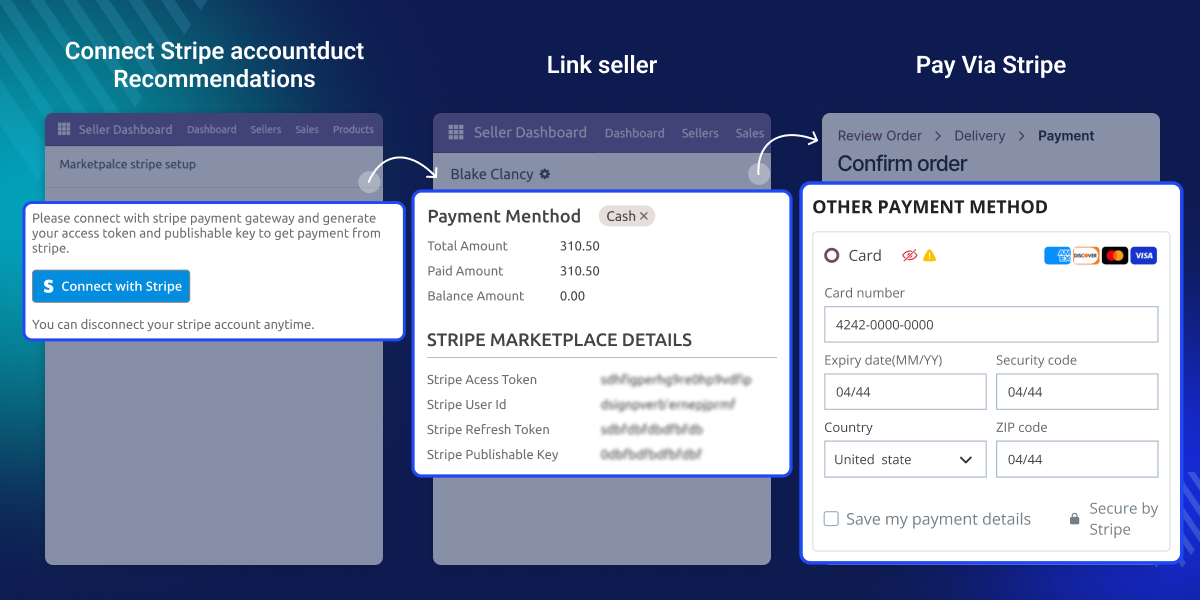
    Odoo Marketplace Stripe Connect

    Why do we need Odoo Marketplace Stripe Connect?

    Module helps marketplace owners make payments smooth, automatic, and safe in Odoo. By adding Stripe, it connects buyers, sellers, and the platform, making it easy for everyone to send and receive money.

    Buyers can pay right on the website without going to another page. This makes checkout quicker, builds trust, and lowers the chances of cart abandonment.

    For admins, there's no need to handle payments manually the module automatically splits the money between the seller and admin based on the set commission.

    Highlighted feature of Odoo Marketplace Stripe Connect

    Direct Stripe Payment Integration

    Customers can pay directly on your Odoo marketplace without being sent to other websites.

    Automatic Payment Splitting

    This module automatically splits payments between the admin and sellers based on set commission rules.

    Seller Stripe Account Connectivity

    Sellers can easily link their Stripe accounts for fast and secure payouts.

    Full & Partial Refund Support

    Admins and sellers can handle full or partial refunds directly from Odoo backend.

    Saved Card Feature for Customers

    Customers can save their card details for faster checkout on future orders.

    PCI Compliance & 3D Secure Support

    Transactions meet security standards and support 3D Secure for extra payment protection.

    Complete Admin Control

    Admins can manage Stripe payments easily from the backend, including enabling or disabling them.

    Smooth & Transparent Transaction Flow

    This module shows clear payment details and splits, so buyers and sellers always know what's happening.

    Seamless Payment Experience

    Odoo Marketplace Stripe Connect makes payments simple and safe. It works with Stripe to help payments on the Odoo marketplace happen easily and without problems. It helps sellers get paid on time.
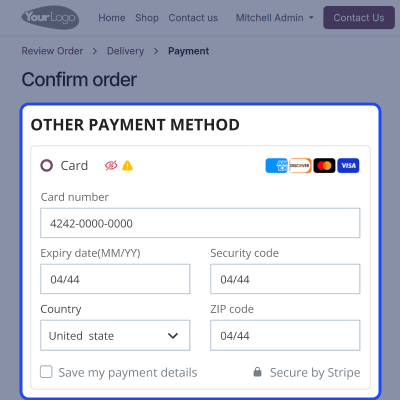
    • Supports fixed and percentage commissions.
    • Payments are split instantly as set.
    • Sellers get paid without admin delays.
    • Ensures correct and error-free payment distribution.
    Seamless Payment Experience

    Automated Payment Distribution

    Once an order is placed, it automatically splits payment between the seller and admin based on set rules, removing the need for manual work. This ensures fast, accurate, and fair payment distribution.
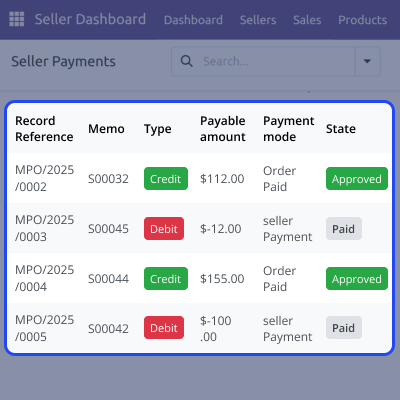
    • Supports fixed and percentage-based commissions.
    • Instant payout split based on settings.
    • Sellers get paid quickly without delays from admin.
    • Ensures accurate and mistake-free payment distribution.
    Automated Payment Distribution

    Seller-Friendly Payout Setup

    Sellers can connect their own Stripe accounts for direct payments, making payouts faster, clearer, and fully automatic. This helps sellers manage their earnings easily and get paid without delays.
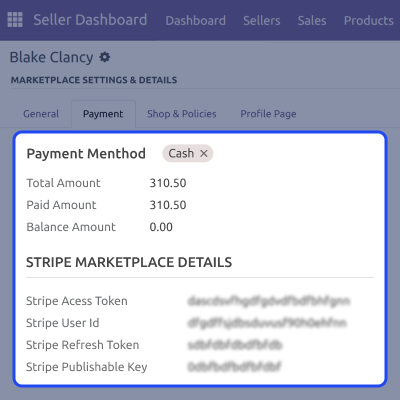
    • Easy setup for sellers to link Stripe accounts.
    • Direct payments to sellers after a purchase.
    • Reduces the need for admin involvement in payments.
    • Increases trust and transparency between sellers and the platform.
    Seller-Friendly Payout Setup

    Secure & Reliable Transactions

    Odoo Marketplace Stripe Connect ensures every transaction follows global security standards, keeping both customer and seller data safe during the entire payment process. This builds trust and protects sensitive information.
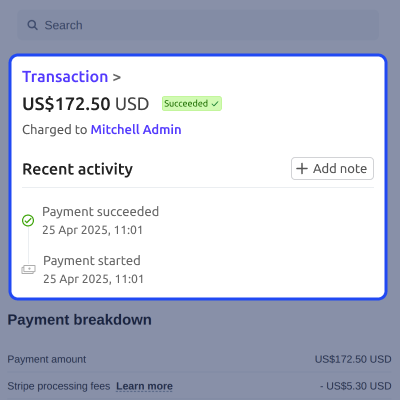
    • PCI-DSS compliant for card security.
    • Supports 3D Secure for added buyer protection.
    • Encrypted payment handling via Stripe.
    • Significantly reduces fraud and chargeback risks.
    Secure & Reliable Transactions

    Support

    For any query or issue, please create a support ticket here CREATE A TICKET HERE

    You may also check our other top-quality Odoo Modules.

    Specifications

    Product Version1.1.0
    Released8 years ago
    Last UpdatedDecember 26, 2025 (19 days ago)
    Supported VersionsOdoo  10.x  11.x  12.x  13.x  14.x  15.x  16.x  17.x  18.x  
    Write a review

    Frequently Asked Questions

     Can sellers receive payments directly to their own Stripe accounts?
    Yes, sellers can connect their Stripe accounts through Stripe Connect, allowing them to receive payments automatically once an order is complete.
     Will the payment be split automatically between the admin and the seller?
    Yes, Odoo Marketplace Stripe Connect automatically splits the payment based on the commission rules set by the admin, so there’s no need for manual work.
      Is it safe to store customer card details on the platform?
    Yes, it is PCI compliant and uses Stripe’s secure system to protect card details, so they are never stored on your server.
      Can Odoo Marketplace Stripe Connect handle refunds if an order is canceled?
    Yes, if an order is canceled, the admin or seller can give back some or all of the money directly from Odoo, depending on the situation.
      Do customers need to leave the site during any payment process?
    No, customers can pay directly on the website, making the checkout process quick and easy.

    Move to Cloud Today

    AWS Free tier hosting for one year by amazon web services, for more details please visit AWS Free Tier.

    GCP Free tier hosting for one year with 300 credit points by google cloud platform, for more details please visit GCP Free Tier.

    Azure free tier hosting for one year with 25+ always free services, for more details please visit Azure Free Tier.

    In our default configuration we will provide tremendous configuration for your eCommerce Website which is fast to load and response.

    Default Configuration Details of Server

    • 1 GB RAM
    • 1 Core Processor
    • 30 GB Hard Disk
    • DB with 1 GB RAM and 1 Core Processor

    * Server Configuration may vary as per application requirements.

    Want to know more how exactly we are going to power up your eCommerce Website with Cloud to fasten up your store. Please visit the Cloudkul Services.

    Get Started with Cloud
    Not Available


