USD
  • EUR
  • INR
  • USD
Cart
Cart 0
  • You have no items in your shopping cart.
    Odoo Apps Extensions
    Cart
    Cart 0
    • You have no items in your shopping cart.
    Hire a Developer
    ×
    Contact Us!
    Send Again
    Close
    Please Login to Write Your Review
    Odoo POS Auto Invoice Reconcile
    Odoo POS Auto Invoice Reconcile
    x
    Free

    * Required Fields

    $69.00
    Add To Cart

    Odoo POS Auto Invoice Reconcile : This module reconciles the invoices generated via POS automatically as and when they are created. It saves the seller from an extra effort of registering the payments manually to mark the invoices as paid.
    In Point Of Sale, when the order is created, the customer pays for an order completely. The corresponding invoice, however, is created in the Open state and not in the Paid state. Later the seller has to mark the invoices as paid manually. This module automates the process and marks such invoices as paid automatically.

    Odoo POS Auto Invoice Reconcile
    Odoo POS Auto Invoice Reconcile
    $69.00
    Odoo Silver Partner
    Odoo Functional Certified Experts
    Check How It Works
    $69.00
    Configure and Buy
    X
    • Description
    • Reviews
    • FAQ
    • Customers ()
    • Specifications
    • Cloud Hosting
    • Changelog

    Odoo POS Auto Invoice Reconcile - As customers pay for their orders in POS, these orders are present in open state and need to be marked as paid. So, it's important to reconcile all these invoices that are paid but present in an open state.

    However, reconciling invoices manually is a tough and time taking task. The Odoo POS Auto Invoice Reconcile makes your task easy and reconciles all the invoices automatically.

    It mainly saves your extra efforts made in registering the payments manually. Instead of doing one by one, it marks all the paid invoices as ‘paid’ automatically. Thus, saving your time and efforts both.
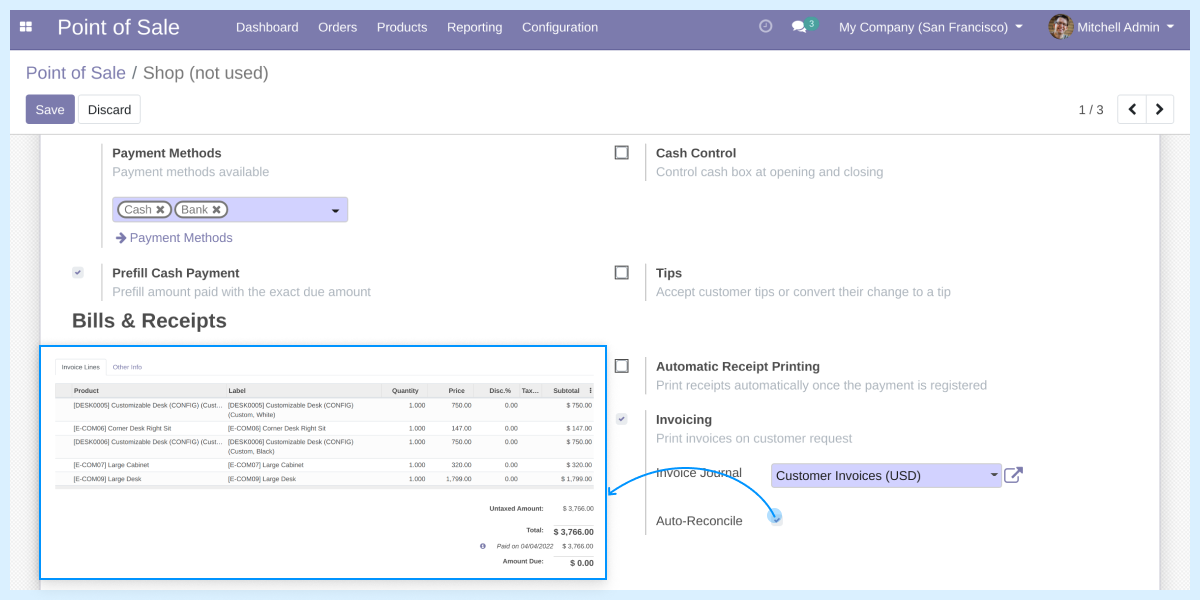
    Odoo POS Auto Invoice Reconcile

     Odoo POS Auto Invoice Reconcile Features

    Now, automatically reconcile the invoices in POS

    • The Odoo POS Auto Invoice Reconcile enables POS users to reconcile all the open invoices automatically.
    • The invoices are generated and they are marked as ‘paid’.

     Say no to manual entry in POS

    • This reduces the extra efforts of the seller of registering the payment manually.
    • This module automates the process and marks invoices as paid automatically.

    Manage the configuration from the backend

    • Visit the POS settings from the backend to enable auto reconcile option.
    • Set the field Auto-Reconcile as true to automatically mark POS invoices as Paid.
    reconciles

     POS Order Validation

    reconciles
    • Order Paid And Invoiced via Point Of Sale.
    • This reduces the manual efforts of the POS user and reconciles the invoices automatically.

    Odoo POS Auto Invoice Reconcile -

    For any query or issue please create a support ticket here http://webkul.uvdesk.com

    You may also check our other top-quality Odoo Modules.

    Specifications

    Product Version1.0
    Released8 years ago
    Last UpdatedApril 9, 2026 (3 months ago)
    Supported VersionsOdoo  9.x  10.x  11.x  12.x  13.x  

    Ratings

    We'd love to hear your thoughts! Share your feedback and help us craft an even better experience tailored just for you.

    Write a review

    Specification

    Detailed technical features and requirements to help you understand the module’s capabilities and ensure smooth integration with your system.

    Cloud Hosting

    Detailed technical features and requirements to help you understand the module’s capabilities and ensure smooth integration with your system.

    Default Configuration Details of Server

    1 GB
    RAM
    1 Core
    Processor
    30 GB
    Hard Disk
    1 GB RAM & 1 Core Processor
    Database

    Want to know more how exactly we are going to power up your eCommerce Website with Cloud to fasten up your store

    * Server Configuration may vary as per application requirements.

    Change Logs

    Not Available


