Odoo POS Cash Drawer Alert : If you are planning to put/set threshold limit on the maximum amount of cash that the POS Cash Drawer should contain, then our module can help you in managing it.Through this module you can set/configure a threshold limit for the POS Cash Drawer .This module provides an alert feature which notifies the POS user,when threshold limit is reached i.e An alert message is displayed on the POS screen once the cash drawer reaches its threshold limit.
- Description
- Reviews
- FAQ
- Customers ()
- Specifications
- Cloud Hosting
- Changelog
Odoo POS Cash Drawer Alert - Managing cash inflows and outflows is important when it comes to maintaining a POS store. The day to day in and out of cash gives you the responsibility to maintain it properly. So, there should be a tool to control and manage the cash in a fruitful way. The cash management is required as all the activities are performed related to cash by the cashiers.
Odoo POS Cash Drawer Alert enables you to set a threshold limit on the maximum amount of cash that the POS Cash Drawer should contain. The module also provides an alert feature that cautions the POS user when the threshold limit is reached.
Odoo POS Cash Drawer Alert Features
Set the threshold limit for the cash drawer in Odoo
- The Odoo POS cash drawer alert module allows the POS user to set the threshold limit for the cash drawer.
- It helps the POS user to manage cost-efficiently in the POS cash drawer.
Enable a pop up option when the threshold limit is reached
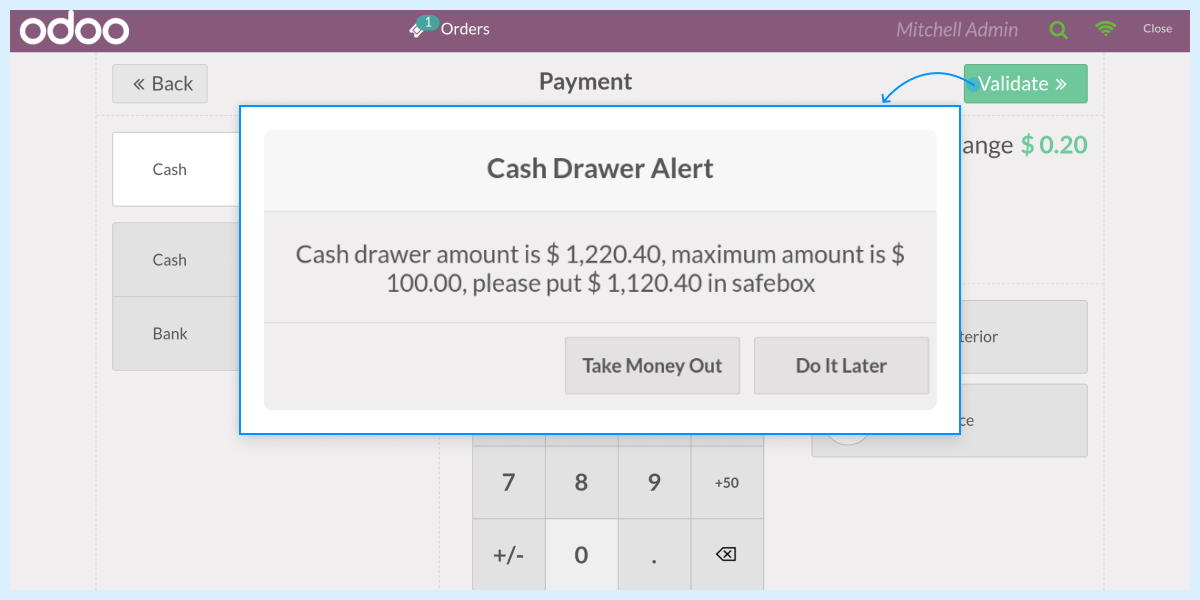
- The cashier gets a pop-up when reaches the threshold limit.
Set a reminder for the POS user in Odoo
- It works as a reminder for the POS user too.
- The cashier can set the “Cash Withdrawal” limit.
Set the threshold limit of the cash drawer from the Odoo backend
- Set the ‘Cash Threshold Value’ so that whenever the cash drawer amount will be greater than the cash threshold amount.
- You can see an alert regarding the money taken out (Withdraw cash) in the POS session.

Enter the required amount to take out from cash drawer

- Enter the required amount to take out from the cash drawer. The cashier needs to mention the reason for taking money out.
- Then click on ‘Proceed’ and the amount will be taken out successfully.
Odoo POS Cash Drawer Alert -
For any query or issue please create a support ticket here http://webkul.uvdesk.com
You may also check our other top-quality Odoo Modules.
Specifications
Specification
Detailed technical features and requirements to help you understand the module’s capabilities and ensure smooth integration with your system.
Cloud Hosting
Detailed technical features and requirements to help you understand the module’s capabilities and ensure smooth integration with your system.
Move to Cloud Today
We’re partnered with top-tier, trusted providers!
Default Configuration Details of Server
RAM 1 Core
Processor 30 GB
Hard Disk
Database
Want to know more how exactly we are going to power up your eCommerce Website with Cloud to fasten up your store
* Server Configuration may vary as per application requirements.


