Enable customers to add multiple variants in the cart in Odoo!!
- Add multiple product variants easily.
- Display product variants in tabular form.
- Customers can add specific quantities of product variants.
- Customers can choose variants with ease.
- Suggest different variants to customers.
- Let you clear product variant stock easily.
- Description
- Reviews
- FAQ
- Customers ()
- Specifications
- Cloud Hosting
- Changelog
Odoo Website Multi Variant Add To Cart - Add multiple product variants with different quantities!!
Odoo Website Multi Variant Add To Cart module helps the customer to add multiple product variants with different quantities in the cart. Product variants will be displayed in tabular form with a quantity selection box.
Why Add Multi Variant To Cart?
- Customers can add multiple product variants with different quantities.
- Product variants will display in tabular format with a quantity box.
- The subtotal amount of variants will be visible on the same product page.
- Let your customers add multiple product variants easily.
- Product variants will display in tabular format on the product page with a quantity box.
- The total number of other variants will be visible on the same product page.
- Makes it easy for customers to choose the product variants without visiting different webpages.
Benefits-
- Adding product variants by customers leads to more sales than usual.
- Customers can add multiple variants with different quantities.
- It will let you clear out stock of the product variants.
- Can suggest different product variants that will attract customers to purchase them.
Odoo Website Multi Variant Add To Cart Features
Add multiple product variants with different quantities
- Odoo Website Multi-Variant Add To Cart module helps the customer to add multiple product variants with different quantities in the cart.
- A customer can add multiple product variants with different quantities in the cart at once.
Display product variants in tabular form
- Product variants will display in tabular format on the product page with a quantity box.
- The subtotal amount of variants along with the total amount of other variants will be visible on the same product page.
Manage the configuration from the Odoo backend
- Enable the attribute option from the Odoo backend as shown.
- With this products can have several attributes defining different variants.

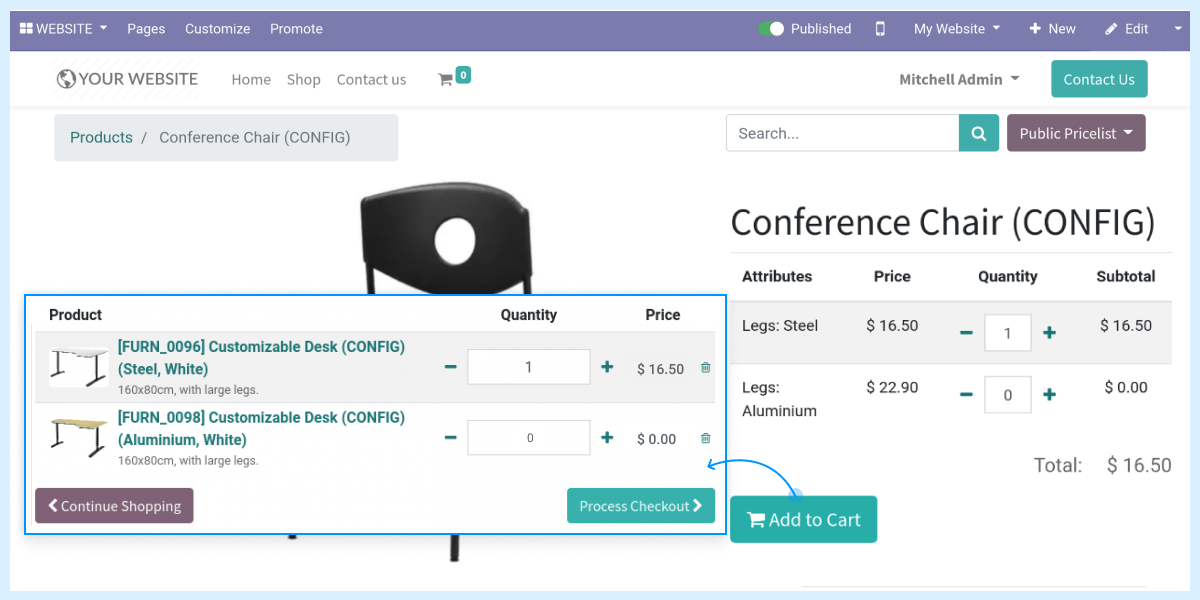
Add different attributes of same product at the Odoo cart

- You can easily add different attributes of same product at the Odoo cart as shown.
- This will enable customers to purchase same product with different attributes in the single order itself.
Odoo Website Multi Variant Add To Cart -
Webkul's dedicated support provides you with the customizations and troubleshooting solutions for Odoo Website Multi Variant Add To Cart.
For any query or issue please CREATE A TICKET HERE
You may also check our other top-quality Odoo Modules.
Specifications
Specification
Detailed technical features and requirements to help you understand the module’s capabilities and ensure smooth integration with your system.
Cloud Hosting
Detailed technical features and requirements to help you understand the module’s capabilities and ensure smooth integration with your system.
Move to Cloud Today
We’re partnered with top-tier, trusted providers!
Default Configuration Details of Server
RAM 1 Core
Processor 30 GB
Hard Disk
Database
Want to know more how exactly we are going to power up your eCommerce Website with Cloud to fasten up your store
* Server Configuration may vary as per application requirements.


