USD
  • EUR
  • INR
  • USD
Cart
Cart 0
  • You have no items in your shopping cart.
    Cart
    Cart 0
    • You have no items in your shopping cart.
    Hire a Developer
    ×
    Contact Us!
    Send Again
    Close
    Please Login to Write Your Review

    Odoo Website Product Brand

    Odoo Website Product Brands helps you create product brands in Odoo and show them on your website. Customers can find products by brand and shop faster.


    • Keep products sorted by brand in a simple and easy way.

    • Help customers open and browse brands without confusion.

    • Show all brands together on one easy-to-find page.

    • Find any brand quickly by using the search option.

    • Add the same brand to many products in less time.

    • Show brand names and logos clearly on your website.

    Screenshots
    Odoo Website Product Brand Odoo Website Product Brand Odoo Website Product Brand Odoo Website Product Brand Odoo Website Product Brand Odoo Website Product Brand Odoo Website Product Brand
    Show More Hide All
    $35.00

    * Required Fields

    Add To Cart
    $35.00
    Configure and Buy
    • Description
    • Reviews
    • FAQ
    • Customers ()
    • Specifications
    • Cloud Hosting
    • Changelog

    Odoo Website Product Brands helps you create product brands and show them on your website. You can assign products to brands and keep your store organized

    Customers can view brands, search brands, and find products from their favorite brands. This makes shopping easy and helps customers find products faster.

    Many online stores sell products from different brands. When products are grouped by brand, customers can quickly find what they want. This helps improve the shopping experience.

    This Module also helps businesses show brand logos and brand information on the website. Customers can learn about brands and explore brand-wise products from one place
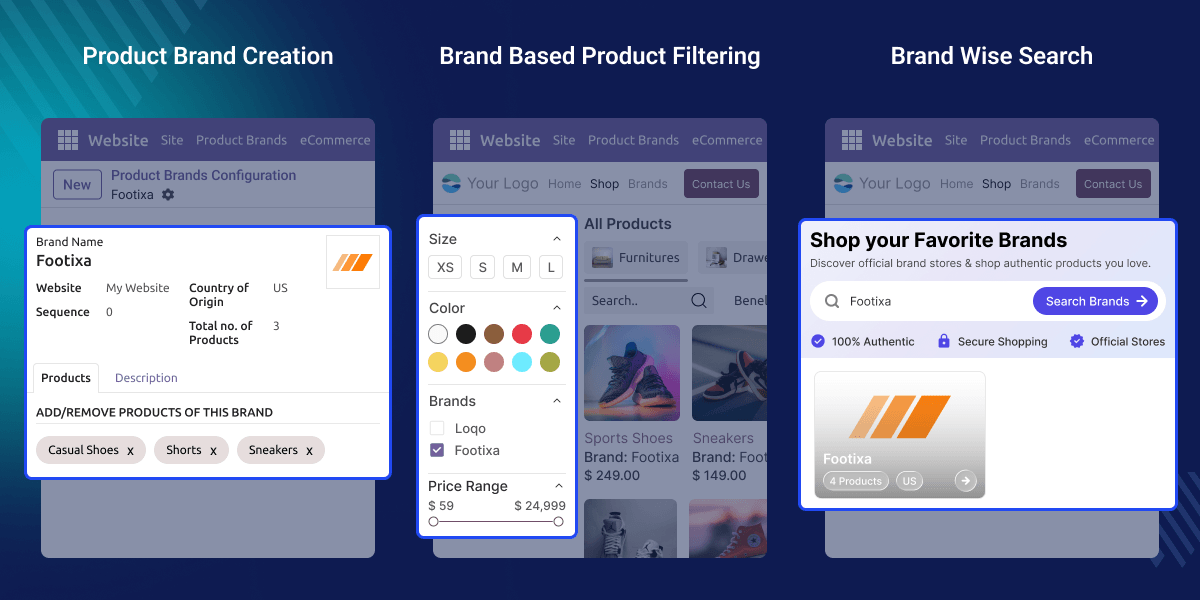
    Odoo Website Product Brands

    Highlighted Features of Odoo Website Product Brands

      Create Product Brands

    Create unlimited brands and manage them from the Odoo backend.

      Display Brand Logos

    Show brand logos on the website so customers can recognize brands easily.

      Assign Products Easily

    Link products to brands and keep product information organized.

      Brand-Based Product Filter

    Let customers filter products and view items from their favorite brands.

      Brand Listing Page

    Show all brands on a separate page for easy browsing.

      Brand Search Option

    Odoo Website Product Brands allow customers to search for brands and find them quickly.

    Why Do We Need This Module?

    Many stores sell products from different brands. When all products are mixed together, customers may spend more time searching.

    Odoo Website Product Brands helps organize products by brand. Customers can open a brand page, view products from that brand, and shop with less effort.

    For example, a fashion store sells products from Nike, Puma, and Adidas. Customers who want Adidas products can simply open the Adidas brand page and see all related products.

    Use Cases

      Better Product Organization

    Businesses can organize products under different brands. This keeps the product catalog clean and easy to manage.

      Faster Product Discovery

    Customers can find products from their preferred brands more quickly. This reduces the time spent searching.

      Improved Shopping Experience

    Customers can browse products brand-wise on the website. This makes shopping simple and convenient.

      Easy Brand Management

    Store owners can create and manage product brands from one place. This helps keep brand information updated.

      Brand-Focused Product Display

    Businesses can highlight products based on their brands. This improves product visibility across the website.

      Simplified Product Browsing

    Customers can explore products through brand pages and filters. This helps them find products with less effort.

    Product Brand Creation

    Create product brands and manage them from one place. This helps keep your store organized and makes brand management easy.

    • Create and manage unlimited product brands with ease
    • Add brand details for better product organization.
    • Display brand information directly on your website.
    • Manage all brand records from one location.
    • Keep products organized under their assigned brands.
    Product Brand Creation

    Product Brand Assignment

    Assign products to brands and keep your catalog clean. This helps customers find products from their favorite brands quickly.
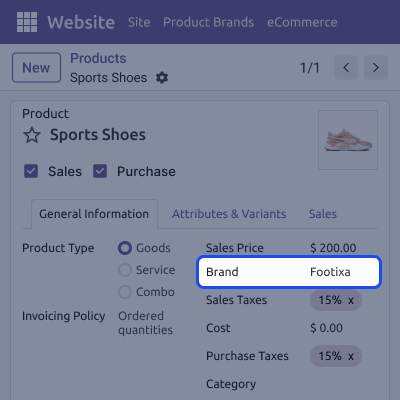
    • Assign products to brands with simple steps
    • Update brand assignments whenever changes are needed.
    • Group products based on their selected brands.
    • Manage brand-wise products from product records easily.
    • Improve catalog structure using product brand grouping.
     Product Brand Assignment

    Brand-Based Product Filtering

    Odoo Website Product Brands allow customers to filter products by brand. This helps them find products faster and improves their shopping experience.

    • Let customers filter products using brand options.
    • Use brand filters with existing website filters.
    • Help customers find preferred products more quickly.
    • Improve product discovery across your online store.
    • Make product searches easier for every customer.
    Brand-Based Product Filtering

    Brand Search and Listing

    Display all brands on a dedicated page. Customers can search brands and browse products without spending extra time.

    • Show all available brands on one page.
    • Create a separate page for brand listings.
    • Search brands quickly using the search option.
    • Browse brands without scrolling through long lists.
    • View products linked to selected brands easily.
    Brand Search and Listing

    Support

    For any query or issue, please create a support ticket here CREATE A TICKET HERE

    You may also check our other top-quality Odoo Modules.

    Specifications

    Product Version1.0.1
    Released10 years ago
    Last UpdatedJuly 8, 2026 (4 days ago)
    Supported VersionsOdoo  8.x  9.x  10.x  11.x  12.x  13.x  14.x  15.x  16.x  17.x  18.x  19.x  
    Write a review

    FAQ’s

     Can I create multiple brands?
    Yes, you can create as many brands as needed and manage all brand details from the Odoo backend without any limit.
     Can I assign brands to existing products?
    Yes, you can connect brands with existing products at any time and organize your product catalog in a better way.
     Can customers filter products by brand?
    Yes, customers can use the brand filter on the website shop page to find products from their preferred brands
     Can I add logos for brands in Odoo Website Product Brands?
    Yes, you can upload logos and display them on the website to help customers identify brands more easily.
     Can I assign many products to one brand?
    Yes, you can add multiple products to a brand and manage brand-wise products without repeating the same work.
     Can brand filters work with other filters?
    Yes, brand filters can work with website filters so customers can narrow product searches more effectively.
     Can I update brand information later?
    Yes, you can edit brand names, logos, descriptions, and product assignments whenever changes are needed.
     How does Odoo Website Product Brands Module help my website?
    This Module helps organize products by brand, improves product discovery, and makes shopping easier for customers.

    Move to Cloud Today

    AWS Free tier hosting for one year by amazon web services, for more details please visit AWS Free Tier.

    GCP Free tier hosting for one year with 300 credit points by google cloud platform, for more details please visit GCP Free Tier.

    Azure free tier hosting for one year with 25+ always free services, for more details please visit Azure Free Tier.

    In our default configuration we will provide tremendous configuration for your eCommerce Website which is fast to load and response.

    Default Configuration Details of Server

    • 1 GB RAM
    • 1 Core Processor
    • 30 GB Hard Disk
    • DB with 1 GB RAM and 1 Core Processor

    * Server Configuration may vary as per application requirements.

    Want to know more how exactly we are going to power up your eCommerce Website with Cloud to fasten up your store. Please visit the Cloudkul Services.

    Get Started with Cloud
    Not Available


