USD
  • EUR
  • INR
  • USD
Cart
Cart 0
  • You have no items in your shopping cart.
    Odoo Apps Extensions
    Cart
    Cart 0
    • You have no items in your shopping cart.
    Hire a Developer
    ×
    Contact Us!
    Send Again
    Close
    Please Login to Write Your Review
    OpenERP CRM LCHD Conversion

    OpenERP CRM LCHD Conversion

    x
    Free

    * Required Fields

    $99.00
    Add To Cart

    OpenERP CRM Lead Claim Helpdesk Conversion lets teams convert records between Leads, Claims, and Helpdesk Support tickets with one button, in either direction.


    • Convert a lead into a claim or a helpdesk support ticket.

    • Convert a claim into a lead or a helpdesk support ticket.

    • Convert a helpdesk support ticket into a lead or a claim.

    • Keep the messages of a record after it is converted.

    • Pick the Conversion Action directly on the lead form.

    • Link the lead to an existing customer, or create a new one.

    • Choose to skip the customer link when a lead has no customer.

    • Highlight claims and helpdesk records when a new message arrives.

    • Find converted records under the Sales menu of OpenERP.


    OpenERP CRM LCHD Conversion
    OpenERP CRM LCHD Conversion
    $99.00
    Check How It Works

    Need Help Deciding?

    Support answers within one business day.

    Open a ticket
    $99.00
    Configure and Buy
    X
    • Description
    • Reviews
    • FAQ
    • Customers ()
    • Specifications
    • Cloud Hosting
    • Changelog

    OpenERP CRM Lead Claim Helpdesk Conversion is an OpenERP module that joins the CRM, Claims, and Helpdesk Support records. A user can move a record from one of these three modules to another.

    A conversion button sits on each form. On claim and helpdesk support forms, it sends the record to a lead or to the other support module.

    On the lead form, the Conversion Action field converts the lead into a helpdesk support ticket or a claim. The result opens in its own menu.

    Messages travel with the record. A converted claim or ticket shows its earlier messages under Sales, so the next team sees the history.

    During lead conversion, the user decides how the lead is tied to a customer. The user can link an existing customer, create a new one, or skip the link.

    Additionally, if you want to track stock against CRM leads and email the customer when products are available, then check OpenERP CRM Stock Management.
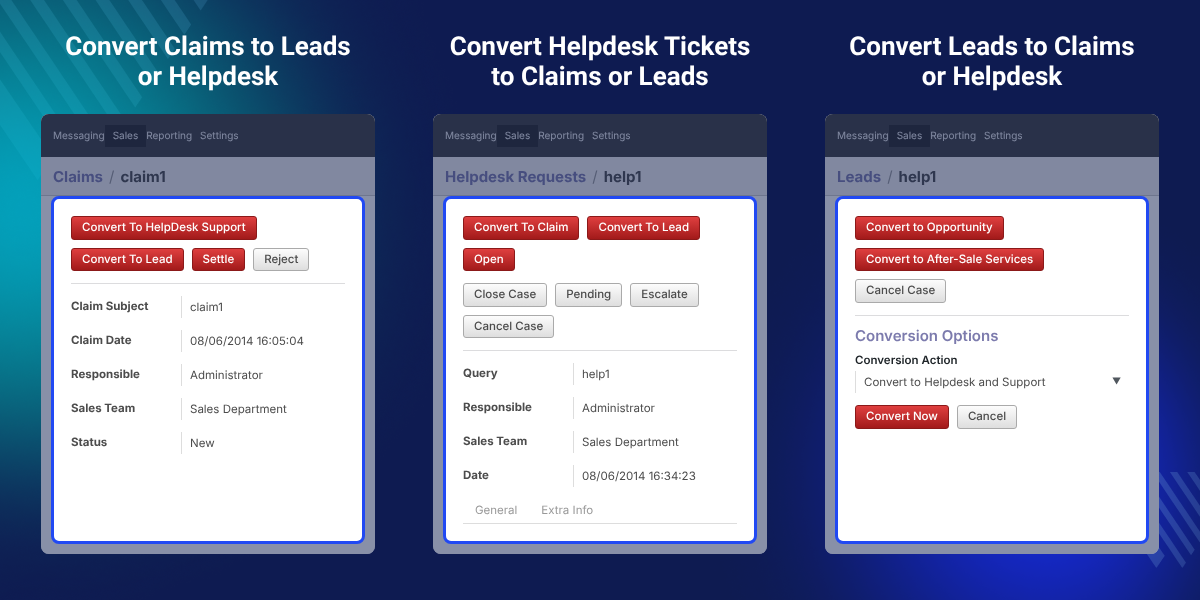
    OpenERP CRM Lead Claim Helpdesk Conversion

    Highlighted Features of OpenERP CRM Lead Claim Helpdesk Conversion

     Convert Claims

    Turn a claim into a lead or a helpdesk support ticket with the conversion button on the claim form, in one click.

     Convert Helpdesk Tickets

    Turn a helpdesk support ticket into a lead or a claim with the conversion button on the ticket form, in one click.

     Convert Leads

    Turn a lead into a claim or a helpdesk support ticket by choosing the Conversion Action on the lead form, in one step.

     Keep Message History

    Converted records open in the new module with their earlier messages, so the history stays with the case after conversion.

     Customer Linking Options

    During lead conversion, link an existing customer, add a new customer, or skip the customer link altogether.

     New Message Highlight

    Claims and helpdesk records are highlighted in the list when a new message arrives on that record.

    Why Do We Need OpenERP CRM Lead Claim Helpdesk Conversion?

    Customer contacts do not always stay in the module where they started. A complaint logged as a claim may need a helpdesk ticket, and a lead may turn out to be a support request.

    Without a conversion option, staff create the new record by hand. They copy the details and the message history, and some details get lost.

    This module removes that work. A button on each form moves the record to the right module, and the messages go with it.

    Setup is plain. It needs the CRM, Helpdesk, and Claims Management modules installed first, and it is installed on the OpenERP server only, by copying the crm_lchd_integration folder into the addons folder.

    Also, if you want sales users to raise purchase quotations from CRM leads, you can check our module Odoo Purchase Quotation from CRM.

    Lead, Claim, and Helpdesk Conversion Use Cases in OpenERP

    • Lead Turns Into Support

      A sales lead turns out to be a product problem, not a sale. Sales converts it into a helpdesk support ticket.

    •  Claim Becomes a Lead

      A claim shows interest in a new purchase. Sales converts it into a lead and follows up in CRM. Teams that also run an outside CRM can check Odoo Multi CRM Solution.

    • Ticket Needs a Formal Claim

      A helpdesk ticket needs a formal complaint record on file. Support agents convert it into a claim.

    • Claim Needs Technical Help

      A claim needs technical work. Staff convert it into a helpdesk support ticket for the support agents to handle.

    Claims Conversion to Lead or Helpdesk Support

    Each claim form carries a conversion button. Users click it to move the claim to the Leads menu or to the Helpdesk and Supports menu.

    The team can hand over a complaint to sales or to support without typing the details into a new record.
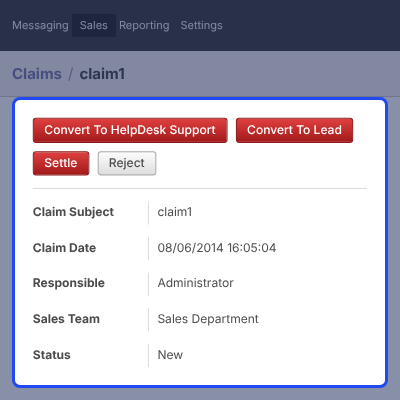
    • Click the conversion button on the claim to start.
    • Convert the claim to a lead, which opens under Sales > Leads.
    • Convert the claim to helpdesk support, which opens under Sales > After-sales service > HelpDesk and Supports.
    • Keep the claim messages on the converted record.
    Claims Conversion to Lead or Helpdesk Support

    Helpdesk Support Conversion to Lead or Claim

    Every helpdesk support form has its own conversion button. It moves the ticket to the Leads menu or to the Claims menu.

    Support agents can pass a ticket to the sales team as a lead, or log it as a formal claim.
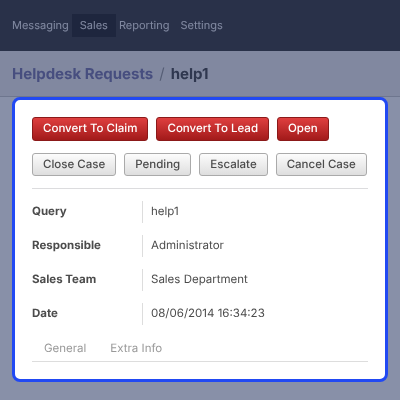
    • Click the conversion button on the helpdesk request to start.
    • Convert the ticket to a lead, which opens under Sales > Leads.
    • Convert the ticket to a claim, which opens under Sales > After-sales service > Claims.
    • Keep the ticket messages on the converted record.
    Helpdesk Support Conversion to Lead or Claim

    Lead Conversion to Helpdesk Support or Claim

    Leads have a Conversion Action field. The user picks where the lead goes, and the lead then opens in that module.

    Sales users can pass a lead to the support side when it is not a sale. For Pipedrive users, Odoo Multi CRM Pipedrive Solution links Odoo with Pipedrive accounts.
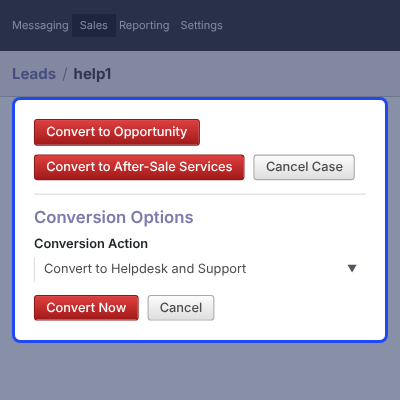
    • Set Conversion Action to Convert to Helpdesk and Support to create a ticket.
    • Find the converted lead under Sales > After-sales service > HelpDesk and Support.
    • Choose the claim option to convert the lead into a claim.
    • Find the converted lead under Sales > After-sales service > Claims.
    • Keep the lead messages on the converted record.
    Lead Conversion to Helpdesk Support or Claim

    Related Customer Options on Lead Conversion

    A lead conversion asks how to handle the customer on the new record. The user picks one of three options.

    Customer data stays correct in the new helpdesk or claim record, whichever option the user picks.
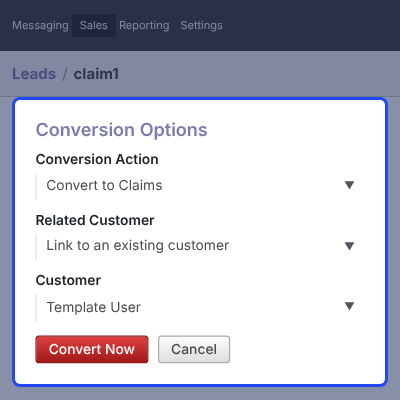
    • Link to an existing customer.
    • Add a new customer and link that customer.
    • Do not link to a customer.
    Related Customer Options on Lead Conversion

    Complete OpenERP CRM Lead Claim Helpdesk Conversion Feature List

    Lead Conversion

    • Convert a lead into a claim or a helpdesk support ticket from the lead form
    • Select Convert to Helpdesk and Support or the claim option as the Conversion Action
    • Open the converted lead under Sales > After-sales service > HelpDesk and Support or Claims
    • Link the lead to an existing customer, create a new customer, or skip the customer link

    Claims Conversion

    • Convert a claim into a lead or a helpdesk support ticket with the conversion button
    • Open the converted claim under Sales > Leads or Sales > After-sales service > HelpDesk and Supports
    • Carry the claim messages over to the converted record

    Helpdesk Conversion

    • Convert a helpdesk support ticket into a lead or a claim with the conversion button
    • Open the converted ticket under Sales > Leads or Sales > After-sales service > Claims
    • Carry the ticket messages over to the converted record

    Message Handling

    • Keep message history on every converted lead, claim, and helpdesk record
    • Highlight claims and helpdesk records when a new message arrives

    Installation & Compatibility

    • Work with the CRM, Helpdesk, and Claims Management modules, which must be installed first
    • Install on the OpenERP server only by copying the crm_lchd_integration folder to the addons folder
    • Support OpenERP 6.x and 7.x as listed on the store page

    OpenERP CRM LCHD Conversion Support -

    For any query or issue please create a support ticket here http://webkul.com/ticket

    Specifications

    Product Version1.0
    Released12 years ago
    CategoryOdoo Apps, CRM, 
    Last UpdatedOctober 13, 2026 (2 days ago)
    Supported VersionsOdoo  6.x  7.x  

    Ratings

    We'd love to hear your thoughts! Share your feedback and help us craft an even better experience tailored just for you.

    Write a review

    Specification

    Detailed technical features and requirements to help you understand the module’s capabilities and ensure smooth integration with your system.

    Cloud Hosting

    Detailed technical features and requirements to help you understand the module’s capabilities and ensure smooth integration with your system.

    Default Configuration Details of Server

    1 GB
    RAM
    1 Core
    Processor
    30 GB
    Hard Disk
    1 GB RAM & 1 Core Processor
    Database

    Want to know more how exactly we are going to power up your eCommerce Website with Cloud to fasten up your store

    * Server Configuration may vary as per application requirements.

    Change Logs

    Not Available


