USD
  • EUR
  • INR
  • USD
Cart
Cart 0
  • You have no items in your shopping cart.
    OpenCart Extensions
    Cart
    Cart 0
    • You have no items in your shopping cart.
    Hire a Developer
    ×
    Contact Us!
    Send Again
    Close
    Please Login to Write Your Review
    Opencart Multi Tenant Marketplace Seller Buyer Chat (Socket Based)

    Opencart Multi Tenant Marketplace Seller Buyer Chat (Socket Based)

    x
    Free

    * Required Fields

    $299.00
    Add To Cart

    OpenCart Seller Buyer Chat (Socket-Based) enables real-time communication between sellers and customers using Socket.IO. It supports instant messaging, browser push notifications, online status, and chat management to enhance customer engagement and support.


    • Enables real-time seller-customer messaging.

    • Supports Socket.IO-based instant communication.

    • Sends browser push notifications for new messages.

    • Shows Online, Busy, and Offline availability status.

    • Allows sellers to block unwanted customers.

    • Maintains chat history for future reference.

    • Customizes the chat window and notifications.

    • Supports Firebase-based push notifications.

    Opencart Multi Tenant Marketplace Seller Buyer Chat (Socket Based)
    Opencart Multi Tenant Marketplace Seller Buyer Chat (Socket Based)
    $299.00
    Check How It Works
    $299.00
    Configure and Buy
    X
    • Description
    • Reviews
    • FAQ
    • Customers ()
    • Specifications
    • Cloud Hosting
    • Changelog

    OpenCart Seller Buyer Chat (Socket-Based) enables real-time communication between sellers and customers in your OpenCart marketplace. It uses Socket.IO technology to deliver instant messaging, helping customers connect with sellers without refreshing the page.

    The module works in real time by establishing a persistent socket connection between buyers and sellers. It supports browser push notifications, online availability status, and customizable chat settings, ensuring users never miss important conversations.

    It also allows sellers to manage customer conversations, block unwanted users, maintain chat history, and customize the chat window. Administrators can configure the chat server, notification settings, appearance, default messages, and Firebase push notifications from the backend.

    Whether you manage a single-vendor store or a multi-vendor marketplace, this module enhances customer engagement with fast and reliable communication. It improves the shopping experience by enabling instant support and seamless interaction between sellers and customers.

    Please Note -
    • Opencart Marketplace Seller Buyer Chat (Socket Based) is an add-on of the Opencart Marketplace Module. To use this module, you must have installed Opencart Marketplace Module
    • Node should be installed on your server.
    • This module supports all templates and themes including the Journal theme.
    • Opencart Marketplace Seller Buyer Chat (Socket Based) module supports the Multi-Store feature of default Opencart.
    Opencart Multi Tenant Marketplace Seller Buyer Chat

    Highlighted Features

     Real-Time Messaging

    Enable instant communication between sellers and customers using Socket.IO technology.

     Browser Push Notifications

    Notify users instantly about new chat messages, even when the chat window is not active.

     Online Availability Status

    Display Online, Busy, or Offline status to let customers know when sellers are available.

     Customer Conversation Management

    Allow sellers to manage chat history and block unwanted customers when required.

     Customizable Chat Experience

    Configure chat appearance, notification settings, and default messages from the admin panel.

     Multi-Vendor Marketplace Support

    Enable seamless real-time communication between customers and multiple marketplace sellers.

    Why Do We Need OpenCart Seller Buyer Chat (Socket-Based)?

    Customers often have questions before or after placing an order. Without real-time communication, they may have to wait for email responses or contact support, which can delay decisions and affect their shopping experience. OpenCart does not provide a built-in live chat system for seller-customer communication.

    OpenCart Seller Buyer Chat (Socket-Based)enables instant communication between sellers and customers using Socket.IO. It supports real-time messaging, browser push notifications, online availability status, and customizable chat settings to ensure seamless conversations.

    This module is ideal for single-vendor and multi-vendor stores that want to provide quick customer support. It improves customer engagement, reduces response time, and helps sellers resolve queries faster through real-time communication.

    Use Cases

    • Assist Customers Before Purchase

      Answer product-related questions instantly to help customers make informed buying decisions.

    • Provide Post-Sales Support

      Resolve order, shipping, and product queries through real-time seller-customer communication.

    • Improve Marketplace Communication

      Enable seamless conversations between customers and multiple sellers on your OpenCart marketplace.

    • Increase Customer Satisfaction

      Offer quick responses and personalized support to build trust and enhance the shopping experience.

    Admin Configuration and Management

    After the installation of the module admin can configure the server settings, general settings, appearance and default messages of the module. Admin can also see all the conversations between seller and buyer and delete them.

    • Admin can configure chat notifications.
    • Admin can configure message font, colour, style, and background.
    • Admin can configure the appearance of the registration field under the chat window.
    • Admin can configure the appearance of the chat window.
    • Admin can enable push notification.
    Admin Management

    Customer Management

    Customers can check from the product page if the seller is online or not. If seller is online then customers can ask their question and get the reply. Customer can check their complete chat history and email it in the form of PDF.

    • Customers can generate chat with sellers.
    • Customers can set their profile image.
    • Customers can email chat transcript.
    • Customers can check complete chat history.
    • Customers can use emoticons in chat.
    • Customers can add attachments to their respective chat windows.
    Customer Management

    Seller Management

    Seller’s can receive the customer’s message if they are online. Also, sellers can check the online status of the customers to whom they had the chat before. Sellers can chat with multiple customers, check chat history, block / unblock the customers from chat, change their online status.

    • Seller can change their online status.
    • Sellers can check and delete chat conversation.
    • Sellers can block/unblock customers from chat.
    • Sellers can use emoticons in chat.
    • Sellers can add attachments to their chat windows, respectively.
    Seller Management

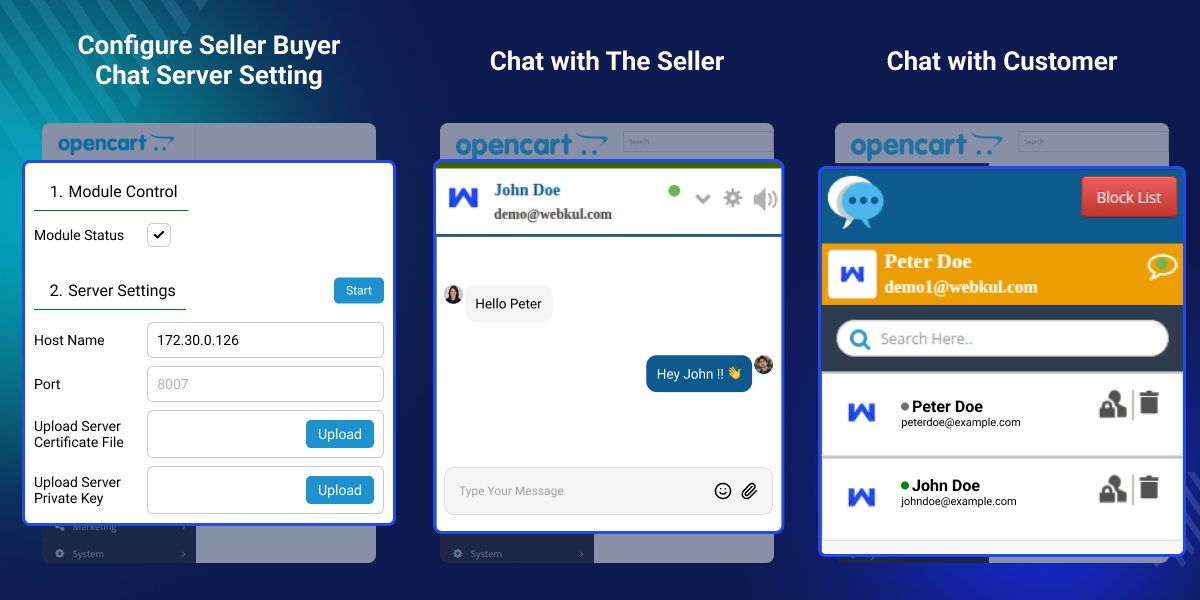
    Configure Seller Buyer Chat Server Settings

    Configure the server settings to enable secure real-time communication between sellers and customers.
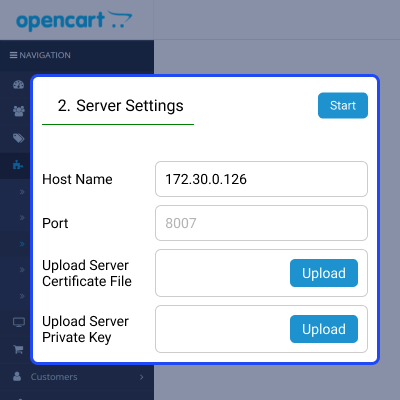
    • Enable or disable the Seller Buyer Chat module.
    • Configure the server hostname and communication port.
    • Upload SSL certificate and private key files.
    • Start the chat server from the admin panel.
    Configure Seller Buyer Chat Server Settings

    Access the Seller Buyer Chat Widget

    Access the chat widget from the storefront to connect with sellers and start real-time conversations.
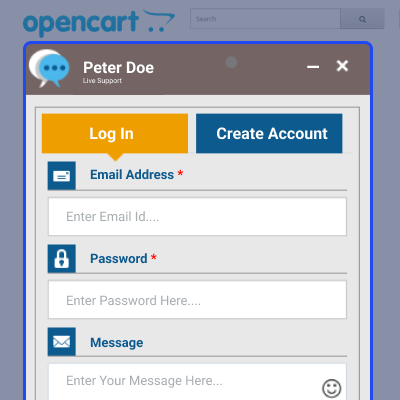
    • Access the chat widget from the storefront.
    • Log in or create an account to chat.
    • Send product-related queries instantly.
    • Communicate with sellers in real time.
    Access the Seller Buyer Chat Widget

    Chat with the Seller

    Start real-time conversations with sellers to get quick assistance with product and order-related queries.
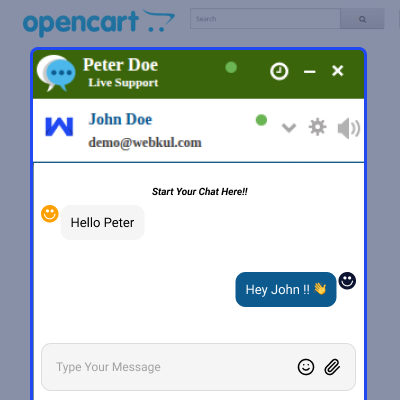
    • Send and receive messages instantly.
    • View conversations in one chat window.
    • Share product and order-related information.
    • Get quick responses from sellers.
    Chat with the Seller

    Opencart Marketplace Seller Buyer Chat (Socket Based) Support -

    For any query or issue please create a support ticket here http://webkul.uvdesk.com/

    You may also check our quality Opencart Extensions.

    Specifications

    Product Version3.3
    Released9 years ago
    CategoryOpenCartMarketplace
    Last UpdatedAugust 11, 2026 (19 days ago)
    Supported VersionsOpenCart  3.x.x.x  

    Ratings

    We'd love to hear your thoughts! Share your feedback and help us craft an even better experience tailored just for you.

    Write a review

    Frequently Asked Questions

     Who should use OpenCart Seller Buyer Chat (Socket-Based)?
    OpenCart Seller Buyer Chat (Socket-Based) is ideal for single-vendor and multi-vendor OpenCart stores that want to provide real-time communication between sellers and customers.
     
     How does this module improve customer communication?
    This module enables instant messaging between sellers and customers using Socket.IO. It helps resolve product, order, and shipping queries quickly, improving the overall shopping experience.
     
     Does it support browser push notifications?
    Yes, this module supports browser push notifications to notify users about new chat messages. This helps sellers and customers stay updated even when the chat window is not active.
     
     Can sellers manage customer conversations?
    Yes, sellers can view chat history, manage ongoing conversations, and block unwanted customers when required. This helps keep communication organized and secure.
     
     Does it support multi-vendor marketplaces?
    Yes, this module is fully compatible with OpenCart Marketplace. Customers can communicate directly with individual sellers for product inquiries and post-sales support.
     
     Can the administrator customize the chat settings?
    Yes, the administrator can configure the chat server, notification settings, chat appearance, default messages, and Firebase push notifications from the admin panel.
     
     Does the module show seller availability status?
    Yes, sellers can display their availability status as Online, Busy, or Offline. This helps customers know whether a seller is available before starting a conversation.
     
     Is a Node.js server required for this module?
    Yes, this module uses Socket.IO for real-time communication and requires a Node.js server to establish instant messaging between sellers and customers. Once configured, it provides fast and seamless chat without requiring page refreshes.

    Specification

    Detailed technical features and requirements to help you understand the module’s capabilities and ensure smooth integration with your system.

    Cloud Hosting

    Detailed technical features and requirements to help you understand the module’s capabilities and ensure smooth integration with your system.

    Default Configuration Details of Server

    1 GB
    RAM
    1 Core
    Processor
    30 GB
    Hard Disk
    1 GB RAM & 1 Core Processor
    Database

    Want to know more how exactly we are going to power up your eCommerce Website with Cloud to fasten up your store

    * Server Configuration may vary as per application requirements.

    Change Logs

    • + Features
    • - Bugs
    Version 3.3
    • ! fixed the login and create account issue.
    Version 3.2
    • * Update the Firebase api.
    Version 3.1.2.0
    • * fixed filename issue
    Version 3.1.1.9
    • * resolved issue in j3 theme patch
    Version 3.1.1.8
    • * add missing code in j3 theme patch
    Version 3.1.1.7
    • * resolved all the git issue with theme issues
    Version 3.1.1.6
    • * add journal3 theme patch in 3.x.x.x version
    Version 3.1.1.5
    • * update the module in 3.x.x.x version
    Version 3.1.1.4
    • * fixed the online status issue
    Version 3.1.1.3
    • * fixed all the remaining git issues
    Version 3.1.1.2
    • * fixed other journal3 issues
    Version 3.1.1.1
    • * fixed all the git issues with theme patch
    Version 3.1.1.0
    • + update the module in version 2.3.x.x version
    Version 3.1.0.4
    • * Fixed the chat message to display event after the customer is not logged in
    Version 3.1.0.3
    • * Fixed the Chat Server connectivity issue.
    Version 3.1.0.2
    • * notification issue resolved in v3
    Version 3.1.0.1
    • * Fixed small config issue
    Version 3.1.0.0
    • + Added journal3 ocmod file
    Version 3.0.1.0
    • * Fixed the fatal error issue on module configuration page in version 2.0.x.x.
    Version 3.0.0.9
    • * Resolved model issue in all version.
    Version 3.0.0.8
    • * Resolved notification sound issues.
    Version 3.0.0.7
    • * Fixed Ocmod protocol issue
    Version 3.0.0.6
    • * Fixed Status change to online
    • * Config value name correction
    Version 3.0.0.5
    • * Image validation issue fixed.
    Version 3.0.0.4
    • * check applied in the all versions
    Version 3.0.0.3
    • * Message not send at seller end and some undefined issues has been resolved in OC_2.3
    Version 3.0.0.2
    • * Fixed bug of https enabled site
    Version 3.0.0.1
    • + Updated Extension for https enabled website
    • * Fixed bug of Version 3.0.2.0
    • + Updated in Opencart Version 3.0.2.0
    Version 2.0.0.0
    • initial update


