Send Again
Close
PrestaShop Google ReCaptcha - The module offers shop owners to use the reCAPTCHA feature to identify the genuine users on the store.
reCAPTCHA is a system designed to establish that the user is a human. The module displays images to identify humans as part of their normal validation procedures.
It also protects your website from unnecessary spammers, bots and ensures higher level of security for your PrestaShop store.
Add an extra layer of validation using reCAPTCHA form the store.
Choose to show this validation form on various forms available across multiple pages of the store.
Use either the light or dark background for the reCAPTCHA form.
reCAPTCHA form will help your website against spammers & bot attacks.
A CAPTCHA can ensure your site by creating tests or puzzles that people can pass, yet bots can't. Early CAPTCHAs showed distorted letters, numbers, and words which can be perused by people yet not by bots. Later forms show a grouping of pictures, from which clients must choose all the pictures that show a specific item, for example, a customer-facing facade or traffic signals. While they have demonstrated to be helpful in the fight against bots, it is basic to realize when to utilize and when not to utilize them.
Online organizations use forms for registration and signups and to offer types of assistance to their clients. Bots as a rule target such forms and fill them with garbage data, which slants the procurement stream measurements for the business. CAPTCHA is generally executed to prevent such spam forms from bots, yet there are sure complex bots that do sidestep CAPTCHA and wind up spamming forms.

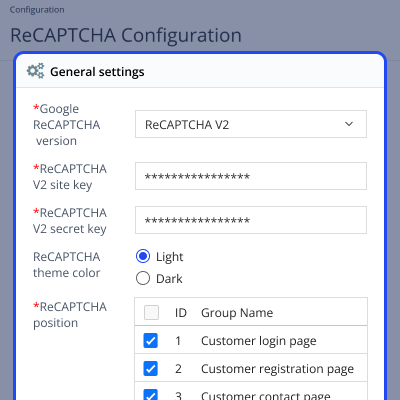
After successful installation, admin has to configure the module, the admin will have to enter the following reCaptcha Credential-
We have given to set the reCAPTCHA background color(light or dark).
Admin will have the option to set the reCAPTCHA on the following positions:
For any query or issue, please create a support ticket here http://webkul.uvdesk.com
You may also check our other top-quality PrestaShop Extensions.
I've successfully deployed this module on my client's website. When there was a conflict with our custom theme Webkul's support promptly resolved the issue for us. I recommend Webkul and their PrestaShop modules.
thank you for you service
thank you for you service
thank you for you service
thank you for you service
I recommend Webkul for their responsiveness and professionalism. They are always listening and very competent.
Detailed technical features and requirements to help you understand the module’s capabilities and ensure smooth integration with your system.
Detailed technical features and requirements to help you understand the module’s capabilities and ensure smooth integration with your system.
We’re partnered with top-tier, trusted providers!
Want to know more how exactly we are going to power up your eCommerce Website with Cloud to fasten up your store
* Server Configuration may vary as per application requirements.



