USD
  • EUR
  • INR
  • USD
Cart
Cart 0
  • You have no items in your shopping cart.
    PrestaShop Extensions
    Cart
    Cart 0
    • You have no items in your shopping cart.
    Hire a Developer
    ×
    Contact Us!
    Send Again
    Close
    Please Login to Write Your Review
    Prestashop Product and Order Social Share

    Prestashop Product and Order Social Share

    x
    Free

    * Required Fields

    $49.00
    Add To Cart

    Prestashop Product and Order Social Share is an effective tool that enables customers to share their favorite products on popular social networks like Facebook, Twitter, Instagram, WhatsApp, Pinterest, and more. Give your customers a reward for sharing products and orders on their Facebook profiles.


    • Adds social share buttons to the product and order confirmation/details page.

    • Improve your store visibility by letting customers share products on popular social media platforms.

    • Give discount vouchers to customers for sharing your products on Facebook.

    • Attract more visitors to your site via social media.


    Note: The Prestashop Product and Order Social Share is compatible with the multi-store feature of PrestaShop.

    Prestashop Product and Order Social Share
    Prestashop Product and Order Social Share
    $49.00
    PrestaShop Expert Certification Core Skills
    Check How It Works

    Need Help Deciding?

    Support answers within one business day.

    Open a ticket
    $49.00
    Configure and Buy
    X
    • Description
    • Reviews
    • FAQ
    • Customers ()
    • Specifications
    • Cloud Hosting
    • Changelog

    Prestashop Product and Order Social Share — Every time a customer finishes an order or browses a product, they are already thinking about your store. This module turns that moment into free, authentic marketing by giving customers one-click sharing on the networks they already use.

    Instead of hoping buyers will talk about your brand, you can now give them a reason to. Share buttons appear naturally on product pages, order confirmation pages, and order history pages. You control the message — set custom text that appears with every share so your brand voice stays consistent.

    On order pages, you can even choose whether the shared link goes to your shop homepage or to the first product the customer bought. For store owners who want to go further, the built-in voucher system turns social sharing into a loyalty driver.

    When a customer shares on Facebook and reaches the share count you set, the module automatically issues a unique discount voucher by email. You decide the discount type, value, validity period, minimum order rules, and which product categories it applies to. Everything is tracked in the Social Share Vouchers panel, so you always know which customers are advocating for your store and what they earned.

    Prestashop Product and Order Social Share

    Highlighted Features

     Let Customers Market your Products

    Increase the social reach of your store by letting customers share your products with a single click.

     Facebook Voucher Rewards

    Automatically reward customers with discount vouchers when they share your store on Facebook and reach a target share count.

     Email Notifications

    Voucher information is sent to a customer via email once the voucher is assigned.

     Voucher Rules and Restrictions

    Set minimum order values, restrict vouchers to specific categories, limit usage per customer, and choose between percentage or fixed-amount discounts.

    Why social sharing is beneficial for e-commerce websites -

    Now, store owners can increase their product visibility on Social media sites.
    If you will have social media buttons on your product pages, then your products will be shared more frequently on social networks like Twitter, Facebook, WhatsApp, Pinterest, etc. You already know that if there will be more shares means more publicity and more publicity lead to new customers for making the purchase.

    priceoffer

    Sharing is Caring :)

    Through our module, you will also have the social sharing links on the customer order confirmation page, by which customers can let their friends and family know about their recent purchases.

    By giving the social links of your product and customer order confirmation page, you will be growing your business by getting new customers which leads to more conversion rates.

    With the correct inspiration managed out to your clients, you can increase shares of your products and exploit the increased lift in mindfulness and deals that this exposure brings.

    priceoffer

    Prestashop Product and Order Social Share Features -

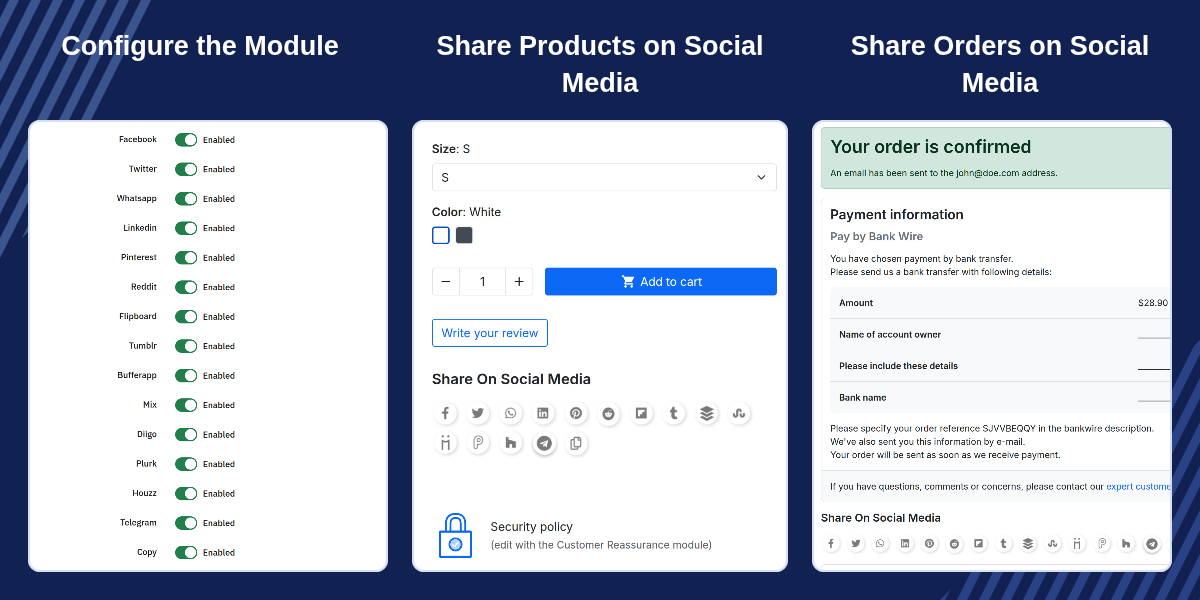
    • Admin can enable/Disable the sharing of products and orders on various social media platforms.
    • Customers can share their orders from "order details" and order "confirmation page".
    • Admin can select the link(shop url or first product url) to be be shared while sharing orders.
    • Customize the text which will be sent while sharing the the products or orders.
    • An icon mentioned on the product page by clicking on which a customer can copy product's url.

    Prestashop Product and Order Social Share Support -

    For any query or issue, please create a support ticket here http://webkul.uvdesk.com

    You may also check our other top-quality PrestaShop Module.

    Specifications

    Product Version4.2.2
    Released10 years ago
    Last UpdatedSeptember 9, 2026 (13 days ago)
    Supported VersionsPrestaShop  1.7.x.x​  8.x.x  9.x.x  

    Ratings

    We'd love to hear your thoughts! Share your feedback and help us craft an even better experience tailored just for you.

    5.0
    1 Reviews
    based on verified customer feedback
    Write a review
    Maeva

    really nice

    Posted On - August 9, 2020

    This a good module and support is really quick and good quality.
    Good Job Webkul !

    Frequently Asked Questions

     Can I choose which social networks appear on my store?
    Yes. The General Configuration tab gives you an on/off toggle for every supported network. Enable the ones your customers use most and hide the rest for a cleaner look.
     
     How does the voucher reward system work?
    When a customer shares your store on Facebook and hits your set share count, the module auto-generates a discount voucher and emails it. You set the discount type, value, validity, and category limits — all tracked in the Social Share Vouchers panel.
     
     Will this conflict with PrestaShop's native share buttons?
    No. During installation, the module disables PrestaShop's native ps_sharebuttons to avoid duplicate buttons. If you uninstall this module, the native share buttons are re-enabled automatically.
     
     What happens if a customer shares an order page?
    On order confirmation/detail pages, the module shares your shop homepage or the first product URL (per your General Configuration setting), auto-including the order share text and correct product image.
     
     Do customers need a Facebook account to earn vouchers?
    Yes, but only for voucher rewards — the auto-voucher system is tied to Facebook sharing, so a Facebook account is required to earn a discount. Customers can still share to all other networks without one.

    Specification

    Detailed technical features and requirements to help you understand the module’s capabilities and ensure smooth integration with your system.

    Cloud Hosting

    Detailed technical features and requirements to help you understand the module’s capabilities and ensure smooth integration with your system.

    Default Configuration Details of Server

    1 GB
    RAM
    1 Core
    Processor
    30 GB
    Hard Disk
    1 GB RAM & 1 Core Processor
    Database

    Want to know more how exactly we are going to power up your eCommerce Website with Cloud to fasten up your store

    * Server Configuration may vary as per application requirements.

    Change Logs

    Not Available