USD
  • EUR
  • INR
  • USD
Cart
Cart 0
  • You have no items in your shopping cart.
    Cart
    Cart 0
    • You have no items in your shopping cart.
    Hire a Developer
    ×
    Contact Us!
    Send Again
    Close
    Please Login to Write Your Review

    Prestashop Stripe Recurring Payment Gateway

    Prestashop Stripe Recurring Payment Gateway allows you to sell subscriptions and accept recurring payments via the Stripe Payment method.


    • Create subscription plans in your PrestaShop back office that automatically sync to your Stripe account.

    • Easily assign subscription plans to normal products or product combinations.

    • See and manage all your active subscribers from a clean "Stripe Customers" tab in your admin area.

    • Show other payment choices like SEPA Direct Debit, ACH Direct Debit, Alipay, Apple Pay, Google Pay, iDEAL, Sofort at Stripe checkout for subscription products.

    • Give customers full or partial refunds directly from your PrestaShop admin panel.


    Note: Prestashop Stripe Recurring Payment Gateway module is compatible with PrestaShop multi-store feature.

    Screenshots
    $99.00

    * Required Fields

    Add To Cart
    $99.00
    Configure and Buy
    • Description
    • Reviews
    • FAQ
    • Customers ()
    • Specifications
    • Cloud Hosting
    • Changelog

    Prestashop Stripe Recurring Payment Gateway - There was a time when subscription models were only used by massive companies like Netflix, Amazon Prime, and Spotify. Today, online stores of all sizes are switching to subscriptions because it helps both the business and the customer.

    By letting your buyers set up automatic repeat orders, you give them a fast, convenient checkout experience while securing steady, predictable income for your business. Customers now expect to subscribe to the items they use every day, like food, clothing, medicine, toiletries, and cosmetics.

    The PrestaShop Stripe Recurring Payment Gateway module makes this easy. Instead of forcing your customers to visit your store and check out manually every single time they run out of essentials, they can just subscribe once. The system will handle the rest by charging them and creating new orders automatically. This builds great customer loyalty, cuts down on abandoned carts, and guarantees regular sales for your shop.
    Prestashop Stripe Recurring Payment Gateway

    Highlighted Features

     Unlimited Subscription Plans

    Create as many subscription plans as needed and assign them to products as per requirement.

     Synchronize Subscription Plans

    Sync subscription plans from Stripe account to Prestashop and vice-versa.

     Schedule Subscription Period

    Create your subscription plans to renew on a daily, weekly, monthly, or yearly basis.

     Secure Online Payments

    Stripe payment gateway available on the store for safe and hassle-free transactions..

    Stripe Plugin Partner

    Stripe is a simple and powerful way to accept payments online. Millions of businesses—ranging from startups to Fortune 500 companies—rely on Stripe’s software tools to accept payments securely and expand globally.

    Webkul is proud to be associated with Stripe in developing customized payment gateway solutions for e-commerce stores, marketplaces, and mobile apps.

    • Stripe is available to businesses in over 35 countries.
    • Accept all major debit & credit cards, wallets, local payment methods.
    • Supports processing payments in 135+ currencies
    • Stripe meets the most stringent industry standards for security. Stripe is also audited by a PCI-certified auditor and is certified to PCI Service Provider Level 1. 
    Stripe Plugin Partner

    Workflow of the Module

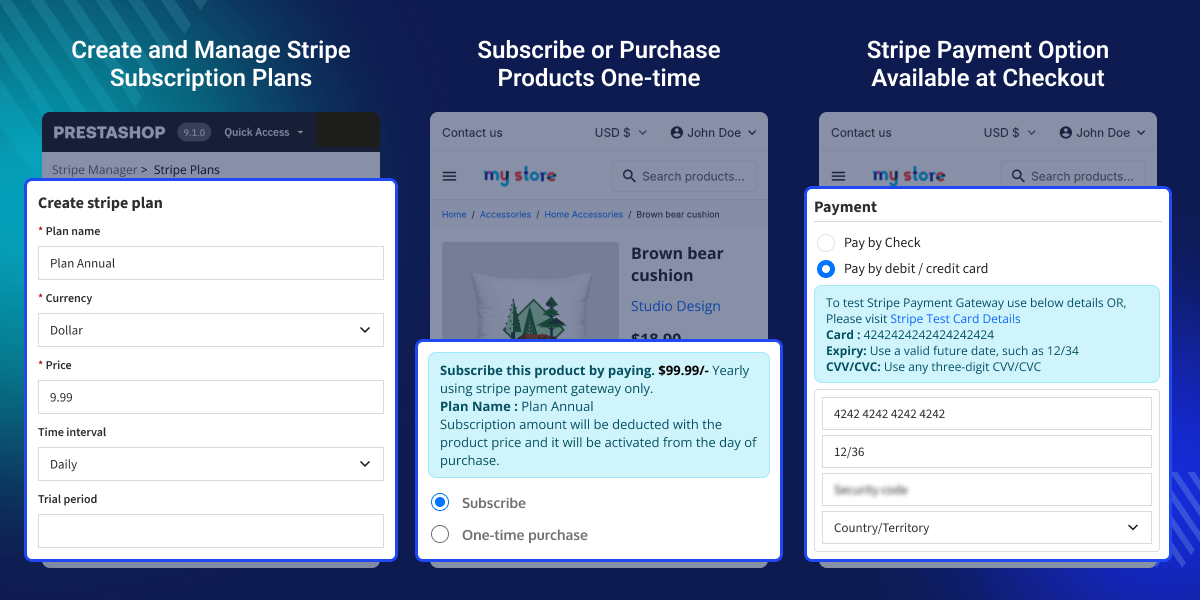
    Once you install the module, a new "Stripe Plans" tab will appear in your PrestaShop admin panel. From this tab, you can easily create and manage your stripe subscription plans. Set the period of the subscription like daily, weekly, monthly, or every 3 months, etc. and offer optional free trial periods.

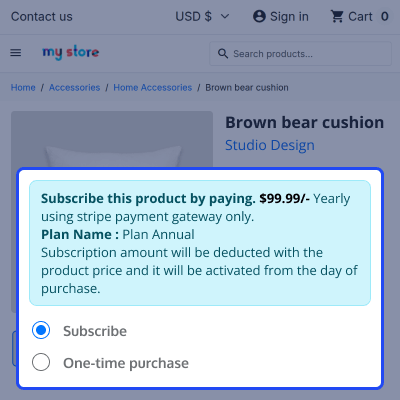
    Once created, assign the subscription plans to your products as per need. When a customer visits the product page, he can view the subscription plan and purchase it via the Stripe payment gateway. The module automatically charges the customer's account at regular intervals.

    Let Customers Manage Subscriptions Easily

    Customers can view a list of subscription plans they have purchased directly from their accounts. The module adds a simple "My Subscriptions" page to the customer's account area where they can:
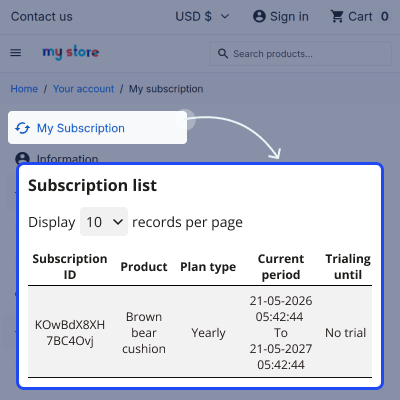
    • View a list of all the products they are currently subscribed to.
    • View their active subscription cycles (such as daily, weekly, or monthly plans).
    • View exactly how many days are left on their promotional free trials.
    • Cancel their recurring payments instantly and safely anytime with a single click.

    Prestashop Stripe Recurring Payment Gateway Features -

    • Create the stripe plans and assign to products for offering subscriptions.
    • Stripe Payment Gateway supports Mastercard, Visa, American Express, JCB, and Discover.
    • Offer alternate payment methods offered by Stripe to make the payments.
    • Create subscription plans for different frequencies i.e. daily, weekly, monthly, yearly, every 3 months, etc.
    • Assign products with or without combinations to the subscription plan.
    • Create the stripe plan on store itself, which will automatically synchronize to admin’s stripe account.
    • Provide refund in full or partial amount to customer for their order.
    • Update/Delete the assigned plan from the product.
    • Offer a trial period for subscription products.
    • View the separate list of transactions made through Stripe.
    • Choose to add the product amount with the subscription amount at the time of checkout or not.
    • Cancel the subscription of any customer.
    • Enable/Disable to offer other payment options like Klarna, AfterPay, Sofort, GiroPay, Ideal etc at checkout.
    • View the list of subscribed customers.
    • Synchronize the stripe plan from stripe account to prestashop.
    • Use the module either in test or live mode, as per the requirement.
    • Select default option as a one-time purchase or subscribe.
    • View the subscription details on product page.
    • View the subscription detail on the buyer’s order detail page.
    • The subscription amount deducts from the buyer’s account, as per the subscribed plan.
    • Choose to make the payment on the host website or redirect the customer to the Stripe website for payment.
    • Choose to display the alternative payment option either in the tabs or accordion on the self-host payment page.

    Prestashop Stripe Recurring Payment Gateway Support -

    For any query or issue please create a support ticket here http://webkul.uvdesk.com

    You may also check our other top-quality PrestaShop Modules.

    Specifications

    Product Version5.4.6
    Released9 years ago
    CategoryPrestaShopPayment
    Last UpdatedMay 20, 2026 (1 day ago)
    Supported VersionsPrestaShop  1.7.x.x​  8.x.x  9.x.x  
    Rating 4.8
    based on 6 reviews

    Recent Reviews

    Write a review

    Impeccable after-sales service

    Posted On - May 20, 2026

    Excellent product. Well done, Wekbul team

    Efficient communication

    Posted On - June 14, 2023

    Efficient communication and worked with me to personnalize the module

    Excellent 10/10

    Posted On - June 25, 2021

    Très bon module et l'équipe webkul répond rapidement comme toujours.
    I recommend this site.

    Excellent

    Posted On - March 19, 2021

    Excellent

    trop cool

    Posted On - May 14, 2020

    trop cool

    Load more reviews

    Frequently Asked Questions

     Can the customer purchase subscription and normal product together?
    Yes, customers can add both product types to the cart together. However, if the cart contains a subscription product, only the standard Stripe card payment option will be available at checkout.
     
     Can the admin add the product price with the plan price when a user adds a subscription product to the cart?
    Yes. The admin can choose whether to add the base product amount to the subscription cost at checkout or just charge the subscription fee by itself.
     
     If a user selects more than one quantity of a product, then it will multiply the plan quantity as per the product quantity on Stripe checkout?
    Yes. If a user buys 2 subscription items, the system will multiply the plan quantity so they are billed correctly on Stripe.
     
     Can admin offer the trial period for the plan?
    Yes, the admin can also add the trial period of the plan. The duration will start after the completion of the trial period.
     
     Which cards are supported by this Payment Gateway?
    Stripe Payment Gateway module supports Mastercard, Visa, American Express, JCB, and Discover.
     
     Can the admin apply the plans to the combinations as well?
    Yes, the admin can assign products with or without combinations to the subscription plan.
     
      Is this module compatible with the multi-shop feature?
    Yes. The module is fully compatible with PrestaShop's multi-store feature. You can manage separate subscription plans across different stores from a single admin panel.
     
     Does this module allow the purchase of recurring/subscription products with Stripe alternate payment methods?
    Yes, Customers can purchase subscription products with Stripe alternate payment methods by using Stripe hosted checkout.
     

    Move to Cloud Today

    AWS Free tier hosting for one year by amazon web services, for more details please visit AWS Free Tier.

    GCP Free tier hosting for one year with 300 credit points by google cloud platform, for more details please visit GCP Free Tier.

    Azure free tier hosting for one year with 25+ always free services, for more details please visit Azure Free Tier.

    In our default configuration we will provide tremendous configuration for your eCommerce Website which is fast to load and response.

    Default Configuration Details of Server

    • 1 GB RAM
    • 1 Core Processor
    • 30 GB Hard Disk
    • DB with 1 GB RAM and 1 Core Processor

    * Server Configuration may vary as per application requirements.

    Want to know more how exactly we are going to power up your eCommerce Website with Cloud to fasten up your store. Please visit the Cloudkul Services.

    Get Started with Cloud
    Not Available