USD
  • EUR
  • INR
  • USD
Cart
Cart 0
  • You have no items in your shopping cart.
    PrestaShop Extensions
    Cart
    Cart 0
    • You have no items in your shopping cart.
    Hire a Developer
    ×
    Contact Us!
    Send Again
    Close
    Please Login to Write Your Review
    Prestashop SumUp Payment

    Prestashop SumUp Payment

    x
    Free

    * Required Fields

    $49.00
    Add To Cart

    Prestashop SumUp Payment allows you to accept card payments quickly and securely in your PrestaShop store so you can offer your customers a simple, trusted way to pay.


    • Fast, secure card payments — Let customers pay by card using SumUp's trusted payment system.

    • Flexible checkout options — Choose popup payment or redirect to SumUp for a smooth checkout experience.

    • Control the payment form — Show or hide email and postal code fields based on what works best for your store.

    • Keep your brand visible — Option to show or hide the SumUp logo in the payment block.

    • Easy refunds from back office — Process refunds directly from the SumUp Transactions list in your PrestaShop admin.

    • Works with multiple currencies — Match your SumUp account currency with your store currency for hassle-free payments.


    NOTE: PrestaShop SumUp Payment is compatible with the PrestaShop Multi-store feature.

    Prestashop SumUp Payment
    Prestashop SumUp Payment
    $49.00
    PrestaShop Expert Certification Core Skills
    Check How It Works

    Need Help Deciding?

    Support answers within one business day.

    Open a ticket
    $49.00
    Configure and Buy
    X
    • Description
    • Reviews
    • FAQ
    • Specifications
    • Cloud Hosting
    • Changelog

    Prestashop SumUp Payment - With PrestaShop SumUp Payment, you can start accepting card payments in your online store without adding complexity to your checkout. SumUp is a well-known, easy-to-use payment solution that gives your customers a familiar and trusted way to pay.

    Whether you're a small business or growing store, this module helps you offer secure card payments with minimal setup. You decide how the payment form appears - in a popup or on a separate page - and you can control which details to collect from customers at checkout.

    PrestaShop doesn't include direct SumUp integration out of the box, so this module fills that gap by connecting your store to your SumUp merchant account securely. Additionally, you can manage everything from your PrestaShop back office.
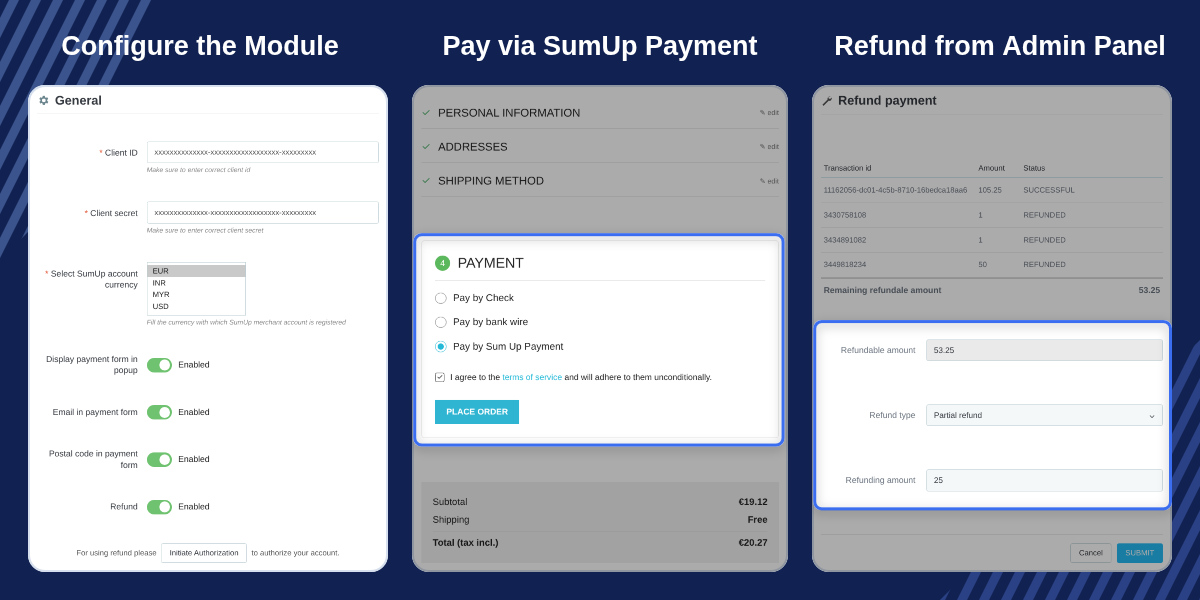
    Prestashop SumUp Payment

    Highlighted Features

     Simplified Checkout

    Customers can make payments for their orders on the same page without being redirected to another page.

     Multi-Currency Support

    Select which currencies from your SumUp account you want to accept, so payments only appear for supported currencies.

     Refund Management

    Make partial or full refunds for the orders placed via SumUp from the back office.

     3D Secure Authentication

    An additional layer of security for prevention against payment fraud.

    Workflow of the Module

    After installation of the module, you need to specify the App Id and secret you have received from your SumUp account for integrating the PrestaShop store with SumUp. You can choose to show the payment form in a popup on the checkout page. Also, you can display the zip code and email fields in the payment form. When a customer adds a product to the cart and selects the SumUp payment method, a popup appears on the checkout page where he needs to enter the card details to complete the payment.

    Module Workflow

    Refund Support

    Gain customer trust and enhance user experience by processing refunds for the orders with ease. Post-installation, a separate tab to manage the transactions gets added to the back office. From this tab, you can easily process full or partial refunds for the orders placed via SumUp.

    Refund Support

    Helps to reduce cart abandonment

    Many times, it has been observed that a customer leaves the website without checking out or placing the order. There can be many reasons for it. But, one such reason which plays an important role in cart abandonment is the availability of a sufficient number of payment methods.

    Here is a list of reasons why any eCommerce website should have multiple payment options.

    • Payment failure is very common & often takes place with almost every payment gateway. Other payment options will allow your customer to complete the payment & place the order successfully.
    • Some customers prefer some specific payment mode, others prefer some other payment mode. Hence, multiple payment gateways will ensure service to all kinds of your customers.
    Reduce Cart Abandonment

    Prestashop SumUp Payment Features -

    • Adds SumUp payment method for customers to pay for their orders.
    • Choose to show card details form in the Pop-up view.
    • View a list of transactions done using SumUp from a separate tab.
    • Easily process refunds for orders placed using SumUp.
    • Refund the amount partially or in full.
    • Show email and zip code fields in the card details popup.
    • The language in the popup will be the same as the context locale.
    • Compatible with the One Page checkout introduced in PrestaShop 9.2.0

    Prestashop SumUp Payment Support -

    For any query or issue, please create a support ticket here http://webkul.uvdesk.com

    You may also check our other top-quality PrestaShop Modules.

    Specifications

    Product Version4.0.5
    Released6 years ago
    Last UpdatedNovember 6, 2026 (19 days ago)
    Supported VersionsPrestaShop  1.7.x.x​  8.x.x  9.x.x  

    Ratings

    We'd love to hear your thoughts! Share your feedback and help us craft an even better experience tailored just for you.

    5.0
    1 Reviews
    based on verified customer feedback
    Write a review
    romuald
    romuald

    au top

    Posted On - December 4, 2025

    Module 100% fonctionnel, équipe au top je recommande fortement . J'ai mis 5 étoiles sa mérite même 10 .

      Frequently Asked Questions

     How can one register for and get app id and secret for module configuration?
    You have to register on https://me.sumup.com and follow the steps mentioned in the guide to get app secret and app id.
     
     Does it work with debit and credit card?
    Yes, You’ll be able to accept Visa, VPay, Mastercard, American Express, Diners Club, Discover cards.
     
     Who can receive a SumUp payment?
    Any service provider such as store owner, equipment dealer, auto mechanic, etc., may receive a virtual payment as long as they have a POS.
     
     What currencies are supported by SumUp?
    Supported currencies are "EUR" "BGN" "CHF" "CZK" "DKK" "GBP" "HUF" "NOK" "PLN" "SEK" "USD"
     
     Does this support both production mode and sandbox mode for testing?
    Yes, If you need a testing environment, please contact us through our contact form.
     Does this payment method takes the customer to different page for the payment?
    There are two different ways either the customer can be redirected to another page to fill out the card details OR you can enable the pop view.
     Is SumUp payment method is shown on the back office in order detail page?
    Yes, if the customer has created the order using the SumUp payment method then this payment method will be shown to the admin in the order detail page.
     

    Specification

    Detailed technical features and requirements to help you understand the module’s capabilities and ensure smooth integration with your system.

    Cloud Hosting for Websites & Applications

    Power your website or application with flexible, scalable cloud infrastructure designed for performance and growth.

    Move Your Website or Application to the Cloud

    Get started with Cloudkul hosting tailored to your needs.

    Flexible Cloud Plans Start small. Scale as you grow.
    Starting at US$25*
    ✓ Hosting for websites and applications
    ✓ Resources matched to your needs
    ✓ Scalable infrastructure for growth

    Configure Your Cloud Server

    RAM Flexible
    CPU Scalable
    Storage Flexible
    Built Around Your Project's Needs

    Choose server resources based on your workload, expected traffic, and performance requirements.

    Grow at Your Own Pace

    Start with the cloud resources your project needs today and adjust your server configuration as your business grows.

    Ready to Move to the Cloud?

    Explore flexible cloud hosting plans and choose your ideal configuration.

    Explore Cloud Hosting Plans

    * Starting price is indicative. Final pricing and available server resources depend on the selected hosting configuration and requirements.

    Change Logs

    Not Available