Send Again
Close
QloApps Booking iCalendar - QloApps Booking iCalendar adds an iCal Sync menu and an iCal Sync tab on every room type. Export links publish availability, and imported channel calendars update room availability on the property. It serves hotels, resorts, serviced apartments and guest houses that list rooms on more than one channel. Staff manage channels, schedule syncs, review logs and send booking calendar files from one module.
If you want to learn how to launch your free hotel website with the help of QloApps then Click Here
For any queries, technical issues, or assistance related to the QloApps Booking iCalendar module, please create a support ticket through our QloApps Support Portal.
You may also explore our other top-quality QloApps Add-ons to extend your property's management capabilities.
QloApps Booking iCalendar adds an iCal Sync menu and an iCal Sync tab on every room type. Export links publish availability, and imported channel calendars update room availability on the property. It serves hotels, resorts, serviced apartments and guest houses that list rooms on more than one channel. Staff manage channels, schedule syncs, review logs and send booking calendar files from one module.
Keeping room availability current across several booking channels by hand is time-consuming and a common cause of double bookings. Every booking, block or release needs a matching update on each channel calendar. The module centralises this work. Export links publish availability, scheduled imports apply channel events to rooms, and the sync log records the outcome of every event, so management always sees what was synced.
Copy or download a secure iCalendar link for each room type and share it with any channel that accepts calendar feeds.
Add each channel's calendar URL to a room type and import its events as room blocks in the Back Office.
Choose whether bookings, manually disabled dates, or both are published, and which order sources count as confirmed bookings.
Decide per channel which event types create room blocks and whether the end date is blocked as well.
Run a single cron command to refresh every active channel feed and update room availability automatically.
Limit exported and imported events to the number of days ahead you set, instead of including every future event.
Export the .ics file of a single order or download booking calendar files filtered by hotel and date range from the Orders page.
Attach the booking .ics file to order confirmation emails sent to customers, super admins, hoteliers, and employees.
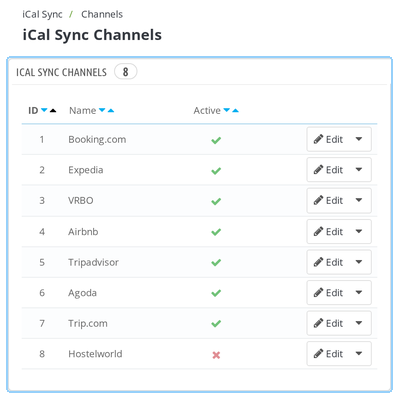
The QloApps Booking iCalendar module provides a dedicated Channels screen to manage booking channels used for calendar synchronization.
Booking.com, Expedia, VRBO, and Airbnb are available upon installation, and staff can add additional channels as required.
These settings help administrators control how calendar events are imported and how room availability is managed across channels.
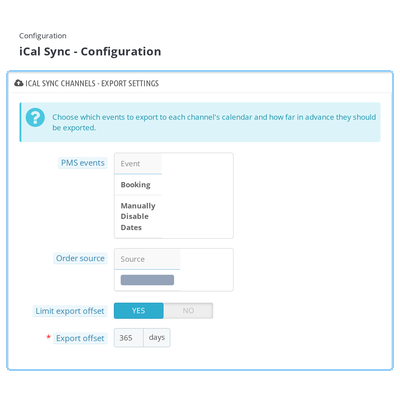
The Configuration screen allows administrators to manage export settings, email recipients, and scheduled calendar synchronization from a centralized interface.
Export Settings
Email Recipients
Enable the option to attach the booking iCalendar (.ics) file to order confirmation emails sent to customers, the super admin, hoteliers, and employees.
Cron Job Configuration
View the cron command used to import calendar feeds from all active channels and automatically refresh room availability.
These configuration options help streamline calendar management and automate availability synchronization.
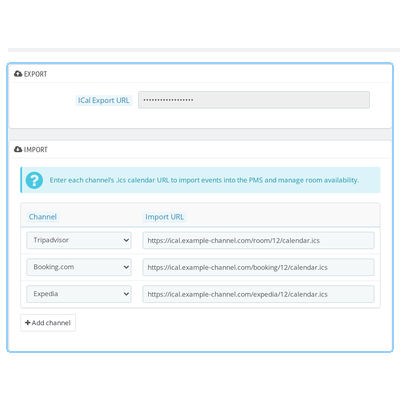
Each room type in QloApps includes a dedicated iCal Sync tab that allows administrators to export room availability and import calendar events from external channels.
Export iCalendar
Import iCalendar
This functionality helps administrators manage room availability using calendar feeds from multiple supported channels.
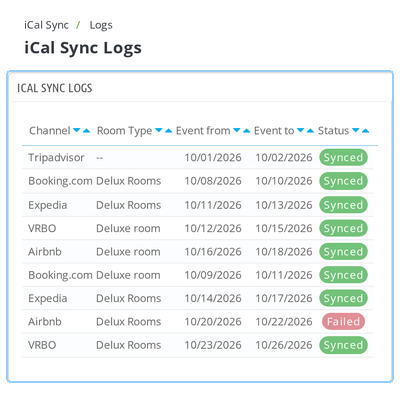
The iCal Sync Logs screen records imported calendar events and helps administrators monitor synchronization activity.
Each log entry displays the following information:
Administrators can use these records to verify whether channel bookings were imported for the correct room type and quickly identify synchronization failures. The Clear All Logs action allows administrators to clear existing log records when they are no longer needed.
For any queries, technical issues, or assistance related to the QloApps Booking iCalendar module, please create a support ticket through our QloApps Support Portal.
You may also explore our other top-quality QloApps Add-ons to extend your property's management capabilities.
Detailed technical features and requirements to help you understand the module’s capabilities and ensure smooth integration with your system.
Detailed technical features and requirements to help you understand the module’s capabilities and ensure smooth integration with your system.
We’re partnered with top-tier, trusted providers!
Want to know more how exactly we are going to power up your eCommerce Website with Cloud to fasten up your store
* Server Configuration may vary as per application requirements.



