USD
  • EUR
  • INR
  • USD
Cart
Cart 0
  • You have no items in your shopping cart.
    Cart
    Cart 0
    • You have no items in your shopping cart.
    Hire a Developer
    ×
    Contact Us!
    Send Again
    Close
    Please Login to Write Your Review

    QloApps SMS Notification

    QloApps SMS Notification:QloApps SMS Notification is an add-on for QloApps which will allow you to send SMS to your guests. By default, there are six SMS service providers (Plivo, Twilio, ClickSend, TextLocal, SendinBlue, and Onehop) available in this module.


    Screenshots
    $99.00

    * Required Fields

    Add To Cart
    $99.00
    Configure and Buy
    • Description
    • Reviews
    • FAQ
    • Customers ()
    • Specifications
    • Cloud Hosting
    • Changelog

    QloApps SMS Notification - SMS is the most effective way to communicate with your guests. They keep your guests well informed about their booking status.This will create a better customer experience and increase their trust in you.

    And this will ultimately increase customer loyalty and sales.SMS Notification module allows admin to send order status notifications to their guests via SMS.

    By default, there are six SMS service providers (Plivo, Twilio, ClickSend, TextLocal, SendinBlue, and Onehop) available in this module

    If you want to learn how to launch your free hotel website with the help of QloApps then Click Here

    QloApps SMS Notification Features -

    • Send SMS notification guest mobile number or home number
    • Add prefix to customer mobile number.
    • Enable/disable order confirmation SMS.
    • Customize the order confirmation message.
    • Enable/disable order status update SMS.
    • Customize the order status message.
    • Select the order status for which you want to send the SMS notification.
    • Admin also has the option to add all the SMS notification messages in different languages.
    • The guest will be notified as the order gets placed and when the admin updates the status.
    • Guests will receive a notification if the order gets canceled.

    API Setting

    To enable SMS functionality, Admin select an SMS provider from the list and enter the required credentials
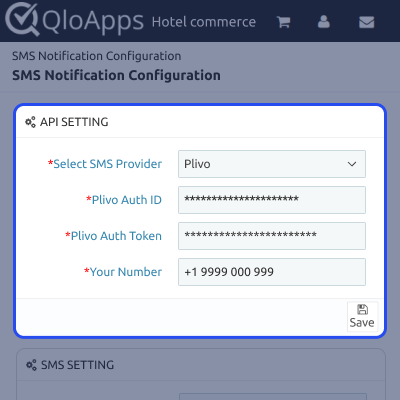
    api configuration

    SMS Setting

    This section allows the admin to choose whether SMS messages should be sent to the guest’s mobile number or their home number. Admin can also choose to add a country code prefix to the phone numbers before sending.
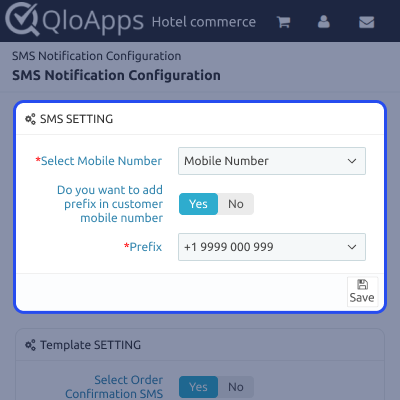
    sms configuration

    Template Setting

    The SMS Template section allows the admin to define and control the content of SMS messages sent to customers. These messages can be triggered by various actions such as order confirmations and order status updates.
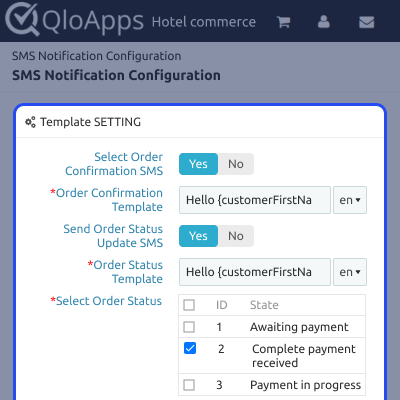
    template configuration

    QloApps SMS Notification Support -

    For any query or issue, please create a support ticket here http://webkul.uvdesk.com

    You may also check our other top-quality QloApps Add-ons.

    Specifications

    Product Version4.0.0
    Released6 years ago
    Last UpdatedAugust 14, 2025 (6 months ago)
    Supported VersionsQloApps  1.6.x  1.7.x  
    Write a review

    Move to Cloud Today

    AWS Free tier hosting for one year by amazon web services, for more details please visit AWS Free Tier.

    GCP Free tier hosting for one year with 300 credit points by google cloud platform, for more details please visit GCP Free Tier.

    Azure free tier hosting for one year with 25+ always free services, for more details please visit Azure Free Tier.

    In our default configuration we will provide tremendous configuration for your eCommerce Website which is fast to load and response.

    Default Configuration Details of Server

    • 1 GB RAM
    • 1 Core Processor
    • 30 GB Hard Disk
    • DB with 1 GB RAM and 1 Core Processor

    * Server Configuration may vary as per application requirements.

    Want to know more how exactly we are going to power up your eCommerce Website with Cloud to fasten up your store. Please visit the Cloudkul Services.

    Get Started with Cloud
    Not Available


