USD
  • INR
  • USD
Cart
Cart 0
  • You have no items in your shopping cart.
    Cart
    Cart 0
    • You have no items in your shopping cart.
    Hire a Developer
    ×
    Contact Us!
    Send Again
    Close
    Please Login to Write Your Review

    QloApps Social Login

    QloApps Social Login is an add-on that simplifies user access to your website by allowing them to log in using their existing accounts on Google, Facebook, X (Twitter), Apple, LinkedIn, and Amazon.
    With this feature, users can skip the traditional registration process and instantly log in with a single click, making the booking experience smoother and faster.

    Note: This module is compatiable with QloApps version 1.7.0.

    Screenshots
    $35.00

    * Required Fields

    Add To Cart
    $35.00
    Configure and Buy
    • Description
    • Reviews
    • FAQ
    • Customers ()
    • Specifications
    • Cloud Hosting
    • Changelog

    QloApps Social Login - In today’s fast-paced digital world, social media platforms like Google, Facebook, X (Twitter), Apple, LinkedIn, and Amazon play a significant role in online interactions. Nearly every user is already registered on these platforms, making it essential to leverage their convenience for a seamless login experience.

    QloApps Social Login allows users to effortlessly log in to your hotel booking website using their existing social media accounts. This streamlined process enhances user engagement, reduces friction, and improves conversion rates, providing a hassle-free experience for your guests.

    With QloApps Social Login, you can simplify the booking process and ensure a smoother journey from sign-up to reservation, ultimately increasing customer satisfaction and loyalty.

    QloApps Social Login

    If you want to learn how to launch your free hotel website with the help of QloApps, then Click Here.

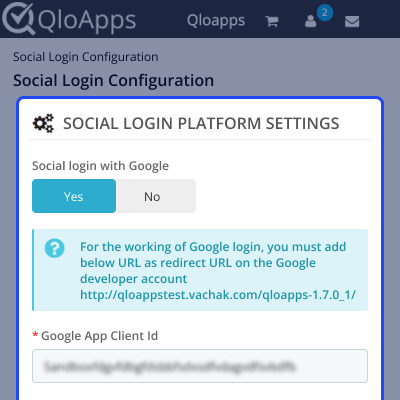
    QloApps Social Login Configurations

    Social Login Display
    • Configure the display settings for social login buttons on various pages like the home page, checkout page, and sign-up page.
    • Display social login buttons with either a logo only or both the logo and the platform name for better clarity.
    • Preview the social login button layout before applying it to ensure it fits seamlessly with the website's design.
    • Enable or disable social login options based on the pages where you want them to appear for a tailored user experience.

    Google Login Configuration

    Google Login Configuration
    • Set up a project in Google Cloud Console and configure Google OAuth credentials.
    • Provide the generated API keys and OAuth 2.0 credentials in the QloApps admin panel to enable Google login for users.

    X (Twitter) Login Configuration

    Twitter Login Configuration
    • Create a Twitter Developer account and configure the necessary API keys.
    • Provide the API keys and authentication tokens in the QloApps admin panel for Twitter login integration.

    QloApps Social Login Addon Support

    For any queries or assistance regarding the QloApps Social Login Addon, please create a support ticket at Webkul Support.

    Explore our other high-quality QloApps Add-ons to further enhance your hotel management system.

    Specifications

    Product Version1.2.1
    Released6 years ago
    CategoryQloAppsSocial Media
    Last UpdatedSeptember 23, 2025 (2 months ago)
    Supported VersionsQloApps  1.6.x  1.7.x  
    Write a review

    Move to Cloud Today

    AWS Free tier hosting for one year by amazon web services, for more details please visit AWS Free Tier.

    GCP Free tier hosting for one year with 300 credit points by google cloud platform, for more details please visit GCP Free Tier.

    Azure free tier hosting for one year with 25+ always free services, for more details please visit Azure Free Tier.

    In our default configuration we will provide tremendous configuration for your eCommerce Website which is fast to load and response.

    Default Configuration Details of Server

    • 1 GB RAM
    • 1 Core Processor
    • 30 GB Hard Disk
    • DB with 1 GB RAM and 1 Core Processor

    * Server Configuration may vary as per application requirements.

    Want to know more how exactly we are going to power up your eCommerce Website with Cloud to fasten up your store. Please visit the Cloudkul Services.

    Get Started with Cloud
    Not Available


