USD
  • EUR
  • INR
  • USD
Cart
Cart 0
  • You have no items in your shopping cart.
    Cart
    Cart 0
    • You have no items in your shopping cart.
    Hire a Developer
    ×
    Contact Us!
    Send Again
    Close
    Please Login to Write Your Review
    Product Image
    Technology Partner Awards.
    Top Selling Extension Winner
    2 times in a row

    Adobe Commerce PIM Integration

    Adobe Commerce PIM Integration automatically syncs products, categories, attributes, and media files between Adobe Commerce and PIM/PXM platforms.


    • Manage product data from one platform.

    • Sync products between Adobe Commerce and PIM systems.

    • Sync categories, attributes, and images.

    • Get instant updates with webhooks.

    • Sync only updated data with delta sync.

    • Create custom import and export profiles.

    • Schedule sync jobs with cron.

    • Process large sync tasks in queues.

    • Map attributes and store views.

    • View sync logs and error reports.

    Technology Partner Awards.
    Top Selling Extension Winner
    2 times in a row
    Screenshots
    $199.00

    * Required Fields

    Add To Cart
    $199.00
    Configure and Buy
    • Description
    • Reviews
    • FAQ
    • Customers ()
    • Specifications
    • Cloud Hosting
    • Changelog

    Adobe Commerce PXM Connector syncs products, categories, attributes, and images automatically between Adobe Commerce and connected PIM or PXM platforms. It also supports instant product updates using webhooks.

    Adobe Commerce PIM Integration helps merchants manage product information for multiple stores and sales channels from one centralized platform. Admins can create multiple import and export profiles with separate settings, mappings, and synchronization configurations based on different business requirements.

    Adobe Commerce Catalog Management supports product imports based on completeness rules. This helps ensure that only complete and ready product data appears on the storefront.

    The module also provides sync history and error logs, making it easier for admins to monitor product synchronization activities and troubleshoot issues quickly.
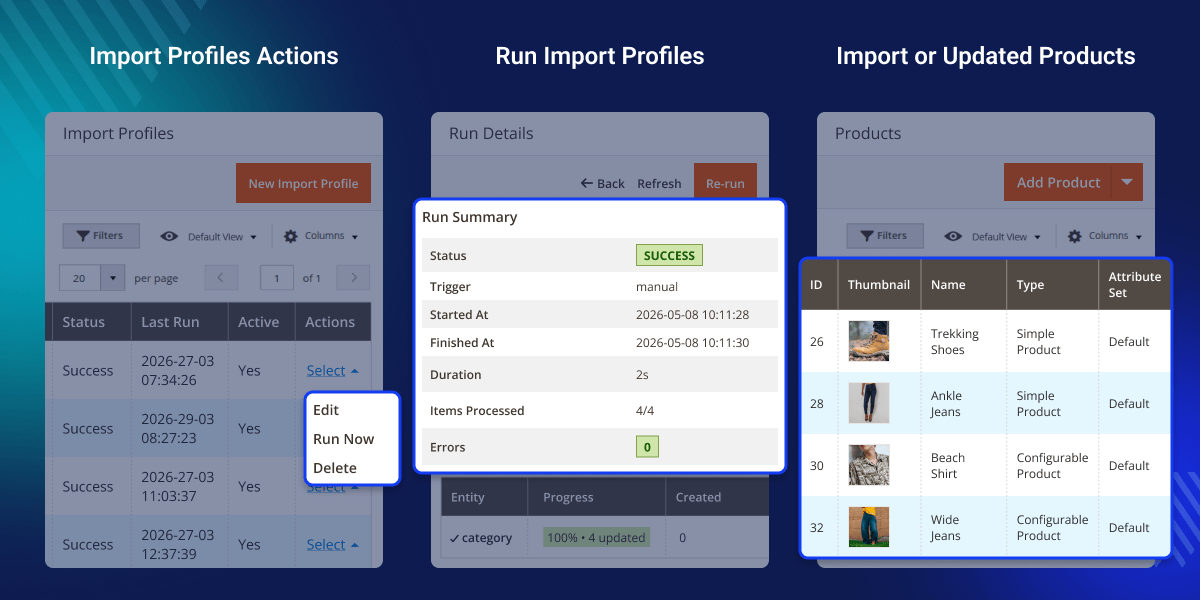
    Adobe Commerce PXM Connector

    Highlighted Features of Adobe Commerce PIM Integration

     Manage Products

    Manage all product information from one PIM or PXM platform.

     Two-Way Product Sync

    Sync product updates between Adobe Commerce and connected systems.

     Category Sync

    Keep categories synchronized across all connected platforms.

     Attribute Sync

    Sync product attributes and attribute families automatically.

     Media Sync

    Import and export product images and media files.

     Real-Time Updates

    Use webhooks to update product data instantly.

     Delta Sync

    Sync only changed data to improve performance and save time.

     Scheduled Sync

    Run automatic synchronization jobs using cron settings.

     Import and Export Profiles

    Create custom profiles for different synchronization tasks.

     Attribute Mapping

    Map attributes between Adobe Commerce and connected PIM platforms.

    Why Do We Need the PIM Integration Module?

    Managing product catalogs manually takes time and increases the chances of errors, especially for businesses handling large product data across multiple sales channels.

    Adobe Commerce does not provide a built-in Open Source PIM integration, making catalog management difficult for growing businesses. It's Catalog Sync helps automate product updates, category management, attribute synchronization, and media transfers between systems.

    The module improves product data accuracy, reduces manual work, and simplifies catalog management for multiple stores and marketplaces. Adobe Commerce PXM Integration also supports real-time updates, scheduled cron jobs, and custom import or export profiles for flexible synchronization workflows.

    Use Cases

    • Large Catalog Management

      Sync thousands of products automatically across connected systems.

    • Multi-Store Management

      Keep product data consistent across multiple Adobe Commerce stores.

    • Automatic Product Updates

      Update product data instantly using webhook-based synchronization.

    • Enterprise Catalog Management

      Manage complete product information from one centralized platform.

    Configuration

    Admins can configure the Adobe Commerce PIM connector directly from the Adobe Commerce admin panel.
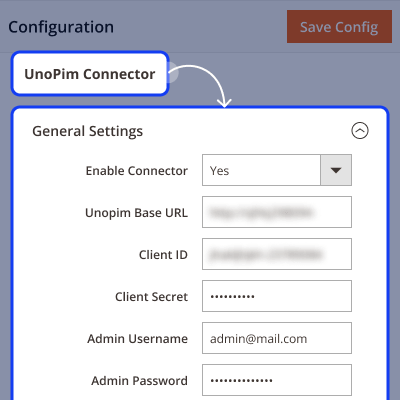
    • Enable or disable the connector anytime
    • Configure UnoPim base URL settings
    • Add client ID and client secret credentials
    • Manage admin authentication details securely
    • Test API connection instantly from the backend
    Configuration

    Import Profiles

    Admins can create multiple import profiles for different synchronization tasks and product channels.
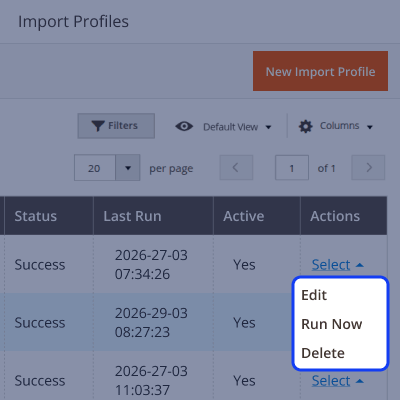
    • Create multiple profiles for different products or channels
    • Support delta import for faster synchronization
    • Map attributes for accurate product data transfer
    • Run scheduled imports using cron execution
    • Manage flexible import settings for different workflows
    Import Profiles

    Export Profiles

    Adobe Commerce Product Import Export helps export catalog data to connected platforms.
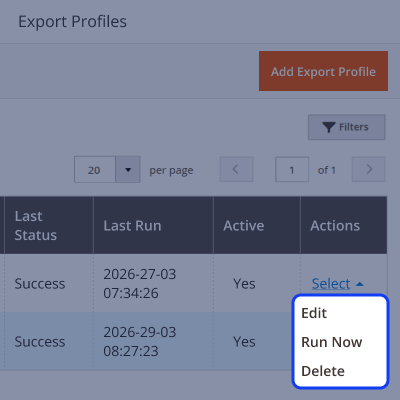
    • Export products and attributes
    • Map entities to PIM/PXM standards
    • Automated scheduled exports
    • View detailed logs
    Export Profiles

    Support

    For any query or issue, please create a support ticket here http://webkul.uvdesk.com/

    You may also check our top-quality Magento 2 Extensions.

    Specifications

    Product Version4.0.0
    Released5 days ago
    CategoryMagento 2
    Last UpdatedMay 15, 2026 (Today)
    Supported VersionsMagento  2.0.x  2.1.x  2.2.x  2.3.x  2.4.x  
    Write a review

    Frequently Asked Questions

      Does this module support multiple stores?
    Yes, this connector keeps product data synchronized across multiple stores and sales channels.
     
      Can I schedule synchronization?
    Yes, Adobe Commerce Product Synchronization supports cron jobs for automatic import and export updates.
     
      Are media files synced automatically?
    Yes, Adobe Commerce PXM Integration syncs product images, media files, and catalog data automatically.
     
      Can I map custom attributes?
    Yes, Adobe Commerce Catalog Management supports custom attribute mapping between connected platforms.
     
      Can I track sync history and errors?
    Yes, the module stores synchronization logs, history, and error reports for tracking and monitoring.
     
      Are real-time updates possible?
    Yes, Adobe Commerce PXM Connector uses webhooks for instant product updates.
     
      Can multiple profiles be created?
    Yes, Adobe Commerce Integration supports multiple synchronization profiles for different tasks and workflows.
     
      Is this module compatible with open-source PIMs?
    Yes, this extension works with Open Source PIM for Adobe Commerce platforms.

    Move to Cloud Today

    AWS Free tier hosting for one year by amazon web services, for more details please visit AWS Free Tier.

    GCP Free tier hosting for one year with 300 credit points by google cloud platform, for more details please visit GCP Free Tier.

    Azure free tier hosting for one year with 25+ always free services, for more details please visit Azure Free Tier.

    In our default configuration we will provide tremendous configuration for your eCommerce Website which is fast to load and response.

    Default Configuration Details of Server

    • 1 GB RAM
    • 1 Core Processor
    • 30 GB Hard Disk
    • DB with 1 GB RAM and 1 Core Processor

    * Server Configuration may vary as per application requirements.

    Want to know more how exactly we are going to power up your eCommerce Website with Cloud to fasten up your store. Please visit the Cloudkul Services.

    Get Started with Cloud
    • - Feature Add (+)
    • - Feature remove (-)
    • - Bug Fixed (!)
    • - Modification (*)
    Version 1.0.0
    • + Initial release of Magento 2 connector for UnoPim PIM.
    • + Added UnoPim API PHP client SDK integration for authenticated communication with UnoPim instances.
    • + Added bidirectional synchronization between UnoPim and Magento 2.
    • + Added product, category, attribute, family, and media gallery import support from UnoPim to Magento 2.
    • + Added product, category, attribute, and family export support from Magento 2 to UnoPim.
    • + Added scope-aware payload routing based on UnoPim attribute channel and locale settings.
    • + Added POST to PUT fallback pattern to reduce unnecessary API calls.
    • + Added pagination support with targeted attribute loading for better performance.
    • + Added Attribute Mapping admin module with standard attributes, custom attributes, product associations, and store view mapping support.
    • + Added live source dropdowns from the UnoPim API.
    • + Added default mapping installation patch with 27 standard attribute codes.
    • + Added import and export profile system with channel, locale, SKU, category, attribute-set, status, delta-sync, and cron configuration support.
    • + Added export profile options for mapping selection, attribute strategy, and skip existing data configuration.
    • + Added Run History UI with live progress bars and color-coded synchronization counters.
    • + Added per-item synchronization ticker during running processes.
    • + Added Pause, Resume, Stop, and Re-run functionality with SKU filter support.
    • + Added automatic polling with heartbeat status monitoring.
    • + Added searchable error reporting section with entity filters, grouped messages, and CSV download support.
    • + Added detached background runner support using proc_open and nohup execution.
    • + Added synchronization status state machine for running, paused, cancelled, and resumed states.
    • + Added throttled polling support with pause and cancel handling between synchronization items.
    • + Added HMAC-SHA256 signed webhook support for real-time UnoPim event ingestion.
    • + Added email reports with synchronization summary counts.
    • + Added configurable post-sync cache flush and indexer reindex hooks.
    • + Added entity mapping table for fast synchronization upserts.
    • + Added completeness threshold filter to import incomplete products as disabled.
    • + Added CLI commands for product, category, attribute, family, and full synchronization execution.
    • + Added CLI commands for profile execution and product export debugging.
    • + Added i18n support with translated phrases and wrapped JavaScript localization strings.
    • + Added Magento 2 standard module folder structure and architecture support.
    • + Added installation, configuration, usage, and troubleshooting documentation with admin screenshots.


