USD
  • EUR
  • INR
  • USD
Cart
Cart 0
  • You have no items in your shopping cart.
    Cart
    Cart 0
    • You have no items in your shopping cart.
    Hire a Developer
    ×
    Contact Us!
    Send Again
    Close
    Please Login to Write Your Review

    Akeneo ERPNext Connector

    Akeneo ERPNext Connector helps you transfer data between Akeneo PIM and ERPNext. It lets you manage product data in Akeneo and send it to ERPNext with ease.


    • Export categories from Akeneo to ERPNext.

    • Export attributes and attribute options from Akeneo to ERPNext.

    • Export products and brands from Akeneo to ERPNext.

    • Manage ERPNext credentials from the Akeneo ERPNext menu.

    • Map Akeneo product attributes to ERPNext Item fields.

    • Configure custom Akeneo attributes for ERPNext custom fields.

    • Configure ERPNext custom tab placement for synced attributes.

    • Sync primary product images from Akeneo to ERPNext.

    • Sync additional product images as attachments in ERPNext.

    • Enable or disable media export using export profiles in ERPNext.

    • Access full ERPNext connector documentation tab inside Akeneo menu.

    Screenshots
    Akeneo ERPNext Connector Akeneo ERPNext Connector Akeneo ERPNext Connector Akeneo ERPNext Connector Akeneo ERPNext Connector Akeneo ERPNext Connector Akeneo ERPNext Connector Akeneo ERPNext Connector Akeneo ERPNext Connector
    Show More Hide All
    $399.00

    * Required Fields

    Add To Cart
    $399.00
    Configure and Buy
    • Description
    • Reviews
    • FAQ
    • Customers ()
    • Specifications
    • Cloud Hosting
    • Changelog

    Akeneo ERPNext Connector links Akeneo PIM with ERPNext. It makes product data management easy across both systems. ERPNext Integration for Akeneo lets you export categories, products, attributes, brands, and images from Akeneo to ERPNext. It keeps your ERPNext data up to date.

    The connector is easy to set up. You can map Akeneo attributes to ERPNext item fields. You can also use custom fields. The module supports image export. It can sync the product image and also send extra images as attachments based on your ERPNext settings.

    Export profiles help you choose which data to send. This gives you better control over exports. This connector is useful for businesses that use Akeneo as their main PIM system. It helps keep product data correct for inventory and order tasks.
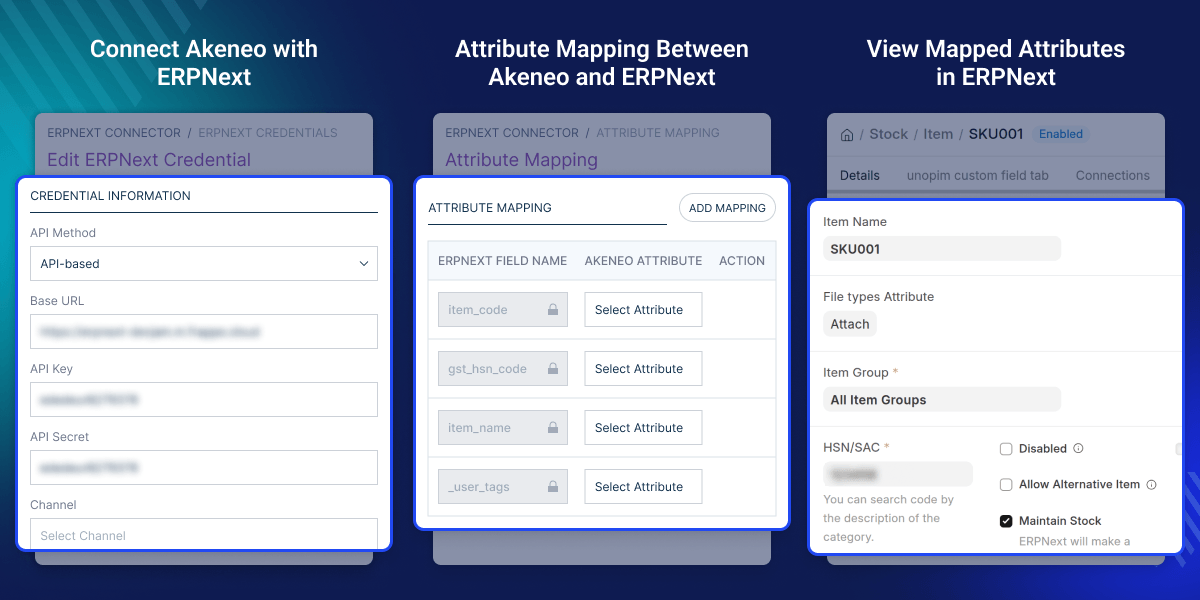
    Akeneo ERPNext Connector

    Highlighted Features

     Complete Product Data Export

    Export products, categories, attributes, and brands from Akeneo to ERPNext in a clear and reliable way.

     Flexible Attribute Mapping

    Map Akeneo attributes to ERPNext Item fields. This helps keep the right product structure.

     Media Export Control

    Use export profiles to turn media export on or off based on your needs.

     Documentation Access Inside Akeneo

    Get access to the full connector documents from Akeneo ERPNext menu.

    Why Do We Need Akeneo ERPNext Connector?

    Akeneo is a reliable product information management system. ERPNext needs well-structured product data for daily work and inventory tasks. Without a connector, teams must export data by hand. This can cause delays and data errors.

    This module sends data from Akeneo to ERPNext. It keeps product data correct and ready for business use. It helps avoid errors that come from repeated imports and exports. For growing businesses, it gives better speed, accuracy, and control over product data across both the systems.

    Use Cases

    Central Product Management

    Manage all product data in Akeneo and send it to ERPNext for daily operations.

    One-Way Data Sync

    Send data updates from Akeneo to ERPNext to keep ERP data aligned.

    Structured Product Data Flow

    Keep product attributes, categories, and brands the same across both systems.

    Media and Image Management

    Sync product images from Akeneo to ERPNext directly.

    Connect Akeneo with ERPNext

    ERPNext Akeneo Connector helps you connect Akeneo with ERPNext in a safe and simple way. You can manage exports, credentials, and sync settings from one place.
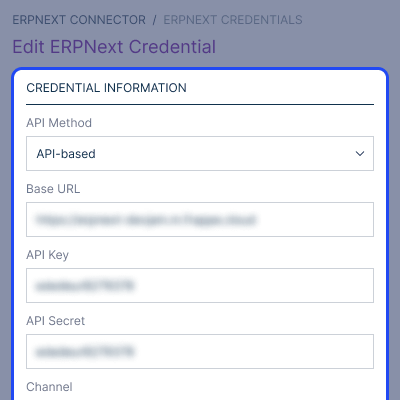
    • Set up a secure ERPNext API connection inside Akeneo.
    • Export product data in a clear format.
    • Choose which data to send to ERPNext.
    • Manage many export profiles with ease.
    • Reduce manual work and data errors.
    Connect Akeneo with ERPNext

    Attribute Mapping Between Akeneo and ERPNext

    This helps you match Akeneo attributes with ERPNext item fields. It allows smooth data transfer with less manual work.
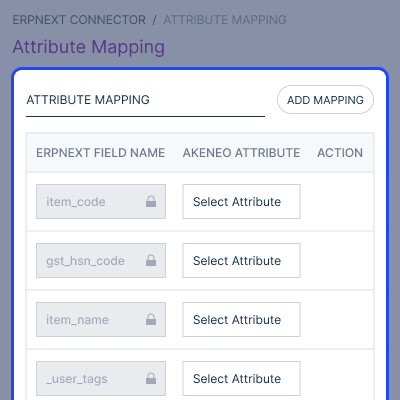
    • Set up flexible attribute mapping between Akeneo and ERPNext fields.
    • Reduce manual field mapping and adjustment efforts.
    • Ensure mapped attributes are synchronized accurately.
    Attribute Mapping Between Akeneo and ERPNext

    Product and Media Export

    This feature helps you send product data and media from Akeneo to ERPNext.
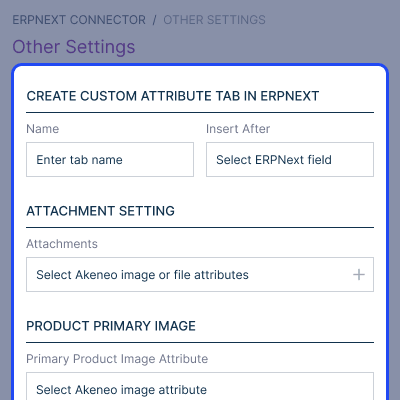
    • Keep product images and attachments in sync during export.
    • Export products and media in a structured format.
    • Reduce manual work and improve data quality.
    Product and Media Export

     Support

    For any query or issue, please create a support ticket here http://webkul.uvdesk.com/. You may also check our top-quality Akeneo Extensions.

    Specifications

    Product Version1.0.0
    Released13 days ago
    CategoryAkeneoAkeneo Add-Ons
    Last UpdatedJune 11, 2026 (13 days ago)
    Supported VersionsAkeneo  7.x.x  
    Write a review

    Frequently Asked Questions

     What does Akeneo ERPNext Connector do?
    It connects Akeneo with ERPNext. It exports products, categories, attributes, brands, and images in a clear format for easy ERP management.
     
     Does it support attribute mapping?
    Yes, it can map Akeneo attributes to ERPNext item fields. You can also use custom fields for more flexibility.
     
     Can I export product images?
    Yes, it supports primary image syncing as well as additional images as attachments in ERPNext.
     
     Does it support custom fields in ERPNext?
    Yes, you can map Akeneo attributes to ERPNext custom fields and organize them in custom tabs.
     
     Can I control what data is exported?
    Yes, export profiles let you choose which data to export, including media, attributes, and categories.
     
     Where can I manage ERPNext credentials?
    You can manage ERPNext API credentials directly from ERPNext Connector for Akeneo menu.

    Move to Cloud Today

    AWS Free tier hosting for one year by amazon web services, for more details please visit AWS Free Tier.

    GCP Free tier hosting for one year with 300 credit points by google cloud platform, for more details please visit GCP Free Tier.

    Azure free tier hosting for one year with 25+ always free services, for more details please visit Azure Free Tier.

    In our default configuration we will provide tremendous configuration for your eCommerce Website which is fast to load and response.

    Default Configuration Details of Server

    • 1 GB RAM
    • 1 Core Processor
    • 30 GB Hard Disk
    • DB with 1 GB RAM and 1 Core Processor

    * Server Configuration may vary as per application requirements.

    Want to know more how exactly we are going to power up your eCommerce Website with Cloud to fasten up your store. Please visit the Cloudkul Services.

    Get Started with Cloud
    • + Features
    • - Bugs
    Version 1.0.0
    • + Export categories from Akeneo to ERPNext.
    • + Export attributes and attribute options from Akeneo to ERPNext.
    • + Export products from Akeneo to ERPNext.
    • + Export brands from Akeneo to ERPNext.
    • + Manage ERPNext credentials from the Akeneo ERPNext menu.
    • + Map Akeneo product attributes to ERPNext Item fields.
    • + Configure custom Akeneo attributes for ERPNext Item custom fields.
    • + Configure ERPNext custom tab placement for synced custom attributes.
    • + Configure product primary image syncing from Akeneo to ERPNext.
    • + Configure additional product image attachment syncing from Akeneo to ERPNext.
    • + Support media export toggle in ERPNext product export profiles.
    • + Provide ERPNext connector documentation inside the Akeneo ERPNext menu.


