Akeneo Omni AI Content Generator
Akeneo Omni AI Content Generator for Akeneo PIM helps you create product content with AI inside your PIM. You can quickly generate, update, and manage product data using simple AI prompts. This makes the work faster and easier.
- Automatically create product content using product information.
- Generate AI content while editing a product.
- Create content for many products at once using bulk actions.
- Use AI from different platforms.
- Make content easily using simple AI prompts.
- Works with Text and Textarea fields.
- Create content in multiple languages.
- Keep product content consistent and high-quality.
- Control the tone, style, and structure of AI content.
- Use real product data automatically in AI content.
- Save prompts to use again later.
- Preview AI content before saving.
- Easily manage and activate AI credentials.
- Generate content for new or existing products.
- Improve product images with AI-generated visuals.
- Description
- Reviews
- FAQ
- Customers ()
- Specifications
- Cloud Hosting
- Changelog
Akeneo Omni AI Content Generator uses AI to create product content using real product data from Akeneo. You can use prompts with product attribute references. AI reads the product data and generates relevant content automatically.
The connector can generate content for one product or many products at the same time. This helps keep product content accurate across large catalogs.
The connector also supports multiple languages and flexible AI platforms. It helps reduce manual work, improve content quality, and speed up catalog updates.
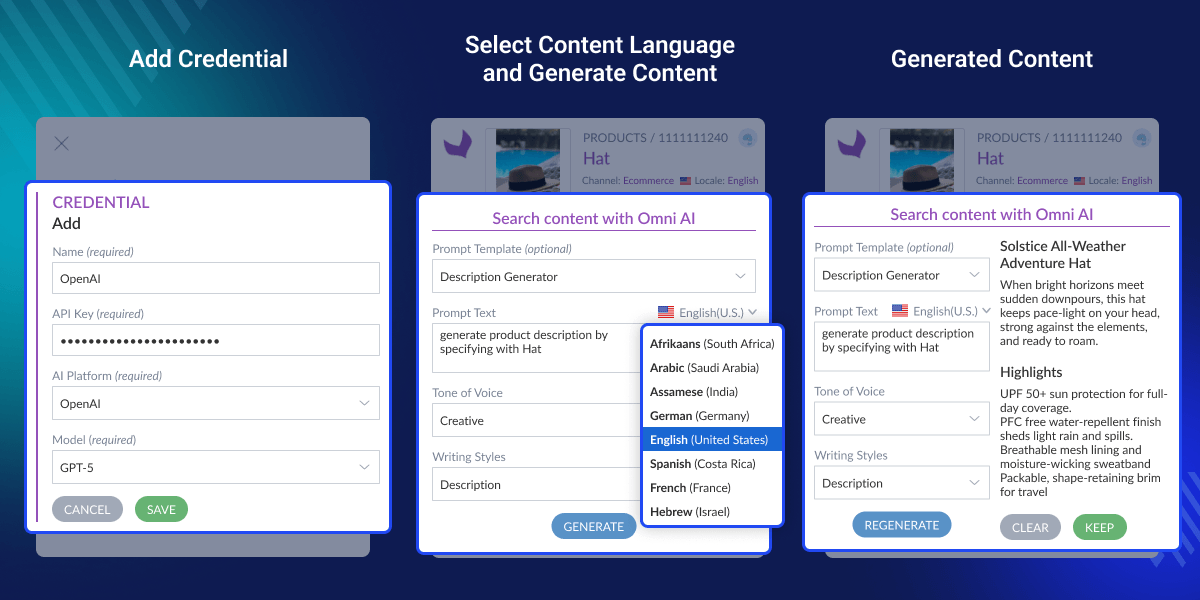
Highlighted Features
Content Generation
Generate AI content directly from the Product Edit Page using saved prompts.
Bulk Content Creation
Generate AI content for multiple products at once using mass actions.
Prompt-Based Control
Control tone, structure, and style using custom prompts.
Multilingual Support
Generate product content in multiple languages (locales).
Multi-Platform AI Support
Use separate credentials for different AI platforms.
Flexible Credential Management
Easily manage and activate AI credentials.
Attribute-Based Generation
Generate content directly in Text and Textarea attributes.
Scalable Architecture
Built to support large catalogs and future AI features.
Why Do You Need Akeneo Omni AI Content Generator?
Akeneo Omni AI Content Generator gives you control over how AI creates product content. You can connect multiple AI platforms like OpenAI, Gemini, Groq, or Claude and choose what works best for your store.
This helps you manage and grow your product catalog without relying on a single AI provider. You can also enhance your catalog with images using the Akeneo AI Image Generator module.
AI Credential Configuration
Manage and control which AI platforms generate product content.
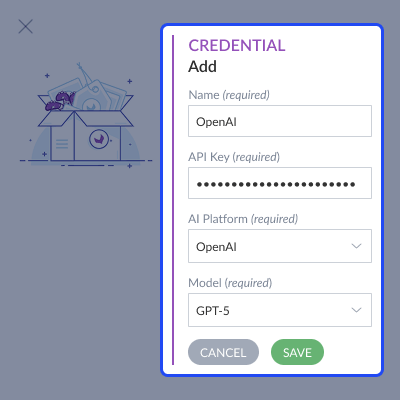
- Create and manage credentials for different AI platforms.
- Enter API keys for each AI service.
- Select the AI platform and model to use.
- Enable only the required credentials.
- Control which AI service generates content.
- Switch between AI platforms anytime.

Dynamic Prompt Creation
Create prompts to control how AI generates product content.
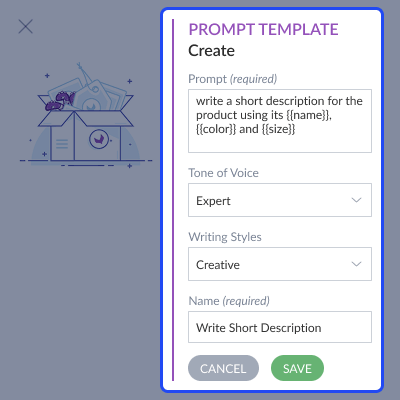
- Create multiple prompts as per your needs.
- Set prompt name, tone, and writing style.
- Use product attributes to add data automatically.
- Let AI use real product data for content generation.
- Save prompts for reuse anytime.

Single Product AI Content Generation
Generate AI content directly from the product edit page.
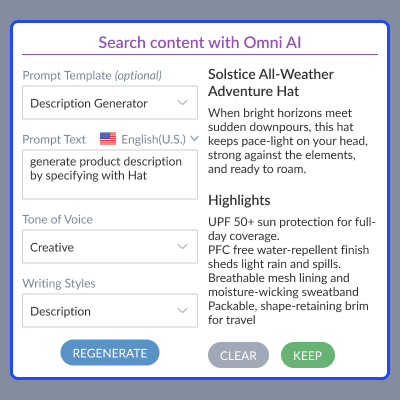
- Open a product in edit mode.
- Click Omni AI next to Text or Textarea attribute.
- Generate content using saved prompt and credential.
- Preview generated content.
- Apply and save content to the product.

Bulk AI Content Generation
Generate AI content for multiple products at once.
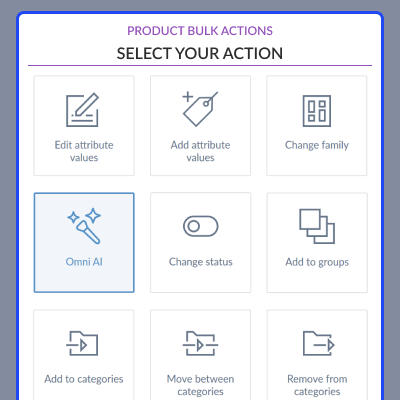
- Select multiple products.
- Use Bulk Action → Omni AI.
- Choose prompt and target attributes.
- Generate preview before applying.
- Apply content in bulk with success confirmation.

Multilingual Content Generation
Create product content in multiple languages.
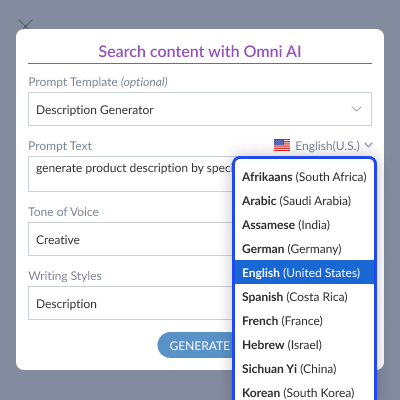
- Generate content based on enabled locales.
- Create content in different languages using prompts.
- Add content for different channels and products.
- Support multilingual product catalogs.

Attribute-Based Smart Generation
Generate content using real product attribute values.
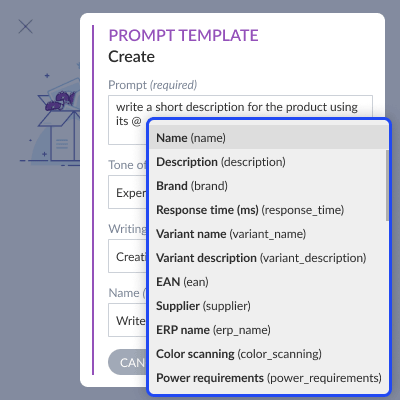
- Use @ to include product attributes in prompts.
- AI reads actual product values automatically.
- Generate accurate product content.
- Keep data consistent across the catalog.

Support
For any query or issue, please create a support ticket here http://webkul.uvdesk.com/. You may also check our top-quality Akeneo Extensions.
Specifications
Frequently Asked Questions
Move to Cloud Today
AWS Free tier hosting for one year by amazon web services, for more details please visit AWS Free Tier.
GCP Free tier hosting for one year with 300 credit points by google cloud platform, for more details please visit GCP Free Tier.
Azure free tier hosting for one year with 25+ always free services, for more details please visit Azure Free Tier.
In our default configuration we will provide tremendous configuration for your eCommerce Website which is fast to load and response.
Default Configuration Details of Server
- 1 GB RAM
- 1 Core Processor
- 30 GB Hard Disk
- DB with 1 GB RAM and 1 Core Processor
* Server Configuration may vary as per application requirements.
Want to know more how exactly we are going to power up your eCommerce Website with Cloud to fasten up your store. Please visit the Cloudkul Services.
Get Started with Cloud- + Features
- - Bugs
- + Product content generation using multiple AI platforms (OpenAI, Gemini, Groq, DeepSeek, Anthropic Claude, Meta AI).
- + AI-powered content generation at Product Edit Page.
- + Bulk product content generation using Mass Action.
- + Supports Text and Textarea attributes for AI content creation.
- + Composer installation supported.
- + Compatible with Akeneo Version 7.x
- + Multilingual support to provide content in multiple locale


