- Description
- Reviews
- FAQ
- Customers ()
- Specifications
- Cloud Hosting
- Changelog
Akeneo to UnoPim Migration Plugin provides an easy way to migrate product information and catalog data from Akeneo PIM to UnoPim. This plugin connects to Akeneo through the API and brings product data into UnoPim.
This plugin keeps related data linked during the move. Products stay connected with their categories, options, and other records. It moves products, categories, product fields, images, files, channels, and other records from your Akeneo setup.
Each job runs through UnoPim Data Transfer. Users can view progress, check logs, and review completed jobs from the Job Tracker. You can move all data or select only the records you need. When you run the job again, existing records are updated and duplicate data is avoided.
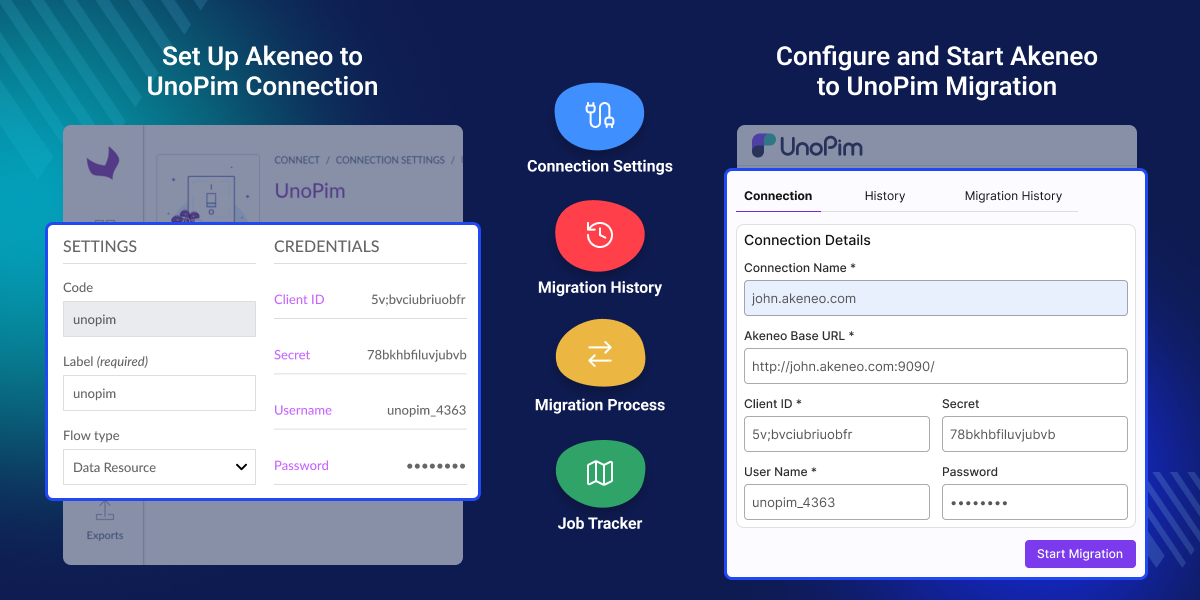
Highlighted Features of Akeneo UnoPim Migration
Move Complete Product Data
Move products, categories, product fields, images, channels, and other records from Akeneo to UnoPim.
Import Only the Data You Need
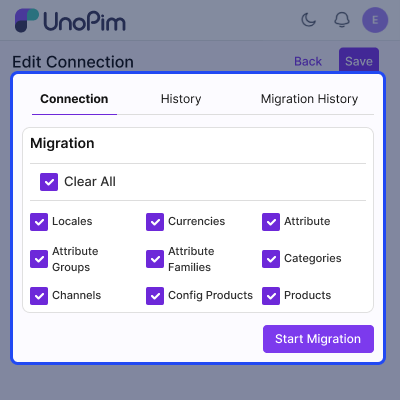
Choose the records you want to move instead of importing the full catalog.
Move Products and Variants
Import products and variants while keeping important links between records.
Move Images and Assets
Transfer images, files, and DAM assets into UnoPim with the correct structure.
Secure Connection Setup
Connect Akeneo and UnoPim through a secure API connection.
Track Jobs and Logs
View job progress, logs, reports, and job history from one place.
Why Use Akeneo to UnoPim Migration Plugin?
Moving product data by hand takes time and often leads to mistakes. When businesses switch from Akeneo to UnoPim, they need to move products, images, categories, and product fields into the new system.
Doing this work manually can slow the project and increase the chance of missing data. This plugin moves data automatically and keeps important records linked after the transfer.
You can run the job again when data changes in Akeneo. Existing records are updated instead of being added again. Logs and job history help teams check results and make sure the data was moved correctly.
In real projects, this helps save time and reduces manual work.
Use Cases
Move from Akeneo to UnoPim
Move product data when changing from Akeneo PIM to UnoPim.
Import Large Product Catalogs
Move thousands of products and related records without manual work.
Move Multi-Language Product Data
Import translated labels and localized product information.
Manage Product Data in One Place
Store products, images, and other records in a single UnoPim system.
Connect Akeneo with UnoPim
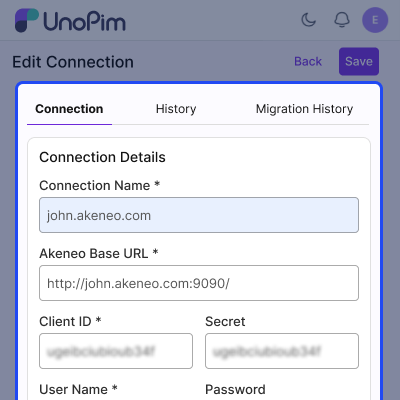
This plugin creates a secure connection between Akeneo and UnoPim. It checks connection details before saving and helps protect account information.
- OAuth-based login.
- Test connection before import.
- Secure storage of login details.
- Support multiple connections.
- Automatic token refresh.
- Connection status messages.
Move Categories and Other Fields
This plugin imports products and keeps related records connected. Product variants stay linked to their parent products after import.
- Import simple products into UnoPim.
- Import configurable products and variants.
- Keep family and attribute assignments.
- Maintain links between related products.
- Support channel-based product values.
- Import locale-specific product information.
Track Jobs and Logs
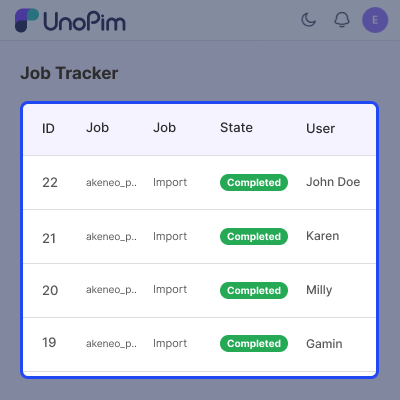
All import jobs are recorded inside UnoPim. Users can view progress and review logs from the admin panel.
- View complete job history.
- Download migration logs when needed.
- Monitor progress with Job Tracker.
- Track records by entity type.
- Review audit details for each job.
- Check errors and status reports.
Support
For any query or issue, please create a support ticket here http://webkul.uvdesk.com/. You may also check our top-quality Akeneo Extensions.
Specifications
Frequently Asked Questions
Specification
Detailed technical features and requirements to help you understand the module’s capabilities and ensure smooth integration with your system.
Cloud Hosting
Detailed technical features and requirements to help you understand the module’s capabilities and ensure smooth integration with your system.
Move to Cloud Today
We’re partnered with top-tier, trusted providers!



Default Configuration Details of Server
RAM 1 Core
Processor 30 GB
Hard Disk
Database
Want to know more how exactly we are going to power up your eCommerce Website with Cloud to fasten up your store
* Server Configuration may vary as per application requirements.
Change Logs
- + Features
- - Bugs
- * Compatibility release for UnoPim 3.0.0 (Laravel 13, PHP 8.4). No feature was removed or changed.
- * Requires UnoPim 3.0.0, PHP 8.4.1+ and Laravel 13.
- *
akeneo/api-php-clientcorrected to^11.4(^13.0has no release). - - Migrations run again on 3.0, which now refuses an import with no source file — an Akeneo job streams from the API instead.
- - Long runs write 3.0's job heartbeat, so they are no longer reaped as stalled.
- - Dates are stored as calendar dates and measurements keep their unit, so products index into Elasticsearch again.
- - Channels import into an empty catalog on PostgreSQL (a missing root category was written as id
0). - - The Job Tracker filter reset works again (
data-transfer/trackerwas renamed tojob-tracker). - * Connection screens use core's components — shared datagrid, page header and breadcrumbs — and the
primary-*design tokens, so they follow the theme and dark mode. - * Editing a connection or its migration entities raises core's global save bar with Discard and Save.
- * The Job Tracker listing refreshes itself while a job runs.
- * Connection routes renamed from
akeneo_migration.credentials.*toakeneo_migration.connections.*(URL/akeneo-migration/connections). ACL permission keys are unchanged. - + The package ships its own PHPUnit configuration, so its suite runs without the host registering it.
- + DAM asset tests skip themselves when the optional
unopim/damextension is absent.
- + Sidebar icon now stays consistent on DAM asset pages.
- + The unused "Test Connection" action has been removed from the listing.
- + Imported product images now use UnoPim's public media storage.
- + One-step install via php artisan akeneo-migration:install.
- + Akeneo connection management with live credential validation and a masked secret/password on edit.
- + Run migrations for selected entities from the connection page, with a Migration History log (masked credentials, per-row details view, and delete).
- + Importers for locales, currencies, attributes, attribute groups, families, categories, channels, DAM assets, configurable products, and products (with media).
- + Mappings recorded automatically during import, a field-level connection History, and downloadable run logs in the Job Tracker.
- + Granular ACL permissions for every action, with translations for all core UnoPim locales.
