USD
  • EUR
  • INR
  • USD
Cart
Cart 0
  • You have no items in your shopping cart.
    Bagisto Laravel Extensions
    Cart
    Cart 0
    • You have no items in your shopping cart.
    Hire a Developer
    ×
    Contact Us!
    Send Again
    Close
    Please Login to Write Your Review
    Bagisto Affiliate Product

    Bagisto Affiliate Product

    x
    Free
    $79.00
    Add To Cart

    Bagisto Affiliate Product adds an Affiliate product type to your store that links to partner websites instead of adding to cart. Create affiliate products like any other product, set the seller link, customize button text and colors, and send customers to buy on the partner site.


    • Create affiliate product types from Catalog > Products with a dedicated Affiliate type.

    • Set external hyperlinks to partner websites with secure http/https validation.

    • Customize button captions per product and language, up to 20 characters.

    • Choose button background and font colors to match your store's theme.

    • Show or hide product prices on the storefront per product.

    • Set store-wide default button text and colors from configuration, per channel and language.

    • Affiliate products skip the cart and checkout entirely, never reaching your customer orders.

    • Available in all 22 languages that Bagisto ships with.

    Bagisto Affiliate Product
    Bagisto Affiliate Product
    $79.00
    Check How It Works

    Need Help Deciding?

    Support answers within one business day.

    Open a ticket
    $79.00
    Configure and Buy
    X
    • Description
    • Reviews
    • FAQ
    • Customers ()
    • Specifications
    • Cloud Hosting
    • Changelog

    Bagisto Affiliate Product lets store owners list products they don't sell directly. Each affiliate product appears in your catalog like any other product but links to the partner's website with a custom button instead of Add To Cart.

    The flow is simple: create an affiliate product, fill in the partner link and button settings, and your customers click your branded button to buy on the partner site. Your store never holds inventory and the affiliate product never reaches checkout.

    On the storefront, the custom button replaces the normal Add To Cart and Buy Now buttons. The price is shown only when you enable Display Price on the product. Affiliate products cannot be added to the cart, and any already in a cart are removed automatically.

    Each product gets its own button caption, background color, and font color. You can also set store-wide defaults from the configuration panel, per channel and language, so new products inherit consistent button styling without manual setup.

    The module works on Bagisto v2.4.11 with no dependencies — it installs on a standard Bagisto install and requires only the install command `php artisan affiliate-product:install`.

    If you want to expand your product catalog further, also check our extension Bagisto Product Attribute.
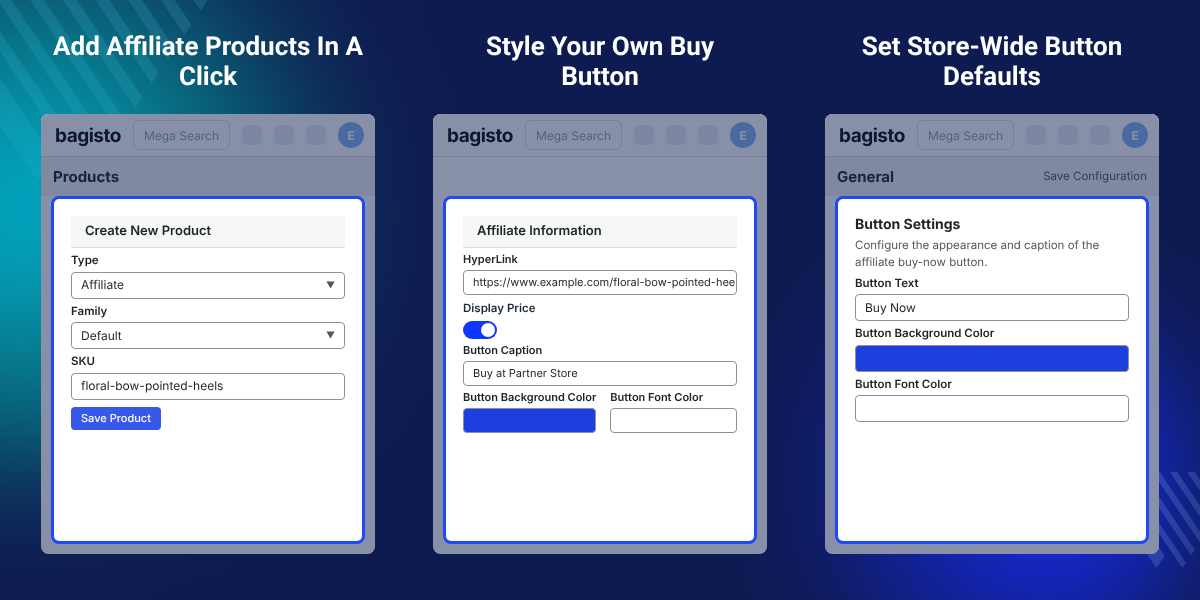
    Bagisto Affiliate Product

    Highlighted Features of Bagisto Affiliate Product

     Affiliate Product Type

    Create affiliate products directly from Catalog > Products by choosing Affiliate as the product type in the dropdown.

     External Hyperlink

    Set the partner website link for each product; only http and https links are accepted, rejecting unsafe links.

     Custom Button Caption

    Write your own button text per product and language, up to 20 characters, or use the store-wide default text.

     Button Colors

    Choose button background and font colors to match your store theme and brand identity.

     Display Price Control

    Turn Display Price on or off per product to show or hide the price on the storefront.

     Never Reaches Checkout

    Affiliate products cannot be added to the cart and are removed automatically if already in one.

    Why Do We Need Bagisto Affiliate Product?

    Bagisto Affiliate Product exists because Bagisto's default product types do not include an affiliate or external link option. Store owners who want to list partner products or earn affiliate commission have no way to link them to the seller's website from within the product catalog.

    Without this module, stores must either build external links manually outside their catalog, manage affiliate products in a separate system, or ask developers to create a custom product type — all of which cost time and create friction in the product management workflow.

    Bagisto Affiliate Product removes this limitation by adding a full Affiliate product type to your catalog. Create affiliate products with the same ease as any other product, set the partner link and button style, and let customers buy directly on the partner site without ever reaching your checkout.

    The module ships with store-wide defaults for button text and colors, set from Configure > Affiliate Product > General, so you can establish a consistent look across all affiliate products and then override it per product when needed.

    You can also check our extension Bagisto SEO Extension to optimize product pages including your affiliate products for search engines.

    Bagisto Affiliate Product Use Cases

    • Earn Affiliate Commission

      Promote marketplace or brand partner products and earn affiliate commission without holding inventory or managing stock.

    • Grow Your Catalog Fast

      Add partner and brand products next to your own range to expand your catalog without buying or storing stock.

    • Test New Product Lines

      List products from partners before committing to stocking them yourself, and gather customer demand signals.

    • Content and Review Stores

      Recommend products sold elsewhere and link directly to seller sites without leaving your site.

    Creating an Affiliate Product

    Affiliate products are created from the standard product creation form. Choose Affiliate as the product type and the form adapts to show only the fields that affiliate products need.
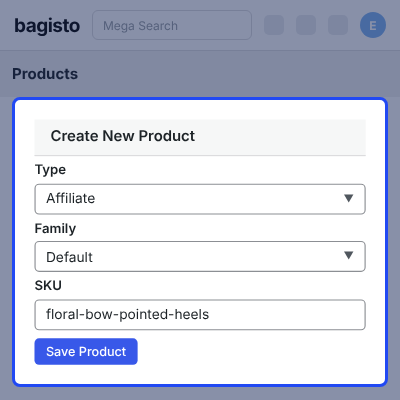
    • Navigate to Catalog > Products > Create Product.
    • Enter the product name, description, and other standard fields.
    • Select Affiliate from the Type dropdown.
    • Fill in the Affiliate Information section with the partner link, price display setting, button caption, and button colors.
    • Save the product; it appears in your catalog with type "affiliate" and Stock Disabled.
    • Affiliate products can be assigned to categories and searched like any other product type.
    Creating an Affiliate Product

    Affiliate Information Settings

    The Affiliate Information section holds all the settings that make each affiliate product unique. This is where you paste the partner link, customize the button, and control price visibility.
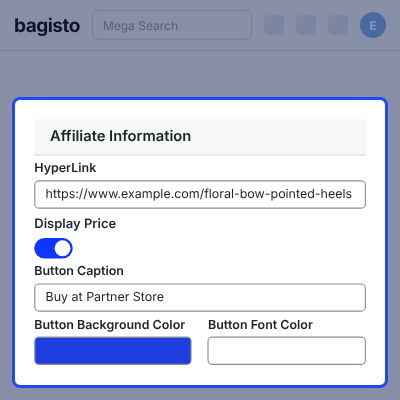
    • HyperLink — the partner website URL that the button links to; only http:// and https:// are accepted.
    • Display Price — toggle to show or hide the product price on the storefront.
    • Button Caption — your custom button text, up to 20 characters per product and per language.
    • Button Background Color — the background color of the button; uses a color picker or hex input.
    • Button Font Color — the text color of the button; uses a color picker or hex input.
    • If any field is left blank, the product uses the store-wide defaults from the configuration panel.
    Affiliate Information Settings

    Store-Wide Button Settings and Configuration

    Set default button text and colors from the configuration panel so new affiliate products inherit consistent styling. Defaults are managed per channel and per language, letting you customize the button appearance for each market.
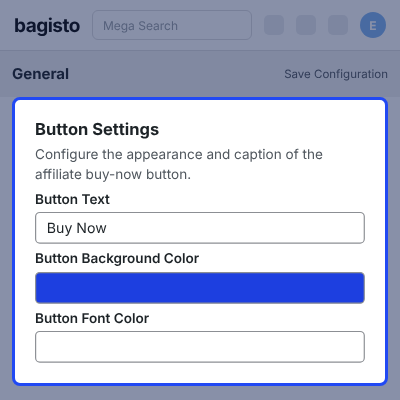
    • Navigate to Configure > Affiliate Product > General.
    • Enter the default Button Text that displays on affiliate products that have no custom caption.
    • Set the default Button Background Color for affiliate product buttons.
    • Set the default Button Font Color for button text.
    • Save settings per channel and per language from the channel and language tabs.
    • Individual product settings override store-wide defaults; if a product has no caption, Buy Now is used if the default is also empty.
    Store-Wide Button Settings

    Affiliate Products on the Admin Product List

    Affiliate products appear in your Catalog > Products list just like any other product. You can filter, search, and bulk-edit them alongside regular products, and the type column clearly marks them as affiliate.
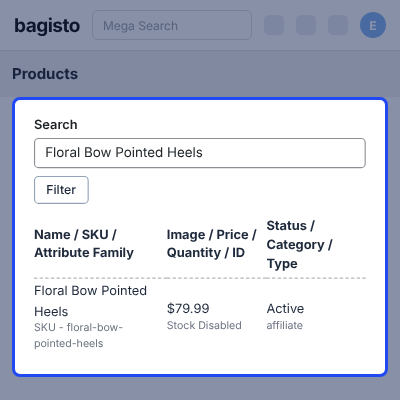
    • The Type column shows affiliate for all affiliate products.
    • The Stock column shows Stock Disabled for all affiliate products since they carry no inventory.
    • Filter by Type: Affiliate to view only affiliate products in your catalog.
    • Edit, delete, or bulk-edit affiliate products using the same admin tools as other products.
    • Affiliate products are included in CSV exports and imports; CSV import does not support setting the affiliate link yet.
    • The product list view and edit form work in all 22 Bagisto languages.
    Affiliate Products on the Admin Product List

    Storefront Display of Affiliate Products

    On the storefront, affiliate products display with your custom button instead of Add To Cart and Buy Now. The button opens the partner's website in a new tab, keeping your store window open for the customer to return.
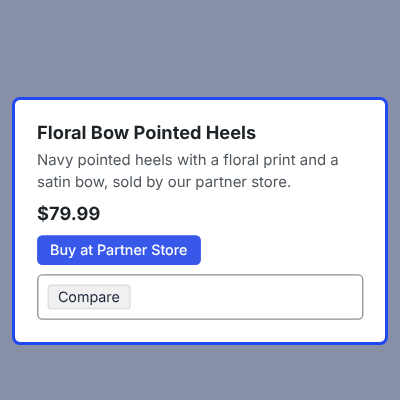
    • On the product page, your custom button replaces Add To Cart and Buy Now.
    • The button caption uses the product-specific text or falls back to the store-wide default.
    • Button colors use the product-specific colors or the store-wide defaults.
    • The button opens the partner link in a new browser tab with target="_blank".
    • The price is shown only when Display Price is enabled on the product.
    • No quantity box appears since customers buy directly on the partner site.
    • On category and search listing pages, affiliate products show no Add To Cart button; customers must open the product page to reach the button.
    Storefront Display of Affiliate Products

    Complete Bagisto Affiliate Product Feature List

    Core Affiliate Product Features

    • Affiliate product type fully integrated into Bagisto's product creation form
    • External hyperlink field with http and https validation to reject unsafe links
    • Per-product button caption, background color, and font color customization
    • Per-product Display Price toggle to show or hide the price on the storefront
    • Custom button opens the partner site in a new tab while keeping your store tab open

    Configuration & Admin Settings

    • Store-wide default button text set from Configure > Affiliate Product > General
    • Default button colors configured per channel and per language
    • Product-level settings override store-wide defaults automatically
    • Type filter on Catalog > Products to view only affiliate products
    • Stock Disabled indicator on affiliate products to show no inventory

    Checkout & Cart Safety

    • Affiliate products cannot be added to the shopping cart
    • Affiliate products are automatically removed from the cart if already present
    • No stock management or inventory tracking for affiliate products
    • Zero risk of affiliate products accidentally reaching checkout or customer orders

    Multi-Language & Store Support

    • Button captions saved per language with language-specific translation support
    • Configuration and admin panel available in all 22 Bagisto languages
    • Default button text and colors set independently per channel
    • Storefront button works correctly in all supported languages

    Support

    For any query or issue, please create a support ticket here http://webkul.uvdesk.com/. You may also check our all Bagisto Extensions.

    Specifications

    Product Version2.4.11
    Released24 days ago
    CategoryBagisto Laravel, 
    Last UpdatedOctober 7, 2026 (24 days ago)
    Supported VersionsBagisto  2.4.x  

    Ratings

    We'd love to hear your thoughts! Share your feedback and help us craft an even better experience tailored just for you.

    Write a review

    Frequently Asked Questions

     Can customers add affiliate products to the cart?
    No. Affiliate products are bought on the partner website. They cannot be added to the cart, and any already in a cart are removed automatically.
     
     Can I hide the price of an affiliate product?
    Yes. Turn Display Price off on the product, and the price is not shown on the storefront. You can set this per product or use the store-wide default.
     
     Can each product have its own button caption and colors?
    Yes. Each product has its own caption, background color, and font color in the Affiliate Information section. A product with no caption uses the store-wide Button Text from the configuration, and Buy Now if that is also empty.
     
     Does the button caption work in other languages?
    Yes. Button captions are saved per language, and the module ships translations for all 22 Bagisto languages.
     
     Do affiliate products need stock?
    No. Affiliate products keep no stock and show as Stock Disabled in the admin product list. There is nothing to manage or track.
     
     Which website links are allowed in the affiliate link field?
    Only http:// and https:// links are accepted. Other links, such as javascript: or ftp:, are rejected with an error message under the field. This keeps your store safe from malicious or broken links.
     
     Can I set different button styles for different channels?
    Yes. Store-wide button defaults are set per channel from the channel tab in Configure > Affiliate Product > General. Each channel can have its own default text and colors.

    Specification

    Detailed technical features and requirements to help you understand the module’s capabilities and ensure smooth integration with your system.

    Cloud Hosting

    Detailed technical features and requirements to help you understand the module’s capabilities and ensure smooth integration with your system.

    Default Configuration Details of Server

    1 GB
    RAM
    1 Core
    Processor
    30 GB
    Hard Disk
    1 GB RAM & 1 Core Processor
    Database

    Want to know more how exactly we are going to power up your eCommerce Website with Cloud to fasten up your store

    * Server Configuration may vary as per application requirements.

    Change Logs

    • - Feature Add (+)
    • - Feature remove (-)
    • - Bug Fixed (!)
    • - Modification (*)
    Version 2.4.11
    • + Compatible with 2.4.11
    • ! Fixed affiliate products being added to the cart through the cart API, reorder or admin order creation; they are now refused with a message, and any already in a cart are removed.
    • ! Fixed a javascript: or other non-http hyperlink failing silently on save; the hyperlink is now checked in the browser and a server-side error is shown under its field.
    • ! Fixed affiliate products showing as Out of Stock in the admin product list; they now show Stock Disabled, as they keep no stock and have no guest checkout.
    • * The storefront Buy Now button's link, caption and colors are now resolved in the listener rather than in the Blade view.