Send Again
Close
Bagisto Marketplace POS module helps you manage store and online sales from one place. You can create orders, complete checkout, and update inventory. As a result, products and orders stay in sync across every sales channel.
The module works for retail stores, supermarkets, and businesses with multiple outlets. It keeps products, customers, and orders updated automatically. So, staff spend less time on manual data entry and avoid stock mismatches.
Cashiers can scan barcodes, add products, and complete orders in a few clicks. They can also accept different payment methods during checkout. Therefore, customers spend less time at checkout.
Managers can track sales, monitor cashier activity, and check inventory from one dashboard. They can also view reports and manage multiple stores. This helps them make faster decisions and maintain accurate stock records.
Additionally, if you want to manage physical stores for your SaaS tenants, you can explore Laravel eCommerce Multi Tenant SaaS POS Module. It helps you manage sales, customers, orders, and payments while keeping data synced in real time.
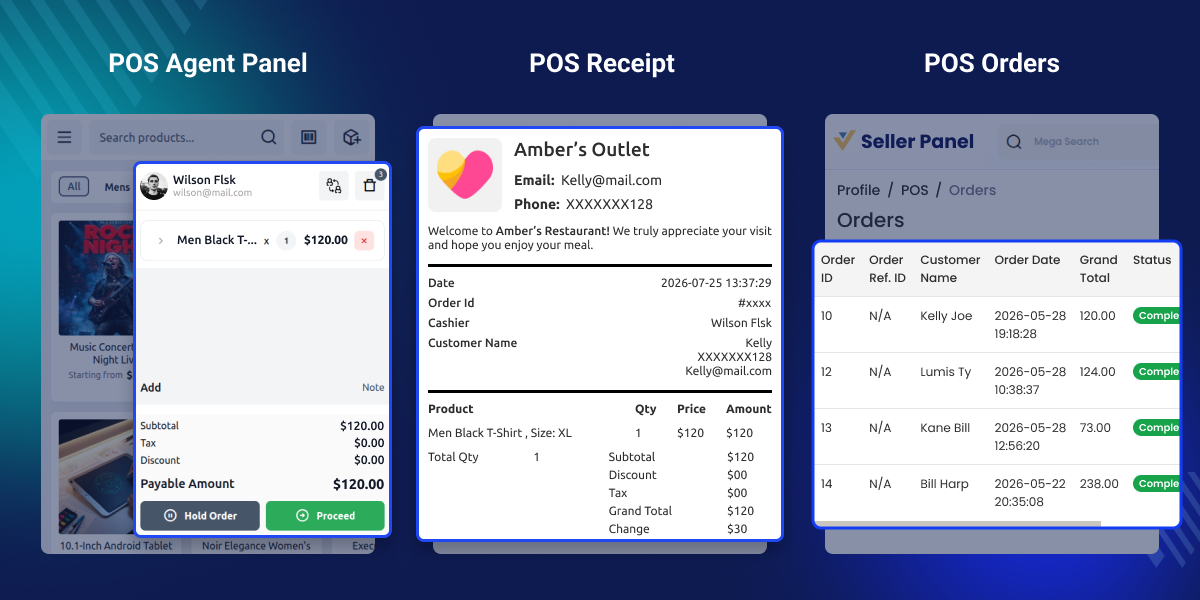
Manage multiple retail stores from one place by adding stores, assigning stock, and using separate receipts for each store.
Manage POS staff accounts by creating users, assigning store access, and enabling or disabling accounts at any time.
Create orders faster by scanning barcodes, holding carts, adding custom products, and completing checkout from a simple point of sale platform.
Keep store and online inventory in sync with automatic stock updates after every sale.
Reorder products in one click by creating a new order from a previous one, returning items, and updating the cart.
Continue selling offline by saving every order and automatically syncing data when the internet connection is restored.
The default Bagisto Marketplace is made for online selling. It does not include a built-in POS system. Sellers cannot create store bills, scan barcodes, manage POS staff, or sell when there is no internet. This makes store work slow and takes more time.
Bagisto Marketplace POS plugin adds all the tools needed to run a retail store. Sellers can create POS orders, scan products, manage staff, handle returns, run many stores, and keep online and store sales in one place.
It helps sellers speed up checkout, manage stock and sales in one place, reduce daily work, and give customers a faster shopping experience.
Apart from this, if you want to manage your online and physical stores from one place, you can explore the Laravel eCommerce Point of Sale. It helps you manage sales, customers, and inventory while keeping data synced in real time.
Manage fast checkout with barcode scanning and keep store and online stock in sync. This helps avoid stock errors during busy business hours.
Sell products from retail outlets while updating inventory across the marketplace. Staff can process exchanges and returns with less manual work.
Create bills quickly, scan products, and manage daily sales with ease. Offline mode helps continue billing even if the internet is unavailable.
Manage several store locations from one system with dedicated POS staff and outlet-wise inventory. This makes daily retail operations easier and more organized.
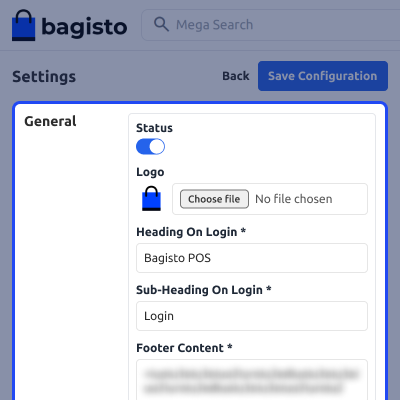
It provides a dedicated page to configure POS settings, including the login screen, logo, and other general options. The settings help businesses customize the point of sale interface and manage it from one place.
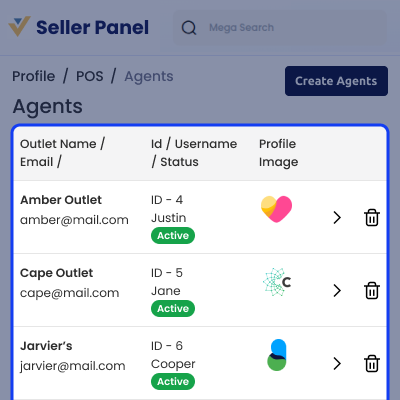
This allows sellers to manage POS agents, assign them to retail outlets, monitor their status, and keep staff details organized from a single panel, making daily store operations easier to manage.
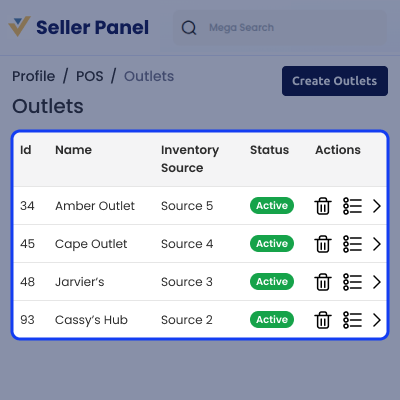
Bagisto Marketplace POS add-on lets sellers manage many store outlets from one place. Sellers can link each outlet to an inventory source and track its status. This makes it easier to run and control every store.
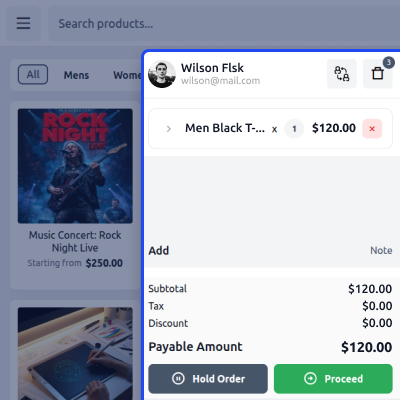
This Marketplace point of sale gives sellers a simple checkout screen to add products, review the cart, apply discounts, add notes, and complete sales quickly. This helps serve customers faster and makes daily billing easier.
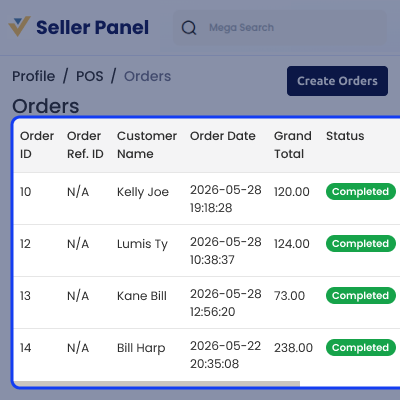
It lets sellers view and manage store orders from one place. Sellers can check customer details, order totals, order dates, and order status to track every sale with ease.
For any query or issue, please create a support ticket here http://webkul.uvdesk.com/. You may also check our all Bagisto Extensions.
Marketplace sellers who operate physical stores can use point of sale module to manage retail sales, customers, inventory, and daily store activities.
Yes, sellers can create and manage multiple retail outlets from one dashboard. Each outlet can have its own inventory source and POS agents.
Yes, this point of sale supports offline mode, allowing sellers to continue sales without an internet connection. Data syncs automatically once the connection is restored.
Yes, inventory is synchronized between point of sale and marketplace, helping keep stock levels up to date after every sale.
Yes, sellers can create and manage POS agents, assign them to outlets, and monitor their status from the seller panel.
Detailed technical features and requirements to help you understand the module’s capabilities and ensure smooth integration with your system.
Detailed technical features and requirements to help you understand the module’s capabilities and ensure smooth integration with your system.
We’re partnered with top-tier, trusted providers!
Want to know more how exactly we are going to power up your eCommerce Website with Cloud to fasten up your store
* Server Configuration may vary as per application requirements.



