USD
  • EUR
  • INR
  • USD
Cart
Cart 0
  • You have no items in your shopping cart.
    Bagisto Laravel Extensions
    Cart
    Cart 0
    • You have no items in your shopping cart.
    Hire a Developer
    ×
    Contact Us!
    Send Again
    Close
    Please Login to Write Your Review
    Bagisto SaaS Phone Login Module

    Bagisto SaaS Phone Login Module

    x
    Free
    $99.00
    Add To Cart

    Bagisto SaaS Phone Login Module adds phone login, mobile OTP verification, password reset by mobile number, and SMS provider support for tenant stores.


    • Enable phone login for each tenant

    • Verify mobile numbers using OTP codes

    • Support customer login with email addresses

    • Start password reset with a mobile number

    • Support multiple SMS API providers

    • Configure custom OTP SMS templates

    • Select country and add calling code

    • Validate mobile numbers by country

    • Secure OTPs with hashing and expiry

    • Limit OTP verification attempts

    • Keep OTP records separate by tenant

    Bagisto SaaS Phone Login Module
    Bagisto SaaS Phone Login Module
    $99.00
    X
    • Description
    • Reviews
    • FAQ
    • Customers ()
    • Specifications
    • Cloud Hosting
    • Changelog

    Bagisto SaaS Phone Login Module adds phone login and OTP verification to Bagisto SaaS stores.

    Customers can log in with their phone number or email. They can also start a password reset with either option.

    Admins can turn phone verification on or off for existing customers. When this setting is enabled, customers must verify their number before shopping.

    This module supports Spring Edge, MSG91, Text Local, Twilio, and JawalbSMS for sending OTPs.

    Each tenant can choose an SMS provider and set the OTP message from its admin panel.

    This module also adds the country calling code, validates phone numbers, and limits OTP attempts. Each OTP expires after 10 minutes.
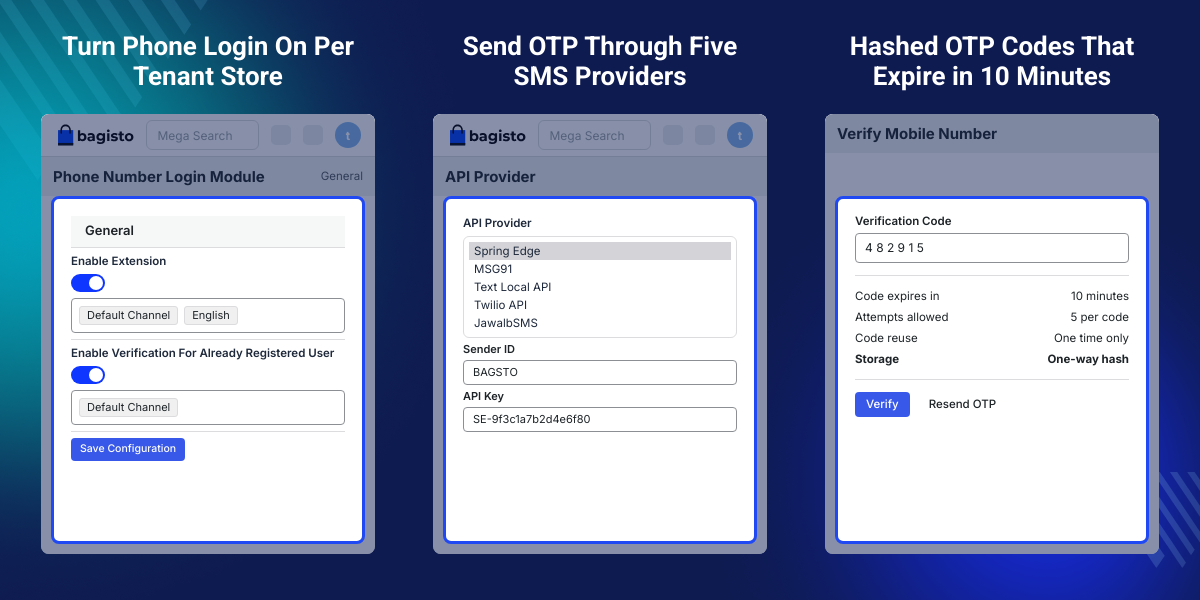
    Bagisto SaaS Phone Login Module

    Highlighted Features

     Phone Number Login

    Customers can log in to their accounts using their registered mobile number in place of their email address, along with their account password.

     Email Login

    Customers can use their email address to log in when they prefer the standard email-based login option.

     Mobile OTP Verification

    Customers can verify their mobile number with an OTP during registration and other required verification steps.

     Mobile Number Password Reset

    Customers can start a password reset by entering their registered mobile number, and the reset link is sent to the email address on the account.

     Tenant-Level Controls

    Each tenant admin can enable or disable the phone login and mobile verification settings from their own admin panel.

     Multiple SMS Providers

    Tenant admins can select from supported SMS API providers for sending OTP verification messages.

     Custom SMS API

    A custom SMS API can be integrated when the required SMS provider is not available by default.

     Country-Based Number Validation

    This module shows a country selector with flags, adds the calling code automatically, and validates the mobile number for the selected country.

    Why Do We Need the Bagisto SaaS Phone Login Module?

    Bagisto SaaS stores may need phone-based customer login instead of relying only on email authentication.

    Customers may prefer using their mobile number to access their accounts. Stores may also need OTP verification to confirm customer phone numbers.

    This module adds phone login, OTP verification, and mobile-based password reset while keeping settings separate for each tenant.

    For SaaS stores, tenant admins can manage their own authentication and SMS settings without affecting other tenants.

    Based on practical multi-tenant store requirements, separate OTP records also help keep verification data isolated between tenant stores.

    Use Cases

    • Multi-Tenant SaaS Stores

      Allow each tenant to manage phone login, mobile verification, and SMS settings from its own admin panel.

    • Mobile-First Stores

      Give customers a simple way to log in using their mobile number instead of their email address.

    • Stores Requiring Phone Verification

      Verify customer mobile numbers during registration and after customers change their account number.

    • Stores Using SMS Providers

      Connect the tenant store with a supported SMS API provider for OTP delivery.

    Manage Phone Login and Mobile Verification

    Tenant admins can manage phone login and mobile checks for customers in their own store.
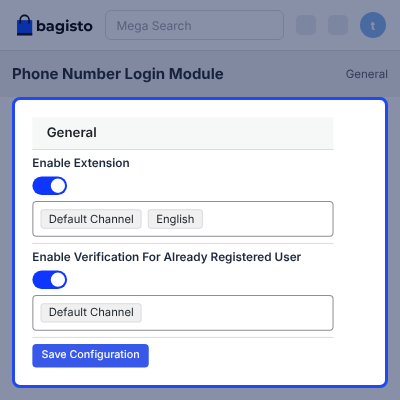
    • Turn mobile checks on for each tenant
    • Verify customer numbers during account signup
    • Ask for OTP before customers shop
    • Verify new numbers after account changes
    • Allow one account for each mobile number
    Manage Phone Login and Mobile Verification

    Support Multiple SMS API Providers

    This module supports many SMS services for sending OTP codes to customers.
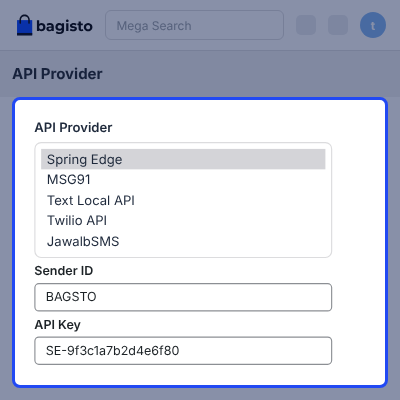
    • Send OTPs through Spring Edge SMS API
    • Send OTPs through MSG91 SMS API
    • Use Text Local for OTP messages
    • Use Twilio for phone number checks
    • Use JawalbSMS for OTP message delivery
    • Add a custom SMS API at no cost
    Multiple SMS API Providers

    Configure OTP SMS Templates

    Each tenant can set the OTP message from its own admin panel.
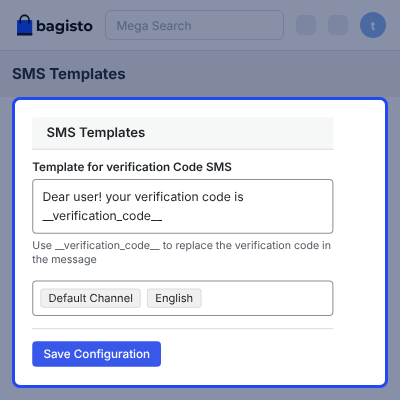
    • Set the SMS template for OTP messages
    • Change SMS text from the tenant admin
    • Edit the message sent to customers
    • Keep SMS settings separate for each tenant
    Configure OTP SMS Templates

    Handle Country Codes and Mobile Numbers

    This module makes phone number entry simple for customers in different countries.
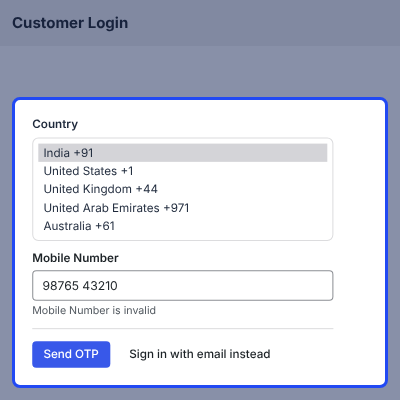
    • Detect the customer country during number entry
    • Pick the country from a flag selector
    • Add the country calling code without manual entry
    • Check numbers based on the selected country
    • Block the OTP request when the number is invalid
    • Make phone number entry quick and simple
    Handle Country Codes and Mobile Numbers

    Secure OTP Verification

    This module adds several checks to help protect OTP codes and customer accounts.
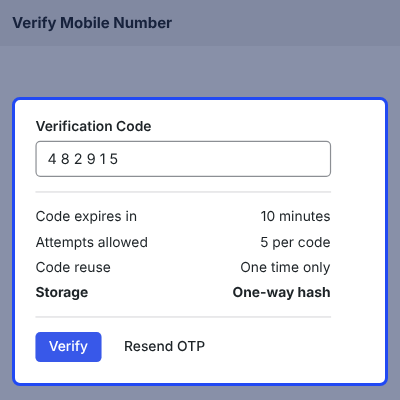
    • Store OTP codes as secure one-way hashes
    • OTP codes expire after 10 minutes
    • Use each OTP code only one time
    • Allow up to five OTP attempts
    • Keep OTP records separate for each tenant
    Secure OTP Verification

    Manage Tenant-Specific Authentication Settings

    Each tenant can manage phone login and mobile checks from its own admin panel.
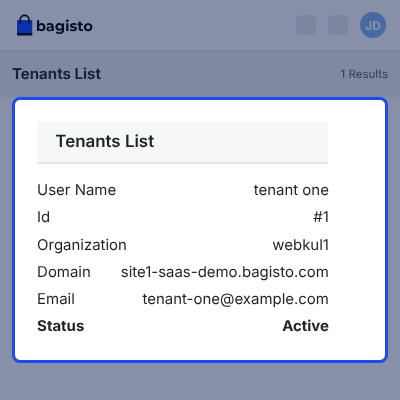
    • Manage phone login from the tenant admin
    • Turn mobile checks on or off
    • Keep OTP records separate for each tenant
    • Keep SMS and phone login settings separate between tenants
    • Set authentication options for each tenant
    Manage Tenant-Specific Authentication Settings

    Support

    For any query or issue, please create a support ticket here http://webkul.uvdesk.com/. You may also check our all Bagisto Extensions.

    Specifications

    Product Version1.1.1
    Released12 days ago
    CategoryBagisto Laravel
    Last UpdatedSeptember 7, 2026 (12 days ago)
    Supported VersionsBagisto  2.4.x  

    Ratings

    We'd love to hear your thoughts! Share your feedback and help us craft an even better experience tailored just for you.

    Write a review

    Frequently Asked Questions

     Can customers log in using their phone number?
    Yes, customers can log in using their registered phone number with OTP verification instead of using only their email address.
     
     Can customers still use email login?
    Yes, customers can continue logging in with their email address when they prefer email-based customer authentication.
     
     Can customers reset passwords using their mobile number?
    Yes, customers can enter their registered mobile number on the forgot password form, and the password reset link is sent to the email address on the account.
     
     Can tenant admins disable mobile verification?
    Yes, each tenant admin can enable or disable mobile verification from their own tenant admin panel.
     
     Are existing customers required to verify their numbers?
    When mobile verification is enabled for existing customers, they must verify their number before continuing to shop.
     
     What happens after changing a mobile number?
    The number is marked as unverified when it is changed from the My Account section, and the customer must verify the new number with an OTP.
     
     Which SMS providers are supported?
    This module supports Spring Edge, MSG91, Text Local, Twilio, and JawalbSMS for sending OTP verification messages.
     
     How many OTP attempts are allowed?
    Customers can make up to five verification attempts for an OTP before the verification limit is reached.
     
     Can I integrate a custom SMS API?
    Yes, a custom SMS API can be integrated when your required SMS provider is not included in the supported list.
     
     Can each tenant select its own SMS provider?
    Yes, each tenant can select and manage its SMS provider independently from the tenant admin panel.
     
     Can tenants customize OTP SMS messages?
    Yes, tenant admins can configure the SMS template used for sending OTP verification messages to customers.
     
     How long does an OTP remain valid?
    Each OTP remains valid for 10 minutes. After expiry, the customer needs to request a new verification code.
     
     Can one mobile number be used for multiple accounts?
    No, this module allows only one customer account to be created using a single mobile number.
     

    Specification

    Detailed technical features and requirements to help you understand the module’s capabilities and ensure smooth integration with your system.

    Cloud Hosting

    Detailed technical features and requirements to help you understand the module’s capabilities and ensure smooth integration with your system.

    Default Configuration Details of Server

    1 GB
    RAM
    1 Core
    Processor
    30 GB
    Hard Disk
    1 GB RAM & 1 Core Processor
    Database

    Want to know more how exactly we are going to power up your eCommerce Website with Cloud to fasten up your store

    * Server Configuration may vary as per application requirements.

    Change Logs

    • - Feature Add (+)
    • - Feature remove (-)
    • - Bug Fixed (!)
    • - Modification (*)
    Version 1.1.1
    • Feature Add: Admin can enable or disable the extension from the admin panel.
    • Feature Add: Admin can choose the API used to send the verification code.
    • Feature Add: SMS templates for verification messages can be configured from the admin panel.
    • Feature Add: Admin can enable or disable mobile number verification for existing registered customers. When enabled, existing customers are required to verify their mobile number.
    • Feature Add: The extension detects the user's location and preselects the country flag, eliminating the need to enter the country code manually.
    • Feature Add: Mobile number validation is performed based on the selected user's country.
    • Feature Add: The extension verifies the mobile number when a customer changes their mobile number from My Account.
    • Feature Add: Only one customer account can be created using a particular mobile number.
    • Feature Add: Added compatibility with SMS APIs including Spring Edge SMS API, Jawalb SMS API, MSG91, and Twilio SMS API. Custom SMS API integration is also supported.
    • Feature Add: Free lifetime support for bug fixes.


