Bagisto Verified Reviews
Bagisto Verified Reviews Extension helps you manage product feedback. It makes your store more trusted by showing real reviews from real buyers. It helps collect real feedback and build trust.
- Only verified buyers are allowed to submit product reviews.
- Admins can approve or reject product reviews.
- Customers can upvote or downvote reviews.
- Reviews can be filtered on the storefront.
- Reduces spam and prevents fake reviews.
- Manage all reviews easily from the admin dashboard.
- Show genuine feedback to build customer trust.
- Simple to set up and configure.
- Description
- Reviews
- FAQ
- Customers ()
- Specifications
- Cloud Hosting
- Changelog
Bagisto Verified Reviews Extension gives store owners full control over customer reviews. This extension allows only verified buyers to share their experience.
Admins can approve, reject, or partially approve reviews. This keeps feedback useful and removes spam or low‑quality content. Customers can vote and filter reviews to spot helpful opinions quickly, making shopping easier.
Sellers gain clear insights into product performance, creating a more reliable and engaging experience for all. If you want to reach global customers, use Bagisto ChatGPT AI Review Translator. It translates reviews accurately and makes moderation easy.
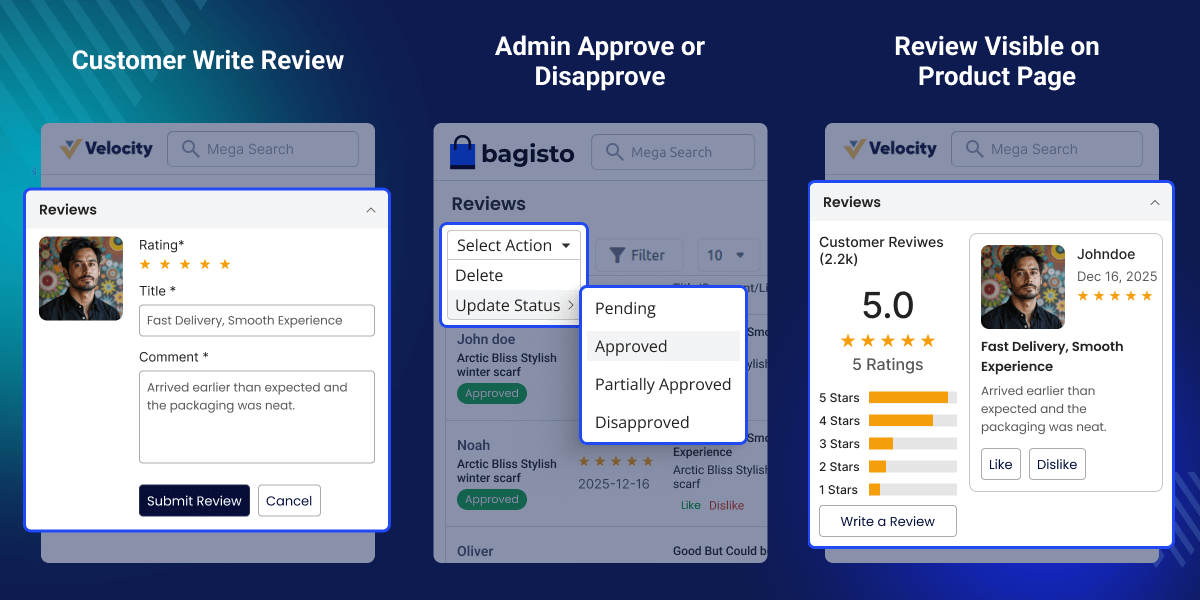
Highlighted Features of Bagisto Verified Reviews
Verified Reviews
Only customers who have actually purchased the product can submit a review, ensuring authenticity and trust.
Review Feedback
Users can like or dislike reviews to highlight the most helpful and relevant feedback for other customers.
Spam Control
Admins have full control over which reviews appear on the site, preventing spam and maintaining content quality.
Quick Sorting
Customers can instantly sort reviews by newest, most helpful, or top-rated to find relevant feedback quickly.
Flexible Approval
Admins can fully approve, disapprove, or partially approve reviews based on moderation requirements.
Visibility Control
Customers can easily check whether their review is live, pending approval, or under moderation.
Why Do We Need Bagisto Verified Reviews Extension?
Bagisto Verified Reviews Extension allows only verified buyers to submit reviews, effectively blocking spam and fake content. Admins have full control over review moderation—they can approve, reject, or partially approve reviews as needed.
With voting and filtering options, the most helpful reviews are highlighted first. Shoppers can quickly find relevant feedback and make confident purchasing decisions.
The setup process is quick and integration is seamless. Store owners can easily manage reviews directly from the dashboard. This enhances product credibility, builds customer trust, and increases conversions.
If you want to provide every shopper with a personalized experience, explore Bagisto Quick Commerce AI Personalization Engine. It recommends the right products and keeps navigation simple and smooth.
Review Configuration Settings
Easily control who can submit reviews and how they appear on your store.
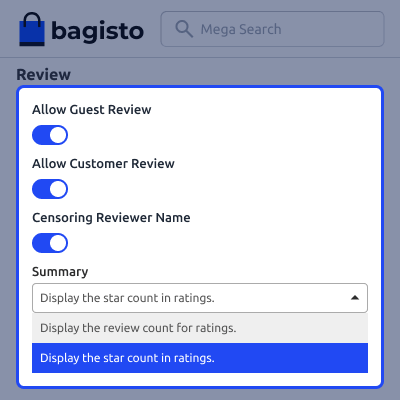
- Allow or block reviews from guest users.
- Enable or disable reviews from registered customers.
- Show or hide reviewer names for privacy.
- Show ratings using star icons.
- Display the total number of reviews.
Customer Review Visibility in My Account
This section allows customers to track their submitted reviews from My Account → Reviews.
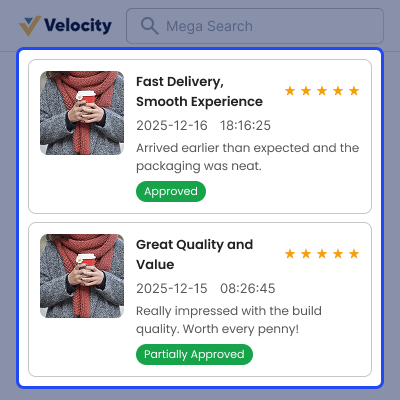
- View all submitted reviews in one place.
- Each review links directly to its product page.
- Every review shows a clear status.
- Reviews can be approved, partially approved, disapproved, or pending.
- Customers can see if their review is live or under moderation.
Approved Reviews on Product Page
This section explains how approved reviews appear on the product page:
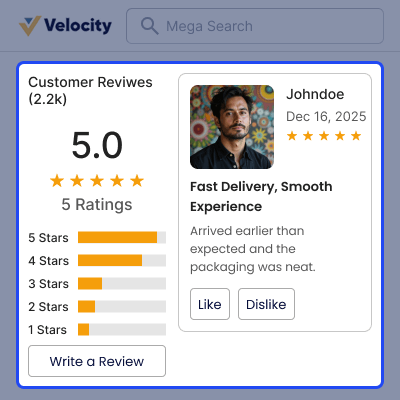
- The star rating shows customer ratings using stars.
- Reviews display detailed customer comments.
- Other customers can mark reviews as helpful using like or dislike options.
- The reviewer’s name is shown, or a censored version for privacy.
- Trust signals help customers make informed purchase decisions.
Global Rating on Product Card
This section displays the overall rating directly on the product card.
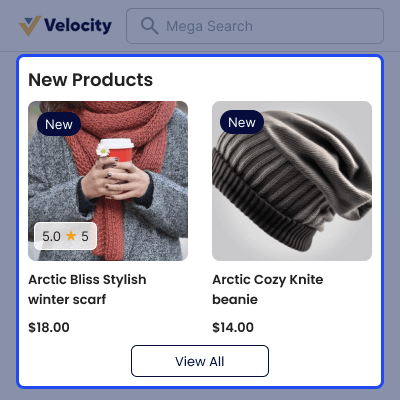
- The star rating shows the average product score.
- The review count shows the total number of product reviews.
- Admins can choose what to display on the product card.
- Show only the star rating.
- Show only the review count.
Support
For any query or issue, please create a support ticket here http://webkul.uvdesk.com/. You may also check our top-quality Bagisto Extensions.
Specifications
Frequently Asked Questions
Move to Cloud Today
AWS Free tier hosting for one year by amazon web services, for more details please visit AWS Free Tier.
GCP Free tier hosting for one year with 300 credit points by google cloud platform, for more details please visit GCP Free Tier.
Azure free tier hosting for one year with 25+ always free services, for more details please visit Azure Free Tier.
In our default configuration we will provide tremendous configuration for your eCommerce Website which is fast to load and response.
Default Configuration Details of Server
- 1 GB RAM
- 1 Core Processor
- 30 GB Hard Disk
- DB with 1 GB RAM and 1 Core Processor
* Server Configuration may vary as per application requirements.
Want to know more how exactly we are going to power up your eCommerce Website with Cloud to fasten up your store. Please visit the Cloudkul Services.
Get Started with Cloud- - Feature Add (+)
- - Feature remove (-)
- - Bug Fixed (!)
- - Modification (*)
- + The module is compatible with Bagisto v2.3.6
- - Fixed issue where only 5-star reviews were displayed in the product review section. Reviews with ratings lower than 5 stars are now properly visible after admin approval.
- - Ensured correct review visibility for both registered customers and guest users, including proper handling via admin configuration.
- - Fixed missing navigation when no reviews were found after applying a rating filter.
- - Added “← Back to All Reviews” button when filtered results return empty.
- - Updated empty-state message to display: “No reviews found for this rating.”
- - Ensured the Reviews tab remains active when returning from filtered empty state.


