USD
  • EUR
  • INR
  • USD
Cart
Cart 0
  • You have no items in your shopping cart.
    Cart
    Cart 0
    • You have no items in your shopping cart.
    Hire a Developer
    ×
    Contact Us!
    Send Again
    Close
    Please Login to Write Your Review

    CS-Cart 360 Degree Product Images

    CS-Cart 360 Degree Product Images add-on helps you show products in a better way allowing customers can rotate products and see every angle.


    • Admins upload image sequences and then configure rotation settings per product.

    • Customers drag or auto-rotate products to examine details from all sides.

    • In addition, this improves product understanding.

    • Set rotation speed, direction, buttons, cursor, and sensitivity.

    • Works on desktop and mobile with touch support.

    • Supports touch gestures.

    • Perfect for fashion, electronics, furniture, and similar products.

    Screenshots
    CS-Cart 360 Degree Product Images CS-Cart 360 Degree Product Images CS-Cart 360 Degree Product Images CS-Cart 360 Degree Product Images CS-Cart 360 Degree Product Images
    Show More Hide All
    $69.00

    * Required Fields

    Add To Cart
    30 Days Refund*
    Only One Time Payment
    $69.00
    Configure and Buy
    • Description
    • Reviews
    • FAQ
    • Customers ()
    • Specifications
    • Cloud Hosting
    • Changelog

    CS-Cart 360 Degree Product Images add-on turns simple product images into interactive 360 views. Customers can drag or swipe to view products from every angle.

    As a result, this creates a more realistic shopping experience. Admins upload a sequence of images. Then, the system builds smooth rotation automatically. This saves time and avoids complex setup.

    It improves product display. In addition, it builds customer confidence. It also makes the store look more professional. You can also check CS-Cart AI Image Search Extension to find products using similar images.
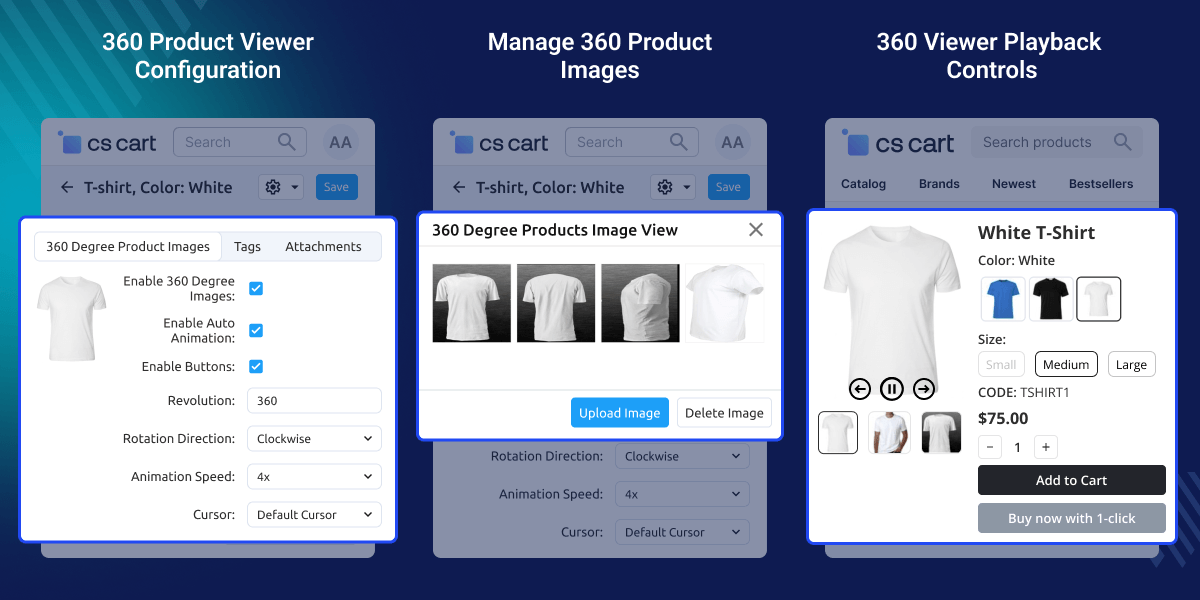
    CS-Cart 360 Degree Product Images

    Highlighted Features of CS-Cart 360 Degree Product Images

     360° Rotation

    Customers drag left or right, so that they can see every angle.

     Image Sequence Upload

    Upload multiple images, and then the system builds the rotation.

     Auto Rotation

    Products can rotate automatically, which means users do not need to drag.

     Speed Control

    You can adjust the rotation speed, depending on your needs.

     Direction Control

    Optionally display left, right, play, and pause buttons below the product for users who prefer clicking over dragging.

     Customizable Cursor

    Choose clockwise or anti-clockwise rotation, so that it matches your style.

     Sensitivity Control

    Adjust how fast the product moves, which helps improve user experience.

     Per Image Settings

    Each image can have its own settings, so you get flexibility.

    Why Do We Need CS-Cart 360 Degree Product Images Add-on?

    CS-Cart 360 Degree Product Images add-on helps store owners show products in a better and more interactive way without relying on expensive photoshoots.

    Admins can upload multiple images and create 360 Degree Product Images in a few steps. This saves time and effort.

    Shoppers can view products from every angle using 360 Degree Product Images. Therefore, they understand the product better and feel more confident before buying.

    It also keeps product presentation consistent across the store and reduces confusion, which can help lower return rates. Also, you can check CS-Cart 3D Product Viewer extensions if you want to 3D product views.

    Use Cases

    Fashion Stores

    Customers can see shoes and bags from all sides. This helps them check details.

    Electronics

    Products can be viewed completely. This helps users understand design.

    Furniture

    Customers can explore size and shape. This helps them make better decisions.

    Multi-Vendor Stores

    Vendors can upload their own images. This allows them to manage their products.

    Premium Products

    You can highlight selected products, and thus improve presentation.

    Mobile Shopping

    Customers can swipe to rotate products. This makes browsing easier.

    Easy Image Sequence Management

    Admins can upload product images and create a 360° view in a few steps. This module joins all images and shows a smooth rotating product view.
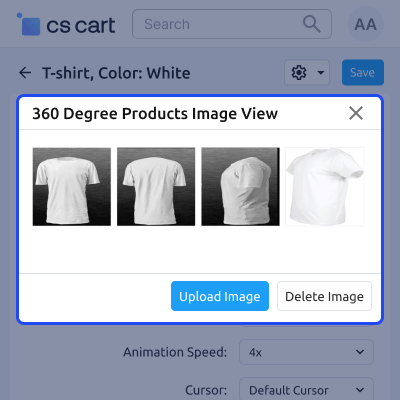
    • Upload many product images
    • Create 360° views automatically
    • Easy setup from the admin panel
    • Good for large product catalogs
    Easy Image Sequence Management

    Simple Rotation Controls and Setup

    Store owners can control how the product rotates on the product page. You can change the speed and direction easily.
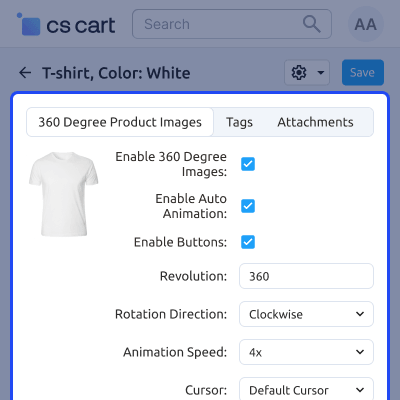
    • Set product rotation speed
    • Change rotation direction
    • Smooth drag and swipe movement
    • Better product viewing experience
    Simple Rotation Controls and Setup

    Category-Based Control

    Admins can enable the 360° viewer for selected categories only. This helps manage products in a better way.
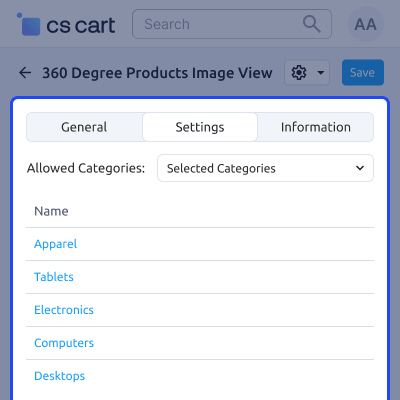
    • Enable viewer by category
    • Easy category management
    • Highlight selected products
    • Useful for large stores
    Category-Based Control

     Support

    For any query or issue please create a support ticket here http://webkul.uvdesk.comYou may also check our other top-quality CS-Cart Add-ons.

    Specifications

    Product Version1.0
    Released4 days ago
    CategoryCS-Cart
    Last UpdatedMay 26, 2026 (4 days ago)
    Supported VersionsCS-Cart  CS-Cart Multivendor  4.18.x  4.19.x  4.20.x  
    Write a review

    Frequently Asked Questions

      How many images should I upload for the CS-Cart 360 viewer?
    For optimal 360° rotation in your CS-Cart store, it is recommended to upload a minimum of 12 images. For smoother and more realistic experience, 24–36 images are ideal.
     
      Which image formats are supported in CS-Cart?
    CS-Cart 360° image viewer supports PNG, JPG, and JPEG formats, ensuring easy compatibility with standard product images.
     
      Does the CS-Cart 360 image viewer work on mobile devices?
    Yes, CS-Cart 360° viewer is fully responsive and works smoothly on all mobile devices, including smartphones and tablets.
     
      Can I enable the 360 viewer for selected product categories only?
    Yes, the CS-Cart add-on allows you to enable the 360° viewer for specific product categories based on your store configuration.
     
      Can customers upload 360 product images from the storefront?
    No, in CS-Cart only administrators can upload and manage 360° product images through the admin panel for better control and security.

    Move to Cloud Today

    AWS Free tier hosting for one year by amazon web services, for more details please visit AWS Free Tier.

    GCP Free tier hosting for one year with 300 credit points by google cloud platform, for more details please visit GCP Free Tier.

    Azure free tier hosting for one year with 25+ always free services, for more details please visit Azure Free Tier.

    In our default configuration we will provide tremendous configuration for your eCommerce Website which is fast to load and response.

    Default Configuration Details of Server

    • 1 GB RAM
    • 1 Core Processor
    • 30 GB Hard Disk
    • DB with 1 GB RAM and 1 Core Processor

    * Server Configuration may vary as per application requirements.

    Want to know more how exactly we are going to power up your eCommerce Website with Cloud to fasten up your store. Please visit the Cloudkul Services.

    Get Started with Cloud
    • - Feature Add (+)
    • - Feature remove (-)
    • - Bug Fixed (!)
    • - Modification (*)
    Version 1.0
    • + Added configuration to enable 360° images for all categories or specific categories.
    • + Added option to upload and delete multiple images for 360° view.
    • + Implemented 360° image animation display on the storefront product page.


