USD
  • EUR
  • INR
  • USD
Cart
Cart 0
  • You have no items in your shopping cart.
    Cart
    Cart 0
    • You have no items in your shopping cart.
    Hire a Developer
    ×
    Contact Us!
    Send Again
    Close
    Please Login to Write Your Review

    CS-Cart Amazon FBM

    CS-Cart Amazon FBM is a connector that helps vendors connect their CS-Cart store with Amazon and manage Amazon orders directly from their CS-Cart Store.


    • Import products from Amazon to CS-Cart.

    • Import orders from Amazon to CS-Cart.

    • Manage Amazon products and orders from CS-Cart.

    • Handle Amazon order returns inside CS-Cart.

    • Track Amazon orders easily from CS-Cart.

    • Vendors can subscribe to Subscription Plans.

    • Admin gets a commission from their sales.


    Screenshots
    CS-Cart Amazon FBM CS-Cart Amazon FBM CS-Cart Amazon FBM CS-Cart Amazon FBM CS-Cart Amazon FBM CS-Cart Amazon FBM CS-Cart Amazon FBM
    Show More Hide All
    $199.00

    * Required Fields

    Add To Cart
    $199.00
    Configure and Buy
    • Description
    • Reviews
    • FAQ
    • Customers ()
    • Specifications
    • Cloud Hosting
    • Changelog

    CS-Cart Amazon FBM is an addon that connects CS-Cart with Amazon’s using Fulfillment by Merchant. With FBM, sellers list products on Amazon but take care of storage, packing, shipping, and customer service themselves.

    This extension lets vendors import Amazon orders into CS-Cart and manage them from one place. Product details and inventory are kept up to date between both platforms.

    Note: To use this connector, you need an Amazon developer account. For help, you’ll need to share your Amazon developer account details.

    After logging in with their Amazon account, the user will be presented with two fulfillment options – Fulfillment by Amazon (FBA) and Fulfillment by Merchant (FBM). The user must choose and proceed with Fulfillment by Merchant (FBM).
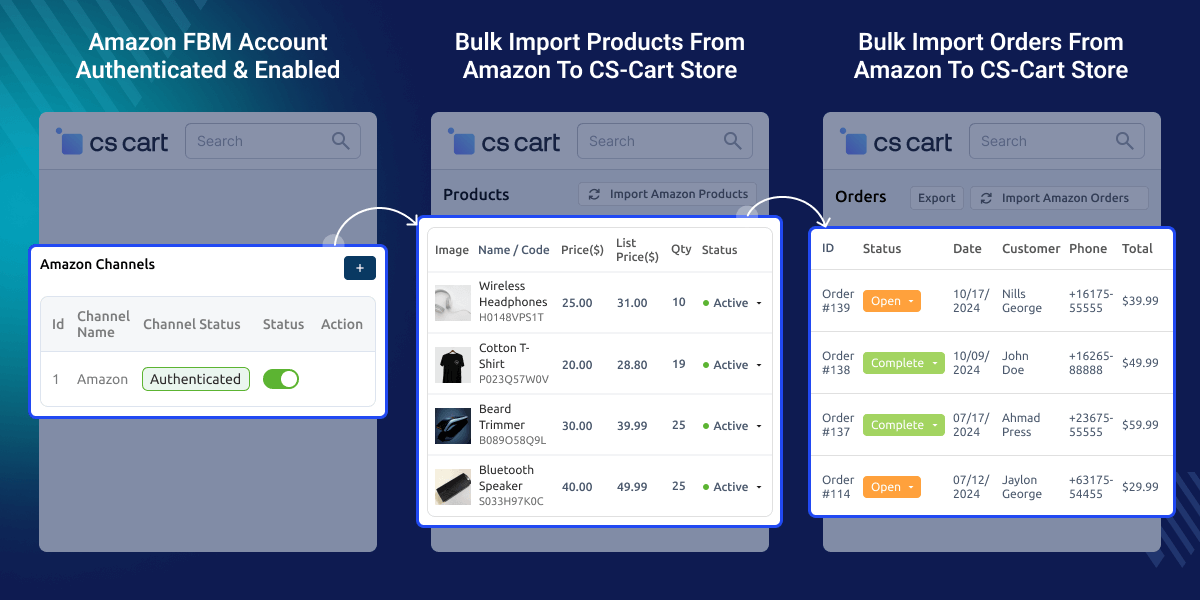
    CS-Cart Amazon FBM

    Highlighted Features of CS-Cart Amazon FBM (Fulfillment by Merchant)

     Import Products From Amazon

    Quickly move products from Amazon to CS-Cart.

     Real-Time Updates

    Product details are synced in CS-Cart and Amazon.

     Import Amazon Orders

    Bring Amazon orders into CS-Cart with one click.

     Easy Order Returns

    Manage and track returns for Amazon orders in CS-Cart.

    Why do we need CS-Cart Amazon FBM Plugin?

    CS-Cart Amazon FBM extension makes it easy to sync products, stock, and prices from Amazon to CS-Cart. Everything is handled from Seller's End via CS-Cart Store.

    Amazon orders are imported into CS-Cart, so sellers can process and ship without switching between systems. It saves time, reduces mistakes, and helps sellers reach more customers by selling on Amazon while using their CS-Cart system.

    You can also check the CS-Cart Pre Order for customers to buy products before release, making the customers buy the product in advance.

    Configuration Settings

    Quickly set up your CS-Cart store with Amazon.
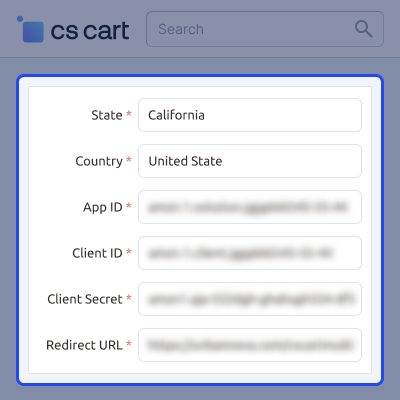
    • Enter details like app ID, client ID, and more.
    • Follow simple steps for setup.
    • Adjust settings to fit your business.
    Configuration Settings

    Product Settings

    Sync product information for clear and accurate Amazon listings.
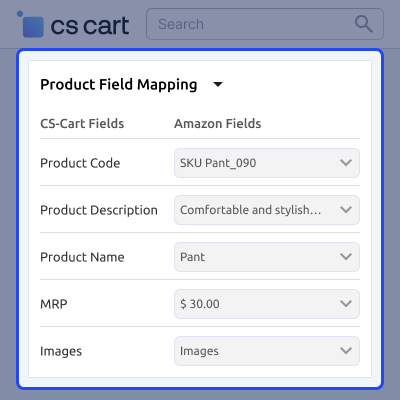
    • Map fields like product code, name, and price.
    • Upload products in bulk.
    • Keep product details synced.
    Product Settings

    Order Settings

    Manage Amazon orders and shipping easily from CS-Cart.
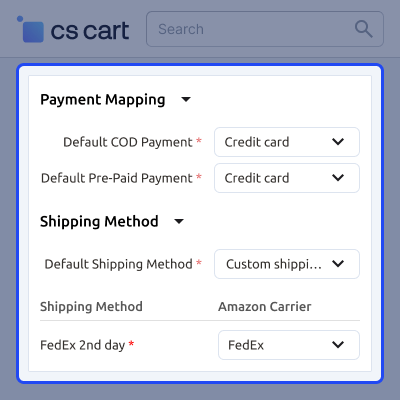
    • Map Amazon payment types to CS-Cart.
    • Set default shipping for Amazon orders.
    • Link Amazon shipping carriers with CS-Cart.
    • Orders and shipping details sync.
    Order Settings

    Manage Category Mapping

    Match your product categories between CS-Cart and Amazon.
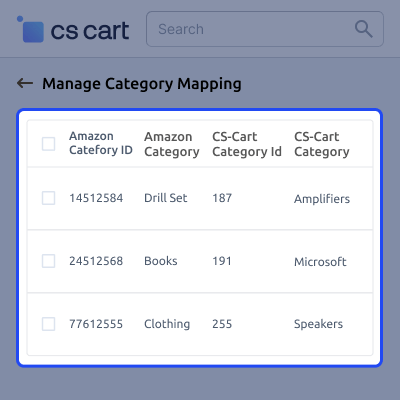
    • Map categories easily.
    • Link category IDs for smooth syncing.
    • Ensure correct product placement on Amazon listings.
    Manage Category Mapping

     Import Products From Amazon to CS-Cart Store

    Vendors can seamlessly import all products from Amazon into their CS-Cart store with product details like -
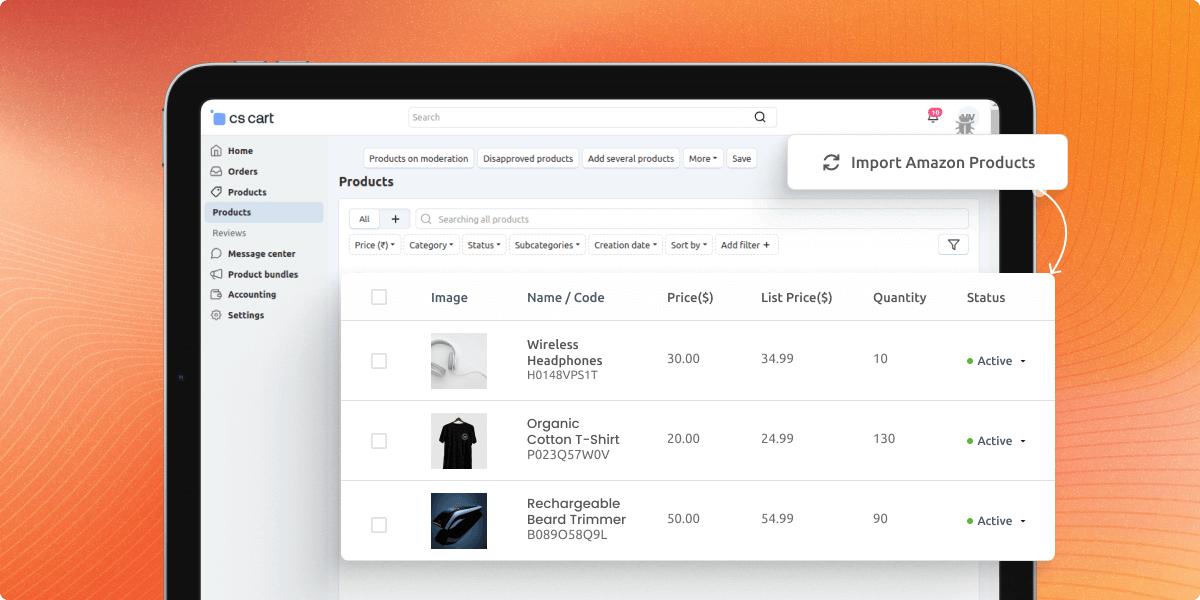
    • Title and Description
    • Price
    Import Products From Amazon to CS-Cart Store

    Import Amazon Orders to CS-Cart Store

    Vendors can import all the orders from Amazon to its CS-Cart store.
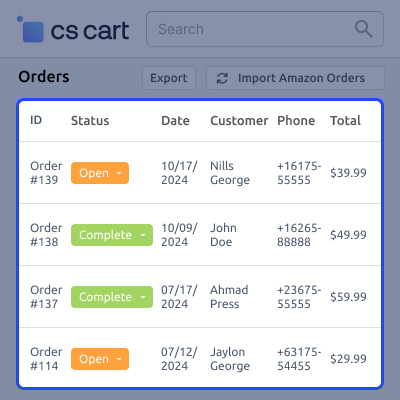
    • Manage shipping and fulfillment from the merchant’s end.
    • Keep order statuses updated on both Amazon and CS-Cart.
    • Also, can view the order status open, paid, complete, etc.
    Import Amazon Orders to CS-Cart Store

    Support -

    For any query or issue please create a support ticket here

    You may also check our other top-quality CS-Cart Add-ons.

    Specifications

    Product Version1.0
    Released10 months ago
    CategoryCS-CartOrderMarketplace
    Last UpdatedMay 6, 2025 (9 months ago)
    Supported VersionsCS-Cart  CS-Cart Multivendor  4.16.x  4.17.x  4.18.x  
    Write a review
     What is CS-Cart Amazon FBM Connector?
    It links Amazon with CS-Cart to manage FBM orders.
     
     What is FBM (Fulfillment by Merchant)?
    Vendors handle storing, packing, and shipping orders.
     
     Can sellers sync products to Amazon?
    Yes, they can sync products, stock, and prices.
     
     Will Amazon orders appear in CS-Cart?
    Yes, orders from Amazon will show up in CS-Cart.
     
     Does inventory update automatically?
    Yes, prices and stock sync in real time.
     
     Can sellers ship orders from CS-Cart?
    Yes, they can ship Amazon orders from CS-Cart.

    Move to Cloud Today

    AWS Free tier hosting for one year by amazon web services, for more details please visit AWS Free Tier.

    GCP Free tier hosting for one year with 300 credit points by google cloud platform, for more details please visit GCP Free Tier.

    Azure free tier hosting for one year with 25+ always free services, for more details please visit Azure Free Tier.

    In our default configuration we will provide tremendous configuration for your eCommerce Website which is fast to load and response.

    Default Configuration Details of Server

    • 1 GB RAM
    • 1 Core Processor
    • 30 GB Hard Disk
    • DB with 1 GB RAM and 1 Core Processor

    * Server Configuration may vary as per application requirements.

    Want to know more how exactly we are going to power up your eCommerce Website with Cloud to fasten up your store. Please visit the Cloudkul Services.

    Get Started with Cloud
    • + Features
    • - Bugs
    Version 1.0
    • + Added import product from Amazon.
    • + Added import orders from Amazon.
    • + Added order processing for Amazon orders.
    • + Added order return processing for Amazon orders.


