USD
  • EUR
  • INR
  • USD
Cart
Cart 0
  • You have no items in your shopping cart.
    Cart
    Cart 0
    • You have no items in your shopping cart.
    Hire a Developer
    ×
    Contact Us!
    Send Again
    Close
    Please Login to Write Your Review

    CS-Cart Dolibarr Connector

    CS-Cart Dolibarr Connector links your CS-Cart store with the Dolibarr ERP & CRM system. It helps manage products, customers, and orders easily between the two platforms.


    • Works with both CS-Cart and Multivendor.

    • Export/import products, customers, and orders between CS-Cart and Dolibarr.

    • New CS-Cart orders sync in real-time with Dolibarr.

    • Use cron jobs to update data from Dolibarr to CS-Cart.

    • Map categories between both systems.

    • Map shipping and payment methods.

    • Map warehouse locations to manage stock.

    • Keeps your data accurate and reduces manual work.

    Additional Info

    Install and activate the Warehouse add-on in CS-Cart before using this module.

    Screenshots
    CS-Cart Dolibarr Connector CS-Cart Dolibarr Connector CS-Cart Dolibarr Connector CS-Cart Dolibarr Connector CS-Cart Dolibarr Connector CS-Cart Dolibarr Connector CS-Cart Dolibarr Connector CS-Cart Dolibarr Connector CS-Cart Dolibarr Connector CS-Cart Dolibarr Connector
    Show More Hide All
    $399.00

    * Required Fields

    Add To Cart
    $399.00
    Configure and Buy
    • Description
    • Reviews
    • FAQ
    • Customers ()
    • Specifications
    • Cloud Hosting
    • Changelog

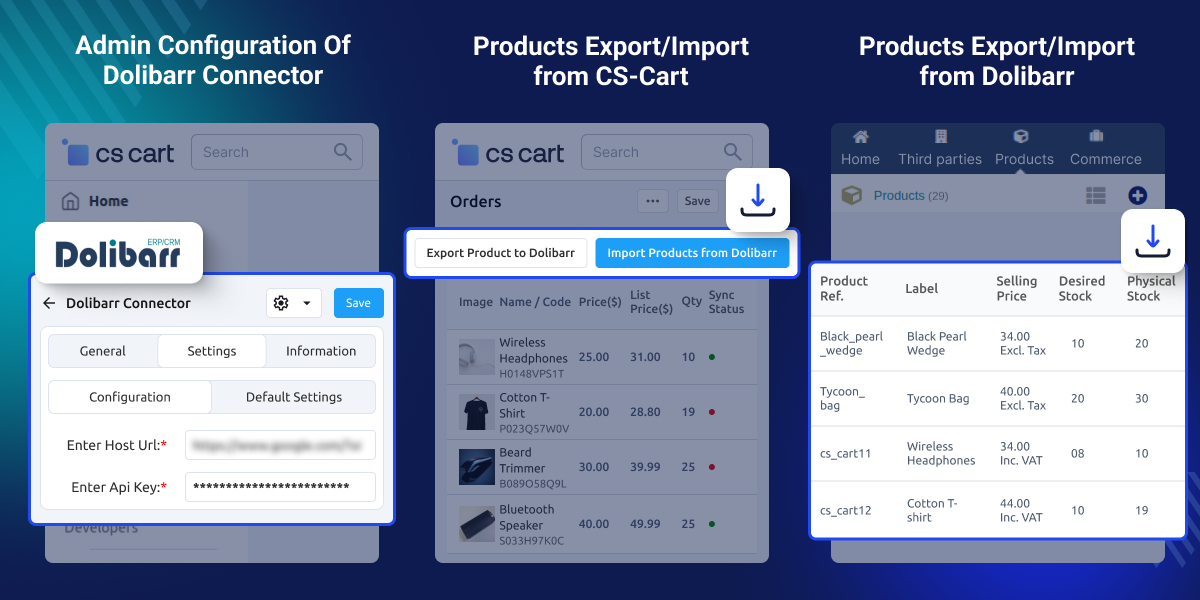
    CS-Cart Dolibarr Connector helps your CS-Cart store work with Dolibarr ERP & CRM. It keeps products, categories, customers, and orders mapping between both platforms. Syncing is automatic and runs in real-time or through cron jobs.

    You can move product details, customer info, and orders without typing them again. The module also supports mapping for categories, shipping, payments, and warehouses.

    This tool saves time, avoids mistakes, and keeps your records updated. It’s a good choice for store owners who want to connect their online store with Dolibarr.

    Also check out our CS-Cart ShippingEasy Connector to manage all shipping tasks in one place.
    CS-Cart Dolibarr Connector

    Highlighted Features of CS-Cart Dolibarr Connector

     Sync Products with Ease

    Import or export products between CS-Cart and Dolibarr.

     Export & Import Orders

    Sync orders both ways by status or date.

     Category Mapping

    Connect categories in CS-Cart and Dolibarr for better product control.

     Currency Mapping

    Use Dolibarr’s currency to show correct prices during sync.

     Auto Customer Mapping

    Match customers by name or email between platforms.

     Warehouse Mapping

    Link warehouses in both systems to keep stock levels correct.

    Why do we need CS-Cart Dolibarr Connector?

    CS-Cart Dolibarr Connector saves time and reduces errors. It keeps your store and ERP system updated by syncing data automatically. You won’t need to add things manually on both sides.

    It helps manage products, orders, and customers faster and more accurately. You can also check our CS-Cart QuickBooks Connector for syncing store data with QuickBooks.

    Integration of Dolibarr Using Keys

    Connect CS-Cart with Dolibarr using a secure API key.
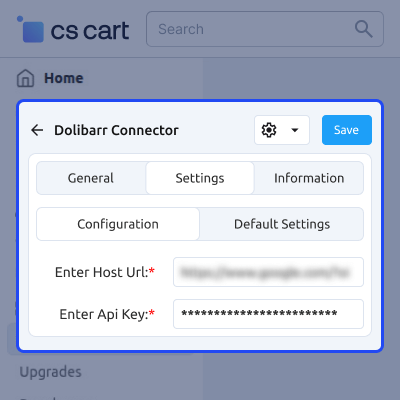
    • Turn on API/Web Services in Dolibarr.
    • Generate a token using Dolibarr login and API URL.
    • Use the key to sync data safely in real-time.
    Integration of Dolibarr Using Keys

    Product Management

    Manage products easily on both sides.
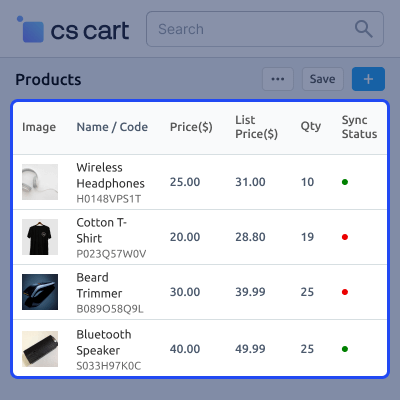
    • Sync products both ways.
    • Add or edit items in either system.
    • Use bulk import/export to save time.
    • Keep listings updated all the time.
    Product Management

    Order Management

    Keep your orders synced between both systems.
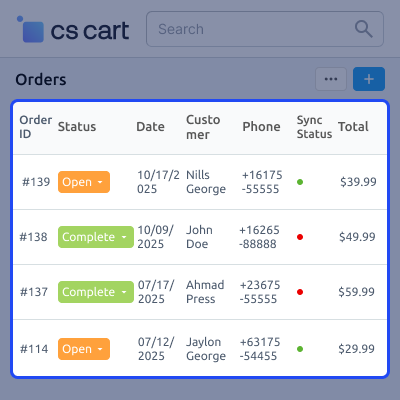
    • New orders from CS-Cart go to Dolibarr instantly.
    • Manage Dolibarr sales orders after checkout.
    • Sync order status with cron jobs.
    • Always have updated order info.
    Order Management

    Customer Management

    Maintain the same customer data in both systems.
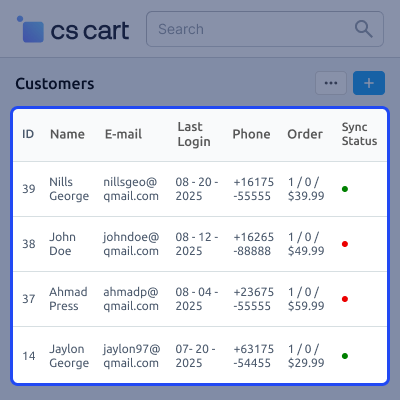
    • Move customer data both ways.
    • Update profiles from either platform.
    • Auto-link Dolibarr contacts with CS-Cart users.
    • Avoid creating duplicate records.
    Customer Management

    Category Mapping

    Organize products under the same categories.
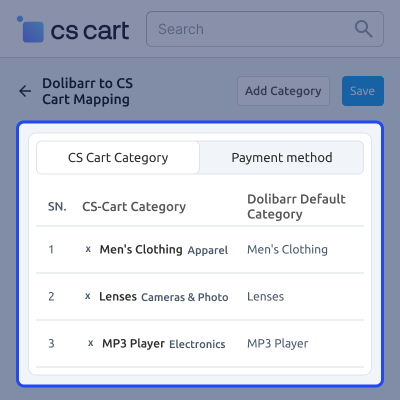
    • Map categories both ways.
    • Keep product categories the same in both systems.
    • Prevent product sync errors.
    • Manage categories from one place.
    Category Mapping

    Support -

    For any query or issue please create a support ticket here

    You may also check our other top-quality CS-Cart Add-ons.

    Specifications

    Product Version1.0
    Released7 months ago
    CategoryCS-CartConnector
    Last UpdatedOctober 6, 2025 (5 months ago)
    Supported VersionsCS-Cart  CS-Cart Multivendor  4.16.x  4.17.x  4.18.x  
    Write a review

    Frequently Asked Questions

     Do I need a Dolibarr account to use this connector?
    Yes. You need an active Dolibarr ERP & CRM with API access.
     
     Is this add-on compatible with CS-Cart Multivendor?
    Yes. It works with both CS-Cart and Multivendor.
     
     Is warehouse mapping supported?
    Yes. But you must install and activate the Warehouse add-on in CS-Cart first.
     
     How are orders synced between CS-Cart and Dolibarr?
    New orders sync from CS-Cart to Dolibarr in real-time. Orders from Dolibarr to CS-Cart sync via cron job.
     
     Can I map CS-Cart product categories to Dolibarr categories?
    Yes. You can map categories both ways.

    Move to Cloud Today

    AWS Free tier hosting for one year by amazon web services, for more details please visit AWS Free Tier.

    GCP Free tier hosting for one year with 300 credit points by google cloud platform, for more details please visit GCP Free Tier.

    Azure free tier hosting for one year with 25+ always free services, for more details please visit Azure Free Tier.

    In our default configuration we will provide tremendous configuration for your eCommerce Website which is fast to load and response.

    Default Configuration Details of Server

    • 1 GB RAM
    • 1 Core Processor
    • 30 GB Hard Disk
    • DB with 1 GB RAM and 1 Core Processor

    * Server Configuration may vary as per application requirements.

    Want to know more how exactly we are going to power up your eCommerce Website with Cloud to fasten up your store. Please visit the Cloudkul Services.

    Get Started with Cloud
    • - Feature Add (+)
    • - Feature remove (-)
    • - Bug Fixed (!)
    • - Modification (*)
    Version 1.0
    • + Admin can import/export products between Dolibarr ERP & CRM and CS-Cart store.
    • + Admin can import/export customers between Dolibarr ERP & CRM and CS-Cart store.
    • + Admin can import/export orders between Dolibarr ERP & CRM and CS-Cart store.
    • + Real-time product updates from your CS-Cart store to the Dolibarr ERP after syncing.
    • + Admin can map Dolibarr category with CS-Cart category.
    • + Admin can map Dolibarr payment/shipping method with CS-Cart payment/shipping method.
    • + Admin can map Dolibarr warehouse with CS-Cart warehouse.
    • + Orders get synced to Dolibarr in real time when created in your CS-Cart store.
    • + Real-time order updates from your CS-Cart store to the Dolibarr ERP after syncing.
    • + Real-time customer updates from your CS-Cart store to the Dolibarr ERP after syncing.
    • + Product updates from Dolibarr to CS-Cart via cron job after syncing.
    • + Order updates from Dolibarr to CS-Cart via cron job after syncing.


