USD
  • EUR
  • INR
  • USD
Cart
Cart 0
  • You have no items in your shopping cart.
    Cart
    Cart 0
    • You have no items in your shopping cart.
    Hire a Developer
    ×
    Contact Us!
    Send Again
    Close
    Please Login to Write Your Review

    CS-Cart Instamojo Payment Gateway

    CS-Cart Instamojo Payment Gateway lets customers pay online with Instamojo in CS-Cart stores. It supports UPI, cards, and net banking.


    • Connect the Instamojo payment gateway with CS Cart stores.

    • Accept online payments using debit and credit cards easily.

    • Also support UPI payments for online store customers.

    • Let customers pay through net banking payment methods.

    • Support digital wallet payments for online customers.

    • Provide PCI DSS compliant support for secure payments.

    • Support Visa and Mastercard verified card payments.

    • Install the add on without changing CS Cart core files.

    • Moreover, support CS Cart MultiVendor store editions.

    Screenshots
    CS-Cart Instamojo Payment Gateway CS-Cart Instamojo Payment Gateway CS-Cart Instamojo Payment Gateway CS-Cart Instamojo Payment Gateway CS-Cart Instamojo Payment Gateway CS-Cart Instamojo Payment Gateway CS-Cart Instamojo Payment Gateway CS-Cart Instamojo Payment Gateway CS-Cart Instamojo Payment Gateway
    Show More Hide All
    $49.00

    * Required Fields

    Add To Cart
    $49.00
    Configure and Buy
    • Description
    • Reviews
    • FAQ
    • Customers ()
    • Specifications
    • Cloud Hosting
    • Changelog

    CS-Cart Instamojo Payment Gateway helps stores accept online payments with Instamojo. Buyers can pay with UPI, cards, wallets, and net banking. Store owners can add Instamojo from the admin panel. Also, setup works without changing core files in CS Cart.

    Customers get more payment choices during checkout. So, stores can offer a simple and smooth buying process. Instamojo supports card payments, UPI, wallets, and net banking. As a result, buyers can use their preferred payment option.

    Instamojo follows PCI DSS security rules for safe payments. Moreover, it supports Visa and Mastercard verified transactions. Module works with CS Cart, MultiVendor, MultiVendor Plus, and Ultimate editions for online stores.

    To strengthen consumer authentication, you may also use the CS-Cart Stripe Payment Gateway.
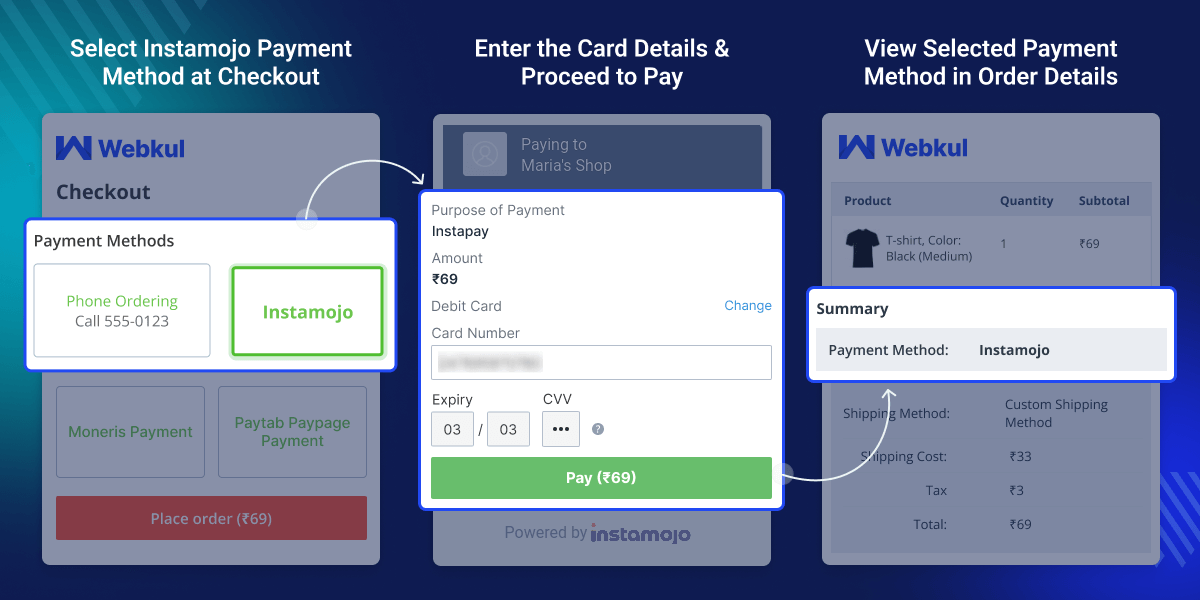
    CS-Cart Instamojo Payment Gateway

    Highlighted Feature of CS-Cart Instamojo Payment Gateway

     Safe and Secure

    InstaMojo payment provides a safe and secure payment gateway that uses anti-fraud and anti-money processing measures to ensure transaction security.

     PCI - DSS Compliant

    Instamojo Payment Gateway ensures safe and secure payments as it follows data security standards.

     Helps to minimize costs and risks

    Instamojo payment gateway can help you minimize costs and risk.

     Supports Multiple Card Types

    Instamojo payment gateway supports cards that are verified by Visa & Master Card.

    Why Do We Need CS-Cart Instamojo Payment Gateway?

    CS-Cart Instamojo Payment Gateway helps stores accept online payments through Instamojo. Many Indian stores need local payment options for buyers. Default payment methods may not support UPI, wallets, or net banking services properly. So, buyers may get fewer payment choices during checkout.

    Stores also need safe payment processing for online orders. Moreover, PCI DSS security support helps improve transaction safety. Store owners can connect Instamojo with CS Cart from the admin panel. Also, setup works without changing core files.

    Buyers can pay with cards, wallets, UPI, and net banking from one payment option during checkout. Module works with CS Cart and MultiVendor editions for different online business needs.

    Customer can also place their orders using this payment method and complete the checkout process.

    Use Cases

    CS Cart Instamojo Payment Gateway supports stores that need online payment options for buyers in India.

    • Online Retail Stores

      Accept payments with UPI, cards, wallets, and net banking.

    • MultiVendor Marketplace Stores

      Support payments in CS Cart marketplace stores.

    • Small Business eCommerce Stores

      Give buyers easy payment methods during checkout.

    • Startup Online Businesses

      Accept payments through online payment methods.

    Instamojo Payment Gateway configuration

    Owners of CS-Cart websites can configure and administer the module by inputting the necessary information. The store admin must enter the following details:
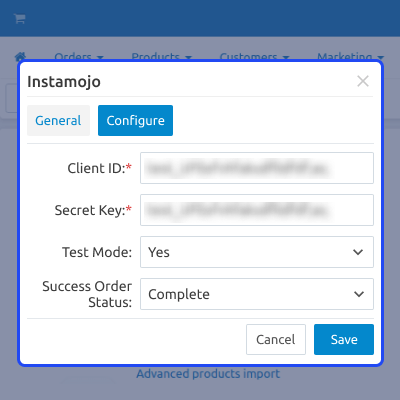
    • Enter the client ID and Secret key
    • The test mode should be yes.
    • Success order complete should be Complete.
    Instamojo Payment Gateway configuration

    Instamojo Payment Gateway at Checkout

    Products can be added to the cart, and Instamojo streamlines the checkout process.
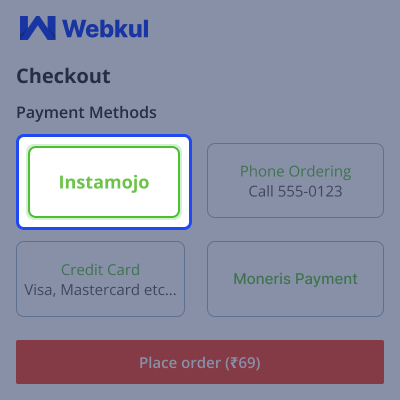
    • Select the Instamojo payment method at checkout.
    • Enter the card details.
    • Place your order successfully by using the Instamojo payment method
    Instamojo Payment Gateway at Checkout

    Admin View Order Details

    Admin can view the details of the placed orders along with payment method.
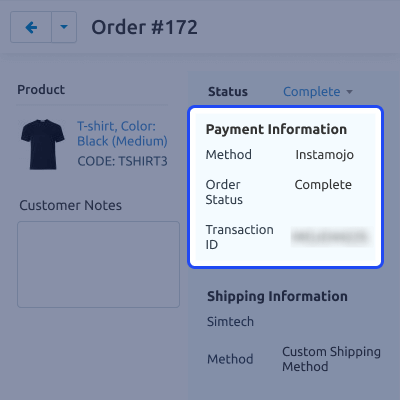
    • Admin can view every detail of orders that are placed by customers.
    • Admin can view the mode of payment.
    • Admin can generate shipment.
     Admin View Order Details

    Better Security Management

    The Instamojo payment gateway provided by Cs-cart ensures security.
    • Instamojo payment gateway is PCI-DSS certified.
    • Instamojo Payment Gateway ensures safe checkout to protect you and your customers.
    • Smooth online and payment process.
    Better Security Management

     CS-Cart Instamojo Payment Gateway- Support

    For any query or issue please create a support ticket here http://webkul.uvdesk.com

    You may also check our other top-quality CS-Cart Add-ons.

    Specifications

    Product Version1.0
    Released4 years ago
    CategoryCS-CartPayment
    Last UpdatedMay 15, 2026 (7 days ago)
    Supported Versions4.17.x  CS-Cart  4.14.x  4.15.x  4.16.x  4.18.x  CS-Cart Multivendor  4.14.x  4.15.x  4.16.x  4.17.x  4.18.x  
    Write a review

    Frequently Asked Questions

     What is CS-Cart Instamojo Payment Gateway?
    CS-Cart Instamojo Payment Gateway enables users of CS-Cart to accept payments through Instamojo on their online stores.
     
     Does the CS-Cart Instamojo payment Gateway Extension work in India or other countries as well?
    The extension is used only in India as the Instamojo Payment Gateway is widely used in India.
     
     How does this extension secure the money transfer?
    The Instamojo payment gateway is PCI-DSS certified, which provides secure checkout for both you and your clients.
     
     Which payment options are available to customers using the Instamojo Payment Gateway?
    Customer can make payment by using NEFT/ RTGS/ Bank transfer. Debit/ Credit Cards- Mastercard/ Visa/ Maestro/ Rupay. Netbanking- SBI/ HDFC/ ICICI.
     
      How does the CS-Cart Instamojo Payment Gateway improve payment security?
    The 3D Secure solution, which helps stop theft and fraudulent payments and guarantees that transactions are safe and genuine, is integrated with the CS-Cart Instamojo Payment Gateway.

    Move to Cloud Today

    AWS Free tier hosting for one year by amazon web services, for more details please visit AWS Free Tier.

    GCP Free tier hosting for one year with 300 credit points by google cloud platform, for more details please visit GCP Free Tier.

    Azure free tier hosting for one year with 25+ always free services, for more details please visit Azure Free Tier.

    In our default configuration we will provide tremendous configuration for your eCommerce Website which is fast to load and response.

    Default Configuration Details of Server

    • 1 GB RAM
    • 1 Core Processor
    • 30 GB Hard Disk
    • DB with 1 GB RAM and 1 Core Processor

    * Server Configuration may vary as per application requirements.

    Want to know more how exactly we are going to power up your eCommerce Website with Cloud to fasten up your store. Please visit the Cloudkul Services.

    Get Started with Cloud
    Not Available


