USD
  • EUR
  • INR
  • USD
Cart
Cart 0
  • You have no items in your shopping cart.
    Cart
    Cart 0
    • You have no items in your shopping cart.
    Hire a Developer
    ×
    Contact Us!
    Send Again
    Close
    Please Login to Write Your Review

    CS-Cart Modified Category Menu

    CS-Cart Modified Category Menu helps store owners show categories in one menu. Customers can change language, switch currency, and check accounts from one place.


    • Show categories and first-level child categories in one menu.

    • Change menu background, heading, and text colors easily.

    • Add a menu icon for faster access to category sections.

    • Add category menu blocks on any storefront page.

    • Let customers change the store language from the menu.

    • Allow customers to switch store currency from the menu.

    • Give customers quick access to account and profile pages.

    • Match the category menu design with your store theme.

    Additional Info

    Before installing the add-on, extract the downloaded package.

    • Install the License Manager add-on first.
    • Then install the required add-on.
    • Follow the license activation steps to generate your license key.

    Screenshots
    $49.00

    * Required Fields

    Add To Cart
    $49.00
    Configure and Buy
    • Description
    • Reviews
    • FAQ
    • Customers ()
    • Specifications
    • Cloud Hosting
    • Changelog

    CS-Cart Modified Category Menu helps store owners create a category menu with custom colors, menu icons, and quick customer options. Store owners can show categories and child categories in one menu. This helps customers find products faster and move between sections with less effort.

    Menu color settings help match the design of the store. Admins can change background, heading, and text colors from the admin panel. Customers can change the store language from the menu. This makes shopping easier for buyers who use different languages.

    Customers can also switch the store currency from the same menu. This helps them view prices in the currency they want. Account and profile links can be added to the menu. Customers can reach account pages quickly without extra clicks.

    To manage vendor plans with multiple commission options, you can also use the CS-Cart Plan Modification extension.
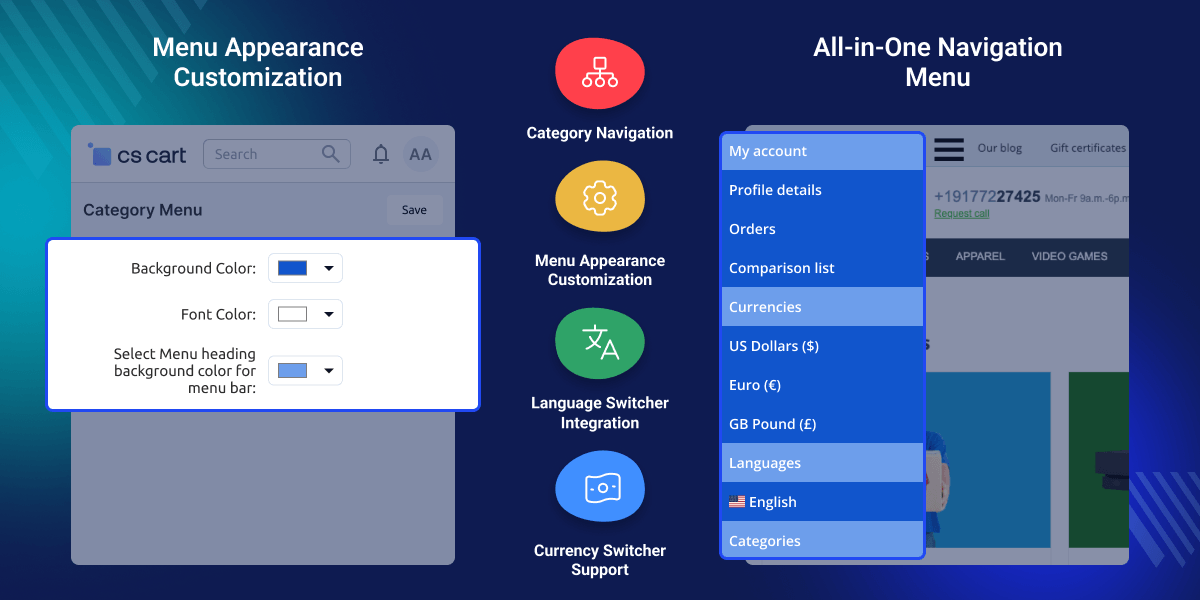
    CS-Cart Modified Category Menu

    CS-Cart Modified Category Menu Highlighted Features

     Menu Color Options

    Change menu background, heading, and text colors to match your store design and improve menu visibility.

     Product Group Menu

    Show categories and child categories in one menu to help customers find products more quickly.

     Menu Icon Option

    Add a menu icon that makes it easier for customers to open and use the category menu.

     Language Change Tool

    Allow customers to change the store language from the menu while they browse products.

     Money Format Selection

    Allow customers to choose a currency and view prices in the format they use most often.

    Before installing the add-on, extract the downloaded package.

    • Install the License Manager add-on first.
    • Then install the required add-on.
    • Follow the license activation steps to generate your license key.

     Profile Page Access

    Give customers direct access to profile details and account pages from the same menu.

    Why do we need CS-Cart Modified Category Menu?

    CS-Cart Modified Category Menu helps stores improve a basic category menu that may not match the store design and can look out of place on the storefront. Customers may find it hard to move between product sections when categories are not shown in a clear and simple way.

    Store owners often need separate areas for language, currency, and account options. This can add extra clicks during shopping. CS-Cart Modified Category Menu brings these options into one menu. Customers can find categories and store settings in a single place.

    Store owners can change menu colors and menu layout to match the look of their store without extra work. Many stores use organized menus to help customers find products faster and move through the store more easily.

    Need better control over store categories? You can also check CS-Cart Category Management to import, export, organize, and manage category data more efficiently across your store.

    Use Cases

     Fashion and Apparel Stores

    Show product categories and child categories in one menu for easier product browsing.

     Electronics and Gadget Stores

    Help customers reach product sections faster and find items with fewer clicks.

     Multi-Language Online Stores

    Let customers change the store language directly from the menu while shopping.

     Multi-Currency Online Stores

    Allow customers to switch currencies and view prices in a familiar format.

     Large Product Catalog Stores

    Keep product groups organized and make products easier to find.

     Multi-Vendor Marketplace Stores

    Provide a simple menu that helps buyers move across the store more easily.

    Customize Category Menu Appearance

    Change menu colors from the admin panel to match your store design. Admins can set background, text, and heading colors from one place.

    This helps keep the menu clear and easy to use. It also helps the menu match the look of the store.
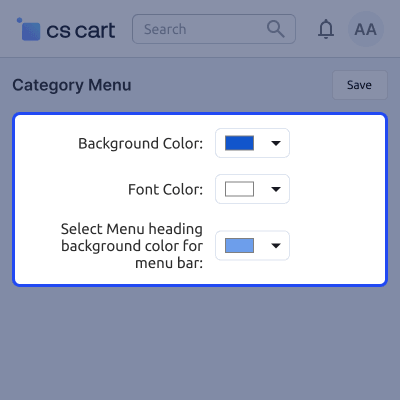
    • Change menu background colors from the admin panel
    • Set menu text colors to match store design
    • Change heading colors for menu sections
    • Match menu style with your store theme
    • Update the menu look without changing the files
    • Manage menu colors from one place
    Customize Category Menu Appearance

    Category Menu for Easy Store Navigation

    Show categories, language options, and currency options in one menu. Customers can use key store options without leaving the page.

    This helps customers find products faster and change store settings with fewer clicks.
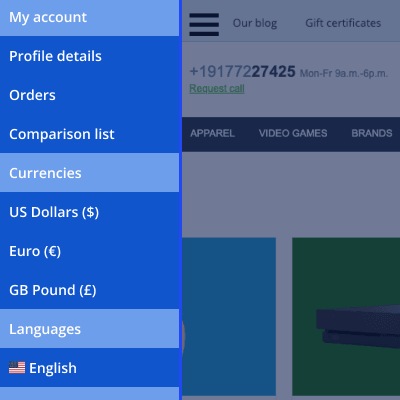
    • Show categories and child categories in one menu
    • Let customers change the store language easily
    • Allow currency changes while shopping online
    • Give quick access to key store options
    • Keep menu links clear and easy to use
    • Help customers find products more quickly
    Category Menu for Easy Store Navigation

     CS-Cart Modified Category Menu- Support

    For any query or issue please create a support ticket here http://webkul.uvdesk.com

    You may also check our other top-quality CS-Cart Add-ons.

    Specifications

    Product Version1.1
    Released4 years ago
    Last UpdatedJuly 3, 2026 (1 day ago)
    Supported VersionsCS-Cart  CS-Cart Multivendor  4.18.x  4.19.x  4.20.x  
    Write a review

    Frequently Asked Questions

     Can I display both categories and subcategories in the same menu?
    Categories and first-level child categories can be shown together in one menu, making it easier for customers to browse product sections.
     
     Will the menu design match my store theme?
    You can change menu background, heading, and text colors to match your store design and keep a consistent look across pages.
     
     Can I place the category menu on specific pages only?
    Menu blocks can be added to selected pages through block management, allowing you to show the menu where it is needed.
     
     Is it possible to add a menu icon?
    A menu icon can be added to make category links easier to find and help customers open the menu more quickly.
     
     Can customers change the store language without leaving the page?
    Customers can switch the store language directly from the menu, helping them continue shopping without extra steps.
     
     How can customers change the store currency?
    Customers can select a different currency from the menu and view product prices in the format they prefer.
     
     Does the menu provide access to customer accounts?
    Customers can open account and profile pages from the same menu, making important account options easier to reach.
     
     Will this add-on work for stores with many categories?
    Yes, it helps organize large numbers of categories in one menu so customers can find products with less effort.
     
     Can marketplace owners use this add-on on Multi-Vendor stores?
    It works with CS-Cart Multi-Vendor editions, making it suitable for stores that have multiple sellers.
     
     Do I need to change the theme files to update menu colors?
    Menu colors can be managed from the add-on settings, so there is no need to edit theme files for basic changes.

    Move to Cloud Today

    AWS Free tier hosting for one year by amazon web services, for more details please visit AWS Free Tier.

    GCP Free tier hosting for one year with 300 credit points by google cloud platform, for more details please visit GCP Free Tier.

    Azure free tier hosting for one year with 25+ always free services, for more details please visit Azure Free Tier.

    In our default configuration we will provide tremendous configuration for your eCommerce Website which is fast to load and response.

    Default Configuration Details of Server

    • 1 GB RAM
    • 1 Core Processor
    • 30 GB Hard Disk
    • DB with 1 GB RAM and 1 Core Processor

    * Server Configuration may vary as per application requirements.

    Want to know more how exactly we are going to power up your eCommerce Website with Cloud to fasten up your store. Please visit the Cloudkul Services.

    Get Started with Cloud
    • - Feature Add (+)
    • - Feature remove (-)
    • - Bug Fixed (!)
    • - Modification (*)
    Version 1.1
    • ! Fix the UI issue at category page.
    • ! Update the developer name.
    • ! When admin click on save button then it displays a success message.
    Version 1.0
    • + The Admin can add colors to the background of the category menu tab.
    • + The Admin has the option to add the font color of the category menu tab.
    • + Admin can add heading’s background color of category menu tab.
    • + Admin can list all categories and first child categories in the menu tab.
    • + The customers can change the language of the storefront from the menu tab.
    • + The option to change the currency of the storefront from the menu tab is available.
    • + Customers can also check their profile details from this menu tab.
    • + Well integrated with CS-Cart, CS-Cart Multivendor, CS-Cart Multivendor-Plus, CS-Cart Multivendor Ultimate.


