USD
  • EUR
  • INR
  • USD
Cart
Cart 0
  • You have no items in your shopping cart.
    Cart
    Cart 0
    • You have no items in your shopping cart.
    Hire a Developer
    ×
    Contact Us!
    Send Again
    Close
    Please Login to Write Your Review

    CS-Cart Razorpay Magic Checkout

    CS-Cart Razorpay Magic Checkout brings Razorpay’s fast checkout experience to your store and, therefore, supports UPI payments, cards, wallets, EMI, and real-time payment processing.


    • Razorpay Magic Checkout works with your CS-Cart store.

    • This addon supports every Razorpay payment method.

    • It offers a fast and easy checkout process.

    • Customers can pay with UPI, cards, wallets, and EMI.

    • It provides a safe payment experience for customers.

    • System handles payments in real time.

    • Customers can place orders with Magic Checkout.

    • Payment status stays synced with CS-Cart orders.

    • It helps improve payment success rates.

    • Store admin can manage orders in admin panel.

    • This addon has easy setup and configuration options.

    • It helps boost checkout conversion rates.

    Screenshots
    CS-Cart Razorpay Magic Checkout CS-Cart Razorpay Magic Checkout CS-Cart Razorpay Magic Checkout CS-Cart Razorpay Magic Checkout CS-Cart Razorpay Magic Checkout CS-Cart Razorpay Magic Checkout
    Show More Hide All
    $99.00

    * Required Fields

    Add To Cart
    30 Days Refund*
    Only One Time Payment
    $99.00
    Configure and Buy
    • Description
    • Reviews
    • FAQ
    • Customers ()
    • Specifications
    • Cloud Hosting
    • Changelog

    CS-Cart Razorpay Magic Checkout helps store owners offer a faster and more convenient payment experience. Customers can complete purchases without going through a lengthy checkout process, helping reduce friction and improve conversions.

    The add-on integrates your CS-Cart store with Razorpay Magic Checkout and supports multiple payment methods in a single checkout flow. Customers can quickly choose their preferred payment option and complete transactions with ease.

    Customers can pay using UPI, debit cards, credit cards, net banking, wallets, EMI options, and other supported Razorpay payment methods. The checkout experience is optimized for desktop and mobile devices.

    Payments are processed in real time, providing customers with a secure payment experience while helping merchants receive faster order confirmations. Order details and payment status are automatically synchronized with CS-Cart, reducing manual effort and ensuring accurate order records.

    Store administrators can easily monitor transactions and payment details directly from the CS-Cart backend. The setup process is simple and requires only a few configuration steps.

    Additionally, if you want to further simplify the checkout process and reduce cart abandonment, you can also explore CS-Cart Single Step Checkout Add-On, which enables customers to complete purchases from a single checkout page with fewer steps.
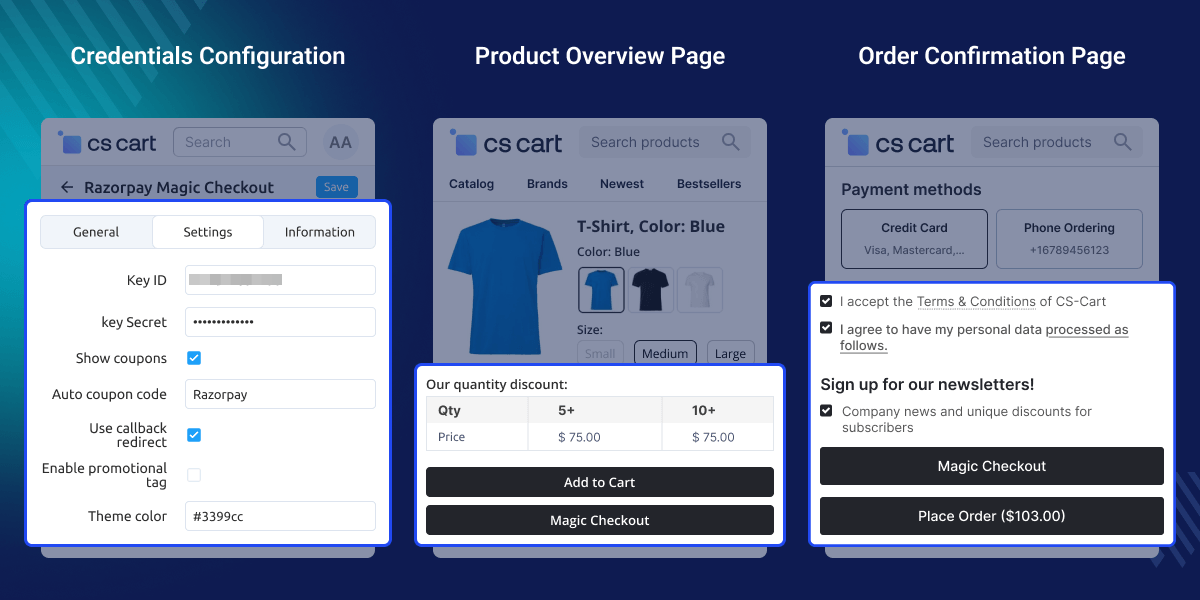
    CS-Cart Razorpay Magic Checkout

    Highlighted Features

     Razorpay Magic Checkout Integration

    Connect your store with Razorpay Magic Checkout for a faster payment experience.

     Multiple Payment Methods

    Accept UPI, cards, wallets, net banking, EMI, and more through one checkout.

     Faster Checkout Flow

    Reduce checkout steps and help customers complete purchases quickly.

     Order and Payment Synchronization

    Keep payment updates and order records synchronized automatically.

    Why Do We Need CS-Cart Razorpay Magic Checkout?

    CS-Cart Razorpay Magic Checkout helps address a common challenge where long checkout processes and limited payment options can, therefore, lead to lost sales and cart abandonment.

    Default payment setup may not give a smooth checkout experience or, therefore, support many payment methods in one flow. Razorpay Magic Checkout helps solve these issues with a fast checkout process, furthermore, many payment options, and safe payment handling.

    This add-on also keeps payment details in sync with store orders. This helps make order management easy for store admin. Many merchants use fast checkout solutions to improve payment success rates and, therefore, make it easier for customers to complete purchases.

    Additionally, if you want to automate payment distribution, you can also explore CS-Cart Razorpay Split Payment Add-on. It automatically splits payments between vendors and admin.

    Use Cases

    Speed Up the Purchase Process

    Reduce checkout delays and help customers place orders faster.

    Improve Mobile Shopping Experience

    Provide a smooth checkout experience for mobile shoppers.

    Track Payments and Orders Automatically

    Keep payment updates and order records synchronized automatically.

    Real-Time Payment Processing

    Process payments instantly with real-time transaction confirmations.

    Razorpay Magic Checkout Integration

    Connect your CS-Cart store with Razorpay Magic Checkout to offer a faster, smoother, and more seamless checkout experience.
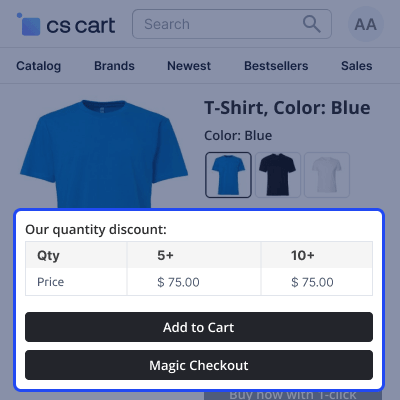
    • Connects your CS-Cart store with Razorpay Magic Checkout.
    • Supports Razorpay checkout process.
    • Makes store setup quick and easy.
    • Gives safe access to CS-Cart payment gateway.
    • Works well with CS-Cart orders.
    • Enables quick setup from admin panel.
    Razorpay Magic Checkout Integration

    Order and Payment Status Synchronization

    Keep payment and order data in sync in CS-Cart. This ensures accuracy, smooth work, and better order management.
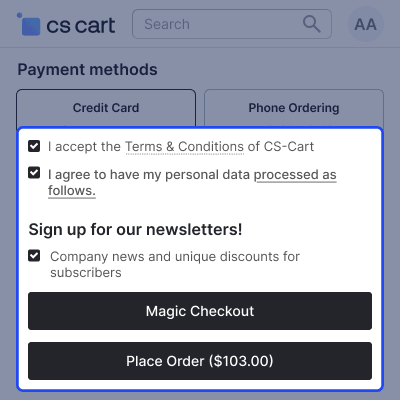
    • Order details stay up to date in real time across system.
    • Payment status stays up to date across all transactions.
    • Records stay correct and consistent across all systems.
    • Fewer manual checks are needed for efficient work.
    • All order details stay in one place for easy access.
    • Orders are easier to track and manage across platforms.
    Order and Payment Status Synchronization

    Admin Configuration Settings

    Central Razorpay admin settings help you manage API keys, coupons, and checkout flow in one place. This ensures secure payments, automatic discounts, and smooth CS-Cart order processing.
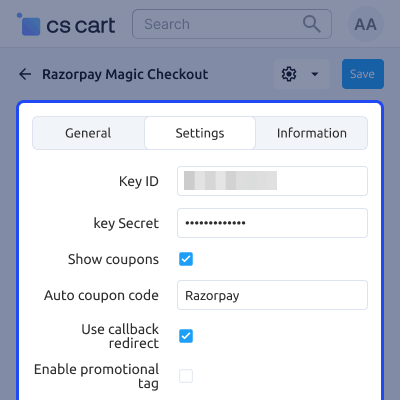
    • Set Razorpay Key ID and Secret safely for payment authentication
    • Turn coupon visibility on or off during checkout
    • Set an auto coupon code to apply default discounts automatically
    • Set the callback redirect URL for order confirmation after payment
    • Manage all payment settings from one place for a smooth and consistent checkout experience
    Admin Configuration Settings

     Support

    For any query or issue please create a support ticket here http://webkul.uvdesk.comYou may also check our other top-quality CS-Cart Add-ons.

    Specifications

    Product Version1.0
    ReleasedToday
    CategoryCS-Cart
    Last UpdatedJune 5, 2026 (1 day ago)
    Supported VersionsCS-Cart  CS-Cart Multivendor  4.18.x  4.19.x  4.20.x  
    Write a review

    Frequently Asked Questions

     Do I need a Razorpay account to use CS-Cart Razorpay Magic Checkout?
    Yes, an active Razorpay account is required to connect your CS-Cart store and start accepting payments.
     
     Can customers pay using UPI apps like Google Pay and PhonePe?
    Yes, customers can use supported UPI apps through Razorpay for fast and convenient payments.
     
     Will customers be redirected to another website for payment?
    Razorpay Magic Checkout provides a seamless payment experience with fewer checkout steps.
     
     Can customers choose their preferred payment method at checkout?
    Yes, customers can select from UPI, cards, wallets, net banking, EMI, and other available payment options.
     
     How long does it take to set up CS-Cart Razorpay Magic Checkout?
    Setup is quick and requires only Razorpay account credentials and basic module configuration.
     
     Can I track payment status without logging into Razorpay?
    Yes, payment details and order updates can be viewed directly from the CS-Cart admin panel.
     
     Will CS-Cart Razorpay Magic Checkout help reduce failed transactions?
    Yes, the streamlined checkout flow can improve payment success rates and customer experience.
     
     Is Razorpay Magic Checkout Integration suitable for high-value orders?
    Yes, customers can use cards, net banking, and EMI options, making large purchases more convenient.
     
     How can Razorpay Magic Checkout Integration help grow my online store?
    A faster checkout experience and multiple payment options can improve conversions and customer satisfaction.

    Move to Cloud Today

    AWS Free tier hosting for one year by amazon web services, for more details please visit AWS Free Tier.

    GCP Free tier hosting for one year with 300 credit points by google cloud platform, for more details please visit GCP Free Tier.

    Azure free tier hosting for one year with 25+ always free services, for more details please visit Azure Free Tier.

    In our default configuration we will provide tremendous configuration for your eCommerce Website which is fast to load and response.

    Default Configuration Details of Server

    • 1 GB RAM
    • 1 Core Processor
    • 30 GB Hard Disk
    • DB with 1 GB RAM and 1 Core Processor

    * Server Configuration may vary as per application requirements.

    Want to know more how exactly we are going to power up your eCommerce Website with Cloud to fasten up your store. Please visit the Cloudkul Services.

    Get Started with Cloud
    • - Feature Add (+)
    • - Feature remove (-)
    • - Bug Fixed (!)
    • - Modification (*)
    Version 1.0
    • + Integration of Razorpay Magic Checkout with CS-Cart.
    • + All Razorpay payment method will be available in checkout.
    • + Customers will be able to place orders using Razorpay Magic Checkout.
    • + Admin will be able to manage orders from the admin panel.


