USD
  • EUR
  • INR
  • USD
Cart
Cart 0
  • You have no items in your shopping cart.
    Cart
    Cart 0
    • You have no items in your shopping cart.
    Hire a Developer
    ×
    Contact Us!
    Send Again
    Close
    Please Login to Write Your Review

    CS-Cart Stripe POS Terminal Connector

    CS-Cart Stripe POS Terminal Connector add-on allows POS agents to make payments through the cards to the POS stripe terminal.


    • POS agents can use Stripe as their payment option for card payments.

    • Admins can assign a specific Stripe terminal to each POS location.

    • Multiple Stripe readers can be connected to one POS system.

    • Use the available simulator to try the Stripe payments.

    • Admins can manage several POS locations from the backend.

    • Payment details for card transactions appear on the order receipt.

    • Supported cards for stripe payment like Visa, Discover, Mastercard, and American Express.

    Screenshots
    CS-Cart Stripe POS Terminal Connector CS-Cart Stripe POS Terminal Connector CS-Cart Stripe POS Terminal Connector CS-Cart Stripe POS Terminal Connector CS-Cart Stripe POS Terminal Connector CS-Cart Stripe POS Terminal Connector CS-Cart Stripe POS Terminal Connector CS-Cart Stripe POS Terminal Connector CS-Cart Stripe POS Terminal Connector
    Show More Hide All
    $389.00

    * Required Fields

    Add To Cart
    30 Days Refund*
    Only One Time Payment
    $389.00
    Configure and Buy
    • Description
    • Reviews
    • FAQ
    • Customers ()
    • Specifications
    • Cloud Hosting
    • Changelog

    CS-Cart Stripe POS Terminal Connector add-on allows debit card payments using the POS Stripe terminal at the POS outlets. POS admin can accept payments from multiple locations to add various Stripe readers to the POS outlets.

    Customers receive order receipts with payment information to ensure efficient records.
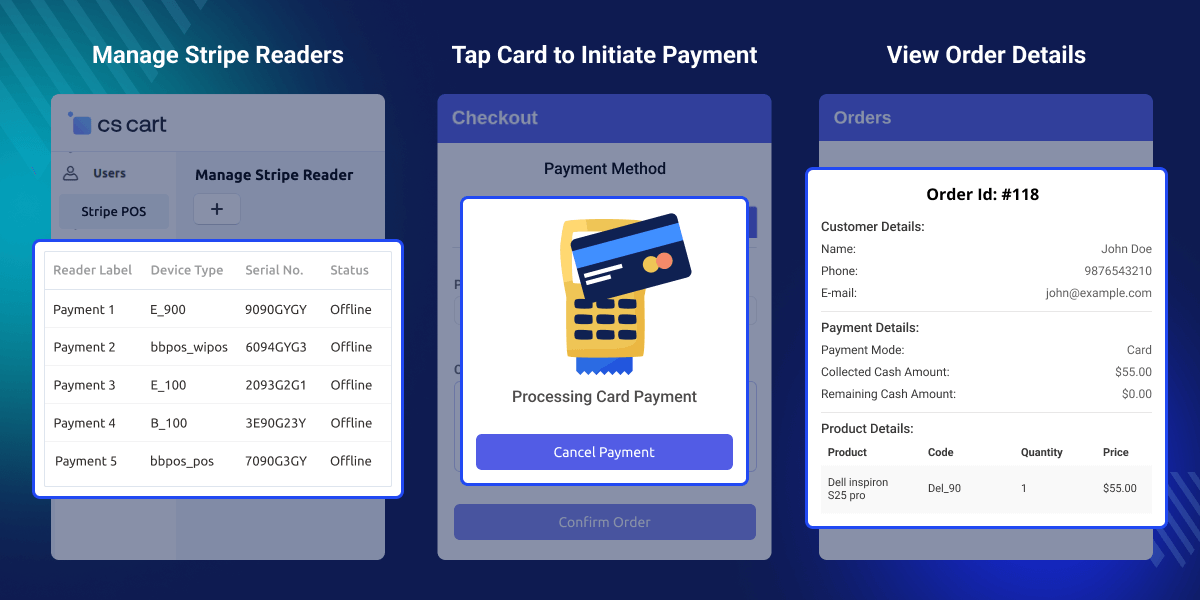
    CS-Cart Stripe POS Terminal Connector

    Highlighted Features of the CS-Cart Stripe POS Terminal Connector

     Stripe Reader Integration

    Set up Stripe as the payment gateway for card transactions.

     Automatic Connection

    The Stripe reader easily connects with the POS and provides a seamless experience.

     Multiple Stripe Readers

    Admin can connect various stripe readers from the backend to receive payment from various POS outlets.

     Card Compatibility

    Users can use any card like Mastercard, American Express, Visa, and Discover cards to make payments.

     Test Payments

    Includes a simulator to test transactions through Stripe before going live.

     Order Receipt Generation

    After the successful payment, the user receives the order receipt with payment details generated by the POS.

    Why Use the CS-Cart Stripe POS Terminal Connector?

    This add-on is designed for POS agents looking to accept payments via Stripe. It provides a simple, safe, and user-friendly payment solution. By integrating Stripe as a payment option, businesses can attract more customers and boost sales.

    Also, you can check our CS-Cart Stripe Payment Gateway module, if you want to integrate Stripe payment gateway into your store.

    Configuration Options

    After Successful installation, the admin can configure the following settings from the backend:
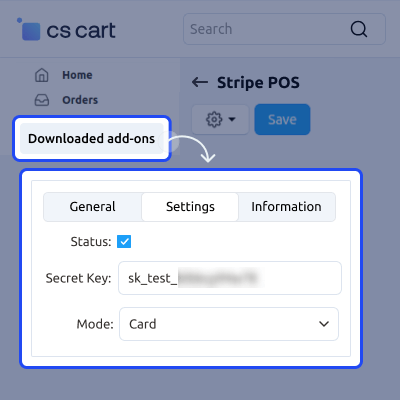
    • Activate the Stripe terminal payment gateway.
    • Customize the title and description shown during checkout.
    • Enable simulator mode for initial payment testing.
    Configuration Options

    Adding Multiple Outlets

    Admin can add multiple outlets to the Stripe POS for card payments.
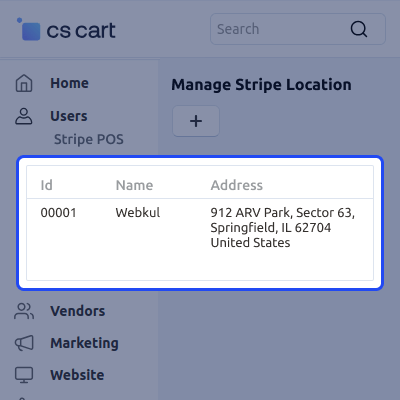
    • Multiple stores can utilize the Stripe payment terminal.
    • Specific readers can be assigned to designated outlets.
    • Receive Payment from multiple Outlets through Stripe Terminal.
    Adding Multiple Outlets

    Processing Payments with Stripe Card Swipe

    With the CS-Cart Stripe connector, POS agents can:
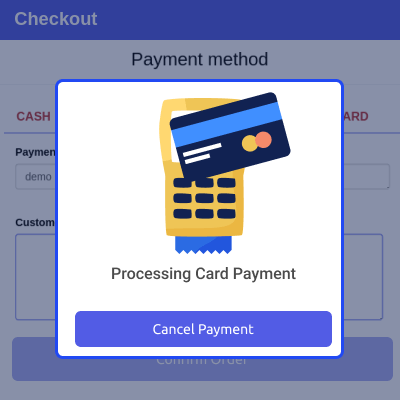
    • Accept various credit/debit cards for payments.
    • Set Stripe card swipe as the default payment method for transactions.
    • Use the simulator for initial testing.
    Processing Payments with Stripe Card Swipe

    Billing and Order Management

    POS agents can efficiently manage billing and orders, allowing them to:
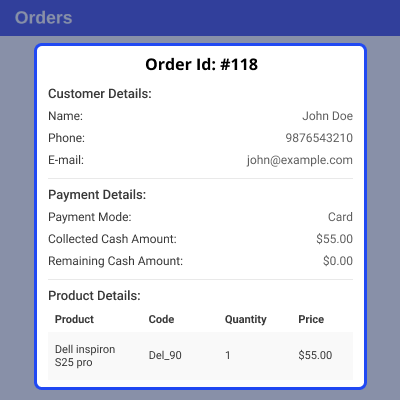
    • Generate order receipts immediately following billing.
    • Include Stripe payment details on the receipts.
    • Ensure a secure and user-friendly payment experience for the customers.
    Billing and Order Management

     Support

    For any query or issue please create a support ticket here http://webkul.uvdesk.com.You may also check our other top-quality CS-Cart Add-ons.

    Specifications

    Product Version1.0
    Released1 year ago
    CategoryCS-CartConnector
    Last UpdatedJanuary 3, 2025 (1 year ago)
    Supported Versions4.16.x  4.17.x  4.18.x  CS-Cart  
    Write a review

    Frequently Asked Questions

     Can I connect multiple Stripe card readers?
    Yes, It allows the Admin to add multiple Stripe card readers to POS.
     
      Will customers receive receipts for their payments?
    Yes, the Customer receives a detailed invoice of the order after successful payment.
     
     Can I customize the payment settings?
    Yes, the POS admin has the ability to configure the payment settings.
     
     Is there a testing option available before going live?
    Yes, A simulator is available for testing payments through the Stripe terminal.
     
      Can I assign specific Stripe readers to different POS locations?
    Yes, the admin can assign a specific Stripe card reader to each POS location, allowing for easy management of multiple outlets.

    Move to Cloud Today

    AWS Free tier hosting for one year by amazon web services, for more details please visit AWS Free Tier.

    GCP Free tier hosting for one year with 300 credit points by google cloud platform, for more details please visit GCP Free Tier.

    Azure free tier hosting for one year with 25+ always free services, for more details please visit Azure Free Tier.

    In our default configuration we will provide tremendous configuration for your eCommerce Website which is fast to load and response.

    Default Configuration Details of Server

    • 1 GB RAM
    • 1 Core Processor
    • 30 GB Hard Disk
    • DB with 1 GB RAM and 1 Core Processor

    * Server Configuration may vary as per application requirements.

    Want to know more how exactly we are going to power up your eCommerce Website with Cloud to fasten up your store. Please visit the Cloudkul Services.

    Get Started with Cloud
    • - Feature Add (+)
    • - Feature remove (-)
    • - Bug Fixed (!)
    • - Modification (*)
    Version 1.0
    • + Customer can pay via card on POS outlet.
    • + POS Admin can accept payment via card on stripe terminal.
    • + Admin can Assign terminal to POS outlet.
    • + Card payment details added on order receipt.


