USD
  • EUR
  • INR
  • USD
Cart
Cart 0
  • You have no items in your shopping cart.
    Cart
    Cart 0
    • You have no items in your shopping cart.
    Hire a Developer
    ×
    Contact Us!
    Send Again
    Close
    Please Login to Write Your Review

    CS-Cart Translate Product Data Using AI Models

    CS-Cart Translate Product Data using AI Models helps translate product details into selected languages automatically. It saves time and makes managing multilingual content easier.


    • Translate product details into selected languages using AI models.

    • Choose from multiple AI models for accurate translations.

    • Translate single or multiple product fields at once.

    • Export products with translated data for external use.

    Screenshots
    CS-Cart Translate Product Data Using AI Models CS-Cart Translate Product Data Using AI Models CS-Cart Translate Product Data Using AI Models CS-Cart Translate Product Data Using AI Models CS-Cart Translate Product Data Using AI Models CS-Cart Translate Product Data Using AI Models CS-Cart Translate Product Data Using AI Models CS-Cart Translate Product Data Using AI Models
    Show More Hide All
    $199.00

    * Required Fields

    Add To Cart
    $199.00
    Configure and Buy
    • Description
    • Reviews
    • FAQ
    • Customers ()
    • Specifications
    • Cloud Hosting
    • Changelog

    CS-Cart Translate Product Data Using AI Models lets store owners translate product names, descriptions, and other details into selected languages automatically. It reduces manual work and makes multilingual content easier to manage.

    Admins can translate individual product fields or multiple products at once. The add-on supports multiple AI services to provide accurate and natural translations. This saves time, especially for stores with large catalogs. It also ensures consistent content across all languages.

    You can also check out our CS-Cart Google Language Translator. This add-on lets you add a Google Translate drop-down to your storefront. Customers can browse in their preferred language without any hassle.
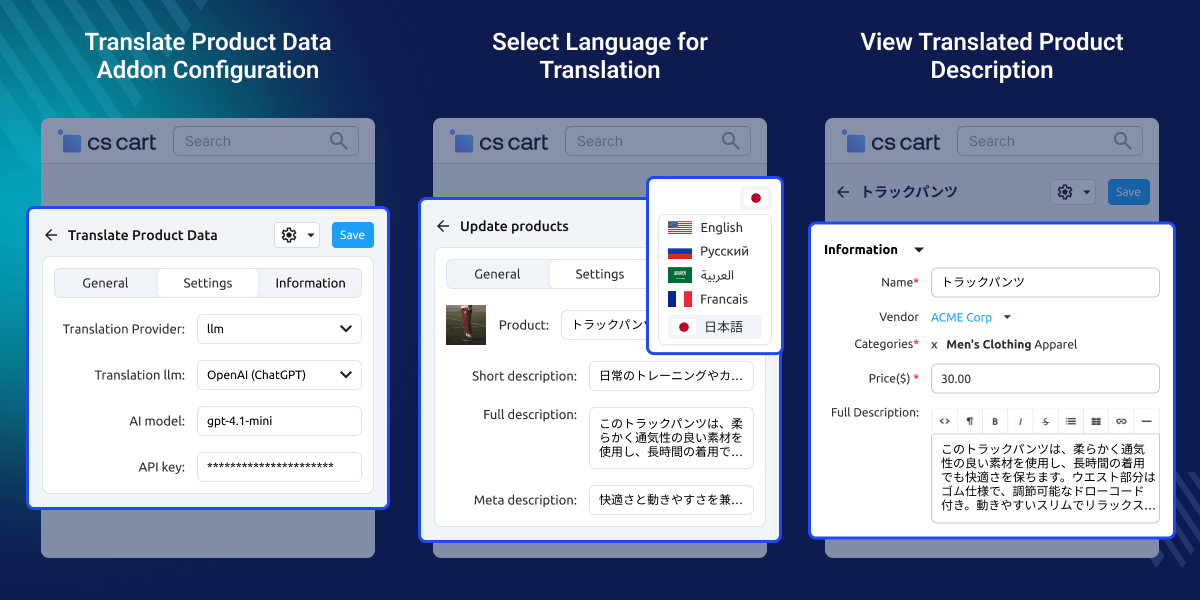
    CS-Cart Translate Product Data Using AI Models

    Highlighted Features

     Multi-Language Product Translation

    Translate CS-Cart product details into selected languages using AI models.

     Multiple AI Model Support

    Select from different AI models for clear and natural product translations.

     Single & Bulk Translation

    Translate single fields or multiple products at once to save time.

     Export Translated Product Data

    Export CS-Cart products along with translated details for external use.

    Why Do We Need CS-Cart Translate Product Data Using AI Models?

    CS-Cart Translate Product Data Using AI Models add-on helps store owners translate product names, descriptions, and other details into multiple languages without manual work. AI-based translation keeps the content clear and consistent.

    It also makes it easier to manage multilingual stores and reach customers from different regions. You can also explore CS-Cart Google Address Autocomplete to help customers enter addresses faster and with better accuracy.

    CS-Cart Translate Product Data Add-on Configuration

    Admins can easily set up AI-based product translation settings from the CS-Cart admin panel.
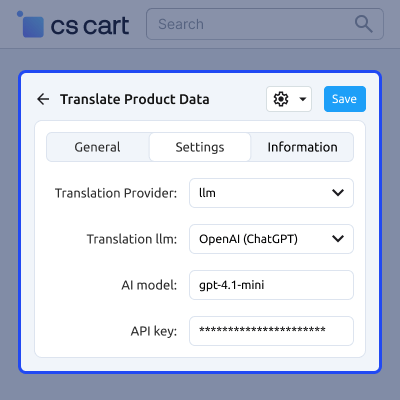
    • Configure translation settings from the admin panel.
    • Select the LLM service for product translation.
    • Choose the AI model for accurate results.
    • Enter the API key to connect with the selected service.
    • Use LLM as the translation provider for the store.
    CS-Cart Translate Product Data Configuration

    CS-Cart Export Product Data

    Export product information for reporting, backup, or external use.
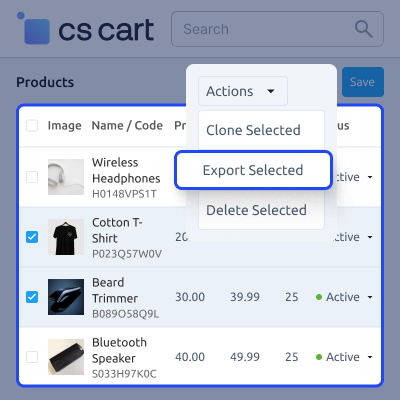
    • Export product names, descriptions, prices, and other details.
    • Export multiple products at the same time.
    • Download exported data in CSV format.
    • Select specific product fields as needed.
    CS-Cart Export Product Data

    Exported Data Details

    View and manage all exported product information in a structured format.
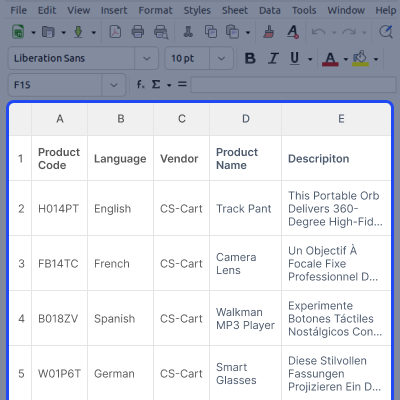
    • View product names, descriptions, prices, and metadata.
    • Check exported data in all selected languages.
    • Download files in CSV format.
    • Manage large product catalogs easily.
    Exported Data Details

    Select Language for Exporting Data

    Choose the language in which product data should be exported.
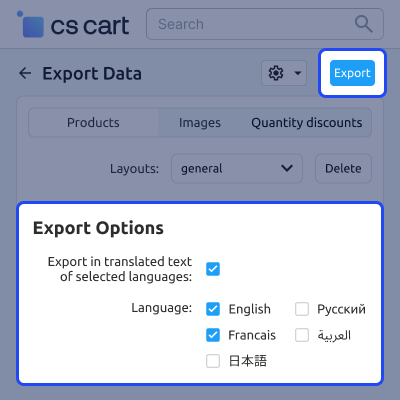
    • Select a specific language for export.
    • Export product names, descriptions, and metadata in the chosen language.
    • Support multiple languages for global stores.
    • Get accurate translated data for each product.
    Select Language for Exporting Data

    Support -

    For any query or issue please create a support ticket here

    You may also check our other top-quality CS-Cart Add-ons.

    Specifications

    Product Version1.0
    Released1 month ago
    CategoryCS-Cart
    Last UpdatedFebruary 11, 2026 (18 days ago)
    Supported VersionsCS-Cart  CS-Cart Multivendor  4.16.x  4.17.x  4.18.x  4.19.x  
    Write a review

    Frequently Asked Questions

     Can I translate all product details at once?
    Yes, the add-on supports both single and bulk product translations.
     
     Which AI models are supported for translation?
    You can choose from multiple AI models, including ChatGPT, Gemini, and other LLMs.
     
     Can I export products with translated data?
    Yes, products along with their translated details can be exported in CSV format.
     
     How do I configure the translation settings?
    All settings, including the AI model and API key, can be managed from the add-on configuration section in the admin panel.
     
     Can I select the language for exported data?
    Yes, you can choose the language in which the product data should be exported.

    Move to Cloud Today

    AWS Free tier hosting for one year by amazon web services, for more details please visit AWS Free Tier.

    GCP Free tier hosting for one year with 300 credit points by google cloud platform, for more details please visit GCP Free Tier.

    Azure free tier hosting for one year with 25+ always free services, for more details please visit Azure Free Tier.

    In our default configuration we will provide tremendous configuration for your eCommerce Website which is fast to load and response.

    Default Configuration Details of Server

    • 1 GB RAM
    • 1 Core Processor
    • 30 GB Hard Disk
    • DB with 1 GB RAM and 1 Core Processor

    * Server Configuration may vary as per application requirements.

    Want to know more how exactly we are going to power up your eCommerce Website with Cloud to fasten up your store. Please visit the Cloudkul Services.

    Get Started with Cloud
    • - Feature Add (+)
    • - Feature remove (-)
    • - Bug Fixed (!)
    • - Modification (*)
    Version 1.0
    • + Implemented add-on configuration.
    • + Implemented product data translation during product export.
    • + Implemented translation of selected product details.


