USD
  • EUR
  • INR
  • USD
Cart
Cart 0
  • You have no items in your shopping cart.
    Cart
    Cart 0
    • You have no items in your shopping cart.
    Hire a Developer
    ×
    Contact Us!
    Send Again
    Close
    Please Login to Write Your Review

    CS-Cart UnoPIM Connector

    CS-Cart UnoPim Connector syncs products, categories, stock, images, and variants between UnoPim and CS-Cart in real time.


    • Connect multiple UnoPim instances with CS-Cart storefronts or vendors.

    • Use import, export, two-way sync, or pause sync anytime.

    • Real-time product updates using webhook-based sync.

    • Sync products, categories, variants, images, price, and stock.

    • Map UnoPim categories with CS-Cart stores using visual mapping.

    • Transfer product options, variants, and attributes without errors.

    • Check product data before sync to avoid incomplete listings.

    • Sync CS-Cart changes back to UnoPim automatically.

    • Track all sync activity with logs, time, and error details.

    • Handle large product catalogs from one central system.

    • Reduce manual work and keep data accurate across stores.

    Additional Info

    Before installing the add-on, extract the downloaded package.

    • Install the License Manager add-on first.
    • Then install the required add-on.
    • Follow the license activation steps to generate your license key.

    Screenshots
    CS-Cart UnoPIM Connector CS-Cart UnoPIM Connector CS-Cart UnoPIM Connector CS-Cart UnoPIM Connector CS-Cart UnoPIM Connector CS-Cart UnoPIM Connector CS-Cart UnoPIM Connector CS-Cart UnoPIM Connector CS-Cart UnoPIM Connector CS-Cart UnoPIM Connector
    Show More Hide All
    $199.00

    * Required Fields

    Add To Cart
    30 Days Refund*
    Only One Time Payment
    $199.00
    Configure and Buy
    • Description
    • Reviews
    • FAQ
    • Customers ()
    • Specifications
    • Cloud Hosting
    • Changelog

    CS-Cart UnoPim Connector connects UnoPim with CS-Cart and keeps product data in sync without manual updates. It helps businesses manage product information from one place.

    CS-Cart Integration for UnoPim uses real-time webhook sync. Any change in UnoPim or CS-Cart updates the connected system instantly. It supports full control over data flow. You can choose import, export, or two-way sync based on your store setup.

    All product data, like price, stock, images, variants, and categories, stays updated across CS-Cart stores. This keeps catalogs clean and correct. The system also checks product data before syncing. This helps prevent missing or incorrect product details.

    It is ideal for businesses that manage large catalogs or multiple CS-Cart stores using UnoPim as a central system.
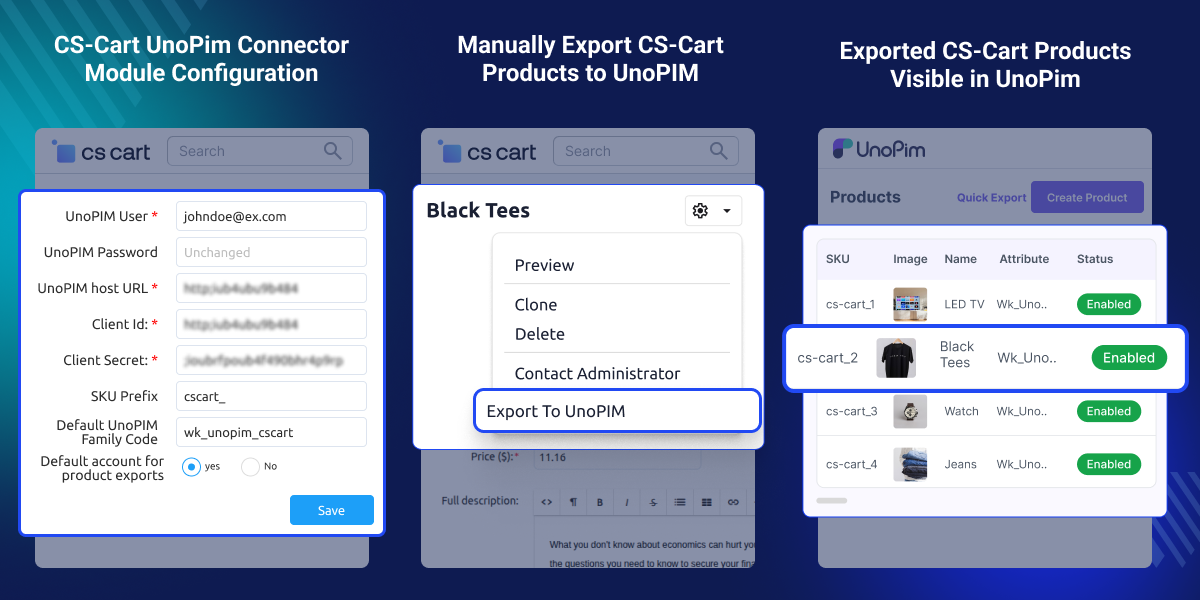
    CS-Cart UnoPim Connector

    Highlighted Features

     Multi-Instance UnoPim Connection

    Connect multiple UnoPim setups with different CS-Cart stores or vendors from one system for easier management.

     Flexible Sync Control

    Choose import, export, or two-way sync and pause synchronization anytime based on business needs.

     Real-Time Webhook Sync

    Product updates move instantly between UnoPim and CS-Cart without waiting for scheduled jobs.

     Complete Product Data Sync

    Sync categories, variants, images, prices, stock, and other product data in one process.

    Why Do We Need CS-Cart UnoPim Connector?

    CS-Cart does not offer strong central product control by default. Managing products across stores can become slow and error-prone. UnoPim stores product data in one place, but without a connector, updates need manual work.

    This module automates the full sync between UnoPim and CS-Cart. It keeps data accurate across both systems. It reduces manual imports and removes the risk of human error during updates. For growing stores, it improves speed, accuracy, and control across all product data.

    Use Cases

    Multi-Store Product Management

    Manage many CS-Cart stores from one UnoPim system with synchronized product data.

    Real-Time Catalog Updates

    Update product data in UnoPim and see changes instantly in connected CS-Cart stores.

    Central Product Control

    Manage prices, stock, images, and variants from one central UnoPim system.

    Large Catalog Handling

    Handle thousands of products easily without depending on manual synchronization work.

    Connect UnoPim with CS-Cart

    CS-Cart Connector for UnoPim helps you connect CS-Cart with UnoPim in a simple way. It keeps product data updated in both systems without manual work.

    It allows you to manage all products from UnoPim while CS-Cart updates changes automatically.
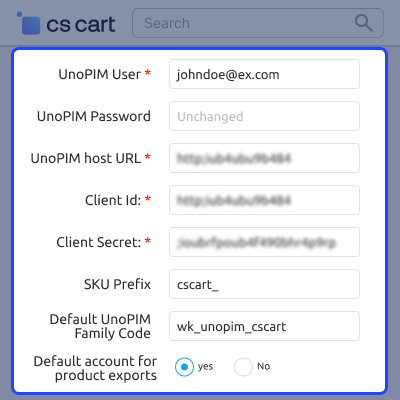
    • Connect UnoPim with one or more CS-Cart stores.
    • Set up a secure API connection between both systems.
    • Sync product data in real time without delays.
    • Choose how data moves between systems.
    • Reduce manual updates and avoid errors.
    Connect UnoPim with CS-Cart

    CS-Cart Category Mapping with UnoPim

    This feature helps you match UnoPim categories with CS-Cart categories. It keeps products in the right place inside your store.

    It is useful when you manage many products or multiple stores.
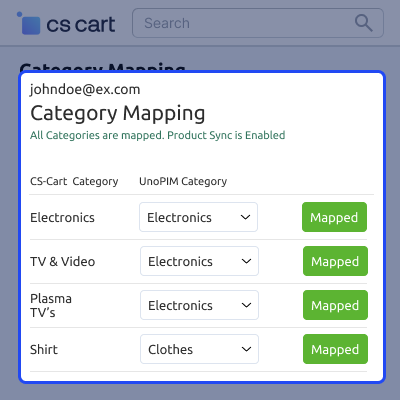
    • Link UnoPim categories with CS-Cart categories easily
    • Keep the category structure the same in both systems
    • Avoid assigning categories manually for each product
    • Support different category setups for multiple stores
    • Improve product organization and store browsing
    CS-Cart Category Mapping with UnoPim

     Sync Products Between CS-Cart and UnoPim

    This feature keeps product data the same in CS-Cart and UnoPim. Any change in one system updates the other automatically.

    It helps you maintain correct and up-to-date product information.
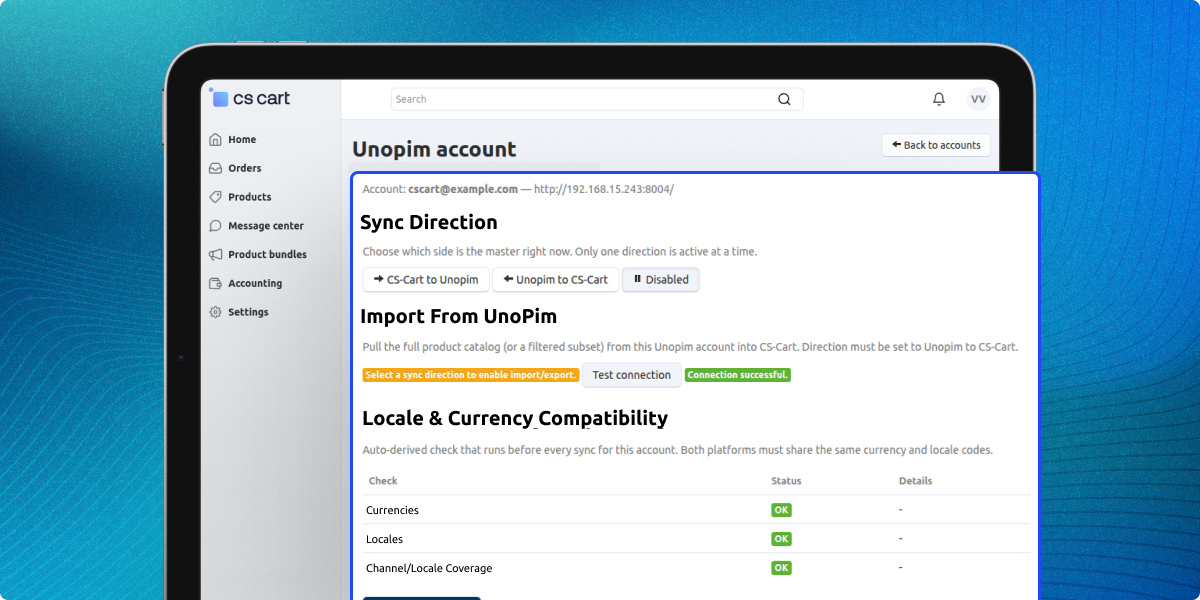
    • Sync products, prices, stock, images, and variants instantly
    • Update changes in real time across both systems
    • Support single and bulk product synchronization
    • Reduce differences between store and UnoPim data
    • Keep product data accurate and updated
    Sync Products Between CS-Cart and UnoPim

     Support

    For any query or issue please create a support ticket here http://webkul.uvdesk.comYou may also check our other top-quality CS-Cart Add-ons.

    Specifications

    Product Version1.0
    Released1 month ago
    CategoryCS-CartUnoPim
    Last UpdatedJune 25, 2026 (5 days ago)
    Supported VersionsCS-Cart  CS-Cart Multivendor  4.18.x  4.19.x  4.20.x  UnoPim  2.0.0  
    Write a review

    Frequently Asked Questions

      What does CS-Cart UnoPim Connector do?
    It connects UnoPim with CS-Cart and syncs products, categories, stock, images, and variants in real time to keep store data updated automatically.
     
      Does it support real-time syncing?
    Yes, it uses webhook based sync to update product data instantly between UnoPim and CS-Cart without delays or manual updates needed.
     
      Can I connect multiple CS-Cart stores?
    Yes, you can connect multiple CS-Cart stores using different UnoPim instances and manage all product data from one central system easily.
     
      Does it support two-way sync?
    Yes, it supports import, export, and two way sync so product changes can move between UnoPim and CS-Cart based on your setup.
     
      Does it validate product data before sync?
    Yes, it checks product data like price, stock, and required fields before syncing to avoid incomplete or incorrect product listings.
     
      Can I pause synchronization anytime?
    Yes, you can pause or resume synchronization anytime based on your store needs without affecting existing product data or system setup.
     
      Does it sync product variants and images?
    Yes, it fully syncs product variants, images, pricing, stock, and attributes between UnoPim and CS-Cart without any manual work.

    Move to Cloud Today

    AWS Free tier hosting for one year by amazon web services, for more details please visit AWS Free Tier.

    GCP Free tier hosting for one year with 300 credit points by google cloud platform, for more details please visit GCP Free Tier.

    Azure free tier hosting for one year with 25+ always free services, for more details please visit Azure Free Tier.

    In our default configuration we will provide tremendous configuration for your eCommerce Website which is fast to load and response.

    Default Configuration Details of Server

    • 1 GB RAM
    • 1 Core Processor
    • 30 GB Hard Disk
    • DB with 1 GB RAM and 1 Core Processor

    * Server Configuration may vary as per application requirements.

    Want to know more how exactly we are going to power up your eCommerce Website with Cloud to fasten up your store. Please visit the Cloudkul Services.

    Get Started with Cloud
    • - Feature Add (+)
    • - Feature remove (-)
    • - Bug Fixed (!)
    • - Modification (*)
    Version 1.0
    • + Initial Release.


