USD
  • EUR
  • INR
  • USD
Cart
Cart 0
  • You have no items in your shopping cart.
    Cart
    Cart 0
    • You have no items in your shopping cart.
    Hire a Developer
    ×
    Contact Us!
    Send Again
    Close
    Please Login to Write Your Review

    CS-Cart Upload Details

    CS-Cart Upload Details lets customers submit product requests with images, comments, and contact details. Admins and vendors can track, review, and manage requests from the store backend.


    • Accept product requests from the storefront.

    • Upload images to explain requirements clearly.

    • Collect customer details through a simple form.

    • Track request status from the customer account.

    • Manage all requests from a single dashboard.

    • Create custom statuses for request tracking.

    • Support both guest and registered customers.

    • Works with CS-Cart Multi-Vendor and Ultimate.

    Screenshots
    CS-Cart Upload Details CS-Cart Upload Details CS-Cart Upload Details CS-Cart Upload Details CS-Cart Upload Details CS-Cart Upload Details CS-Cart Upload Details CS-Cart Upload Details
    Show More Hide All
    $49.00

    * Required Fields

    Add To Cart
    $49.00
    Configure and Buy
    • Description
    • Reviews
    • FAQ
    • Customers ()
    • Specifications
    • Cloud Hosting
    • Changelog

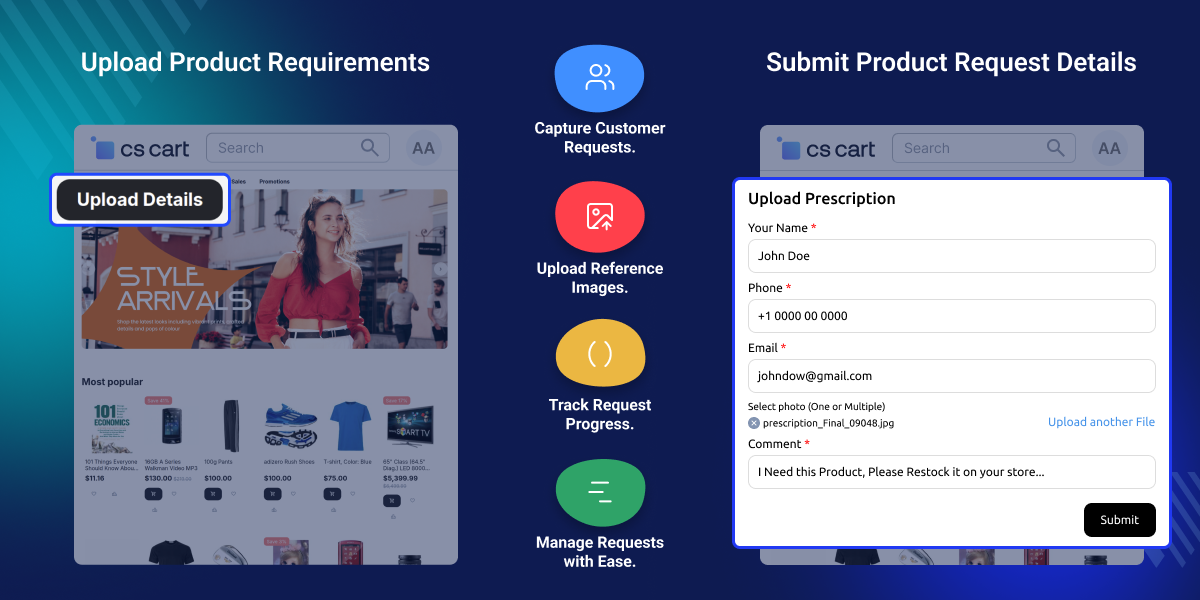
    CS-Cart Upload Details helps customers send product or service requests through your store. They can share their needs, add comments, and upload images to explain what they want.

    The add-on includes a simple request form for collecting customer details. This helps merchants understand demand and respond with the right products or services.

    Admins and vendors can view all requests from the backend. They can review submissions, download files, and update request statuses from a single place.

    Customers can track their requests from their account area. The module supports guest users, multi-vendor stores, and custom status management for better request handling.

    Additionally, you can try CS-Cart Culqi Payment Gateway to accept credit and debit card payments through Culqi. It enables secure online transactions for your CS-Cart store.
    CS-Cart Upload Details

    Highlighted Features

     Easy Request Form

    Customers can fill out a simple form to share what they need.

     Upload Product Images

    Customers can upload images to show the product or service they want.

     Manage Requests with Ease

    Admins and vendors can view, download, and handle customer requests from the backend.

     Custom Request Statuses

    Create different status options to organize and track requests.

     Support Guest Users

    Both guest users and registered customers can send requests.

     Vendor Request Management

    Vendors can view and manage customer requests for their storefront.

    Why do we need CS-Cart Upload Details?

    Many customers cannot find the exact product or service they need in an online store. This often leads to missed sales and lost business opportunities.

    The default CS-Cart setup does not provide a simple way for customers to share special requests, upload reference images, or explain their requirements in detail.

    CS-Cart Upload Details solves this problem by adding an easy request form to your storefront. Customers can share their needs, upload images, and send all required information in one place.

    Store owners and vendors can review requests, update statuses, and respond faster to customer demand. This helps improve customer satisfaction, build trust, and create more sales opportunities.

    Use Cases

    Request Out-of-Stock Products

    Customers can ask for products that are not available in the store.

    Share Custom Product Needs

    Customers can upload images and details for custom product requests.

    Collect Service Requests

    Customers can send service needs and related files through a simple form.

    Request Spare Parts

    Customers can upload photos to help find the right spare part or replacement item.

    Basic Setup for Upload Details

    The store owners can make the following settings to configure the module:
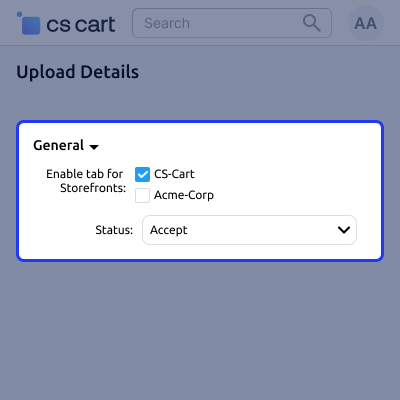
    • For the general settings, the store merchant has to enable the tab for the storefronts.
    • Likewise, for this module, the admin can enable the status for the CS-Cart demo.webkul/ultimate.
    • In the same way, the status can be selected as new or seen from the dropdown.
    • The store merchants can make the template settings for the notification which he wants to send to the customers after successful submission of the details.
    General Module Settings

    Product Demand Form View

    At the customer end, the customers can view an Upload Details button present on the top.A form will display by clicking on the upload details button. However, here the store owner has to enter the below details:
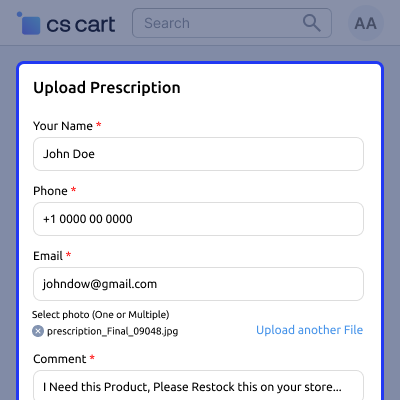
    • The user has to enter the name, contact number, and email address.
    • Customers can also upload an image of the product which they want to demand.
    • Now the user can click on the submit button to submit the details.
    • A success notification will display to the customer after submission and he will also receive an email for the same on his email address.
    Product Demand Form View

    Block Creation for Details

    The store owners can add a new block to take the input and to set the display of the upload details button general settings.
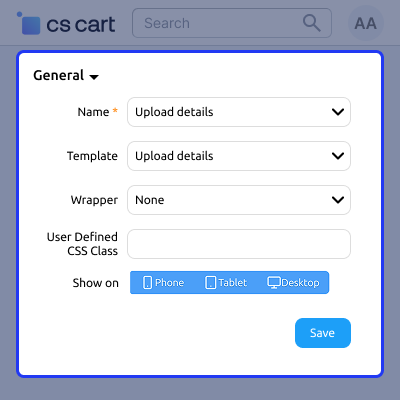
    • The store owner has to enter the name of the block that he wants to create.
    • Select the template from the dropdown menu from the Template option.
    • Then, select the wrapper from the dropdown list in front of the Wrapper option.
    • Now enter the user-defined CSS class for that block on the basis of the device option from the Show-On option and click on the Save button.
    CS-Cart Upload Details

     CS-Cart Upload Details- Support

    For any query or issue please create a support ticket here http://webkul.uvdesk.com

    You may also check our other top-quality CS-Cart Add-ons.

    Specifications

    Product Version1.0
    Released4 years ago
    Last UpdatedJune 29, 2026 (5 days ago)
    Supported Versions4.14.x  4.15.x  4.16.x  4.17.x  CS-Cart  4.18.x  
    Write a review

    Frequently Asked Questions

     Is it possible for the customers to demand any of the products from the store owner?
    Yes, the customers can demand any of the products easily from the storefront.
     
     Does the customer receive any notification or email for their requests?
    The customer will receive an email after the successful submission of the details.
     
     How can the customers track the status of their uploaded details?
    The customers can track the status from the My Account section of their profile.
     
     Is there any restriction for the users or the guest users can also request the product?
    There are no restrictions for the users as registered users and guest users both can request the product.
     
     
     Can admins manage customer requests from the backend?
    Yes, admins can view, download, and manage customer requests from the backend panel.
     
     
     Can store owners create custom request statuses?
    Yes, store owners can create multiple statuses to organize and manage customer requests.

    Move to Cloud Today

    AWS Free tier hosting for one year by amazon web services, for more details please visit AWS Free Tier.

    GCP Free tier hosting for one year with 300 credit points by google cloud platform, for more details please visit GCP Free Tier.

    Azure free tier hosting for one year with 25+ always free services, for more details please visit Azure Free Tier.

    In our default configuration we will provide tremendous configuration for your eCommerce Website which is fast to load and response.

    Default Configuration Details of Server

    • 1 GB RAM
    • 1 Core Processor
    • 30 GB Hard Disk
    • DB with 1 GB RAM and 1 Core Processor

    * Server Configuration may vary as per application requirements.

    Want to know more how exactly we are going to power up your eCommerce Website with Cloud to fasten up your store. Please visit the Cloudkul Services.

    Get Started with Cloud
    Not Available


