- Description
- Reviews
- FAQ
- Customers ()
- Specifications
- Cloud Hosting
- Changelog
ERPNext Booking and Reservation Management adds online booking and reservation management directly into ERPNext.
Businesses can create booking products for appointments, events, classes, hotel rooms, meeting rooms, equipment rentals, and many other reservation-based services.
Every booking product can have its own images, description, price, duration, capacity, and website settings. This makes it easy for businesses to offer bookable services right from their website.
Businesses can set which days are available, create booking slots, add plans, set prices, and limit capacity. This keeps everything organized and makes sure no slot gets overbooked.
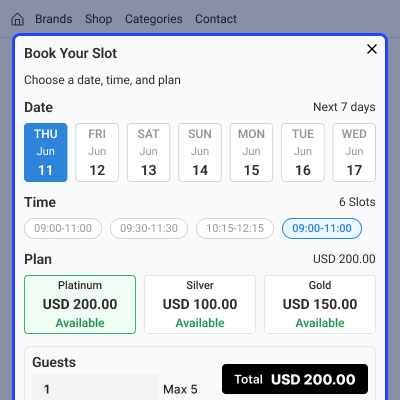
Customers can look through available services, pick a date, choose a time slot, select a plan, enter the number of guests, and finish their booking online in just a few steps. All booking details link up with the ERPNext Webshop, Quotations, Sales Orders, and booking records. This makes managing orders and reservations much easier.
The module also keeps booking products, prices, website visibility, and webshop details all in sync from one single place.
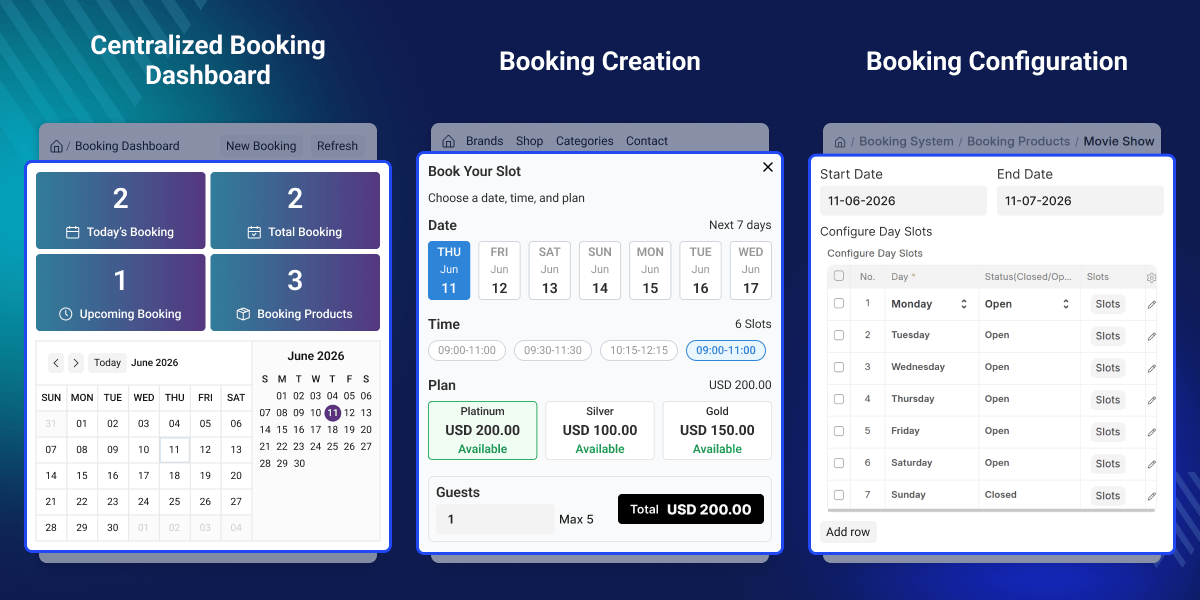
Highlighted Features of ERPNext Booking and Reservation Management
Booking Product Management
Create booking products and add pricing, duration, capacity, images, and descriptions to each one.
Website Booking Page
List booking services on the website and let customers make reservations online with ease.
Slot and Availability Management
Set up booking days, time slots, prices, and how many spots are available for each slot.
Booking Plans
Create different booking plans for the same service, each with its own price and availability.
Capacity Validation
Before any booking is confirmed, the system checks if the slot still has space. This stops overbooking completely.
Webshop Synchronization
Link booking products with webshop records so everything stays connected and easy to manage.
Order Integration
Booking details are saved directly inside Quotations and Sales Orders so nothing gets lost.
Reports and Dashboard
Keep an eye on bookings, revenue, trends, and all booking activity from one place.
Why Do We Need ERPNext Booking and Reservation Management Module?
Many businesses offer services that need a reservation rather than a simple product purchase. Before placing an order, customers often need to pick a date, time slot, plan, or number of guests. Normal product pages are not made for this.
They cannot handle appointments, event bookings, room reservations, or services with limited capacity. Doing all of this by hand takes too long and is very easy to get wrong.
ERPNext Booking and Reservation Management fixes this by bringing booking management, slot selection, capacity control, and order integration directly into the website and ERPNext. Businesses can take online bookings and manage all booking records from one single system
A clear and structured booking process helps businesses handle reservations faster and with fewer mistakes.
Use Cases
Movie and Event Booking
A cinema or event organizer can list shows, set time slots, limit seat capacity, and let customers book their tickets online.
Hotel Room Booking
Hotels and property businesses can manage room availability, guest numbers, booking schedules, and reservations straight from the website.
Appointment Scheduling
Clinics, consultants, trainers, and service providers can list their available slots and accept bookings online without any manual work.
Equipment Rental
Rental businesses can list equipment or resources with set availability and booking capacity so customers can book what they need.
Classes and Workshops
Training centres can list their courses, set a limit on available seats, and handle all registrations through ERPNext.
Reservation Product Setup
Create and manage all booking services from one central place, making it easier to organize and maintain booking products without switching between different systems.
- Create booking products and add descriptions and images.
- Set the price and duration for each booking.
- Set a capacity limit for each booking product.
- Control whether the product is active and visible on the website.
- Manage all services directly from ERPNext.
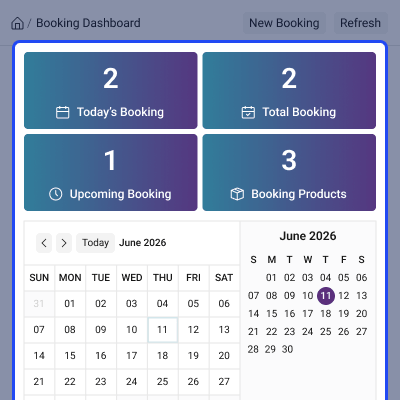
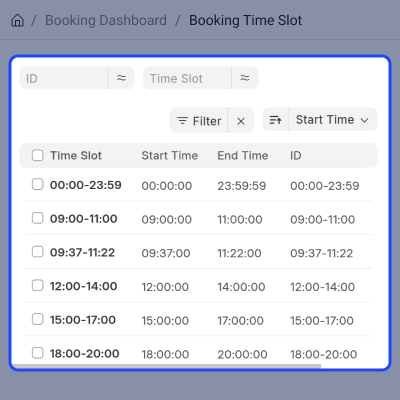
Availability and Time Slot Management
Decide when customers are allowed to make reservations by defining available days, time slots, and booking capacity according to your business schedule.
- Set which days are available for booking.
- Create as many time slots as needed.
- Open or close any booking day whenever required.
- Set a different price for each slot if needed.
- Set a capacity limit for each slot.
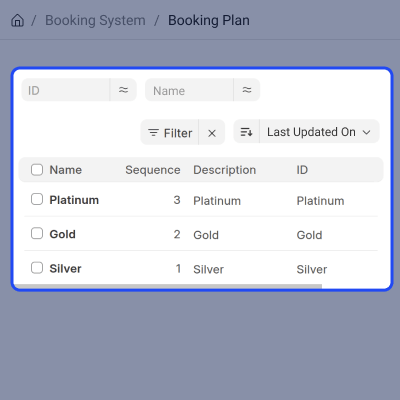
Flexible Booking Plans
Give customers different options to choose from for the same service, allowing you to offer multiple plans with separate pricing and availability.
- Create more than one booking plan for a service.
- Link plans to the slots where they are available.
- Set a separate price for each plan.
- Show all plan options to customers while they are booking
- Save the chosen plan with the booking record.
Online Booking Experience
Let customers book services on their own straight from the website through a simple booking process that helps them quickly complete their reservations.
- Look through all available booking services.
- Search and filter to find the right booking product.
- Pick a date and a time slot.
- Choose a plan and enter the number of guests.
- Add the booking to the cart and place the order.
Booking Order Management
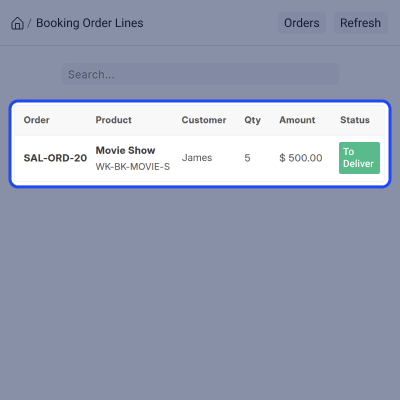
Make sure booking details stay linked to the right sales documents so all reservation information remains connected throughout the order process.
- Save the booking reference inside the order.
- Store the booking date and time slot with the order.
- Record which booking plan the customer selected.
- Create a booking record once the order is confirmed.
- Manage reservations alongside all sales transactions.
Support
For any query or issue, please create a support ticket here CREATE A TICKET HERE
You may also check our other top-quality ErpNext Modules.
Specifications
FAQ’s
Specification
Detailed technical features and requirements to help you understand the module’s capabilities and ensure smooth integration with your system.
Cloud Hosting
Detailed technical features and requirements to help you understand the module’s capabilities and ensure smooth integration with your system.
Move to Cloud Today
We’re partnered with top-tier, trusted providers!



Default Configuration Details of Server
RAM 1 Core
Processor 30 GB
Hard Disk
Database
Want to know more how exactly we are going to power up your eCommerce Website with Cloud to fasten up your store
* Server Configuration may vary as per application requirements.
