USD
  • EUR
  • INR
  • USD
Cart
Cart 0
  • You have no items in your shopping cart.
    Cart
    Cart 0
    • You have no items in your shopping cart.
    Hire a Developer
    ×
    Contact Us!
    Send Again
    Close
    Please Login to Write Your Review

    ERPNext Cloudflare Turnstile

    Erpnext Cloudflare Turnstile integrates Cloudflare Turnstile with ERPNext to verify real users and block bots on key pages like the login and password reset page, ensuring security without interrupting the user.


    • Verify real users and block bots automatically.

    • Easy post-login Turnstile keys setup.

    • Displays a captcha error for incorrect Turnstile credentials.

    • Runs in the background for smooth access.


    Screenshots
    ERPNext Cloudflare Turnstile ERPNext Cloudflare Turnstile ERPNext Cloudflare Turnstile ERPNext Cloudflare Turnstile ERPNext Cloudflare Turnstile ERPNext Cloudflare Turnstile
    Show More Hide All
    $100.00

    * Required Fields

    Add To Cart
    $100.00
    Configure and Buy
    • Description
    • Reviews
    • FAQ
    • Customers ()
    • Specifications
    • Cloud Hosting
    • Changelog

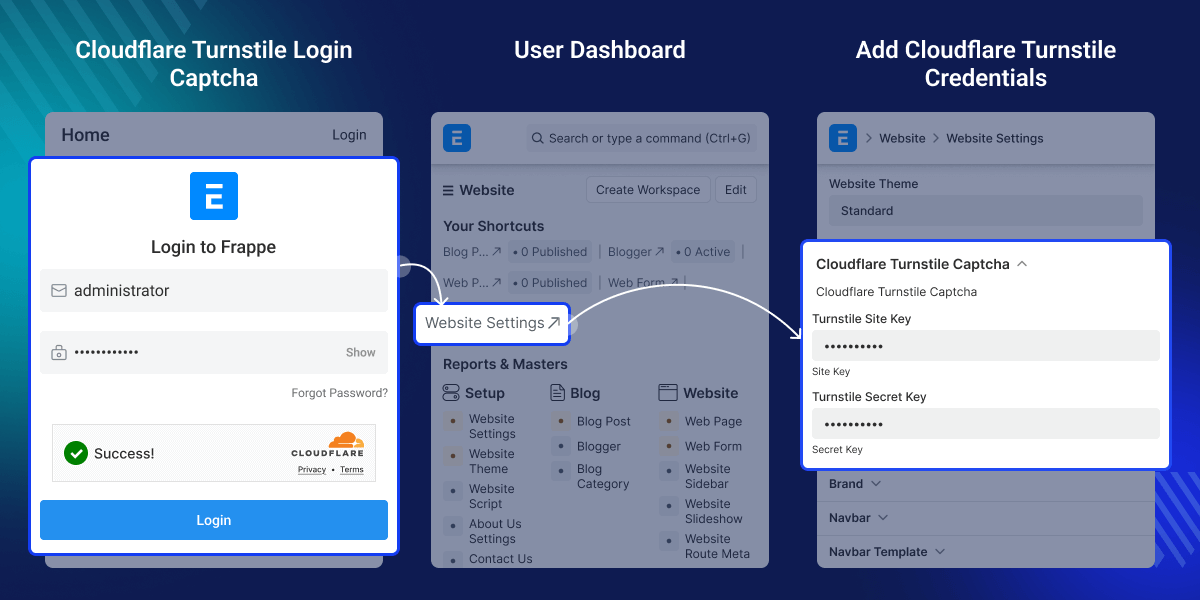
    ERPNext Cloudflare Turnstile helps you stop bots from accessing your ERPNext website.

    Uses Cloudflare’s Turnstile to check if a visitor is a real person. This check happens on important pages like login and password reset.

    The verification runs in the background, so users do not have to solve CAPTCHA puzzles.

    This makes the website safer while keeping it easy and fast for real people to use.
    ERPNext Cloudflare Turnstile

    Why do we need ERPNext Cloudflare Turnstile?

    Bots often try to log in or reset passwords, causing problems for users. This can waste server resources and risk security.

    Only real users can access sensitive pages, making your site more secure.

    For example, when someone tries to log in, Turnstile checks if they are human. If it is a bot, it is blocked quietly. Real users log in without any restrictions, keeping the system safe and user experience friendly.

    Highlighted Features of ERPNext Cloudflare Turnstile

     Easy Cloudflare Turnstile captcha setup

    Cloudflare Turnstile for login & reset with user verification.

     Secure Without Hassle

    Bot protection with smooth, secure user access.

    ERP Next Cloudflare Turnstile Configuration

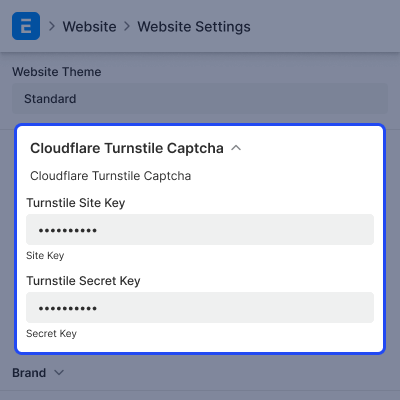
    Easily configure Cloudflare Turnstile CAPTCHA in ERPNext to protect login and password reset pages by allowing access only to genuine users.

    • Add Cloudflare CAPTCHA to login and password reset pages.
    • Enter your Turnstile site key and secret key to configure the module.
    • Protects your pages while letting genuine users access them effortlessly.
    ERP Next Cloudflare Turnstile Configuration

    Seamless User Verification

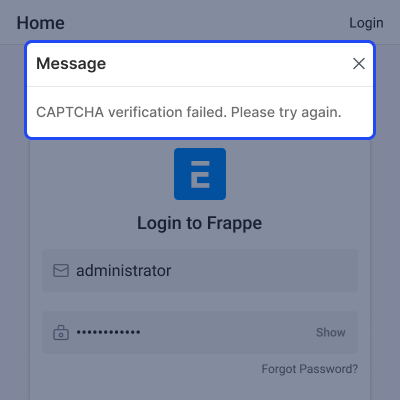
    Easily tell real users apart from bots. If the Turnstile keys are not set up correctly, you will see an error message, so you can fix it quickly and easily.

    • Wrong Turnstile keys may block secure login.
    • Enter your Turnstile site key and secret key to configure the module.
    • Protects your pages while letting genuine users access them effortlessly.
    Seamless User Verification

    Support

    For any query or issue, please create a support ticket here CREATE A TICKET HERE

    You may also check our other top-quality ERPNext Modules.

    Specifications

    Product Version1.0.0
    Released1 month ago
    Last UpdatedFebruary 4, 2026 (1 month ago)
    Supported VersionsERPNext  version 14  
    Write a review

    FAQs

     Can I use ERPNext Cloudflare Turnstile on the contact form or other web pages?
    Currently, ERPNext Cloudflare Turnstile securely works on the Login and Password Reset pages. Support for additional pages can be added in future enhancements.
     Will users know they are being verified?
    Users are verified on the UI. Correct credentials and Turnstile keys give access; otherwise, the “Access Denied” message appears.
     Where can we add Turnstile keys in ERPNext Cloudflare Turnstile module?
    Navigate to Website > Website Settings > Cloudflare Turnstile Captcha. Then, enter your Turnstile Site Key and Turnstile Secret Key
     Can I see who was blocked by Turnstile?
    No, the module does not show which bots were blocked, as it does not log such details.
     Is there any limit to using ERPNext Cloudflare Turnstile with this module?
    Cloudflare Turnstile is free for a large number of verifications. One may check Cloudflare’s website for the latest free-tier limits and website bot protection scheme.

    Move to Cloud Today

    AWS Free tier hosting for one year by amazon web services, for more details please visit AWS Free Tier.

    GCP Free tier hosting for one year with 300 credit points by google cloud platform, for more details please visit GCP Free Tier.

    Azure free tier hosting for one year with 25+ always free services, for more details please visit Azure Free Tier.

    In our default configuration we will provide tremendous configuration for your eCommerce Website which is fast to load and response.

    Default Configuration Details of Server

    • 1 GB RAM
    • 1 Core Processor
    • 30 GB Hard Disk
    • DB with 1 GB RAM and 1 Core Processor

    * Server Configuration may vary as per application requirements.

    Want to know more how exactly we are going to power up your eCommerce Website with Cloud to fasten up your store. Please visit the Cloudkul Services.

    Get Started with Cloud
    Not Available


